Vscode-remote-release: gpg: signing failed: No such file or directory
- VSCode Version: 1.46.0
- Local OS Version: macOS High Sierra 10.13.6
- Remote OS Version: mcr.microsoft.com/vscode/devcontainers/base:0-alpine-3.10
- Remote Extension/Connection Type: Docker
Steps to Reproduce:
- Follow https://github.com/microsoft/vscode-remote-release/issues/3053#issue-625537467
Host
$ gpg --version
gpg (GnuPG) 2.2.20
libgcrypt 1.8.5
Copyright (C) 2020 Free Software Foundation, Inc.
License GPLv3+: GNU GPL version 3 or later <https://gnu.org/licenses/gpl.html>
This is free software: you are free to change and redistribute it.
There is NO WARRANTY, to the extent permitted by law.

Home: /Users/mtsmfm/.gnupg
Supported algorithms:
Pubkey: RSA, ELG, DSA, ECDH, ECDSA, EDDSA
Cipher: IDEA, 3DES, CAST5, BLOWFISH, AES, AES192, AES256, TWOFISH,
        CAMELLIA128, CAMELLIA192, CAMELLIA256
Hash: SHA1, RIPEMD160, SHA256, SHA384, SHA512, SHA224
Compression: Uncompressed, ZIP, ZLIB, BZIP2
$ gpg --output test.sig --detach-sig test.txt
$ echo $?
0
Remote
/workspaces/vscode-remote-container-gpg-test # gpg --version
gpg (GnuPG) 2.2.19
libgcrypt 1.8.5
Copyright (C) 2019 Free Software Foundation, Inc.
License GPLv3+: GNU GPL version 3 or later <https://gnu.org/licenses/gpl.html>
This is free software: you are free to change and redistribute it.
There is NO WARRANTY, to the extent permitted by law.

Home: /root/.gnupg
Supported algorithms:
Pubkey: RSA, ELG, DSA, ECDH, ECDSA, EDDSA
Cipher: IDEA, 3DES, CAST5, BLOWFISH, AES, AES192, AES256, TWOFISH,
        CAMELLIA128, CAMELLIA192, CAMELLIA256
Hash: SHA1, RIPEMD160, SHA256, SHA384, SHA512, SHA224
Compression: Uncompressed, ZIP, ZLIB, BZIP2
/workspaces/vscode-remote-container-gpg-test # gpg --output test.sig --detach-sig test.txt
gpg: signing failed: No such file or directory
gpg: signing failed: No such file or directory
 mtsmfm
All 21 comments
Heres the repo to show what I got via Remote-Containers: Reopen in Container https://github.com/mtsmfm/vscode-remote-container-gpg-test
mtsmfm
on 11 Jun 2020
I confirmed it doesn't work on Windows as well
VSCode Version: 1.46.1
Local OS Version: Windows 10 Version 2004
Remote OS Version: mcr.microsoft.com/vscode/devcontainers/base:0-alpine-3.10
Remote Extension/Connection Type: Docker
# gpg --output test.sig --detach-sig test.txt
gpg: no default secret key: No secret key
gpg: signing failed: No secret key
I've run into this issue with Debian 9-based images (such as the Node.js 14 & TypeScript configuration) because the the setup process doesn't handle existing GPG files:
[3668 ms] Start: Launching Remote-Containers helper.
[3670 ms] Start: Run: gpgconf --list-dir agent-extra-socket
[3753 ms] Start: Run in container: gpgconf --list-dir agent-socket
[3757 ms] /root/.gnupg/S.gpg-agent
[3757 ms]
[3757 ms] Start: Run in container: mkdir -p -m 700 '/root/.gnupg'
[3761 ms]
[3761 ms]
[3761 ms] Start: Run in container: cat <<'EOF-/tmp/vscode-remote-containers-1eeb8d93cd577daf657fd02632b3e4b6dcb69db0.js' >/tmp/vscode-remote-containers-1eeb8d93cd577daf657fd02632b3e4b6dcb69db0.js
[3761 ms] Start: Run: gpgconf --list-dir homedir
[3767 ms]
[3767 ms]
[3767 ms] Start: Run in container: cat <<'EOF-/tmp/vscode-remote-containers-server-1eeb8d93cd577daf657fd02632b3e4b6dcb69db0.js' >/tmp/vscode-remote-containers-server-1eeb8d93cd577daf657fd02632b3e4b6dcb69db0.js
[3785 ms]
[3785 ms]
[3786 ms] Start: Run: docker exec -i -u root -e REMOTE_CONTAINERS_SOCKETS=["/tmp/vscode-ssh-auth-1eeb8d93cd577daf657fd02632b3e4b6dcb69db0.sock","/root/.gnupg/S.gpg-agent"] -e REMOTE_CONTAINERS_IPC=/tmp/vscode-remote-containers-ipc-1eeb8d93cd577daf657fd02632b3e4b6dcb69db0.sock f27f39d05a1e5cf69cf78e3bf38e933e188f6be42e2fd524a8659bfc381d7a2b /root/.vscode-server/bin/cd9ea6488829f560dc949a8b2fb789f3cdc05f5d/node /tmp/vscode-remote-containers-server-1eeb8d93cd577daf657fd02632b3e4b6dcb69db0.js
[3852 ms] Start: Run in container: gpgconf --list-dir homedir
[3857 ms] /root/.gnupg
[3857 ms]
[3858 ms] Start: Run in container: # Copy /Users/jarrodldavis/.gnupg/pubring.kbx to /root/.gnupg/pubring.kbx
[3860 ms] /root/.gnupg/pubring.kbx exists
[3861 ms]
[3861 ms] Start: Run in container: # Copy /Users/jarrodldavis/.gnupg/trustdb.gpg to /root/.gnupg/trustdb.gpg
[3867 ms] /root/.gnupg/trustdb.gpg exists
[3867 ms]
[3867 ms] Start: Run: gpg-connect-agent updatestartuptty /bye
As you can see, the pubring.kbx and trustdb.gpg files already exist in the container, so those files don't get copied over from the host. I've verified this by comparing MD5 hashes from my host system and both a Debian 9 and Debian 10 image – only the Debian 9 image is different from the host.
Correction, this appears to be an issue with the official Node.js docker images. For some reason, they have those files already in the image. Both node:14 and node:14-buster (and images based on those images) exhibit this issue.
 jarrodldavis
on 29 Jun 2020
jarrodldavis
on 29 Jun 2020
The bot added the wrong label on this one.
@chrmarti This is interesting:
Correction, this appears to be an issue with the official Node.js docker images. For some reason, they have those files already in the image. Both node:14 and node:14-buster (and images based on those images) exhibit this issue.
For the pre-built images, we can add a snippet to remove the GPG key from the container (though I'm not 100% why it is there to start). That said, it looks like base images can have these keys in them so I wonder if we need to do something to raise awareness in this situation - it looks broken at first glance but is not.
This may be different than the originally reported Alpine problem, however.
 Chuxel
on 6 Jul 2020
Chuxel
on 6 Jul 2020
Confirmed these are two issues. On the second one: It makes sense to not overwrite the files when they already exist. The same check prevents us from copying them when reconnecting after we copied them before. We could add a notification when they exist the first time we connect (might need an additional marker file) though I'm hesitant with adding notifications (there are already too many and we'd need to make sure it doesn't show too often).
@mtsmfm The example you show works for me. Make sure you have a graphical pinentry program setup on Mac/Windows (console pinentry wouldn't work).
 chrmarti
on 7 Jul 2020
chrmarti
on 7 Jul 2020
@chrisdias How do I make sure I have the one?
I already installed all components with Gpg4win but I still get the same error.
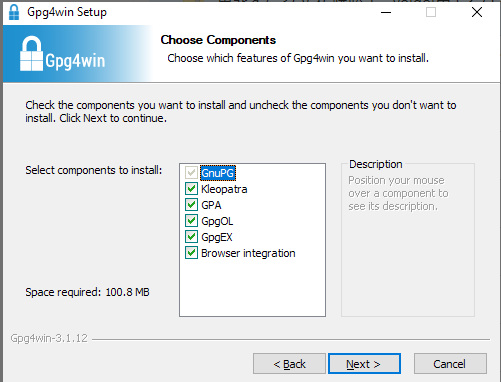
https://github.com/microsoft/vscode-remote-release/issues/3168#issuecomment-647137514
mtsmfm
on 30 Jul 2020
When you sign locally, are you asked to enter your passphrase in the terminal where you sign or in an additional window?
Also check if ~/.gnupg/gpg-agent.conf has a pinentry-program entry.
chrmarti
on 31 Jul 2020
The fix for #3221 now detects private keys in ~/.gnupg of the container and turns off the forwarding feature if there are any.
chrmarti
on 3 Aug 2020
When you sign locally, are you asked to enter your passphrase in the terminal where you sign or in an additional window?
I got pinentry-qt dialog.
Now I've noticed Container extension says socat is needed on WSL.
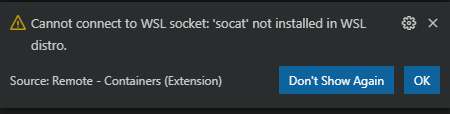
So then I installed socat package on my WSL (ubuntu) and then I got another error.
/workspaces/vscode-remote-container-gpg-test # gpg --output test.sig --detach-sig test.txt
gpg: signing failed: Not a tty
gpg: signing failed: Not a tty
Also check if ~/.gnupg/gpg-agent.conf has a pinentry-program entry.
/workspaces/vscode-remote-container-gpg-test # ls ~/.gnupg/gpg-agent.conf
ls: cannot access '/root/.gnupg/gpg-agent.conf': No such file or directory
There's no such file.
mtsmfm
on 15 Aug 2020
I think I have the same issue. My host is Windows 10 Pro, the docker image is the one that is offered by VSCode for Rust.
GPG signing data works for me on the host (worked for years). The gpg-agent is running, it uses a smart card (Yubikey 5 NFC).
My .devcontainer/Dockerfile:
```# See here for image contents: https://github.com/microsoft/vscode-dev-containers/tree/v0.134.1/containers/rust/.devcontainer/base.Dockerfile
FROM mcr.microsoft.com/vscode/devcontainers/rust:0-1
Install packages
RUN apt-get update && export DEBIAN_FRONTEND=noninteractive \
&& apt-get -y install --no-install-recommends gnupg2
RUN rm -rf /home/vscode/.gnupg
RUN rm -rf /root/.gnupg
Set proper locale
RUN echo "en_US.UTF-8 UTF-8" > /etc/locale.gen && /usr/sbin/locale-gen
RUN mkdir /cargo-target
RUN chown -R vscode /cargo-target
Set a proper shell as default
RUN chsh vscode -s /usr/bin/zsh
USER vscode
Install oh-my-zsh
ENV TERM xterm
ENV SHELL /usr/bin/zsh
RUN wget https://github.com/robbyrussell/oh-my-zsh/raw/master/tools/install.sh -O - | zsh || true
Cargo performance hack
ENV CARGO_TARGET_DIR /cargo-target
My `.devcontainer/devcontainer.json`:

```// For format details, see https://aka.ms/vscode-remote/devcontainer.json or this file's README at:
// https://github.com/microsoft/vscode-dev-containers/tree/v0.134.1/containers/rust
{
    "name": "Rust",
    "build": {
        "dockerfile": "Dockerfile"
    },
    "runArgs": [
        "--cap-add=SYS_PTRACE",
        "--security-opt",
        "seccomp=unconfined"
    ],
    // Set *default* container specific settings.json values on container create.
    "settings": {
        "terminal.integrated.shell.linux": "/usr/bin/zsh",
        "lldb.executable": "/usr/bin/lldb",
        // VS Code don't watch files under ./target
        "files.watcherExclude": {
            "**/target/**": true
        },
        "rust-analyzer.updates.askBeforeDownload": false
    },
    // Add the IDs of extensions you want installed when the container is created.
    "extensions": [
        "rust-lang.rust",
        "bungcip.better-toml",
        "vadimcn.vscode-lldb",
        "mutantdino.resourcemonitor",
        "serayuzgur.crates",
        "donjayamanne.git-extension-pack",
        "codezombiech.gitignore",
        "MS-vsliveshare.vsliveshare-pack",
        "hbenl.vscode-test-explorer-liveshare",
        "mooman219.rust-assist",
        "matklad.rust-analyzer",
        "hbenl.vscode-test-explorer",
        "swellaby.vscode-rust-test-adapter",
        "statiolake.vscode-rustfmt"
    ],
    // Use 'forwardPorts' to make a list of ports inside the container available locally.
    // "forwardPorts": [],
    // Use 'postCreateCommand' to run commands after the container is created.
    // "postCreateCommand": "rustc --version",
    // Uncomment to connect as a non-root user. See https://aka.ms/vscode-remote/containers/non-root.
    "remoteUser": "vscode"
}
Relevant log:
```[9239 ms] Start: Launching Remote-Containers helper.
[9239 ms] Start: Run: gpgconf --list-dir agent-extra-socket
[9277 ms] Start: Run in container: gpgconf --list-dir agent-socket
[9279 ms] /home/vscode/.gnupg/S.gpg-agent
[9279 ms]
[9279 ms] Start: Run in container: gpgconf --list-dir homedir
[9281 ms] /home/vscode/.gnupg
[9282 ms]
[9282 ms] Start: Run in container: ls '/home/vscode/.gnupg/private-keys-v1.d' 2>/dev/null
[9284 ms]
[9284 ms]
[9284 ms] Exit code 2
[9284 ms] Start: Run in container: mkdir -p -m 700 '/home/vscode/.gnupg'
[9287 ms]
[9287 ms]
[9287 ms] Start: Run in container: cat <<'EOF-/tmp/vscode-remote-containers-b8e8a983142ef4094844e4512f219aa2167f0a51.js' >/tmp/vscode-remote-containers-b8e8a983142ef4094844e4512f219aa2167f0a51.js
[9287 ms] Start: Run: gpgconf --list-dir homedir
Output of the host commands:
PS C:\Users\Tamas> gpgconf --list-dir agent-extra-socket
C:\Users\Tamas\AppData\Roaming\gnupg\S.gpg-agent.extra
PS C:\Users\Tamas> gpgconf --list-dir agent-socket
C:\Users\Tamas\AppData\Roaming\gnupg\S.gpg-agent
PS C:\Users\Tamas> gpgconf --list-dir homedir
C:\Users\Tamas\AppData\Roaming\gnupg
Inside the container, vscode user:
✗ ls -lha ~/.gnupg
total 16K
drwx------ 2 vscode vscode 4.0K Sep 5 17:49 .
drwxr-xr-x 1 vscode vscode 4.0K Sep 5 17:58 ..
-rw-r--r-- 1 vscode vscode 0 Sep 5 17:49 pubring.kbx
srwxr-xr-x 1 vscode vscode 0 Sep 5 17:49 S.gpg-agent
-rw-r--r-- 1 vscode vscode 1.8K Sep 5 17:49 trustdb.gpg
```
Enabling the gpg-agent plugin in my .zshrc doesn't help.
 tamasd
on 5 Sep 2020
tamasd
on 5 Sep 2020
@mtsmfm Please check your gpg-agent.conf on the Mac. What's in ~/.gnupg in the container?
@tamasd What's the output when you try to sign something in the container? Is there additional output at that time the in the DevContainer log? (F1 > Remote-Containers: Show Log)
chrmarti
on 7 Sep 2020
@tamasd What's the output when you try to sign something in the container? Is there additional output at that time the in the DevContainer log? (
F1>Remote-Containers: Show Log)
✗ echo test | gpg --clearsign
gpg: no default secret key: No secret key
gpg: [stdin]: clear-sign failed: No secret key
gpg -K shows an empty output. There is nothing new in the container's log when I run gpg commands.
tamasd
on 8 Sep 2020
@tamasd Are you opening a folder from WSL? (In that case we connect the container's GPG to WSL's GPG socket.)
Note that the pubring.kbx has size 0. Is there anything about that file in the DevContainer log? (Or maybe it's from WSL and that is indeed empty?)
chrmarti
on 9 Sep 2020
@tamasd Are you opening a folder from WSL? (In that case we connect the container's GPG to WSL's GPG socket.)
Note that the pubring.kbx has size 0. Is there anything about that file in the DevContainer log? (Or maybe it's from WSL and that is indeed empty?)
I don't use WSL. The project on the host is in an oridinary folder under Documents.
This is what I found in the log:
[41889 ms]
[41889 ms] Start: Run in container: # Test for /home/vscode/.gnupg/pubring.kbx and gpg
[41892 ms]
[41895 ms] Start: Run in container: # Copy C:\Users\Tamas\AppData\Roaming\gnupg\pubring.kbx to /home/vscode/.gnupg/pubring.kbx
[41897 ms]
[41897 ms]
[41897 ms] Exit code 1
[41897 ms] Start: Run in container: for pid in `cd /proc && ls -d [0-9]*`; do { echo $pid ; readlink -f /proc/$pid/cwd ; xargs -0 < /proc/$pid/environ ; xargs -0 < /proc/$pid/cmdline ; } ; echo ; done 2>/dev/null
[41918 ms] Start: Run in container: # Test for /home/vscode/.gnupg/trustdb.gpg and gpg
[41919 ms] Start: Run in container: /home/vscode/.vscode-server/bin/a0479759d6e9ea56afa657e454193f72aef85bd0/server.sh --disable-user-env-probe --use-host-proxy --port 0 --extensions-download-dir /home/vscode/.vscode-server/extensionsCache
[41920 ms]
[41921 ms]
[41921 ms] Start: Run in container: # Copy C:\Users\Tamas\AppData\Roaming\gnupg\trustdb.gpg to /home/vscode/.gnupg/trustdb.gpg
[41924 ms]
[41924 ms]
[41924 ms] Start: Run: gpg-connect-agent updatestartuptty /bye
[42051 ms]
What is the size of C:\Users\Tamas\AppData\Roaming\gnupg\pubring.kbx in bytes?
chrmarti
on 11 Sep 2020
What is the size of
C:\Users\Tamas\AppData\Roaming\gnupg\pubring.kbxin bytes?
PS C:\Users\Tamas> ls -l .\AppData\Roaming\gnupg\


    Directory: C:\Users\Tamas\AppData\Roaming\gnupg


Mode                LastWriteTime         Length Name
----                -------------         ------ ----
d-----       2018-06-09     12:45                crls.d
d-----       2018-12-19     18:45                private-keys-v1.d
-a----       2018-05-30     19:37              0 gnupg_spawn_agent_sentinel.lock
-a----       2018-05-31     02:20              0 gnupg_spawn_dirmngr_sentinel.lock
-a----       2018-12-19     22:11            105 gpa.conf
-a----       2018-12-19     22:14            344 gpg-agent.conf
-a----       2018-12-19     22:14             43 gpg-agent.conf.gpgconf.bak
-a----       2018-05-30     19:37              0 gpg-v21-migrated
-a----       2018-05-30     19:37              0 gpg-v21-migrated.lock
-a----       2017-09-02     21:59            305 gpg.conf
-a----       2020-02-09     21:18          23880 pubring.bak
-a----       2020-09-04     23:21          23880 pubring.gpg
-a----       2017-09-02     21:53              0 pubring.gpg.lock
-a----       2017-09-02     21:59              0 pubring.kbx
-a----       2017-09-02     21:59              0 pubring.kbx.lock
-a----       2020-01-16     20:34            600 random_seed
-a----       2020-09-09     07:22              8 reader_0.status
-a----       2019-12-13     19:35             22 S.dirmngr
-a----       2020-08-22     15:32             22 S.gpg-agent
-a----       2020-08-22     15:32             22 S.gpg-agent.browser
-a----       2020-08-22     15:32             22 S.gpg-agent.extra
-a----       2020-09-04     23:34             22 S.gpg-agent.ssh
-a----       2020-09-04     23:34             22 S.scdaemon
-a----       2020-09-05     00:10             22 S.uiserver
-a----       2017-09-02     21:53              0 secring.gpg
-a----       2017-09-02     21:53              0 secring.gpg.lock
-a----       2018-12-19     22:17            687 sshcontrol
-a----       2018-12-19     23:16          49152 tofu.db
-a----       2020-09-04     23:21           1760 trustdb.gpg
-a----       2017-09-02     21:53              0 trustdb.gpg.lock
However:
PS C:\Users\Tamas> gpg -K
C:/Users/Tamas/AppData/Roaming/gnupg/pubring.gpg
------------------------------------------------
sec#  rsa4096 2018-12-19 [SC]
      AECD4A22A8C7F19583C0B03ECCAD8960035C19E0
uid           [ultimate] Tamás Demeter-Haludka <[REDACTED]>
uid           [ultimate] Tamás Demeter-Haludka <[REDACTED]>
uid           [ultimate] Tamás Demeter-Haludka <[REDACTED]>
uid           [ultimate] Tamas Demeter-Haludka <[REDACTED]>
ssb>  rsa4096 2018-12-19 [S]
ssb>  rsa4096 2018-12-19 [E]
ssb>  rsa4096 2018-12-19 [A]
We currently only support the newer pubring.kbx, but not the older pubring.gpg you are using. The empty pubring.kbx makes me wonder if the conversion of the old file failed. (See, e.g., https://lists.gnupg.org/pipermail/gnupg-users/2017-June/058467.html.)
chrmarti
on 14 Sep 2020
We currently only support the newer pubring.kbx, but not the older pubring.gpg you are using. The empty pubring.kbx makes me wonder if the conversion of the old file failed. (See, e.g., https://lists.gnupg.org/pipermail/gnupg-users/2017-June/058467.html.)
That was the problem for me, thank you!
tamasd
on 14 Sep 2020
https://github.com/microsoft/vscode-remote-release/issues/3168#issuecomment-674355155
Finally I've found the solution for my problem (gpg: signing failed: Not a tty).
My environment:
- [Host OS] Windows 10
- [WSL2 OS] Ubuntu
- Dev Container is opened from WSL2
- [Windows] Install Gpg4win
I just need pinentry.exe, probably we can install more suitable one on WSL2 - [WSL2] Install socat (
sudo apt install socat)
TBH, I'm not sure why it's needed though [WSL2] Install gpg (
sudo apt install gpg)In that case we connect the container's GPG to WSL's GPG socket
https://github.com/microsoft/vscode-remote-release/issues/3168#issuecomment-689313475I need to setup gpg stuff on WSL2, not on Windows. It's really confusing 😕
- [WSL2] Set pinentry-program option
echo pinentry-program /mnt/c/Program\ Files\ \(x86\)/Gpg4win/bin/pinentry.exe > ~/.gnupg/gpg-agent.conf - [WSL2] Reload gpg agent on WSL2
gpg-connect-agent reloadagent /bye - Now I can run
gpg --output test.sig --detach-sig test.txt
mtsmfm
on 20 Sep 2020
Thanks @mtsmfm for posting your solution. We should also add support for forwarding to the Windows gpg-agent. I have opened https://github.com/microsoft/vscode-remote-release/issues/3702 to track that.
chrmarti
on 21 Sep 2020
Honestly I don't use Windows environment for development.
I'm using WSL2 only.
I think we should have a setup guide or self diagnostic to find a missing config (e.g. pinentry-program config on WSL2, not Windows)
mtsmfm
on 21 Sep 2020
Related issues
 gulshan
·
3Comments
gulshan
·
3Comments
 nphmuller
·
3Comments
nphmuller
·
3Comments
 mxdmedia
·
3Comments
mxdmedia
·
3Comments
 peterkappelt
·
3Comments
peterkappelt
·
3Comments
 kieferrm
·
3Comments
kieferrm
·
3Comments
Most helpful comment
https://github.com/microsoft/vscode-remote-release/issues/3168#issuecomment-674355155
Finally I've found the solution for my problem (
gpg: signing failed: Not a tty).My environment:
I just need pinentry.exe, probably we can install more suitable one on WSL2
sudo apt install socat)TBH, I'm not sure why it's needed though
[WSL2] Install gpg (
sudo apt install gpg)I need to setup gpg stuff on WSL2, not on Windows. It's really confusing 😕
echo pinentry-program /mnt/c/Program\ Files\ \(x86\)/Gpg4win/bin/pinentry.exe > ~/.gnupg/gpg-agent.confgpg-connect-agent reloadagent /byegpg --output test.sig --detach-sig test.txt