Vscode-remote-release: frequently reconnect remote server
Issue Type: Bug
version: 1.43.2 (user setup)
submit: 0ba0ca52957102ca3527cf479571617f0de6ed50
date: 2020-03-24T07:38:38.248Z
Electron: 7.1.11
Chrome: 78.0.3904.130
Node.js: 12.8.1
V8: 7.8.279.23-electron.0
OS: Windows_NT x64 10.0.18362
extensions: Remote-SSH
When I SSH to my work VM machine, VSCode broke down frequently. I have no idea what happened.
VS Code version: Code 1.43.2 (0ba0ca52957102ca3527cf479571617f0de6ed50, 2020-03-24T07:38:38.248Z)
OS version: Windows_NT x64 10.0.18362
System Info
|Item|Value|
|---|---|
|CPUs|Intel(R) Core(TM) i3-3110M CPU @ 2.40GHz (4 x 2395)|
|GPU Status|2d_canvas: enabled
flash_3d: enabled
flash_stage3d: enabled
flash_stage3d_baseline: enabled
gpu_compositing: enabled
multiple_raster_threads: enabled_on
oop_rasterization: disabled_off
protected_video_decode: unavailable_off
rasterization: enabled
skia_renderer: disabled_off_ok
video_decode: enabled
viz_display_compositor: enabled_on
viz_hit_test_surface_layer: disabled_off_ok
webgl: enabled
webgl2: enabled|
|Load (avg)|undefined|
|Memory (System)|3.58GB (0.73GB free)|
|Process Argv||
|Screen Reader|no|
|VM|0%|
Extensions (9)
Extension|Author (truncated)|Version
---|---|---
code-runner|for|0.9.17
latex-workshop|Jam|8.8.0
vscode-language-pack-zh-hans|MS-|1.44.0
python|ms-|2020.3.71659
remote-containers|ms-|0.106.0
remote-ssh|ms-|0.51.0
remote-ssh-edit|ms-|0.51.0
remote-wsl|ms-|0.42.4
vscode-remote-extensionpack|ms-|0.20.0
 mouthful
All 9 comments
(Experimental duplicate detection)
Thanks for submitting this issue. Please also check if it is already covered by an existing one, like:
![vscodebot[bot] picture](https://avatars2.githubusercontent.com/in/2406?v=4&s=40) vscodebot[bot]
on 3 Apr 2020
vscodebot[bot]
on 3 Apr 2020
Can you give some more details?
 roblourens
on 7 Apr 2020
roblourens
on 7 Apr 2020
I have the same issue (1.44.0). After attaching to remote docker container, htop (on remote machine) demostrates that vscode consumes GBs of RAM, then it disconnects, reconnects and it repeats again.
I discovered that adding build files to "files.exclude" in settings.json solves the problem, but I lost all IDE features.
The previous version didn't have this problem.
 FilatovArtm
on 16 Apr 2020
FilatovArtm
on 16 Apr 2020
My Code asking me to reconnect or reload window if I use some scripts like npm install or any of gulp tasks, it happens randomly and then sometimes Code reconnecting successfuly, but sometimes it gives an error.
Here is my logs with error:
[15:53:43.079] Log Level: 2
[15:53:43.086] [email protected]
[15:53:43.086] win32 x64
[15:53:43.091] SSH Resolver called for "ssh-remote+_server", attempt 1
[15:53:43.092] SSH Resolver called for host: _server
[15:53:43.092] Setting up SSH remote "_server"
[15:53:43.200] Using commit id "ff915844119ce9485abfe8aa9076ec76b5300ddd" and quality "stable" for server
[15:53:43.202] Install and start server if needed
[15:53:43.225] Checking ssh with "ssh -V"
[15:53:43.232] Got error from ssh: spawn ssh ENOENT
[15:53:43.232] Checking ssh with "C:\Windows\System32\OpenSSH\ssh.exe -V"
[15:53:43.233] Got error from ssh: spawn C:\Windows\System32\OpenSSH\ssh.exe ENOENT
[15:53:43.234] Checking ssh with "C:\Program Files\Git\usr\bin\ssh.exe -V"
[15:53:43.497] > OpenSSH_8.1p1, OpenSSL 1.1.1d  10 Sep 2019
[15:53:43.499] Running script with connection command: "C:\Program Files\Git\usr\bin\ssh.exe" -T -D 3336 _server bash
[15:53:43.505] Terminal shell path: C:\Windows\System32\cmd.exe
[15:53:43.895] >
[15:53:43.896] Got some output, clearing connection timeout
[15:53:45.915] > 6de227ae8003: running
>
[15:53:45.981] > Acquiring lock on /root/.vscode-server/bin/ff915844119ce9485abfe8aa9076ec76b5300
> ddd/vscode-remote-lock.root.ff915844119ce9485abfe8aa9076ec76b5300ddd
> \ln /root/.vscode-server/bin/ff915844119ce9485abfe8aa9076ec76b5300ddd/vscode-rem
> ote-lock.root.ff915844119ce9485abfe8aa9076ec76b5300ddd.target /root/.vscode-serv
> er/bin/ff915844119ce9485abfe8aa9076ec76b5300ddd/vscode-remote-lock.root.ff915844
> 119ce9485abfe8aa9076ec76b5300ddd
>
[15:53:46.005] > Found existing installation at /root/.vscode-server/bin/ff915844119ce9485abfe8aa
> 9076ec76b5300ddd...
>
[15:53:46.040] > SSH_CONNECTION=192.168.0.100 3338 192.168.0.200 22
> LANG=en_US.UTF-8
> NODE_PATH=/usr/bin
> XDG_SESSION_ID=1
> USER=root
> PWD=/root
> HOME=/root
> SSH_CLIENT=192.168.0.100 3338 22
> SHELL=/bin/bash
> SHLVL=2
> VSCODE_AGENT_FOLDER=/root/.vscode-server
> LOGNAME=root
> DBUS_SESSION_BUS_ADDRESS=unix:path=/run/user/0/bus
> XDG_RUNTIME_DIR=/run/user/0
> PATH=/usr/lib/node_modules/bin:/usr/local/sbin:/usr/local/bin:/usr/sbin:/usr/bin
>
> LESSOPEN=||/usr/bin/lesspipe.sh %s
> _=/usr/bin/printenv
> Starting server with command... /root/.vscode-server/bin/ff915844119ce9485abfe8a
> a9076ec76b5300ddd/server.sh --host=127.0.0.1 --enable-remote-auto-shutdown  --po
> rt=0 &> "/root/.vscode-server/.ff915844119ce9485abfe8aa9076ec76b5300ddd.log" < /
> dev/null
>
[15:53:46.077] > Waiting for server log...
>
[15:53:46.638] > Waiting for server log...
>
[15:53:47.114] > Waiting for server log...
>
[15:53:47.612] > Waiting for server log...
>
[15:53:48.150] >
> *
>
[15:53:48.177] > * Reminder: You may only use this software with Visual Studio family products,
> * as described in the license (https://go.microsoft.com/fwlink/?linkid=2077057)
> *
>
> 6de227ae8003: start
> sshAuthSock====
> agentPort==42593==
> osReleaseId==centos==
> arch==x86_64==
> webUiAccessToken====
> tmpDir==/run/user/0==
> platform==linux==
> 6de227ae8003: end
>
[15:53:48.177] Received install output:
sshAuthSock====
agentPort==42593==
osReleaseId==centos==
arch==x86_64==
webUiAccessToken====
tmpDir==/run/user/0==
platform==linux==

[15:53:48.178] Remote server is listening on port 42593
[15:53:48.179] Parsed server configuration: {"agentPort":42593,"osReleaseId":"centos","arch":"x86_64","webUiAccessToken":"","sshAuthSock":"","tmpDir":"/run/user/0","platform":"linux"}
[15:53:48.180] Starting forwarding server. localPort 3339 -> socksPort 3336 -> remotePort 42593
[15:53:48.181] Forwarding server listening on 3339
[15:53:48.182] Waiting for ssh tunnel to be ready
[15:53:48.183] Tunneled remote port 42593 to local port 3339
[15:53:48.184] Resolved "ssh-remote+_server" to "127.0.0.1:3339"
[15:53:48.187] [Forwarding server 3339] Got connection 0
[15:53:48.201] ------


[15:53:48.246] [Forwarding server 3339] Got connection 1
[15:53:48.248] [Forwarding server 3339] Got connection 2
[15:56:48.374] >
[15:59:48.302] >
[16:02:48.396] >
[16:04:40.684] ------


[16:04:40.684] SSH Resolver called for "ssh-remote+_server", attempt 2, (Reconnection)
[16:04:40.685] SSH Resolver called for host: _server
[16:04:40.685] Setting up SSH remote "_server"
[16:04:40.690] Using commit id "ff915844119ce9485abfe8aa9076ec76b5300ddd" and quality "stable" for server
[16:04:40.693] Install and start server if needed
[16:04:40.701] Running script with connection command: "C:\Program Files\Git\usr\bin\ssh.exe" -T -D 3465 _server bash
[16:04:40.706] Terminal shell path: C:\Windows\System32\cmd.exe
[16:04:41.028] >
[16:04:41.029] Got some output, clearing connection timeout
[16:05:52.345] >
[16:06:08.504] "install" terminal command done
[16:06:08.505] Install terminal quit with output:
[16:06:08.505] Received install output:
[16:06:08.507] Stopped parsing output early. Remaining text:
[16:06:08.507] Failed to parse remote port from server output
[16:06:08.508] Resolver error:
[16:06:08.513] ------
I have no idea why VS Code looses connections...
 vhood
on 18 Apr 2020
vhood
on 18 Apr 2020
Seeing similar issues occasionally, when remote is under load, Using 1.44.0
 thomasthorsen
on 21 Apr 2020
thomasthorsen
on 21 Apr 2020
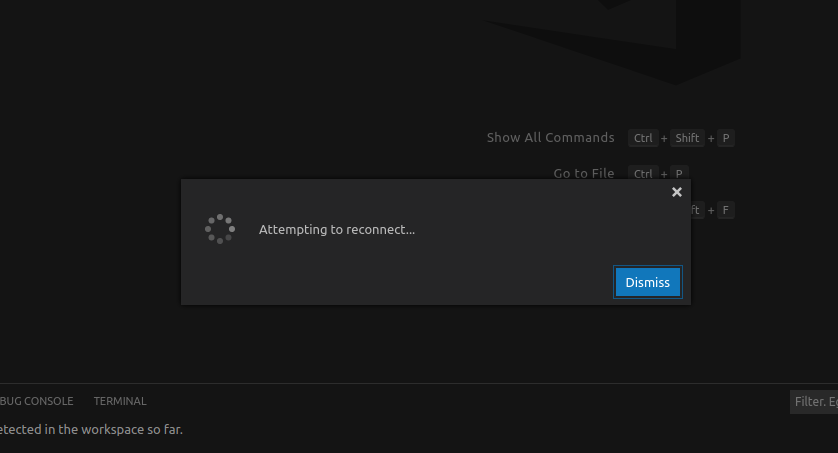
Can you give some more details?
As shown above, VScode asked me to reconnect or reload this window.
Sometimes this issue occurred frequently, and sometimes Vscode worked very well.
Actually, when I use other remote tools (e.g. Mobaxterm) to log in to the Linux server, I never met this kind of interruption.
 mouthful
on 23 Apr 2020
mouthful
on 23 Apr 2020
I guess this is the reason for my connection loss...

vhood
on 26 Apr 2020
It happens to me recently and frequently, every time the connection is broken, there is a alert which says the host is down. But I get enough memory and cpu
 kosl90
on 13 Jul 2020
kosl90
on 13 Jul 2020
Here are some things that can cause disconnections
- Extensions or other processes using lots of CPU or memory
- Very large workspaces that cause VS Code's filewatcher process to use lots of memory
- Anything that disrupts the network connection between the local and remote machnes
roblourens
on 9 Nov 2020
Related issues
 kzawad1
·
3Comments
kzawad1
·
3Comments
 gurdevrana
·
3Comments
gurdevrana
·
3Comments
 Yvand
·
3Comments
Yvand
·
3Comments
 sulume
·
3Comments
sulume
·
3Comments
 JacksonKearl
·
3Comments
JacksonKearl
·
3Comments
Most helpful comment
I have the same issue (1.44.0). After attaching to remote docker container, htop (on remote machine) demostrates that vscode consumes GBs of RAM, then it disconnects, reconnects and it repeats again.
I discovered that adding build files to "files.exclude" in settings.json solves the problem, but I lost all IDE features.
The previous version didn't have this problem.