Vscode-remote-release: Persist log in ExtensionContext#logPath
Lightly related to https://github.com/microsoft/vscode-remote-release/issues/1125
If there's an error, you're shown a modal dialog box, which sometimes prevents you from interacting with the logs box.
Any option you choose closes the logs.
Please either do not force a modal dialog, or allow a way of accessing the previous failure logs after the container disconnects.
 eedwards-sk
All 14 comments
You can access the logs after dismissing the dialog. Not very intuitive, but we want to have a modal dialog to make sure the user immediately notices it.
 chrmarti
on 23 Oct 2019
chrmarti
on 23 Oct 2019
The described behavior is how it is expected to work. If you disagree, please explain what is expected and what is not in more detail. See also our issue reporting guidelines.
Happy Coding!
![vscodebot[bot] picture](https://avatars2.githubusercontent.com/in/2406?v=4&s=40) vscodebot[bot]
on 23 Oct 2019
vscodebot[bot]
on 23 Oct 2019
You can access the logs after dismissing the dialog
@chrmarti How?
Selecting any of the modal dialog actions, to dismiss the dialog, causes the window to load to another state, which no longer shows the logs.
eedwards-sk
on 23 Oct 2019
@chrmarti
I confirmed I can dismiss the dialog with escape, 2 to three times.
There are 2 modal dialogs in total, and there is nothing about the UX that indicates it should be possible to dismiss them.
Absolutely frustrating UX.
I would suggest an option to "Dismiss" or "Close" so that I can get into the state using the UI flow, without having to resort to keyboard shortcuts.
eedwards-sk
on 23 Oct 2019
What is the message in the dialog? I might have a different one in mind.
chrmarti
on 23 Oct 2019
@chrmarti
First you receive this modal dialog:
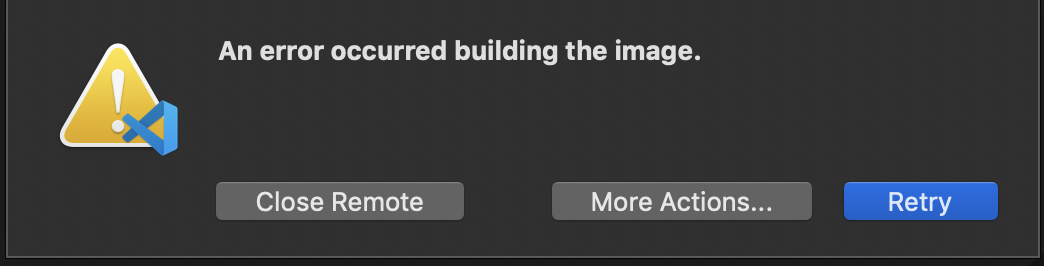
Hitting 'esc' automatically selects "more options" which then presents this modal dialog:
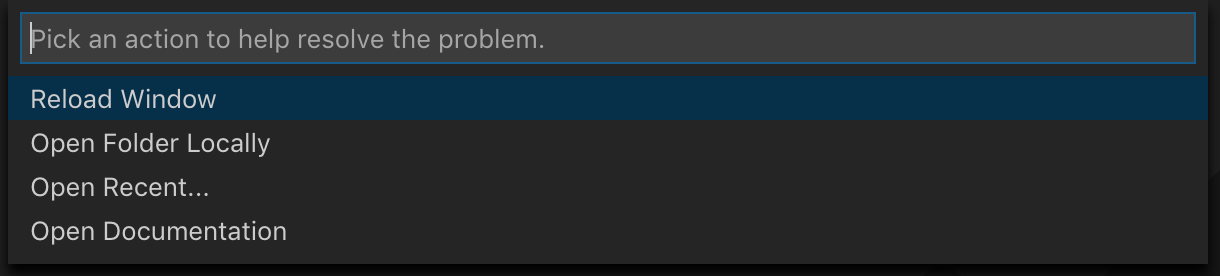
Hitting 'esc' yet again finally dismisses the dialog completely.
eedwards-sk
on 23 Oct 2019
You should be shown the Terminal with all log output. You can't interact with that while the modal (the first) dialog is open, but after that you can interact with it. (The second 'dialog' is not modal.)
chrmarti
on 28 Oct 2019
Thanks for clarifying.
I would still like to be able to access the logs when I "Open Folder Locally" which is what I'd be doing after a build fails to solve it.
I do not appreciate the dialogs. Even if the second one isn't "Modal", it still leads to really frustrating UX compared to other plugins.
e.g. I've ended up in a situation where clicking "Open Folder Locally" ends up opening a SECOND vscode window, and any time I go back to the first one, it's still displaying this dialog, and forces me back to the other window.
It's very confusing.
I don't understand the value or point of the dialog in the first place. We already have an established way of running commands through the command search, and there's a button in the bottom left for interacting with dev containers (e.g. to rebuild them).
The dialog feels completely tacked on -- "we don't know how to handle this flow, so let's just force an awkward dialog".
If I could access my dev container logs (e.g. in a tab under "output" rather than a terminal in "terminal" that disappears!"), I can do debugging from the "Local View".
We have the toast (?) notifications in the bottom right already, as well. I don't see why that isn't a valid place to insert the failure notification, either? e.g. "Your build failed, click here for more details" or such to display the build log, while reverting to the local view.
I don't know -- these are all just suggestions as ideas to get around the current flow, because I really, really dislike it, and I want to spread dev containers to the rest of my team through our projects, but this feels SUPER awkward.
eedwards-sk
on 29 Oct 2019
I agree, it is not ideal. A few points:
- The first message is a modal dialog and not a notification to make sure the user becomes immediately aware of the fatal error.
- The second message is a 'QuickPick' because that scales better to a larger number of commands than a dialog with buttons.
- The second message does not reuse any of the existing commands lists because in an error condition during startup only a subset of commands make sense.
- We can't move the log to Output because that doesn't support displaying terminal escape sequences.
- 'Open Folder Locally' opens a new window in the error case, so you can go back to the first window an inspect the log while changing the configuration in the local window.
chrmarti
on 29 Oct 2019
I understand those points, I feel like they're all solutions looking for problems.
At its core, it's a glorified docker build.
If I'm doing a docker build in the terminal, which is what I've always done, I run a script or terminal command, watch the output, and when it fails, I go back to my editor of choice and iterate.
At no point during this process does docker build require me to answer interactive dialogs to confirm the failure, or provide suggestions or a list of options that I need to run.
I'm not looking for my IDE to do any of these things, either. I'm perfectly capable of understanding when an error state occurs without needing a modal dialog.
I don't need a list of options in my face to pick from when I already know what I want to do.
I really feel like the whole experience is overstepping its bounds from a feature for providing dev containers into trying to model some new UX that includes holding hands rather than providing the information and letting engineers do their job.
Edit: to summarize, I believe the error state being printed in the docker build terminal is sufficient. I would prefer to edit my dockerfile after a build in the same session/window as the one I was attempting to load the dev container into. Switching between local / dev container with 2 windows is poor UX when I just want to iterate until the build succeeds and the container loads -- and leads to the issue of losing the build terminal output in the local edit session. Dialogs are unnecessary in all cases, only adding additional keypresses/clicks/dismissing actions to my workflow, without accelerating anything.
eedwards-sk
on 29 Oct 2019
The dialogs are there to help when you are not yet an expert with docker build and also when some other step of Remote-Containers fails.
If you prefer, you could also launch the container yourself and then connect to it from the Remote Explorer view. (That can still fail with the dialogs, just not for a docker build failure.)
chrmarti
on 29 Oct 2019
The dialogs are there to help when you are not yet an expert with docker build and also when some other step of Remote-Containers fails.
But why? If I'm an expert already I don't need my IDE to teach me. This is awful UX and a terrible slippery slope that drove me away from MS products in the first place.
If you prefer
I'd prefer UX that doesn't try to teach people how tools work, and instead just runs the tools, like how the rest of vscode extensions work. I don't get a popup for documentation when my linter fails.
This is getting into the weeds. The core issue stands: if the build fails, I am unable to retrieve the logs outside of that instance of the build session. Is there a place they're written to I'm unaware of? My searching and reading of documentation did not surface it yet.
eedwards-sk
on 29 Oct 2019
Point taken, we should persist the log and have a command to open it from another window.
chrmarti
on 29 Oct 2019
The next version will write log files, have a 'Remote-Containers: Open Log File...' command and automatically open the last log file after 'Reopen Folder Locally' after failing to build / connect to the container.
chrmarti
on 14 Jan 2020
Related issues
 JacksonKearl
·
3Comments
JacksonKearl
·
3Comments
 6XAM
·
3Comments
6XAM
·
3Comments
 kieferrm
·
3Comments
kieferrm
·
3Comments
 asyncx
·
3Comments
asyncx
·
3Comments
 tianomagdaong
·
3Comments
tianomagdaong
·
3Comments
Most helpful comment
Point taken, we should persist the log and have a command to open it from another window.