Vscode-remote-release: High CPU usage
Issue Type: Bug
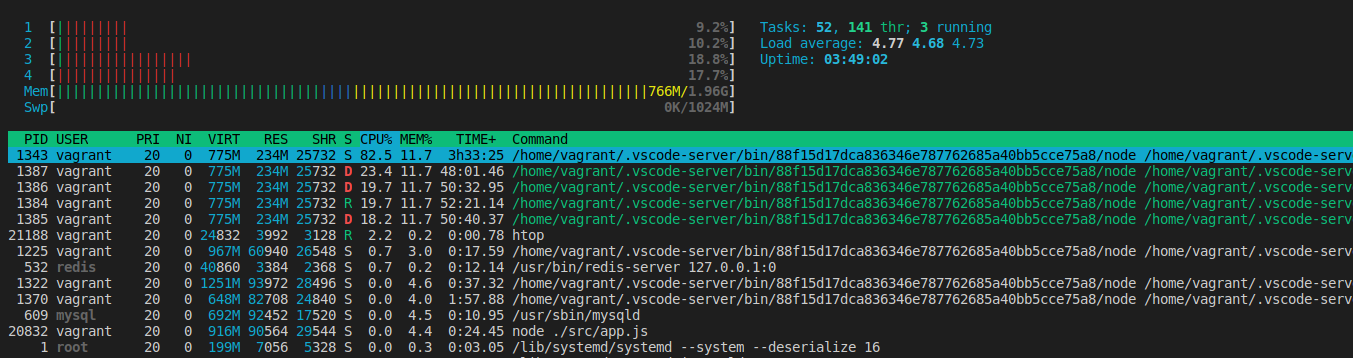
high CPU usage from multiple VSCodeServer instances (NodeJS)
Extension version: 0.47.1
VS Code version: Code 1.39.1 (88f15d17dca836346e787762685a40bb5cce75a8, 2019-10-10T23:30:33.955Z)
OS version: Linux x64 5.0.0-31-generic snap
Remote OS version: Linux x64 4.9.0-8-amd64
System Info
|Item|Value|
|---|---|
|CPUs|Intel(R) Core(TM) i5-8300H CPU @ 2.30GHz (8 x 2300)|
|GPU Status|2d_canvas: unavailable_software
flash_3d: disabled_software
flash_stage3d: disabled_software
flash_stage3d_baseline: disabled_software
gpu_compositing: disabled_software
multiple_raster_threads: enabled_on
native_gpu_memory_buffers: disabled_software
oop_rasterization: disabled_off
protected_video_decode: disabled_off
rasterization: disabled_software
skia_deferred_display_list: disabled_off
skia_renderer: disabled_off
surface_synchronization: enabled_on
video_decode: disabled_software
viz_display_compositor: disabled_off
webgl: unavailable_software
webgl2: unavailable_software|
|Load (avg)|4, 4, 3|
|Memory (System)|19.29GB (5.98GB free)|
|Process Argv|--force-user-env --unity-launch|
|Screen Reader|no|
|VM|0%|
|Item|Value|
|---|---|
|Remote|SSH: ANNA-BACKEND|
|OS|Linux x64 4.9.0-8-amd64|
|CPUs|Intel(R) Core(TM) i5-8300H CPU @ 2.30GHz (4 x 2303)|
|Memory (System)|1.96GB (0.57GB free)|
|VM|100%|
 pwnorbitals
All 10 comments
vagrant@ANNA-BACKEND:~/ANNA-Backend$ ps aux | grep vscode
vagrant   1217  0.0  0.0   4288   760 ?        S    12:39   0:00 sh /home/vagrant/.vscode-server/bin/88f15d17dca836346e787762685a40bb5cce75a8/server.sh --host=127.0.0.1 --enable-remote-auto-shutdown --port=0
vagrant   1225  0.1  2.9 990264 61096 ?        Sl   12:39   0:18 /home/vagrant/.vscode-server/bin/88f15d17dca836346e787762685a40bb5cce75a8/node /home/vagrant/.vscode-server/bin/88f15d17dca836346e787762685a40bb5cce75a8/out/vs/server/main.js --host=127.0.0.1 --enable-remote-auto-shutdown --port=0
vagrant   1303  0.0  1.9 873216 39184 ?        Sl   12:39   0:02 /home/vagrant/.vscode-server/bin/88f15d17dca836346e787762685a40bb5cce75a8/node /home/vagrant/.vscode-server/bin/88f15d17dca836346e787762685a40bb5cce75a8/out/bootstrap-fork --type=watcherService
vagrant   1322  0.2  4.5 1281896 93752 ?       Sl   12:39   0:37 /home/vagrant/.vscode-server/bin/88f15d17dca836346e787762685a40bb5cce75a8/node /home/vagrant/.vscode-server/bin/88f15d17dca836346e787762685a40bb5cce75a8/out/bootstrap-fork --type=extensionHost --uriTransformerPath=/home/vagrant/.vscode-server/bin/88f15d17dca836346e787762685a40bb5cce75a8/out/vs/server/uriTransformer.js
vagrant   1337  0.0  3.7 602496 77092 ?        Sl   12:39   0:03 /home/vagrant/.vscode-server/bin/88f15d17dca836346e787762685a40bb5cce75a8/node /home/vagrant/.vscode-server/bin/88f15d17dca836346e787762685a40bb5cce75a8/extensions/node_modules/typescript/lib/tsserver.js --syntaxOnly --useInferredProjectPerProjectRoot --disableAutomaticTypingAcquisition --cancellationPipeName /tmp/vscode-typescript1000/7460589a6dca9789dc09/tscancellation-af2f634cdbb9615d9b0b.tmp* --locale en --noGetErrOnBackgroundUpdate --validateDefaultNpmLocation
vagrant   1343 93.4 11.7 794560 240636 ?       Sl   12:39 214:13 /home/vagrant/.vscode-server/bin/88f15d17dca836346e787762685a40bb5cce75a8/node /home/vagrant/.vscode-server/bin/88f15d17dca836346e787762685a40bb5cce75a8/extensions/node_modules/typescript/lib/tsserver.js --useInferredProjectPerProjectRoot --enableTelemetry --cancellationPipeName /tmp/vscode-typescript1000/7460589a6dca9789dc09/tscancellation-2c4d3676582793b69b7e.tmp* --locale en --noGetErrOnBackgroundUpdate --validateDefaultNpmLocation
vagrant   1370  0.8  4.0 663860 82708 ?        Sl   12:39   1:58 /home/vagrant/.vscode-server/bin/88f15d17dca836346e787762685a40bb5cce75a8/node /home/vagrant/.vscode-server/bin/88f15d17dca836346e787762685a40bb5cce75a8/extensions/node_modules/typescript/lib/typingsInstaller.js --globalTypingsCacheLocation /home/vagrant/.cache/typescript/3.6 --enableTelemetry --typesMapLocation /home/vagrant/.vscode-server/bin/88f15d17dca836346e787762685a40bb5cce75a8/extensions/node_modules/typescript/lib/typesMap.json --validateDefaultNpmLocation
vagrant   2243  0.0  2.1 576076 44828 ?        Sl   14:52   0:02 /home/vagrant/.vscode-server/bin/88f15d17dca836346e787762685a40bb5cce75a8/node /home/vagrant/.vscode-server/bin/88f15d17dca836346e787762685a40bb5cce75a8/extensions/json-language-features/server/dist/jsonServerMain --node-ipc --clientProcessId=1322
vagrant  21253  0.0  0.0  12780   940 pts/1    S+   16:28   0:00 grep vscode
All extensions are disabled
The four processes at the top, constantly eating 25%+ cpu, are :
vagrant 22425 50.5 3.7 663416 76568 ? Sl 16:49 3:25 /home/vagrant/.vscode-server/bin/88f15d17dca836346e787762685a40bb5cce75a8/node /home/vagrant/.vscode-server/bin/88f15d17dca836346e787762685a40bb5cce75a8/extensions/node_modules/typescript/lib/typingsInstaller.js --globalTypingsCacheLocation /home/vagrant/.cache/typescript/3.6 --enableTelemetry --logFile /home/vagrant/.vscode-server/data/logs/20191012T123932/exthost6/vscode.typescript-language-features/tsserver-log-b3pf7F/ti-22417.log --typesMapLocation /home/vagrant/.vscode-server/bin/88f15d17dca836346e787762685a40bb5cce75a8/extensions/node_modules/typescript/lib/typesMap.json --validateDefaultNpmLocation
This happens only with NodeJS v10
pwnorbitals
on 12 Oct 2019
Does this reproduce in the latest VS Code insiders build with all extensions disabled?
 mjbvz
on 25 Oct 2019
mjbvz
on 25 Oct 2019
Same issue. Although I closed all windows of vscode, the multi related processes stay with high cpu usage.
 hunterlxt
on 8 Nov 2019
hunterlxt
on 8 Nov 2019
Any news on this? It is happening to us too :)
 ifuyivara
on 3 Mar 2020
ifuyivara
on 3 Mar 2020
Me as well
 intnick
on 3 Mar 2020
intnick
on 3 Mar 2020
Me too :(
 GoogleSkrome
on 18 Mar 2020
GoogleSkrome
on 18 Mar 2020
same here.
 koenzhao
on 23 Mar 2020
koenzhao
on 23 Mar 2020
Problem was gone for me after disabling docker extension in the remote workspace, removing .vscode-server directory and reconnecting.
PS: Possibly not related to the reported issue, but may help others.
 orangelynx
on 25 Mar 2020
orangelynx
on 25 Mar 2020
Closing as OP never replied with information to investigate this (it seemed TS specific but could have been fixed by our TS updates)
If you are seeing a perf issue with VS code, follow these instructions to collect performance information. If it still seems VS Code itself is to blame, open a new issue
mjbvz
on 25 Mar 2020
Related issues
 Yvand
·
3Comments
Yvand
·
3Comments
 tianomagdaong
·
3Comments
tianomagdaong
·
3Comments
 peterkappelt
·
3Comments
peterkappelt
·
3Comments
 6XAM
·
3Comments
6XAM
·
3Comments
 sulume
·
3Comments
sulume
·
3Comments
Most helpful comment
Any news on this? It is happening to us too :)