Vscode-remote-release: Container action icons
Testing microsoft/vscode-internalbacklog#772
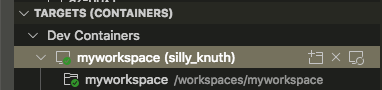
To me, the "Attach to Container" icon looks very similar to our "new folder" icon. I can't think of a better option though.
And the "Stop Container" icon doesn't really look like "stop", is the badge supposed to be a square? This might be similar to the "Stop search" icon that @misolori was iterating on.
 roblourens
All 14 comments
Stop has been removed to the context menu since it is more low level, so no more icon.
I've fixed the Attach To Container action to open a new window every time, which I hope will help.
@rebornix for the Attach looking like new folder.
 alexr00
on 28 Aug 2019
alexr00
on 28 Aug 2019
cc @misolori we may need a new icon for Attach. The new folder icon is used for Connect to Host in New Window, which makes sense as you need to choose a folder to open later on in the newly created window. However in Container case, it looks a bit weird.
 rebornix
on 28 Aug 2019
rebornix
on 28 Aug 2019
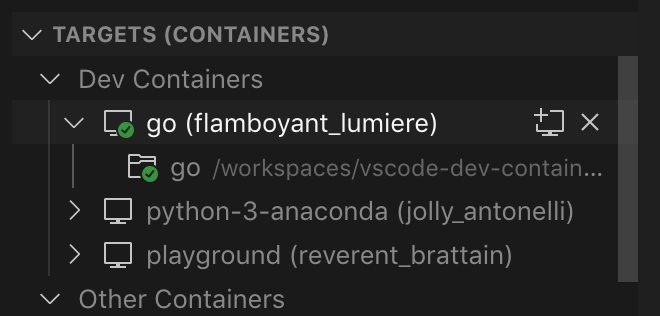
I wonder if this icon makes sense (trying to follow the same pattern for open in new window):
 misolori
on 28 Aug 2019
misolori
on 28 Aug 2019
@misolori @alexr00 I am also having a hard time detecting the difference between the "running" and "stopped" icon on a 96-DPI monitor (1920x1080). The difference is too subtle that small from a normal seating position - I'm having to lean in to see it.

 Chuxel
on 9 Sep 2019
Chuxel
on 9 Sep 2019
@Chuxel do you find that it's only the running/stopped icons or do you think all of those icons w/ small badges are harder to read as well?
misolori
on 9 Sep 2019
@misolori Could be the size. If the shape is materially different, then is more noticible and color helps - e.g. a checkmark verses a box. Of course color isn't always accessible.

But the triangle and box are too close together and smudge particularly if its lost in a big list. Its more of a problem in light theme which is where I saw it first:
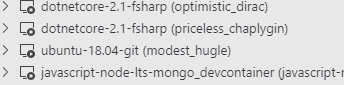
I really have to stare to pick up that ubuntu-18.04-git is the play icon.
Chuxel
on 9 Sep 2019
@misolori +1 to not being able to tell the difference between stopped and running.
alexr00
on 10 Sep 2019
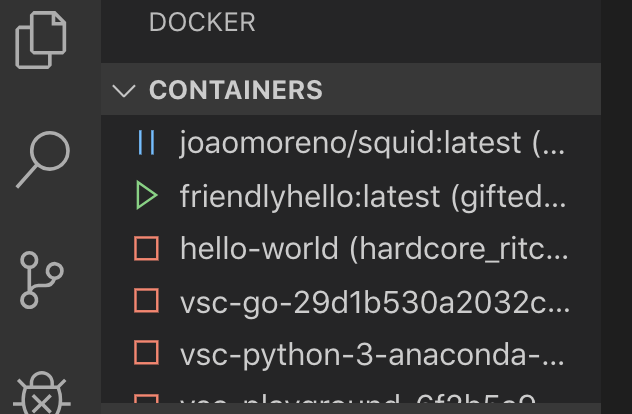
@Chuxel @alexr00 what if we made Stopped the empty circle and used the filled-in ones when they are running or active? We should also add a tooltip when you hover each icon to indicate what it is.
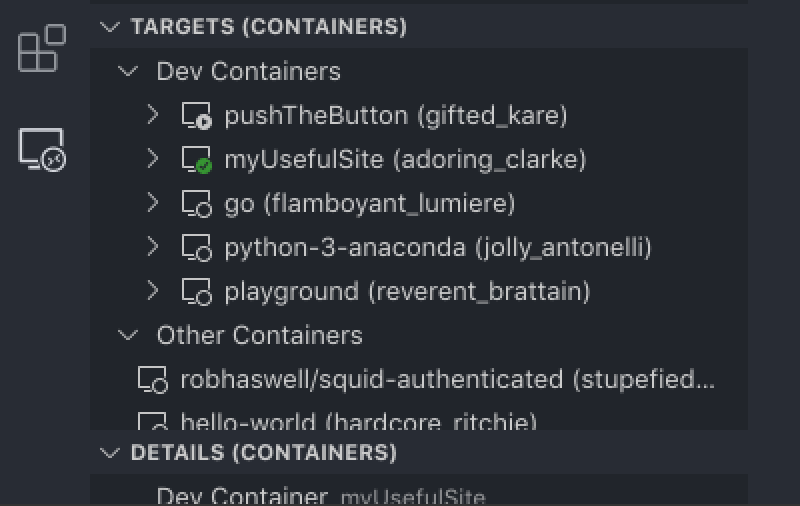
If we feel these aren't enough we could go a little more agressive and copy what the new Docker icons will be showing (we'd remove the Machine portion of the icon) though not sure how it would play with the SSH connections:
misolori
on 11 Sep 2019
@misolori Yeah that's different enough I should be able to see it. Mostly solid vs empty. I suppose another option would be not have the dot at all if the container is not running (like SSH before you connect). Or use the square stop shape instead of a dot if we want to still invoke the "audio button" aesthetic.
Chuxel
on 11 Sep 2019
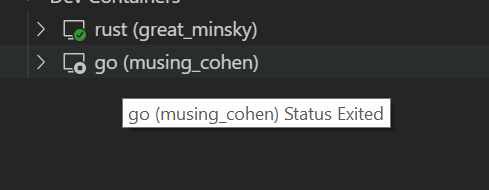
We already have a tooltip that gives you the status when hovering over the text of the container, but the tree itself doesn't extend that to the icon. I'll look at fixing that: https://github.com/microsoft/vscode/issues/80694
Current tooltip:
alexr00
on 11 Sep 2019
It sounds like we should go back to how the icons were used before:
Closed dot for:
Running
Open dot for:
Created
Paused
Refresh (this usually only shows for a second any way)
No dot for:
Exited
Dead (Another unusual state)
alexr00
on 11 Sep 2019
@misolori where can I find the icon from here? https://github.com/microsoft/vscode-remote-release/issues/1289#issuecomment-525878757
alexr00
on 12 Sep 2019
@alexr00 here is that icon: remote-icons-stopped.zip
Is created the default state? I don't think that one should have the empty circle as it's just a static state so the no dot icon would work here.
misolori
on 12 Sep 2019
Updated the created state icon.
It looks like https://github.com/microsoft/vscode-remote-release/files/3606355/remote-icons-stopped.zip is the open dot icon. Could I get the new window icon from https://github.com/microsoft/vscode-remote-release/issues/1289#issuecomment-525878757 ?
alexr00
on 17 Sep 2019
Related issues
 Yvand
·
3Comments
Yvand
·
3Comments
 robertlugg
·
3Comments
robertlugg
·
3Comments
 tianomagdaong
·
3Comments
tianomagdaong
·
3Comments
 jkoritzinsky
·
3Comments
jkoritzinsky
·
3Comments
 nphmuller
·
3Comments
nphmuller
·
3Comments
Most helpful comment
@Chuxel @alexr00 what if we made
Stoppedthe empty circle and used the filled-in ones when they are running or active? We should also add a tooltip when you hover each icon to indicate what it is.If we feel these aren't enough we could go a little more agressive and copy what the new Docker icons will be showing (we'd remove the
Machineportion of the icon) though not sure how it would play with the SSH connections: