Vscode-remote-release: Go To Definition not working
- VSCode Version: Code - Insiders Version 1.35.0-insider
- Local OS Version: macOS Mojave Version 10.14
- Remote OS Version: Ubuntu 18.04.2 LTS
- Remote Extension/Connection Type: SSH
Steps to Reproduce:
- connect to remote server using ssh, no password. connects fine
- open project directory on remote server (contains typescript/javascript)
- Click on a symbol/function/variable
- Select F12, command pallet >go to definition, or cmd+click won't go to definition. Nothing happens.
Does this issue occur when you try this locally?: No, when I open my project directory locally "Go To Definition" works just fine.
Does this issue occur when you try this locally and all extensions are disabled?: No, when not connecting using ssh this works fine.
 Jeffhabs
All 9 comments
Intellisense also doesn't seem to be working. Here are a few screen shots comparing vscode-insider locally vs remote using ssh.
Vscode-insider local directory:


Vscode-insider remote directory:


Jeffhabs
on 30 May 2019
Also something interesting. When I select to change my typescript version on the status bar I get this error when connected remotely via ssh:
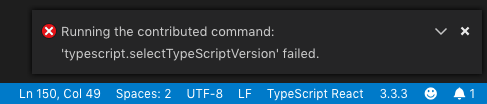
This doesn't occur locally, it seems like there is an issue with the built-in Typescript & Javascript language features extension?
Jeffhabs
on 31 May 2019
Same issue
 far1s
on 4 Jun 2019
far1s
on 4 Jun 2019
Same here
 davidhtml
on 4 Jun 2019
davidhtml
on 4 Jun 2019
Same
 Zacharias030
on 9 Jun 2019
Zacharias030
on 9 Jun 2019
Same here - issue exists both in JavaScript and Python for me.
 illiriks
on 10 Jun 2019
illiriks
on 10 Jun 2019
Possibly https://github.com/microsoft/vscode/pull/75547
@Jeffhabs Can you please test in the next VS code insiders build to see if that is the case. Also check the developer tools logs to see if there are any errors using the Developer: toggle developer tools command
 mjbvz
on 25 Jun 2019
mjbvz
on 25 Jun 2019
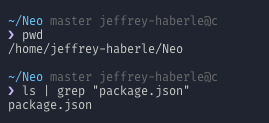
@mjbvz It looks like everything is working again, although I do get these errors in my developer tools:

Not sure if that is related, but I can confirm that I have a package.json at that path:
Jeffhabs
on 25 Jun 2019
@Jeffhabs Thanks for testing. Can you see if the errors about the package.json come back again. I don't think they are related to the issue here. If you do see these errors again, please open another issue
mjbvz
on 25 Jun 2019
Related issues
 gurdevrana
·
3Comments
gurdevrana
·
3Comments
 sulume
·
3Comments
sulume
·
3Comments
 JacksonKearl
·
3Comments
JacksonKearl
·
3Comments
 mxdmedia
·
3Comments
mxdmedia
·
3Comments
 6XAM
·
3Comments
6XAM
·
3Comments
Most helpful comment
Intellisense also doesn't seem to be working. Here are a few screen shots comparing vscode-insider locally vs remote using ssh.
Vscode-insider local directory:


Vscode-insider remote directory:

