Vscode-remote-release: remote development port forwarding improvements
i'm using remote development quite a lot and really like it! but there are a couple of use cases which could be improved with the port forwarding feature:
allow to redirect ports
it would be nice if we could optionally configure different remote and local ports. e.g run a webservice in the SSH session on port 3000 but open it on 5000 on the "client"forward local ports to the remote session
there are some applications we are not able to run inside the remote session but need to run on the devs client. it would be quite cool if we could map those local ports to the remote session (basically the reversed feature of port forwarding today)save forwarded ports and auto restore them after opening the project
reconfiguring the ports every time after opening the project could be improved. why not have a config file (maybe like devcontainer?) where it is saved.
 OneCyrus
All 5 comments
Perhaps we can store forwarded ports in a workspace.
 epicfaace
on 23 Jun 2019
epicfaace
on 23 Jun 2019
- save forwarded ports and auto restore them after opening the project
reconfiguring the ports every time after opening the project could be improved. why not have a config file (maybe like devcontainer?) where it is saved.
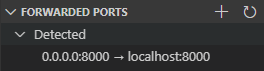
You can now achieve this via the SSH config file (see #685).
You'll need an Insiders version of VSCode and the Remote-SSH nightly to see it right now.
This should be included in the Jan Stable Release.
SSH Config:
Host dev
    HostName        <host/ip>
    User            <username>
    LocalForward    8000 0.0.0.0:8000
 pd93
on 13 Jan 2020
pd93
on 13 Jan 2020
- save forwarded ports and auto restore them after opening the project
reconfiguring the ports every time after opening the project could be improved. why not have a config file (maybe like devcontainer?) where it is saved.You can now achieve this via the SSH config file (see #685).
You'll need an Insiders version of VSCode and the Remote-SSH nightly to see it right now.
This should be included in the Jan Stable Release.SSH Config:
Host dev
    HostName        <host/ip>
    User            <username>
    LocalForward    8000 0.0.0.0:8000
I've done that but with port 80,
example:
LocalForward 80localhost:80
It worked fine until the past friday. But I think it's a windows or ssh program related issue.
Now every time I hope a connection with that line in the ssh config just returns
Privileged ports can only be forwarded by root
Ok maybe it's a new update to help increase security, I'm fine with that.
But then if I remove that line from the ssh config and then write 80 inside the vs code forward tab just works. So, I can save the local forward config, but actually no.
Any fix/workaround for this, because right now I need to type the port 80 everytime I open that ssh connection.
Nevermind, setting remote.restoreForwardedPorts to truesolved this issue. :)
 lmotascp
on 31 Mar 2020
lmotascp
on 31 Mar 2020
I think all of this is done now except remote port forwarding, which the user can do in their SSH config file, but I'll leave it to @alexr00 whether this should be doable through vscode UI
 roblourens
on 10 Nov 2020
roblourens
on 10 Nov 2020
Yes, 1 and 3 are done. 2 is a duplicate of https://github.com/microsoft/vscode-remote-release/issues/2318
 alexr00
on 10 Nov 2020
alexr00
on 10 Nov 2020
Related issues
 JacksonKearl
·
3Comments
JacksonKearl
·
3Comments
 Yvand
·
3Comments
Yvand
·
3Comments
 Arunselvan-AS
·
3Comments
Arunselvan-AS
·
3Comments
 grzegorz-silarski
·
3Comments
grzegorz-silarski
·
3Comments
 jeffreyyjp
·
3Comments
jeffreyyjp
·
3Comments
Most helpful comment
Perhaps we can store forwarded ports in a workspace.