Vscode-remote-release: keywords in .ssh/config should be expected being case-insensitive
- VSCode Version: 1.34.0-insider
- Local OS Version: Linux 4.18.0-16-generic / ubuntu cosmic
- Remote OS Version: not relevant
- Remote Extension/Connection Type: SSH
Steps to Reproduce:
- create
.ssh/configwith multiple hosts
Host host
  HostName host.name.tld
  User XXX

Host host1
  Hostname host1.name.tld
  User XXX

Host host2
  Hostname host2.name.tld
  User XXX

Host host1-host
  Hostname host1.name.tld
  User XXX
  ProxyJump host

Host host2-host
  Hostname host2.name.tld
  User XXX
  ProxyJump host
- click on 'remote extension' in side menu
- just first host ("host") in my case will be shown in "connections"
- click on 'refresh' icon
- just one host will be shown in connections
workaround
credits: TomFrost
keyword HostName ignored when written as Hostname.
According manpage, keywords are case-insensitive there in ssh_config.
expected behavior:
all hosts from .ssh/known_hosts will be shown in 'connections'.
screenshot
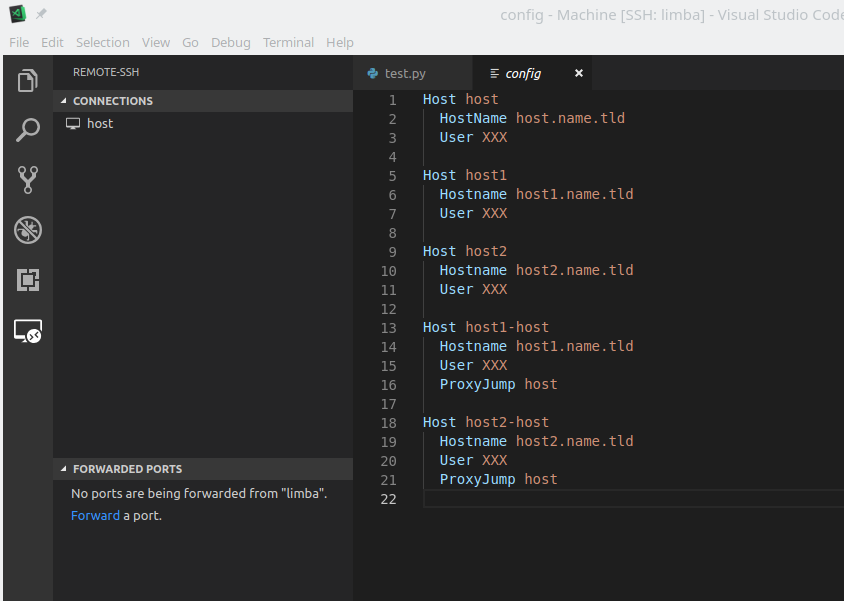
 jose-d
All 5 comments
edit: it seems that in the bottom left remote button all hosts are included, so perhaps it would be enough to clarify what's the role of the menu "CONNECTIONS" and what one should expect to see there.
jose-d
on 3 May 2019
Experiencing the same issue/confusion.
 ikhurramraza
on 3 May 2019
ikhurramraza
on 3 May 2019
@jose-d I'm not on the VSCode team, but this looks like a syntax error in your file. The first entry has HostName with a capital N, the rest do not. I just tested this-- Hostname with a lowercase N does not appear in the list, but uppercase it and it does.
 TomFrost
on 3 May 2019
TomFrost
on 3 May 2019
The first entry has
HostNamewith a capital N, the rest do not.
@TomFrost, nice, you found the trigger!
in man ssh_config they say:
The possible keywords and their meanings are as follows (note that keywords are case-insensitive and arguments are case-sensitive)
So both variants are acceptable.
EDIT: for standard ssh, scp, etc. both variants with 'H' and 'h' works.
jose-d
on 3 May 2019
TIL-- I thought they were case sensitive! Great catch.
TomFrost
on 3 May 2019
Related issues
 kieferrm
·
3Comments
kieferrm
·
3Comments
 kzawad1
·
3Comments
kzawad1
·
3Comments
 grzegorz-silarski
·
3Comments
grzegorz-silarski
·
3Comments
 nphmuller
·
3Comments
nphmuller
·
3Comments
 sulume
·
3Comments
sulume
·
3Comments
Most helpful comment
@jose-d I'm not on the VSCode team, but this looks like a syntax error in your file. The first entry has
HostNamewith a capital N, the rest do not. I just tested this--Hostnamewith a lowercase N does not appear in the list, but uppercase it and it does.