Vscode-remote-release: VS Code server failed to start using zsh
- VSCode Version: 1.34.0-insider (user setup)
- Local OS Version: Windows 10 1809
- Remote OS Version: N/A (locally using Ubuntu 18.04 for WSL)
- Remote Extension/Connection Type: WSL (Ubuntu 18.09)
Steps to Reproduce:
- Launch wsl from powershell
- open a python folder with virtualenv activated
- launch
code-insiders .
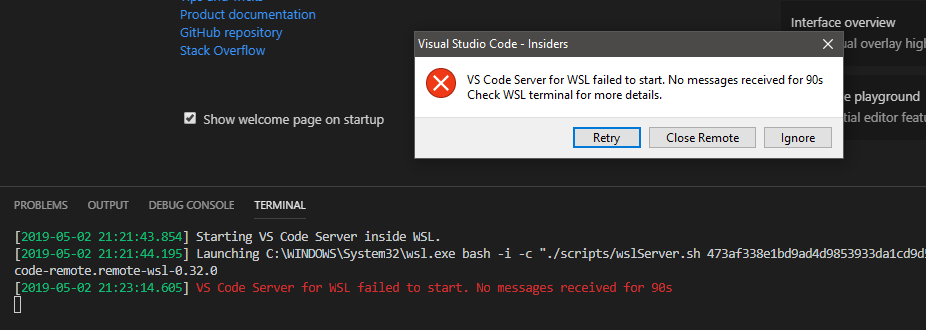
Does this issue occur when you try this locally?: Yes
Does this issue occur when you try this locally and all extensions are disabled?: Yes
 a2975667
All 19 comments
Do you use tmux in WSL?
 Tyriar
on 3 May 2019
Tyriar
on 3 May 2019
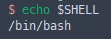
No. I'm using bash+zsh
a2975667
on 3 May 2019
Can you try to run the server script manually in the wsl shell?
Should be something like (Replace 'YourUserName' with your Windows user name)
bash -x /mnt/c/Users/YourUserName/.vscode-insiders/extensions/ms-vscode-remote.remote-wsl-0.31.0/
scripts/wslServer.sh 473af338e1bd9ad4d9853933da1cd9d5d9e07dc9 insider .vscode-remote
 aeschli
on 3 May 2019
aeschli
on 3 May 2019
I see.
So I realized that I mapped the path in WSL to neglect /mnt/ which causes it not to find the path...
Is there a way to translate this? (this was done because I was trying to sync paths in WSL with windows for docker a long time ago) I guess I wouldn't need to deal with this anymore?
a2975667
on 3 May 2019
So I tried removing the /mnt/ and it still doesn't work. It seems like as mentioned in #77 it's a zsh issue.
Commenting out the initialization of zsh from bashrc will work. Not otherwise.
a2975667
on 3 May 2019
Can you try this version?
- Save the extension as
remote-wsl-0.32.1.vsix(GitHub limitation on files to attach) - in the extensions viewlet, use
Install from VSIX... - check that you now see version 0.32.1
This fixes:
- when starting the wslServer.sh, no longer runs with
-i, so unexpected commands (such as cd, zsh) in .bash_profile no longer interfere. - inside wslServer.sh, start the server with the user configured shell (and
-i)
See https://medium.com/@vinhp/set-and-use-zsh-as-default-shell-in-wsl-on-windows-10-the-right-way-4f30ed9592dc on how to configure the shell in wsl
Please let me know if that solves the issues.
aeschli
on 6 May 2019
@aeschli I just tried the install steps you outlined for version 0.32.1 but I received this error
Installing extensions...
(node:19772) [DEP0005] DeprecationWarning: Buffer() is deprecated due to security and usability issues. Please use the Buffer.alloc(), Buffer.allocUnsafe(), or Buffer.from() methods instead.
Corrupt ZIP: end of central directory record signature not found
Failed Installing Extensions: c:\Users\username\.vscode-insiders\extensions\remote-wsl-0.32.1.vsix
 alexmspina
on 7 May 2019
alexmspina
on 7 May 2019
@aeschli not sure what happened (maybe a new update was pushed recently) but 0.32.1 installed on my machine. thanks!
alexmspina
on 7 May 2019
Entertainingly simple fix for me, I couldn't access WSL in a regular terminal either so I rebooted and all is well 😎
 mckernanin
on 9 May 2019
mckernanin
on 9 May 2019
I was able to get 0.32.1 to work by changing the shebang line to #!/usr/bin/env zsh and manually removing the -i in the wslServer.sh command. Today there was an update to 0.33.0 and it overwrote my changes and also keeps the -i in the command

Now I can't find that same line in the wslServer.sh file and I'm not sure where the command is being executed.
alexmspina
on 9 May 2019
@alexmspina I used search to find and remove the -i from wslDaemon.js.

I only needed to remove the first highlighted -i and it seems to work without changing the shebang to zsh.
 timolinn
on 10 May 2019
timolinn
on 10 May 2019
@aeschli Manually disabling auto update and install 0.32.1 does fix the issue (running on the latest code insider as well)
a2975667
on 10 May 2019
@timolinn thanks for finding that. It's running with my zsh environment again.
alexmspina
on 10 May 2019
Yes, the fix that's in 0.32.1 has still to be pushed and published in a real version. Working in it!
aeschli
on 11 May 2019
You need to use this on your .bashrc file:
# Switch to ZSH shell
if test -t 1; then
  exec zsh
fi
Instead of:
exec zsh
If you use the second one the vscode remote server couldn't start...
 leandrowilliam
on 5 Jun 2019
leandrowilliam
on 5 Jun 2019
If you want to change your default shell you should use chsh, not run the other shell in your .bashrc.
Tyriar
on 5 Jun 2019
Yes! this is the right way... but the error was because it's configured as the other way.
Would be great if some sites like 👇 were updated... to avoid this kind of error, because they appear at the top of the search "how to install oh-my-zsh on WSL"
https://www.howtogeek.com/258518/how-to-use-zsh-or-another-shell-in-windows-10/
https://evdokimovm.github.io/windows/zsh/shell/syntax/highlighting/ohmyzsh/hyper/terminal/2017/02/24/how-to-install-zsh-and-oh-my-zsh-on-windows-10.html
leandrowilliam
on 5 Jun 2019
You need to use this on your
.bashrcfile:if test -t 1; then exec zsh fiInstead of:
exec zshIf you use the second one the vscode remote server couldn't start...
I was having this exact same issue, only i use fish shell rather than zsh. The above snippet worked perfectly for me just by replacing zsh for fish.
so, changing:
to
if test -t 1; then
  fish
fi
was the solution for me.
 proteus-aholt
on 7 Jun 2019
proteus-aholt
on 7 Jun 2019
@proteus-aholt you should change you default shell as in https://github.com/microsoft/vscode-remote-release/issues/27#issuecomment-499082064:
chsh -s <path to fish>
Related issues
 kieferrm
·
3Comments
kieferrm
·
3Comments
 jkoritzinsky
·
3Comments
jkoritzinsky
·
3Comments
 JacksonKearl
·
3Comments
JacksonKearl
·
3Comments
 mxdmedia
·
3Comments
mxdmedia
·
3Comments
 sulume
·
3Comments
sulume
·
3Comments
Most helpful comment
You need to use this on your
.bashrcfile:# Switch to ZSH shell if test -t 1; then exec zsh fiInstead of:
exec zshIf you use the second one the vscode remote server couldn't start...