Vscode-react-native: [Bug] Could not find AppLauncher by the project root path <insert path here>
🐛 What is the bug? How can we reproduce it?
Please put here any steps, code or any information that can help us
reproduce the error on our side so we can fix it:
- Head to the Debug section of VSCode
- Start up your RNW project (start-native)
- Try attaching to packager ("type": "reactnative", "request": "attach")
- A dialog pops up stating "An error occurred while attaching debugger to the application. Could not find AppLauncher by the project root path
(error code 1410)
Expected behavior
The debugger attaches to the project
Debug output
Debug Console
There is no console output - we fail before that
React Native output channel
No output
Developer Tools console
  ERR Cannot read property 'getRnCdpProxy' of undefined: TypeError: Cannot read property 'getRnCdpProxy' of undefined
    at E.<anonymous> (c:\Users\roede\.vscode\extensions\msjsdiag.vscode-react-native-1.0.0\dist\rn-extension.js:1:115654)
    at Generator.next (<anonymous>)
    at c:\Users\roede\.vscode\extensions\msjsdiag.vscode-react-native-1.0.0\dist\rn-extension.js:1:113380
    at new Promise (<anonymous>)
    at n (c:\Users\roede\.vscode\extensions\msjsdiag.vscode-react-native-1.0.0\dist\rn-extension.js:1:113125)
    at E.disconnectRequest (c:\Users\roede\.vscode\extensions\msjsdiag.vscode-react-native-1.0.0\dist\rn-extension.js:1:115594)
    at E.<anonymous> (c:\Users\roede\.vscode\extensions\msjsdiag.vscode-react-native-1.0.0\dist\rn-extension.js:1:389665)
    at Generator.next (<anonymous>)
    at c:\Users\roede\.vscode\extensions\msjsdiag.vscode-react-native-1.0.0\dist\rn-extension.js:1:385793
    at new Promise (<anonymous>)
    at n (c:\Users\roede\.vscode\extensions\msjsdiag.vscode-react-native-1.0.0\dist\rn-extension.js:1:385538)
    at E.disconnectRequest (c:\Users\roede\.vscode\extensions\msjsdiag.vscode-react-native-1.0.0\dist\rn-extension.js:1:389479)
    at E.dispatchRequest (c:\Users\roede\.vscode\extensions\msjsdiag.vscode-react-native-1.0.0\dist\rn-extension.js:1:121885)
    at E.dispatchRequest (c:\Users\roede\.vscode\extensions\msjsdiag.vscode-react-native-1.0.0\dist\rn-extension.js:1:361666)
    at E.handleMessage (c:\Users\roede\.vscode\extensions\msjsdiag.vscode-react-native-1.0.0\dist\rn-extension.js:1:358534)
    at E._handleData (c:\Users\roede\.vscode\extensions\msjsdiag.vscode-react-native-1.0.0\dist\rn-extension.js:1:360256)
    at Socket.<anonymous> (c:\Users\roede\.vscode\extensions\msjsdiag.vscode-react-native-1.0.0\dist\rn-extension.js:1:358866)
    at Socket.emit (events.js:223:5)
    at addChunk (_stream_readable.js:309:12)
    at readableAddChunk (_stream_readable.js:290:11)
    at Socket.Readable.push (_stream_readable.js:224:10)
    at TCP.onStreamRead (internal/stream_base_commons.js:181:23)
Environment
Please tell us about your system and your project:
npx react-native doctorornpx expo doctorif your project is using Expo:
error Cannot destructure property 'contributor' of 'undefined' as it is undefined.
TypeError: Cannot destructure property 'contributor' of 'undefined' as it is undefined.
    at getHealthchecks (F:\outlook\node_modules\react-native\node_modules\@react-native-community\cli\build\commands\doctor\healthchecks\index.js:41:3)
    at Object._default [as func] (F:\outlook\node_modules\react-native\node_modules\@react-native-community\cli\build\commands\doctor\doctor.js:173:111)
    at processTicksAndRejections (internal/process/task_queues.js:97:5)
    at async Command.handleAction (F:\outlook\node_modules\react-native\node_modules\@react-native-community\cli\build\index.js:184:9)
envinfo:
  System:
    OS: Windows 10 10.0.19041
    CPU: (8) x64 Intel(R) Core(TM) i7-4790K CPU @ 4.00GHz
    Memory: 8.74 GB / 15.64 GB
  Binaries:
    Node: 12.18.2 - C:\Program Files\nodejs\node.EXE
    Yarn: 1.22.4 - C:\Program Files (x86)\Yarn\bin\yarn.CMD
    npm: 6.14.5 - C:\Program Files\nodejs\npm.CMD
  Utilities:
    Git: 2.17.0.
  IDEs:
    VSCode: 1.49.2 - C:\Users\roede\AppData\Local\Programs\Microsoft VS Code\bin\code.CMD
  Browsers:
    Edge: 44.19041.423.0
    Internet Explorer: 11.0.19041.1
  Monorepos:
    Yarn Workspaces: 1.22.4
    Lerna: 3.22.1
- React Native Tools extension version: 1.0.0
- Expo SDK version (if applicable): N/A
 roederw
All 23 comments
The path looks right - nothing has changed on my end except for the RN Tools version bump. What is AppLauncher?
roederw
on 29 Sep 2020
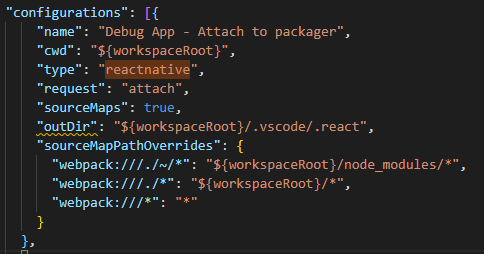
Here is my launch.json entry:
roederw
on 29 Sep 2020
Downgraded to v0.1.7 as a temporary work around (repro-able only on v1.0.0). Checking to see if I missed any new changes that might not be configured properly on my end as a result of the upgrade.
roederw
on 29 Sep 2020
Hi @roederw . Do you have any modifications for projectRoot in your settings.json file as described here? Also, could you please send us your react-native and react-native-windows versions as they might be important for this problem?
AppLauncher is the some kind of manager for React Native project folders in your workspace, if it is not found for your project it means that for some reason extension could not define your project as a React Native one and spawn an AppLauncher for it. That might happen when non standard react-native version in package.json file is used.
Also, please try to launch debugging on a freshly created RNW app and let us know if debugging works for that case.
 SounD120
on 29 Sep 2020
SounD120
on 29 Sep 2020
react-native-cli: 2.0.1
react-native: 0.62.2
react-native-windows: 0.62.9
Yes, I have a projectRoot modification - it just drops into the view directory. react-native-tools.projectRoot": "./view
roederw
on 29 Sep 2020
Dropping down to an earlier version of RNW seems to work (when on v1.0.0) - try repro-ing when on RNW 0.62.9
roederw
on 29 Sep 2020
Could it be related to the JS engine we're using? Since we're not building with Hermes? What changed between v1.0.0 and v0.17.0?
roederw
on 29 Sep 2020
Hi there,
I'm also having the same issue.
My current react-native version is 0.62.2, and react-native-cli: 2.0.1.
Downgrading the VS Code extension React Native Tools from 1.00 to 0.17.0 the Debug correctly works.
 pfalcetti
on 30 Sep 2020
pfalcetti
on 30 Sep 2020
I'm also getting this issue but i'm on react native 0.61.5.
if i look at the Log(Window) under output i get the following error
[renderer1] [error] Cannot read property 'getRnCdpProxy' of undefined: TypeError: Cannot read property 'getRnCdpProxy' of undefined
at E.
at Generator.next (
at c:xxxx.vscodeextensionsmsjsdiag.vscode-react-native-1.0.0distrn-extension.js:1:113380
at new Promise (
at n (c:xxxx.vscodeextensionsmsjsdiag.vscode-react-native-1.0.0distrn-extension.js:1:113125)
at E.disconnectRequest (c:xxxt.vscodeextensionsmsjsdiag.vscode-react-native-1.0.0distrn-extension.js:1:115594)
at E.
at Generator.next (
at c:xxxx.vscodeextensionsmsjsdiag.vscode-react-native-1.0.0distrn-extension.js:1:385793
at new Promise (
at n (c:xxxx.vscodeextensionsmsjsdiag.vscode-react-native-1.0.0distrn-extension.js:1:385538)
at E.disconnectRequest (c:xxxx.vscodeextensionsmsjsdiag.vscode-react-native-1.0.0distrn-extension.js:1:389479)
at E.dispatchRequest (c:xxx.vscodeextensionsmsjsdiag.vscode-react-native-1.0.0distrn-extension.js:1:121885)
at E.dispatchRequest (c:xxx.vscodeextensionsmsjsdiag.vscode-react-native-1.0.0distrn-extension.js:1:361666)
at E.handleMessage (c:xxxx.vscodeextensionsmsjsdiag.vscode-react-native-1.0.0distrn-extension.js:1:358534)
at E._handleData (c:xxxx.vscodeextensionsmsjsdiag.vscode-react-native-1.0.0distrn-extension.js:1:360256)
at Socket.
at Socket.emit (events.js:223:5)
at Socket.EventEmitter.emit (domain.js:475:20)
at addChunk (_stream_readable.js:309:12)
at readableAddChunk (_stream_readable.js:290:11)
at Socket.Readable.push (_stream_readable.js:224:10)
at TCP.onStreamRead (internal/stream_base_commons.js:181:23)
(user directory anonymized)
 VPelt
on 30 Sep 2020
VPelt
on 30 Sep 2020
when i change to "type": "reactnative-preview", (launch.json) it seems to work just fine
VPelt
on 30 Sep 2020
Hi guys @roederw , @VPelt , @pfalcetti version 1.0.1 with a fix for that just have been released. Please try it out and let us know if the problem persists.
SounD120
on 30 Sep 2020
Hello there,
Updating to version 1.0.1 the extension , it works.
But i'm getting this error:
Could not read source map for file:///Users/pietrofalcetti/Developer/apptour/Mobile/AppBT/.vscode/.react/debuggerWorker.js: ENOENT: no such file or directory, open '/Users/pietrofalcetti/Developer/apptour/Mobile/AppBT/.vscode/.react/debuggerWorker.js.map'
Here is my 'debuggerWorker.js' file :
// Initialize some variables before react-native code would access them
var onmessage=null, self=global;
// Cache Node's original require as __debug__.require
global.__debug__={require: require};
// Prevent leaking process.versions from debugger process to
// worker because pure React Native doesn't do that and some packages as js-md5 rely on this behavior
Object.defineProperty(process, "versions", {
    value: undefined
});
// TODO: Replace by url.fileURLToPath method when Node 10 LTS become deprecated
function fileUrlToPath(url) {
  if (process.platform === 'win32') {
      return url.toString().replace('file:///', '');
  } else {
    return url.toString().replace('file://', '');
  }
}
function getNativeModules() {
    var NativeModules;
    try {
        // This approach is for old RN versions
        NativeModules = global.require('NativeModules');
    } catch (err) {
        // ignore error and try another way for more recent RN versions
        try {
            var nativeModuleId;
            var modules = global.__r.getModules();
            var ids = Object.keys(modules);
            for (var i = 0; i < ids.length; i++) {
              if (modules[ids[i]].verboseName) {
                 var packagePath = new String(modules[ids[i]].verboseName);
                 if (packagePath.indexOf('react-native/Libraries/BatchedBridge/NativeModules.js') > 0) {
                   nativeModuleId = parseInt(ids[i], 10);
                   break;
                 }
              }
            }
          if (nativeModuleId) {
            NativeModules = global.__r(nativeModuleId);
          }
        }
        catch (err) {
            // suppress errors
        }
    }
    return NativeModules;
}
// Originally, this was made for iOS only
var vscodeHandlers = {
    'vscode_reloadApp': function () {
        var NativeModules = getNativeModules();
        if (NativeModules && NativeModules.DevMenu) {
            NativeModules.DevMenu.reload();
        }
    },
    'vscode_showDevMenu': function () {
        var NativeModules = getNativeModules();
        if (NativeModules && NativeModules.DevMenu) {
            NativeModules.DevMenu.show();
        }
    }
};
process.on("message", function (message) {
    if (message.data && vscodeHandlers[message.data.method]) {
        vscodeHandlers[message.data.method]();
    } else if(onmessage) {
        onmessage(message);
    }
});
var postMessage = function(message){
    process.send(message);
};
if (!self.postMessage) {
    self.postMessage = postMessage;
}
var importScripts = (function(){
    var fs=require('fs'), vm=require('vm');
    return function(scriptUrl){
        scriptUrl = fileUrlToPath(scriptUrl);
        var scriptCode = fs.readFileSync(scriptUrl, 'utf8');
        // Add a 'debugger;' statement to stop code execution
        // to wait for the sourcemaps to be processed by the debug adapter
        vm.runInThisContext('debugger;' + scriptCode, {filename: scriptUrl});
    };
})();

// Worker is ran as nodejs process, so console.trace() writes to stderr and it leads to error in native app
// To avoid this console.trace() is overridden to print stacktrace via console.log()
// Please, see Node JS implementation: https://github.com/nodejs/node/blob/master/lib/internal/console/constructor.js
console.trace = (function() {
    return function() {
        try {
            var err = {
                name: 'Trace',
                message: require('util').format.apply(null, arguments)
                };
            // Node uses 10, but usually it's not enough for RN app trace
            Error.stackTraceLimit = 30;
            Error.captureStackTrace(err, console.trace);
            console.log(err.stack);
        } catch (e) {
            console.error(e);
        }
    };
})();

// As worker is ran in node, it breaks broadcast-channels package approach of identifying if it’s ran in node:
// https://github.com/pubkey/broadcast-channel/blob/master/src/util.js#L64
// To avoid it if process.toString() is called if will return empty string instead of [object process].
var nativeObjectToString = Object.prototype.toString;
Object.prototype.toString = function() {
    if (this === process) {
        return '';
    } else {
        return nativeObjectToString.call(this);
    }
};


"use strict";

/**
 * Copyright (c) Facebook, Inc. and its affiliates.
 *
 * This source code is licensed under the MIT license found in the
 * LICENSE file in the root directory of this source tree.
 *
 */

/* global __fbBatchedBridge, self, importScripts, postMessage, onmessage: true */

/* eslint no-unused-vars: 0 */
onmessage = function () {
  var visibilityState;

  var showVisibilityWarning = function () {
    var hasWarned = false;
    return function () {
      // Wait until `YellowBox` gets initialized before displaying the warning.
      if (hasWarned || console.warn.toString().includes('[native code]')) {
        return;
      }

      hasWarned = true;
      console.warn('Remote debugger is in a background tab which may cause apps to ' + 'perform slowly. Fix this by foregrounding the tab (or opening it in ' + 'a separate window).');
    };
  }();

  var messageHandlers = {
    executeApplicationScript: function (message, sendReply) {
      for (var key in message.inject) {
        self[key] = JSON.parse(message.inject[key]);
      }

      var error;

      try {
        importScripts(message.url);
      } catch (err) {
        error = err.message;
      }

      sendReply(null
      /* result */
      , error);
    },
    setDebuggerVisibility: function (message) {
      visibilityState = message.visibilityState;
    }
  };
  return function (message) {
    if (visibilityState === 'hidden') {
      showVisibilityWarning();
    }

    var object = message.data;

    var sendReply = function (result, error) {
      postMessage({
        replyID: object.id,
        result: result,
        error: error
      });
    };

    var handler = messageHandlers[object.method];

    if (handler) {
      // Special cased handlers
      handler(object, sendReply);
    } else {
      // Other methods get called on the bridge
      var returnValue = [[], [], [], 0];
      var error;

      try {
        if (typeof __fbBatchedBridge === 'object') {
          returnValue = __fbBatchedBridge[object.method].apply(null, object.arguments);
        } else {
          error = 'Failed to call function, __fbBatchedBridge is undefined';
        }
      } catch (err) {
        error = err.message;
      } finally {
        sendReply(JSON.stringify(returnValue), error);
      }
    }
  };
}();

//# sourceMappingURL=debuggerWorker.js.map
// Notify debugger that we're done with loading
// and started listening for IPC messages
postMessage({workerLoaded:true});
I'm sorry for the bad indentation of the file. I don't know why it shows like that.
pfalcetti
on 30 Sep 2020
Despite the error, the debug is working correctly.
pfalcetti
on 30 Sep 2020
Another issue after updating to version 1.0.1 :
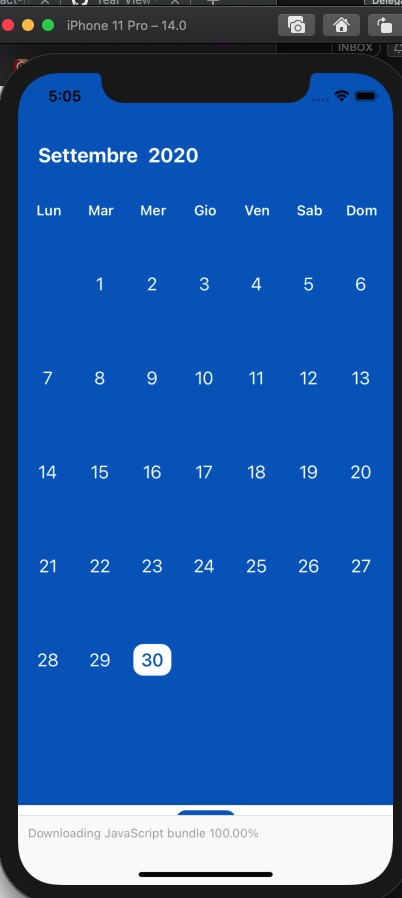
The message 'Downloading javascript bundle 100%' is never getting hide, so it's covering the BottomTab Bar of the App.
pfalcetti
on 30 Sep 2020
v1.0.1 resolved this problem - @pfalcetti I'm closing this out since it's been patched. I recommend opening a new bug report with the information you added above. Thanks @SounD120!
roederw
on 30 Sep 2020
This issue seems to persist in 1.0.1
[2020-10-01 08:57:02.049] [renderer3] [error] Cannot read property 'getRnCdpProxy' of undefined: TypeError: Cannot read property 'getRnCdpProxy' of undefined
at E.
at Generator.next (
at c:xxx.vscodeextensionsmsjsdiag.vscode-react-native-1.0.1distrn-extension.js:1:113369
VPelt
on 1 Oct 2020
In my case it's not working again with the RNT extension 1.0.1.
A new update has been released about 1 hour ago, and it doesn't solve the problem.
pfalcetti
on 1 Oct 2020
@pfalcetti What exactly is not working in your case?
SounD120
on 1 Oct 2020
Same error as yesterday.
"Could not find AppLauncher .... "
So the debugger is not starting.
pfalcetti
on 1 Oct 2020
@pfalcetti Do you have settings.json with the lines like below in your root project folder?
{
    "react-native-tools.projectRoot": "./<relative path to your project folder>"
}
There were no more updates except 1.0.1, so what update are you talking about?
SounD120
on 1 Oct 2020
"react-native-tools": {
    "projectRoot": "./Mobile/AppBT",
    "showInternalLogs": false,
    "logLevel": "Info"
  }
This is my 'react-native-tools' key in setting.json in the root project folder.
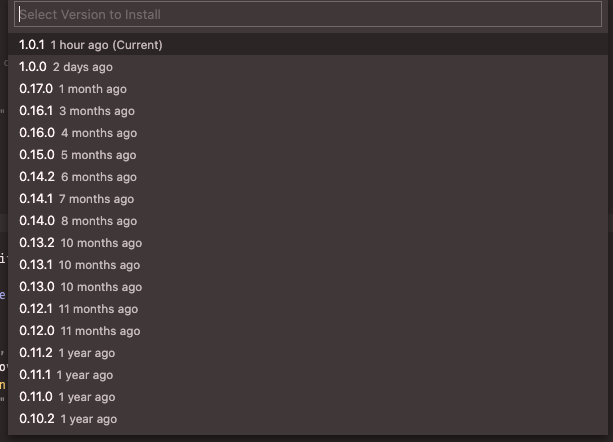
VSCode extension manager is marking a new release of RNT extension released 1 hour ago
pfalcetti
on 1 Oct 2020
@pfalcetti Could you please try to reinstall the extension using the following instruction?
- Delete the React Native Tools extension
- Close all VS Code instances
- Open VS Code
- Install the latest version of the extension from the marketplace and try to run debugging again
Please let me know if still this issue persists.
This looks quite weird because the release has happened more than 10 hours ago. 😕
SounD120
on 1 Oct 2020
@SounD120 , ok.
Reinstalling the extension following yours instruction, it's working!
I'm still having the bug #1425, but this is another story 😄
Thank you very much for your help ☮️ ✌️
pfalcetti
on 1 Oct 2020
Related issues
 rsouthgate
·
4Comments
rsouthgate
·
4Comments
 peterp
·
4Comments
peterp
·
4Comments
 Jacky9425
·
4Comments
Jacky9425
·
4Comments
 yuki2006
·
5Comments
yuki2006
·
5Comments
 dimitarnestorov
·
4Comments
dimitarnestorov
·
4Comments
Most helpful comment
@pfalcetti Could you please try to reinstall the extension using the following instruction?
Please let me know if still this issue persists.
This looks quite weird because the release has happened more than 10 hours ago. 😕