Vscode-react-native: Optimize readme.md for extension post installation instructions
After installation of the extension, the README.md gets displayed:

Even though my screen has a nice resolution, the features relevant to the extension (command palette and debugging) are not above the fold. Instead, I get instructions that tell me to install VS Code (already done), install the extension (done too), open my react native project (if it was installed with the VS Code recommendation it might be done too).
If there is no way to tell VS Code to use another file, I think we should optimize that file for this scenario (visualization within VS Code after installation).
Thoughts?
 molant
All 6 comments
I've been looking at the docs and it looks like the only filed picked up to show up in the marketplace and post installation is the README.md at the root of the project.
molant
on 24 Mar 2020
Hi @molant, we looked through other VS Code extensions and found out that it could be useful to add a table of contents at the top of the README page. That allows to quickly select needed topic and jump to it. We created a draft version of new README. We also added information about Command Palette commands provided by the extension. What do you think about such representation?
 RedMickey
on 24 Mar 2020
RedMickey
on 24 Mar 2020
I think it's a great start!
Let me run it through our UX researcher see if he has any other suggestion.
Thanks 🙏
molant
on 24 Mar 2020
Now that I've had more time to look at it I really like having a ToC at the beginning.
I think we should inline also the docs of the latest sections in the main readme even if it makes it longer. There are a couple reasons:
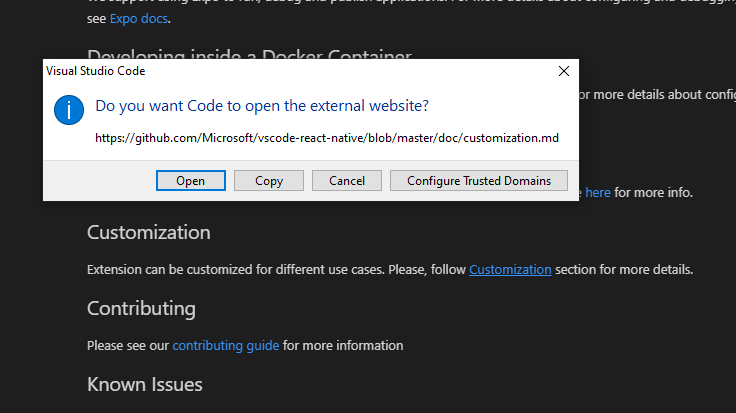
- The links do not open just "on click" in VS Code:
- I think it will make it easier to find the information (Ctrl+f) if everything is in one single point. Even navigating inside GitHub isn't great.
What do you think? Pinging @jabfrei (our UX researcher) for feedback as well.
This is low priority at the moment. Unless you are idle please don't stop doing any other work for implementing this. I can do the PR once we have an agreement to start my code contributions to the project 😊
molant
on 24 Mar 2020
@molant Sounds interesting, lets see what @jabfrei can propose.
 SounD120
on 25 Mar 2020
SounD120
on 25 Mar 2020
Great idea - providing a ToC makes sense and expect it would help with navigation to other sections. Moving to inline will remove the friction of opening a browser window. Bringing in the relevant info from the RN getting started documentation would be great here. Hypothesizing this would be directly relevant to a user that's getting started. Additionally we could also condense the less complex/relevant steps (e.g. "install vs code" and "install the extension in vs code") to bring users closer to the point where it's more applicable to a getting started process. At a future point in time it would be great to run a study and see how users experience this documentation during this setup process in order to determine how else we could improve it.
 jabfrei
on 26 Mar 2020
jabfrei
on 26 Mar 2020
Related issues
 dimitarnestorov
·
4Comments
dimitarnestorov
·
4Comments
 AlexandreLouisnard
·
3Comments
AlexandreLouisnard
·
3Comments
 canpoyrazoglu
·
3Comments
canpoyrazoglu
·
3Comments
 buddhamangler
·
5Comments
buddhamangler
·
5Comments
 andreyleonardo
·
3Comments
andreyleonardo
·
3Comments
Most helpful comment
I think it's a great start!
Let me run it through our UX researcher see if he has any other suggestion.
Thanks 🙏