Vscode-react-native: After upgrade to macOS Catalina cannot debug.
Actual Behavior
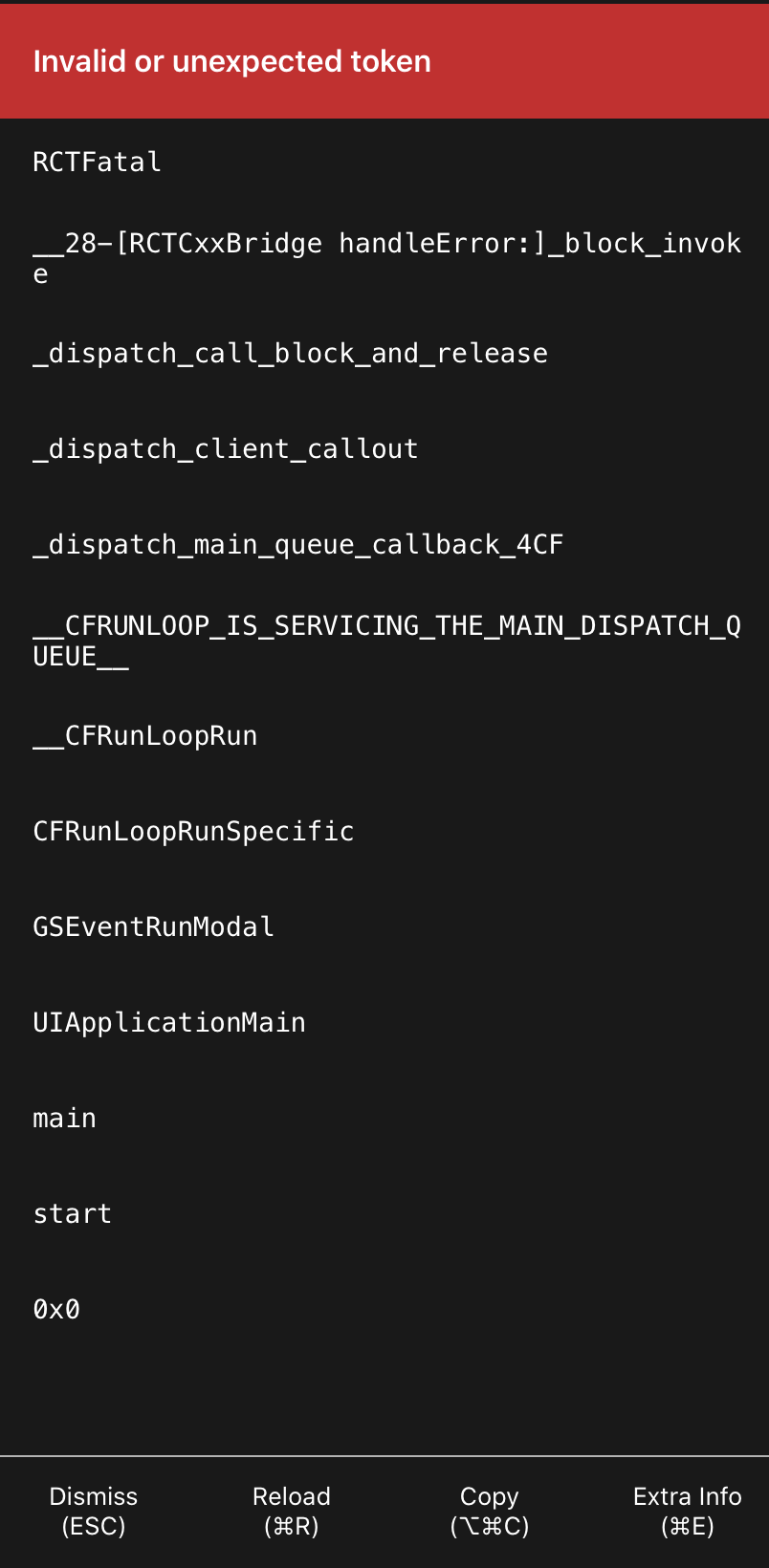
Because of your extension the emulator doesn't work. Became after the upgrade macOS.
Expected Behavior
I would like it to work.
Software versions
- React-Native VS Code extension version: 0.12.0
- VSCode version: 1.38.1
- OS platform and version: macOS Catalina 10.15
- NodeJS version: v10.16.3
- React Native version: 0.61.0-rc.0
- Expo SDK version (include if relevant): -
Outputs (Include if relevant)
- When debug with throw Exceptions.

 shlaikov
All 17 comments
Hi @shlaikov . It is a known issue and the fix will be released soon. Could you please try VSIX with a fix and let us know how it works for you? To try it please do the following:
- Download and unzip compiled extension VSIX : vscode-react-native-0.12.0.vsix.zip
- Uninstall extension
- Close VS Code
- Open VS Code
- Click
Extensions -> ... -> Install from VSIX...and select downloaded VSIX
 SounD120
on 9 Oct 2019
SounD120
on 9 Oct 2019
@SounD120 the same.
shlaikov
on 9 Oct 2019
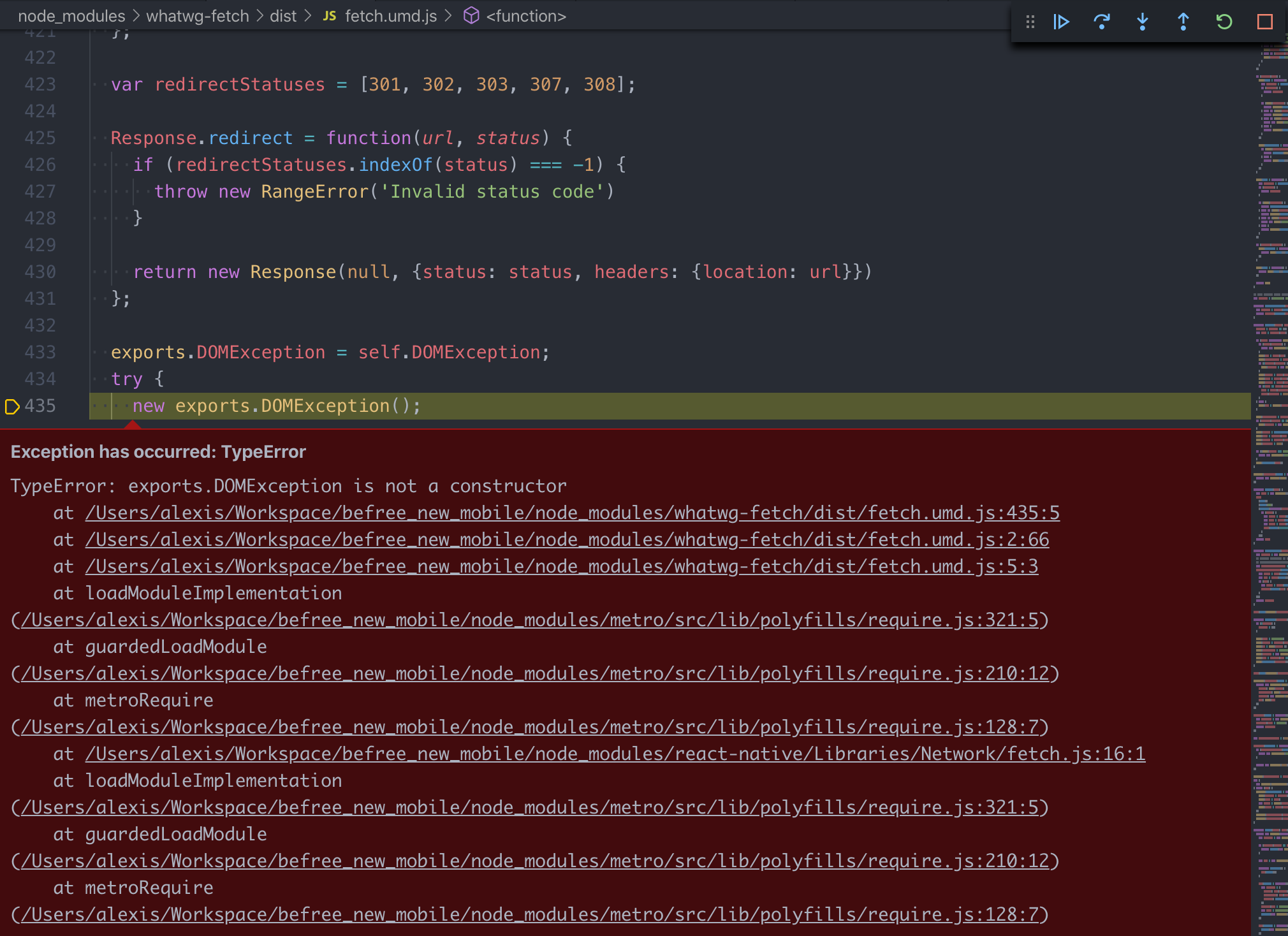
The VSIX is not a fix for me - same outcomes.
 GraemeAllanBryce
on 9 Oct 2019
GraemeAllanBryce
on 9 Oct 2019
shlaikov
on 9 Oct 2019
@shlaikov Could you please provide a minimal demo application in which this behavior is reproduces?
SounD120
on 9 Oct 2019
@SounD120 I can't provide my code. But the starter pack took here. Maybe it will help you.
shlaikov
on 9 Oct 2019
@shlaikov Does this reproduce on the previous extension versions? You can try to install them as follows:
- Right click on the React Native Tools extension in the VS Code extension tab
- Click on
Install Another Version... - Choose the previous version, for example
0.11.2
Please let us know if that helped.
SounD120
on 9 Oct 2019
@shlaikov, @GraemeAllanBryce I just tried to reproduce your issue on ueno-llc starter app, and it reproduced on old version of extension, and worked without any problems on a VSIX with a fix.
Could you please make sure that the latest version was installed correctly?
To do that please do the following:
- Uninstall extension (when clicked VS Code will mark it for deletion, but will not delete until you restart VS Code)
- Restart VS Code
- Click
Extensions(at this point all the extensions marked for deletion are deleted and you can install a new version) - Click
... - Click
Install from VSIX...and select downloaded VSIX
SounD120
on 9 Oct 2019
@shlaikov Does this reproduce on the previous extension versions? You can try to install them as follows:
- Right click on the React Native Tools extension in the VS Code extension tab
- Click on
Install Another Version...- Choose the previous version, for example
0.11.2Please let us know if that helped.
It's helped. But the exceptions are still throwing.

shlaikov
on 9 Oct 2019
@shlaikov Could you please describe what kind of exceptions do you encounter?
SounD120
on 9 Oct 2019
First ex.
TypeError: exports.DOMException is not a constructor
    at http://localhost:8081/src/index.tsx.bundle?platform=ios&dev=true&minify=false:30843:7
    at http://localhost:8081/src/index.tsx.bundle?platform=ios&dev=true&minify=false:30402:68
    at http://localhost:8081/src/index.tsx.bundle?platform=ios&dev=true&minify=false:30403:5
DOMException is undefined.
Second ex. it's my issue.
Error: 400: An update check must include a valid deployment key - please check that your app has been configured correctly. To view available deployment keys, run 'code-push deployment ls <appName> -k'.
@shlaikov That seems to be an issue that is not connected with the original one. Could you please create a new issue for that?
SounD120
on 9 Oct 2019
Can I confirm that the latest code with the proposed fix is indeed https://github.com/microsoft/vscode-react-native/files/3706287/vscode-react-native-0.12.0.vsix.zip.
If so then I have uninstalled, restarted and then installed that version and the issue remains evident.
If there is a more recent build can you please post the URL for the VSIX
Thanks
GraemeAllanBryce
on 9 Oct 2019
@SounD120 I was wrong. VSIX ex. has the same exceptions like 0.11.2 version. And VSIX ex. is working for me. I create a new issue for that.
shlaikov
on 9 Oct 2019
@GraemeAllanBryce Have you tried that instruction?
Does this reproduce on the previous extension versions? You can try to install them as follows:
- Right click on the React Native Tools extension in the VS Code extension tab
- Click on
Install Another Version...- Choose the previous version, for example
0.11.2Please let us know if that helped.
SounD120
on 9 Oct 2019
@shlaikov , @GraemeAllanBryce React Native Tools v0.12.1 with a fix for that has been released. Please try it out and let us know if the problem persists. Thanks!
SounD120
on 9 Oct 2019
Fantastic - confirm that 0.12.1 is a fix for the issue. Many Thanks
GraemeAllanBryce
on 9 Oct 2019
Related issues
 springcoil
·
5Comments
springcoil
·
5Comments
 webda2l
·
3Comments
webda2l
·
3Comments
 canpoyrazoglu
·
3Comments
canpoyrazoglu
·
3Comments
 kralcifer-ms
·
4Comments
kralcifer-ms
·
4Comments
 AlexandreLouisnard
·
3Comments
AlexandreLouisnard
·
3Comments
Most helpful comment
Fantastic - confirm that 0.12.1 is a fix for the issue. Many Thanks