Vscode-react-native: Only white screen while debugging and cors request.
Hello there.
I was struggling with a white screen when I used debugger from this extension.
I test to launch my app from react-native run-android with JS Debugging enabled and figure out that's a problem of cors request.
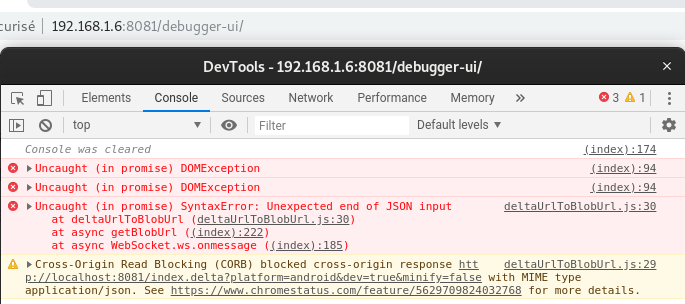
So i change 192.168.1.6 to localhost and that worked.
Is it possible to change to localhost inside the extension ? (instead of my ip)
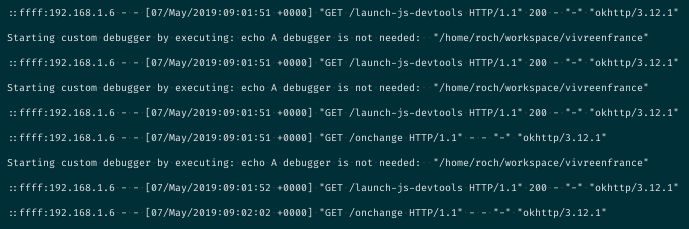
Or maybe to disable cors inside the extension ?
Hope my question is not too confusing.
Node: v12.1.0
Npm: 6.9.0
Ubuntu: 19.04
VSCode: 1.33
react-native-cli: 2.0.1
react-native: 0.57.8
 sixclones
All 9 comments
Hi @sixclones and thanks for questioning. Could you please fill outputs as described in our issue template in the format shown below? Also, do you use Expo? This information will be helpful for better understanding of the situation from our side.
Outputs
- Output of the Debug Console (View -> Toggle Debug Console):
PASTE OUTPUT HERE
- Output of the React-Native output channel (View -> Toggle Output -> Select React-Native in ListBox):
PASTE OUTPUT HERE
- Output of the Developer Tools console (Help -> Toggle Developer Tools -> Select Console tab):
PASTE OUTPUT HERE
 SounD120
on 7 May 2019
SounD120
on 7 May 2019
Similar problem: white screen on debuggin mode, works fine on other debugging tools (eg: react-native Debugger OR chrome debugging). App only renders if not in debugging mode in vs code
Output of the Debug Console (View -> Toggle Debug Console):
Starting debugger app worker.
Established a connection with the Proxy (Packager) to the React Native application
Debugger worker loaded runtime on port 27929
******** Unhandled error in debug adapter - Unhandled promise rejection: Error: Cannot connect to runtime process, timeout after {_timeout} ms - (reason: {_error}).
    at Object.runtimeConnectionTimeout (c:\Users\Jacky\AppData\Local\Programs\Microsoft VS Code\resources\app\extensions\ms-vscode.node-debug2\node_modules\vscode-chrome-debug-core\out\src\errors.js:91:12)
    at utils.retryAsync.catch.err (c:\Users\Jacky\AppData\Local\Programs\Microsoft VS Code\resources\app\extensions\ms-vscode.node-debug2\node_modules\vscode-chrome-debug-core\out\src\chrome\chromeConnection.js:110:49)
    at process._tickCallback (internal/process/next_tick.js:68:7)
Output of the React-Native output channel (View -> Toggle Output -> Select React-Native in ListBox):
BUILD SUCCESSFUL in 38s
146 actionable tasks: 1 executed, 145 up-to-date
info Running C:\Users\Jacky\AppData\Local\Android\Sdk/platform-tools/adb -s 62213210HY116BF02QV reverse tcp:8081 tcp:8081
info Starting the app on 62213210HY116BF02QV (C:\Users\Jacky\AppData\Local\Android\Sdk/platform-tools/adb -s 62213210HY116BF02QV shell am start -n com.naicha/com.naicha.MainActivity)...
Starting: Intent { cmp=com.naicha/.MainActivity }
Output of the Developer Tools console (Help -> Toggle Developer Tools -> Select Console tab):
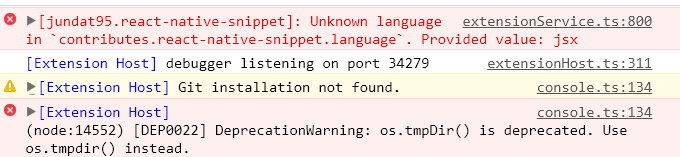
 Jacky9425
on 8 May 2019
Jacky9425
on 8 May 2019
Hi @Jacky9425 . Could you please create a new issue describing your specific case?
SounD120
on 8 May 2019
Hi @sixclones . Could you please try to install Node 10.15.3 and let us know if it works for you? It looks like it is a Node 12 problem.
SounD120
on 8 May 2019
Hi @SounD120 this is my outputs (sorry I wasn't able to disable french).
This output came from Node v10.15.3.
Hope this can help you to understand what's going on.
Outputs
Output of the Debug Console (View -> Toggle Debug Console):
OS: linux x64
Adapter node: v10.2.0 x64
vscode-chrome-debug-core: 6.7.46
Démarrage du thread de travail du débogueur.
Connexion établie entre le proxy (outil de création de package) et l'application React Native
Le thread de travail du débogueur a chargé le runtime sur le port 12505
******** Unhandled error in debug adapter - Unhandled promise rejection: Error: Cannot connect to runtime process, timeout after {_timeout} ms - (reason: {_error}).
    at Object.runtimeConnectionTimeout (/usr/share/code/resources/app/extensions/ms-vscode.node-debug2/node_modules/vscode-chrome-debug-core/out/src/errors.js:91:12)
    at utils.retryAsync.catch.err (/usr/share/code/resources/app/extensions/ms-vscode.node-debug2/node_modules/vscode-chrome-debug-core/out/src/chrome/chromeConnection.js:110:49)
    at process._tickCallback (internal/process/next_tick.js:68:7)
Output of the React-Native output channel (View -> Toggle Output -> Select React-Native in ListBox):
[Info] Démarrage de l'outil de création de package

┌──────────────────────────────────────────────────────────────────────────────┐
│                                                                              │
│  Running Metro Bundler on port 8081.                                         │
│                                                                              │
│  Keep Metro running while developing on any JS projects. Feel free to        │
│  close this tab and run your own Metro instance if you prefer.               │
│                                                                              │
│  https://github.com/facebook/react-native                                    │
│                                                                              │
└──────────────────────────────────────────────────────────────────────────────┘

Looking for JS files in
   /home/roch/workspace/vivreenfrance

[Info] L'outil de création de package a démarré.

[Info] Préchauffage du cache du bundle. L'opération peut prendre du temps...

[Info] Prêt à obtenir : http://localhost:8081/index.bundle?platform=android

Loading dependency graph, done.
 BUNDLE  [android, dev] ./index.js ▓▓▓▓▓▓▓▓▓▓▓▓▓▓▓▓ 100.0% (1040/1040), done.

::ffff:127.0.0.1 - - [09/May/2019:07:47:56 +0000] "GET /index.bundle?platform=android HTTP/1.1" 200 10060445 "-" "-"
[Warning] Le cache du bundle a été préparé.

[Info] Génération et exécution de l'application.

[Info] Activer le débogage JS

Starting custom debugger by executing: echo A debugger is not needed:  "/home/roch/workspace/vivreenfrance"
::ffff:192.168.1.6 - - [09/May/2019:07:48:03 +0000] "GET /launch-js-devtools HTTP/1.1" 200 - "-" "okhttp/3.12.1"
Starting custom debugger by executing: echo A debugger is not needed:  "/home/roch/workspace/vivreenfrance"
::ffff:192.168.1.6 - - [09/May/2019:07:48:03 +0000] "GET /launch-js-devtools HTTP/1.1" 200 - "-" "okhttp/3.12.1"
Starting custom debugger by executing: echo A debugger is not needed:  "/home/roch/workspace/vivreenfrance"
::ffff:192.168.1.6 - - [09/May/2019:07:48:03 +0000] "GET /launch-js-devtools HTTP/1.1" 200 - "-" "okhttp/3.12.1"
Starting custom debugger by executing: echo A debugger is not needed:  "/home/roch/workspace/vivreenfrance"
::ffff:192.168.1.6 - - [09/May/2019:07:48:04 +0000] "GET /launch-js-devtools HTTP/1.1" 200 - "-" "okhttp/3.12.1"
Output of the Developer Tools console (Help -> Toggle Developer Tools -> Select Console tab):
[Extension Host] debugger listening on port 25295
workbench.main.js:sourcemap:4342 Overwriting grammar scope name to file mapping for scope source.cs.
Old grammar file: file:///usr/share/code/resources/app/extensions/csharp/syntaxes/csharp.tmLanguage.json.
New grammar file: file:///home/roch/.vscode/extensions/eppz.eppz-code-1.2.41/syntaxes/source.cs.json
register @ workbench.main.js:sourcemap:4342
workbench.main.js:sourcemap:235 [Extension Host] [vscode-icons] v8.6.0 activated!
workbench.main.js:sourcemap:235 [Extension Host] Looking for parseable documents...
workbench.main.js:sourcemap:235 [Extension Host] Found no documents
workbench.main.js:sourcemap:235 [Extension Host] Browser Preview (Live Share): Extension not installed, so skipping initialization
Output of React Native: run Android
[Warning] Target simulator is not supported for Android platform.
 If you want to use particular device or simulator for launching Android app,
 please specify  device id (as in 'adb devices' output) instead.

[Info] Le fichier local.properties n'existe pas. Utilisation de l'emplacement du kit Android SDK à partir de PATH.

[Info] Démarrage de l'outil de création de package React Native.

Building and installing the app on the device (cd android && ./gradlew installDebug)...
WARNING: Configuration 'compile' is obsolete and has been replaced with 'implementation' and 'api'.
It will be removed at the end of 2018. For more information see: http://d.android.com/r/tools/update-dependency-configurations.html
publishNonDefault is deprecated and has no effect anymore. All variants are now published.
WARNING: Configuration 'provided' is obsolete and has been replaced with 'compileOnly'.
It will be removed at the end of 2018. For more information see: http://d.android.com/r/tools/update-dependency-configurations.html
WARNING: Configuration 'compile' is obsolete and has been replaced with 'implementation' and 'api'.
It will be removed at the end of 2018. For more information see: http://d.android.com/r/tools/update-dependency-configurations.html
WARNING: The specified Android SDK Build Tools version (26.0.1) is ignored, as it is below the minimum supported version (27.0.3) for Android Gradle Plugin 3.1.4.
Android SDK Build Tools 27.0.3 will be used.
To suppress this warning, remove "buildToolsVersion '26.0.1'" from your build.gradle file, as each version of the Android Gradle Plugin now has a default version of the build tools.
WARNING: Configuration 'compile' is obsolete and has been replaced with 'implementation' and 'api'.
It will be removed at the end of 2018. For more information see: http://d.android.com/r/tools/update-dependency-configurations.html
WARNING: The specified Android SDK Build Tools version (26.0.1) is ignored, as it is below the minimum supported version (27.0.3) for Android Gradle Plugin 3.1.4.
Android SDK Build Tools 27.0.3 will be used.
To suppress this warning, remove "buildToolsVersion '26.0.1'" from your build.gradle file, as each version of the Android Gradle Plugin now has a default version of the build tools.
// list of all packages
Installing APK 'app-debug.apk' on 'Nexus_S_API_27(AVD) - 8.1.0' for app:debug
Installed on 1 device.

BUILD SUCCESSFUL in 5s
163 actionable tasks: 1 executed, 162 up-to-date
Running /home/roch/workspace/android/sdk/platform-tools/adb -s emulator-5554 reverse tcp:8081 tcp:8081
Starting the app on emulator-5554 (/home/roch/workspace/android/sdk/platform-tools/adb -s emulator-5554 shell am start -n com.vivreenfrance/com.vivreenfrance.MainActivity)...
Starting: Intent { cmp=com.vivreenfrance/.MainActivity }
Hi @sixclones . I have reinstalled Node several times: from 8.10.0 to 10.15.3 and to 12.2.0. 8 and 10 Node.js versions are works for me, but 12 version shows the same output as you described. Please make sure that VS Code uses installed Node.js 10, and Node.js 12 is deleted correctly. You can run command node -v in your VS Code terminal to make sure that it uses correct version.
Here is my react-native info command output:
  React Native Environment Info:
    System:
      OS: Linux 4.18 Ubuntu 18.04.2 LTS (Bionic Beaver)
      CPU: (8) x64 Intel(R) Core(TM) i7-7700HQ CPU @ 2.80GHz
      Memory: 6.41 GB / 15.58 GB
      Shell: 4.4.19 - /bin/bash
    Binaries:
      Node: 10.15.3 - /usr/bin/node
      Yarn: 1.16.0 - ~/.yarn/bin/yarn
      npm: 6.9.0 - /usr/local/bin/npm
    SDKs:
      Android SDK:
        API Levels: 27, 28
        Build Tools: 27.0.3, 28.0.3
        System Images: android-28 | Google Play Intel x86 Atom
    npmPackages:
      react: 16.6.3 => 16.6.3
      react-native: 0.57.8 => 0.57.8
    npmGlobalPackages:
      react-native-cli: 2.0.1
I use nvm to manage my node version, so it should be good and the output in VSCode terminal was 10.15.1 (for node -v) when I tried.
I will carefully try again, especially with the react-native info command. I can't try it this week but I will clear this doubt I soon as possible.
sixclones
on 13 May 2019
@sixclones I found out the reason of that behaviour. Node.js no more supports --debug-brk arg for debugging Node processes. The extension used this argument for debugging, but using of that argument is not allowed since version 12.0.0. I'll close this issue as duplicate of #1000, so we can move our discussion there. Feel free to reopen if your issue is not connected with Node.js 12.
SounD120
on 14 May 2019
Hello @SounD120,
I tried again with node 10.15.3 (I'v have uninstall node 12) and that worked back. Thanks!
sixclones
on 20 May 2019
Related issues
SounD120
·
4Comments
 vladimir-kotikov
·
5Comments
vladimir-kotikov
·
5Comments
 canpoyrazoglu
·
3Comments
Jacky9425
·
4Comments
canpoyrazoglu
·
3Comments
Jacky9425
·
4Comments
 springcoil
·
5Comments
springcoil
·
5Comments