Vscode-react-native: Just Getting: Debug adapter process has terminated unexpectedly
Actual Behavior
When I try to run Debug Android/iOS, or Attach to packager I just get a notification saying Debug adapter process has terminated unexpectedly. Probably something trivial is configured wrong, but I have looked around a bit and can't find a solution.
Expected Behavior
Some meaningfull error as to what goes wrong
Software versions
- React-Native VS Code extension version:
0.6.9 - VSCode version:
1.23.0 - OS platform and version:
macOS 10.13.4 - NodeJS version:
10.0.0 - React Native version:
0.53.3
Outputs (Include if relevant)
- Output of the Debug Console:
empty - Output of the React-Native output channel:
React Native not an option to select - Output of the Developer Tools console (Help -> Toggle Developer Tools -> Select Console tab):
  | e.onDidNotificationChange | @ | notificationsAlerts.ts:39
-- | -- | -- | --
  | (anonymous) | @ | notificationsAlerts.ts:28
  | e.fire | @ | event.ts:140
  | e.notify | @ | notifications.ts:127
  | e.error | @ | notificationService.ts:61
  | t.onServerExit | @ | rawDebugSession.ts:540
  | (anonymous) | @ | rawDebugSession.ts:195
  | e.fire | @ | event.ts:140
  | (anonymous) | @ | debugAdapter.ts:273
  | emitTwo | @ | events.js:111
  | emit | @ | events.js:194
  | __dirname.ChildProcess._handle.onexit | @ | internal/child_process.js:215
 MrLoh
MrLoh
All 26 comments
Hi @MrLoh Could you please share with me your <your_project>/.vscode/settings.json if you have one? Are you trying to debug your project not inside it's root directory but inside upper-level directory?
 ruslan-bikkinin
on 10 May 2018
ruslan-bikkinin
on 10 May 2018
I don't have a settings.json, just a launch.json and I get the error even in a fresh react-native inited project.
MrLoh
on 13 May 2018
@MrLoh could you please do the following:
- Add
"trace": "verbose"entry to your debug configuration inlaunch.json, then try to debug your app using this configuration and copy-paste here output of Debug Console window?
Please, share with us content of
<your_project>/.vscode/launch.jsonand point what configuration have you used.List what extensions are you using now?
ruslan-bikkinin
on 16 May 2018
I disabled all but the react native extension, my Debug Console is absolutely empty, even if I add verbose tracing option, I'm pretty sure the process just doesn't get started, because of the error that is reported in the Developer Tools console. This is a fresh empty react-native inited project.
Here is my completely fresh auto generated launch.json:
{
  "version": "0.2.0",
  "configurations": [
    {
      "name": "Debug Android",
      "program": "${workspaceRoot}/.vscode/launchReactNative.js",
      "type": "reactnative",
      "request": "launch",
      "platform": "android",
      "sourceMaps": true,
      "outDir": "${workspaceRoot}/.vscode/.react",
      "trace": "verbose"
    },
    {
      "name": "Debug iOS",
      "program": "${workspaceRoot}/.vscode/launchReactNative.js",
      "type": "reactnative",
      "request": "launch",
      "platform": "ios",
      "sourceMaps": true,
      "outDir": "${workspaceRoot}/.vscode/.react",
      "trace": "verbose"
    },
    {
      "name": "Attach to packager",
      "program": "${workspaceRoot}/.vscode/launchReactNative.js",
      "type": "reactnative",
      "request": "attach",
      "sourceMaps": true,
      "outDir": "${workspaceRoot}/.vscode/.react"
    },
    {
      "name": "Debug in Exponent",
      "program": "${workspaceRoot}/.vscode/launchReactNative.js",
      "type": "reactnative",
      "request": "launch",
      "platform": "exponent",
      "sourceMaps": true,
      "outDir": "${workspaceRoot}/.vscode/.react"
    }
  ]
}
@MrLoh
Could you also add "react-native-tools.logLevel": "Trace" into your workspace settings and restart vscode to apply that, please.
 iTOYS
on 16 May 2018
iTOYS
on 16 May 2018
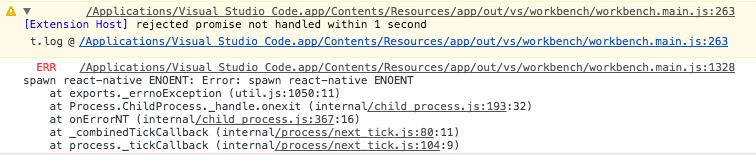
Yes I did that, it lead to the following additional output in the Developer Tools console
MrLoh
on 16 May 2018
- Output of the Debug Console:
empty- Output of the React-Native output channel:
React Native not an option to select
It means that you are not in a react-native project or that we couldn't detect it.
But if you are have auto-generated launch.json this looks weird.
iTOYS
on 16 May 2018
BTW: with "react-native-tools.logLevel": "Trace" the React-Native output channel should exists:
[Debug] Extension messaging server started at /tmp/vscode-reactnative-54ffaa923449e28f152bb1a5b2f8f900cf5a04d2b6e5036c590757c3b6e5160c.sock.
@MrLoh
This error is signalizing you that extension couldn't start react-native command. Taking into account this please try do the following:
If you have only one node version installed, please, make sure that
react-native-clipackage is installed globally for it.Are you using nvm? If you do, please, make sure that node version which you are using now has
react-native-clipackage installed globally. Generally, If case of nvm node version that is available inside VS Code may differ with the one is available in os terminal. You can check it by callingnode -vwithin VS Code terminal and within global os terminal. If they differs you can make them identical by callingnvm alias default 10.0.0.
ruslan-bikkinin
on 16 May 2018
I’m not using nvm and I am able to run all React native commands for building the app from within the vscode terminal. I’m using yarn and the fish shell though, could that have anything todo with it? React native cli is accessible from bash as well though.
Sent with GitHawk
MrLoh
on 16 May 2018
@MrLoh
- Could you please run
which react-nativein terminal and paste here the output. - Are you able to run
react-nativecommand in VS Code terminal, for examplereact-native -v? - Is everything okay with your user permissions/access rights for VS Code?
ruslan-bikkinin
on 17 May 2018
which react-native: /Users/tolo/.npm-packages/bin/react-native
As I already stated react-native works fine otherwise when I use it from the vscode terminal.
How do I check my user permissions/access rights for VS Code?
MrLoh
on 17 May 2018
@MrLoh You can do it by calling ls -la /Applications/Visual\ Studio\ Code.app/ in terminal.
ruslan-bikkinin
on 18 May 2018
Oh, you just ment the permission to he .app executable, gotcha, they are:
drwxr-xr-x@ 4 tolo staff 128 May 15 16:09 Visual Studio Code.app
MrLoh
on 18 May 2018
@MrLoh it looks fine to me. Well, the main problem here is that I can't reproduce your issue using exact software you mentioned. Did you try to completely reinstall extension using this steps:
- Remove extension from VS Code.
- Close VS Code.
- Remove
~/.vscode/extensions/vsmobile.vscode-react-native*. - Run VS Code and install extension again?
ruslan-bikkinin
on 18 May 2018
No, it still fails with the same error, after reinstalling, is there any way I can edit the extension to produce some more error output. The main issue seems to be that the extension fails to start but doesn't log any specific errors either.
MrLoh
on 18 May 2018
@MrLoh you can debug the debugger if extension using instructions provided here: https://github.com/Microsoft/vscode-react-native/blob/master/CONTRIBUTING.md#debugging.
Before doing this you need to perform steps provided here:
https://github.com/Microsoft/vscode-react-native/blob/master/CONTRIBUTING.md#development-setup
ruslan-bikkinin
on 18 May 2018
@MrLoh We will try to improve our logging system in next releases. But as for now, unfortunately, the only way to determine the cause of your issue is to debug extension itself on your side. Please let us know if you need any help with that.
ruslan-bikkinin
on 18 May 2018
Ok thanks for your effort. I’ll see when I find time to look into setting up debugging the extension. I’m traveling at the moment.
MrLoh
on 22 May 2018
Hi again @MrLoh.
Do you have a global installation of react-native, or react-native-cli? They both create a react-native executable, but they behave differently and only react-native-cli is intended to be a global install.
Also, please make sure that local ./node_modules/.bin is not in your PATH.
ruslan-bikkinin
on 7 Jun 2018
None of that helps either, all of that was configured correctly and removing ./node_modules/.bin from path doesn't make a difference.
I'm gonna give up on getting this plugin to work and revisit it on my next computer with a fresh system. Since there is no meaningfull error message there is no reasonable path to solving this issue at the time and we are probably just wasting my and your time. Thank you a lot for all the great effort to come up with ideas what this could be related to though.
I'm closing for now. If there is a clear way how to pinpoint the actual cause of this issue in the future, via better error reporting, let me know.
MrLoh
on 10 Jun 2018
@ruslan-bikkinin I just setup the debugger for a node project and the project also couldn't find my globally installed nodemon runtime executable. I could fix it by pointing to ${workspaceFolder}/node_modules/.bin/nodemon but maybe the react-native plugin has a similar issue, not being able to find the global react-native-cli installation as you had mentioned before.
I run fish as my shell, but which react-native works in fish, bash, and sh, so I'm not sure it could have anything to do with that. But it seems that the vscode execution somehow runs commands differently and maybe doesn't find the executable in PATH. How does vscode execute the commands, do you have any more ideas, what could be going on?
MrLoh
on 21 Jun 2018
Hi @MrLoh,
Please see this issue https://github.com/Microsoft/vscode-react-native/issues/723
Seems like you have the same problems.
iTOYS
on 22 Jun 2018
@iTOYS no the .bash_profile is set up correctly. How exactly are the react-native commands from this extension executed. Can I somehomw reproduce how they are executed on my computer. Is it a shell script file with #!/bin/bash in the file, or is it called from node?
MrLoh
on 22 Jun 2018
@MrLoh
Something like this:
const child_process = require('child_process');
child_process.spawn('react-native', ['start'], {env: process.env});
For future reference, I was having the same problem.
Removing the package, closing VSCode and reinstalling fixed it.
 rpedroni
on 15 Nov 2018
rpedroni
on 15 Nov 2018
Related issues
 springcoil
·
5Comments
springcoil
·
5Comments
 tavrez
·
4Comments
tavrez
·
4Comments
 Jacky9425
·
4Comments
Jacky9425
·
4Comments
 Gabemb
·
4Comments
Gabemb
·
4Comments
 vsccarl
·
3Comments
vsccarl
·
3Comments
Most helpful comment
For future reference, I was having the same problem.
Removing the package, closing VSCode and reinstalling fixed it.