Vscode-react-native: Unknown error: not all success patterns were matched
Software versions
- React-Native VS Code extension version: latest (0.5.7?)
- VSCode version: 1.19.3
- OS platform and version: Windows 10 v1709 Build 16299.15
- NodeJS version: 8.13
- React Native version:
react-native-cli: 2.0.1
react-native: 0.52.0
Expected Behavior
- Open up React Native project with the extension installed.
- Have the debug JS entrypoint file be created (
launchReactNative.js). - Launch an Android device from an emulator or plug in a physical Android device.
- Launch
Debug: Androidfrom VSCode. - Have it hit a breakpoint.
Actual Behavior
- Open up React Native project with the extension installed.
- Debug JS entrypoint file (
launchReactNative.js) IS NOT CREATED. Sourcemaps are not generated either. - No errors are shown in the Developer Tools or any console.
- Launch an Android device from an emulator or plug in a physical Android device.
- When I try to launch
Debug: Androidthe packager starts but it doesn't work. It instead fails with the error below.
Outputs (Include if relevant)
- Output of the Debug Console (View -> Toggle Debug Console):
OS: win32 x64
Adapter node: v7.9.0 x64
vscode-chrome-debug-core: 3.18.5
Could not debug. Unknown error: not all success patterns were matched
- Output of the React-Native output channel (View -> Toggle Output -> Select React-Native in ListBox):
Metro Bundler ready.

[Info] Packager started.

[Info] Prewarming bundle cache. This may take a while ...

[Info] Entry point at e:\1_stuff\javascript\test\index.android.js doesn'tLog. exist. Skipping prewarming...

[Info] Building and running application.

[Error] Error: Unknown error: not all success patterns were matched

Loading dependency graph, done.
- Output of the ReactNative Run Android
[Warning] Target simulator is not supported for Android platform. If you want to use particular device or simulator for launching Android app, please specify  device id (as in 'adb devices' output) instead.

[Info] Starting React Native Packager.

Scanning folders for symlinks in e:\1_stuff\javascript\test\node_modules (54ms)
 resolritter
All 17 comments
Hi @jpsouzasilva, thank you for your request! First of all, let me explain to you what the message you see actually means. It simply says that some of the following actions were not executed: "BUILD SUCCESSFUL", "Starting the app", "Starting: Intent". I don't see any of them in the output window as well.
It's hard to say why that happened, but I believe the reason here is that react native can't find the connected device to run the application in or doesn't like the simulator/device you plug in. The output after run android supports my proposition as well. Please double-check that you have an android device connected or a simulator running.
If that doesn't help you, please provide repro steps. You didn't fill in Actual behaviour & Expected behaviour fields and we can't reproduce the issue or understand what exactly you are trying to do.
 annakocheshkova
on 8 Feb 2018
annakocheshkova
on 8 Feb 2018
my bad @annakocheshkova, I have updated the issue's description to include the behavior fields
by the way, running the app through react-native-scripts android (the default run-script for CRAN applications) works perfectly fine, either on an emulated device or a real one
resolritter
on 8 Feb 2018
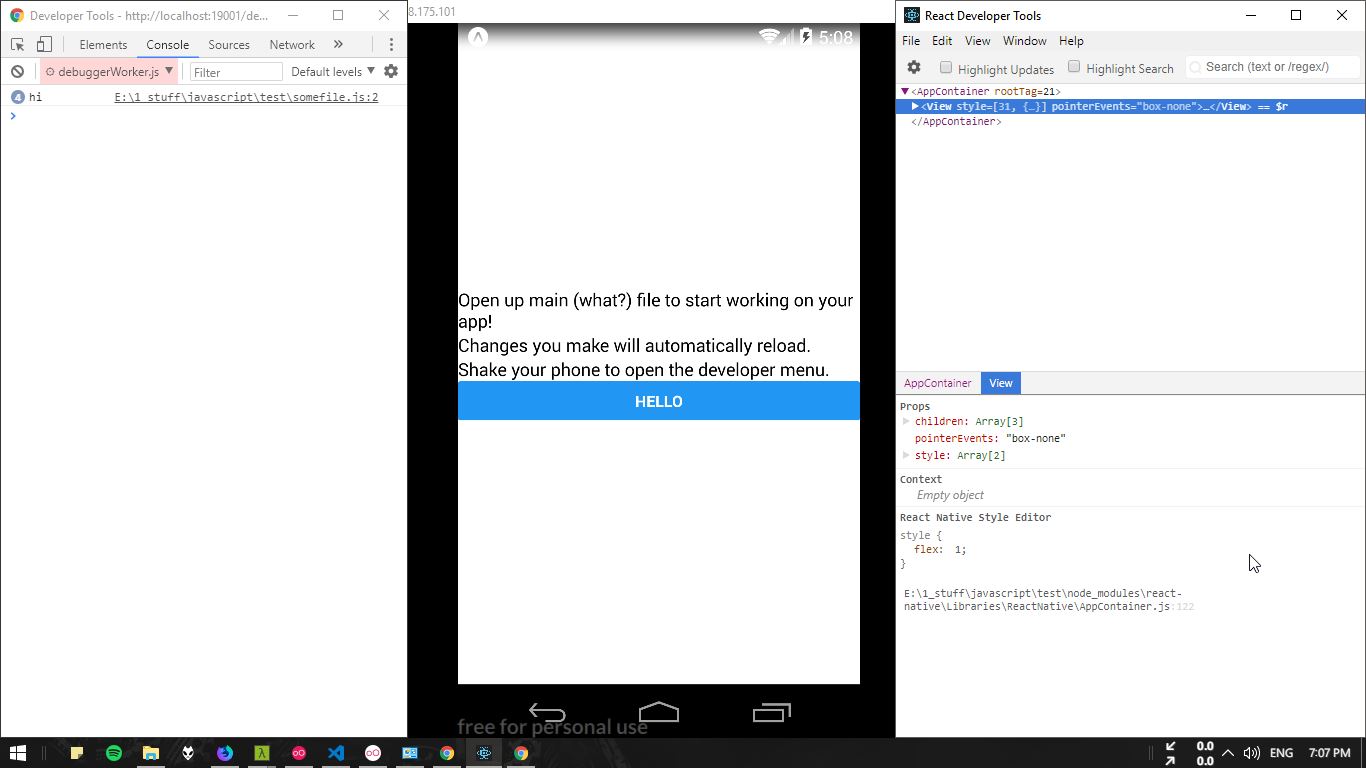
Just as proof that my setup is mostly correct, I am able to debug remotely through the browser using React-Devtools. Breakpoints from VSCode obviously don't work but breakpoints set up from the browser work fine.
I'll be using this for now until we get more clarification going on this issue, no rush. Take it easy. 😄
resolritter
on 8 Feb 2018
Hi @jpsouzasilva thank you for the detailed information! To find out the problem we will need a minimal working version of your app or at least launch.json contents. So if you find the time to send us more information, it would be great!
annakocheshkova
on 9 Feb 2018
My launch.json file is the same as the auto-generated one and looks nothing out of the ordinary. The same goes on for the rest of the app, it's just a plain starting app created with CRAN.
{
    // Use IntelliSense to learn about possible attributes.
    // Hover to view descriptions of existing attributes.
    // For more information, visit: https://go.microsoft.com/fwlink/?linkid=830387
    "version": "0.2.0",
    "configurations": [
        {
            "name": "Debug Android",
            "program": "${workspaceRoot}/.vscode/launchReactNative.js",
            "type": "reactnative",
            "request": "launch",
            "platform": "android",
            "sourceMaps": true,
            "outDir": "${workspaceRoot}/.vscode/.react"
        },
        {
            "name": "Debug iOS",
            "program": "${workspaceRoot}/.vscode/launchReactNative.js",
            "type": "reactnative",
            "request": "launch",
            "platform": "ios",
            "sourceMaps": true,
            "outDir": "${workspaceRoot}/.vscode/.react"
        },
        {
            "name": "Attach to packager",
            "program": "${workspaceRoot}/.vscode/launchReactNative.js",
            "type": "reactnative",
            "request": "attach",
            "sourceMaps": true,
            "port": "19000",
            "outDir": "${workspaceRoot}/.vscode/.react"
        },
        {
            "name": "Debug in Exponent",
            "program": "${workspaceRoot}/.vscode/launchReactNative.js",
            "type": "reactnative",
            "request": "launch",
            "platform": "exponent",
            "sourceMaps": true,
            "outDir": "${workspaceRoot}/.vscode/.react"
        }
    ]
}
By the way, the port option in Attach to packager is also not respected. The whole situation seems iffy to me.
resolritter
on 10 Feb 2018
@jpsouzasilva looks like we still need to use a minimal working version of your application to have the issue be reproduced.
annakocheshkova
on 12 Feb 2018
Are you trying to run debugger on a port other than 8081? I've been using a port patcher post install script, because custom ports hadn't been attaching to debuggers/working 100% for me.
yarn add --dev react-native-port-patcher
Then add to your package.json
scripts {
...
    "postinstall": "react-native-port-patcher --new-port 8082"
}
Then add (or create) to your .vscode/settings.json
{
    "react-native.packager.port": 8082
}
Another problem I found was, since I started my project on Windows, the permissions on my gradlew file got mangled when I tried to run on OSX. I did a
cd android && chmod 755 gradlew
This fixed my issue. Just throwing these suggestions out there, I'm sure there are a lot of people in the same boat.
Also another thing I'll admit to missing. As far as attaching within VSCode, sometimes right after deployment the Remote JS Debugging option isn't toggled automatically. (This is especially true for UWP apps)
Hit Shift+F10 (UWP) or Ctrl+M (Android) or do some shaking action in your emulator and go ahead and toggle this option from the pop up menu.
 ethanx94
on 14 Feb 2018
ethanx94
on 14 Feb 2018
Hi @jpsouzasilva, finally, I was able to reproduce this bug.
We are going to investigate it next week. Let me know if it's blocking you very much.
@ethanx94 unfortunately, your suggestions didn't help me, but thank you anyway!
annakocheshkova
on 14 Feb 2018
Can confirm that I am also having the same issue as @jpsouzasilva and have a near identical launch.json. I have launching with iOS and simulator however
 arshbot
on 19 Feb 2018
arshbot
on 19 Feb 2018
@jpsouzasilva @arshbot, have just started a deeper investigation on your issue. Сould you please paste the output of react-native run-android?
annakocheshkova
on 21 Feb 2018
Having the same issue. Launch.json nearly identical to @jpsouzasilva's (except for the Packager port, I guess):
{
    // Use IntelliSense to learn about possible attributes.
    // Hover to view descriptions of existing attributes.
    // For more information, visit: https://go.microsoft.com/fwlink/?linkid=830387
    "version": "0.2.0",
    "configurations": [

        {
            "name": "Debug Android",
            "program": "${workspaceRoot}/.vscode/launchReactNative.js",
            "type": "reactnative",
            "request": "launch",
            "platform": "android",
            "sourceMaps": true,
            "outDir": "${workspaceRoot}/.vscode/.react"
        },
        {
            "name": "Debug iOS",
            "program": "${workspaceRoot}/.vscode/launchReactNative.js",
            "type": "reactnative",
            "request": "launch",
            "platform": "ios",
            "sourceMaps": true,
            "outDir": "${workspaceRoot}/.vscode/.react"
        },
        {
            "name": "Attach to packager",
            "program": "${workspaceRoot}/.vscode/launchReactNative.js",
            "type": "reactnative",
            "request": "attach",
            "sourceMaps": true,
            "outDir": "${workspaceRoot}/.vscode/.react"
        },
        {
            "name": "Debug in Exponent",
            "program": "${workspaceRoot}/.vscode/launchReactNative.js",
            "type": "reactnative",
            "request": "launch",
            "platform": "exponent",
            "sourceMaps": true,
            "outDir": "${workspaceRoot}/.vscode/.react"
        }
    ]
}
Output as follows
[Info] Packager is already running.
[Info] Prewarming bundle cache. This may take a while ...
[Info] About to get: http://localhost:8081/index.android.bundle?platform=android
[Warning] The Bundle Cache was prewarmed.
[Info] Building and running application.
 BUNDLE  [android, dev] ./index.android.js ▓▓▓▓▓▓▓▓▓▓▓▓▓▓▓▓ 100.0% (1/1), done.
[Error] Error: Unknown error: not all success patterns were matched
 PunchcardCoder
on 22 Feb 2018
PunchcardCoder
on 22 Feb 2018
I find some resolve way to fix this bug.
But I am not sure it is same question.
I deleted a asset file dir (in the image, the iconfont dir ) then VSCODE React Native Tool throw
[Error] Error: Unknown error: not all success patterns were matched

When I put it back , all is right.
Hope help to other people.
 aemoe
on 24 Feb 2018
aemoe
on 24 Feb 2018
@PunchcardCoder, could you please also paste the output of the React Native: run android? You can choose it in the top right dropdown in the output window. I suppose the actual issue can be seen there.
annakocheshkova
on 26 Feb 2018
+1 for having this issue using the auto-generated launch.json with a newly created react native project. The simulator running is iPhone 6 iOS 11.2.
Some other info:
OS: darwin x64
Adapter node: v7.9.0 x64
vscode-chrome-debug-core: 3.23.0
 christwsy-zz
on 20 Mar 2018
christwsy-zz
on 20 Mar 2018
I have the same issue "Could not debug. Unknown error: not all success patterns were matched". Output of the React Native: run android was initially (without any modifications to the generated files):
[Warning] Target simulator is not supported for Android platform. If you want to use particular device or simulator for launching Android app, please specify device id (as in 'adb devices' output) instead.

[Info] Starting React Native Packager.

Scanning folders for symlinks in d:\work\test\AwesomeProject\node_modules (34ms)
I added "target": "ad0c13034414b952e2" to launch.json. Now I still get the same error "Could not debug. Unknown error: not all success patterns were matched" but the React Native: run android says:
[Info] Starting React Native Packager.

[Info] Attaching to running React Native packager

Scanning folders for symlinks in d:\work\test\AwesomeProject\node_modules (26ms)
 kinex
on 16 Apr 2018
kinex
on 16 Apr 2018
Hi everyone, just want to clarify more about this error. If you see this, it means that something wrong happened when executing react-native run-ios or react-native run-android commands which debugger starts during the debug session to launch app. Debugger tries to analyze output that comes out from command and identify common problems that might take place using regex patterns. So most likely if you will try to run one of these commands outside of vscode it will fail as well. The root of the problem could be build problems (for example gradle can't find adb/sdk environment variable), react-native specific issues (bundler problems, occasional bugs connected to update to newer RN versions, etc), emulator problems (adb couldn't connect to emulator, emulator didn't started at all, etc) or some tricky environment issues. So general recommendations for such kind of problems are the following:
- Double-check that you are able to run
react-native run-%platform%without any problems in terminal. - Otherwise start debug session from scratch, wait until it stops and
Unknown error: not all success patterns were matchedis shown, then take a look intoView -> Toggle Output ->React-native,View -> Toggle Output ->React-native: Run androidorView -> Toggle Output ->React-native: Run ios(depends on your platform) and make sure that there is no weird stuff there.
I am closing this issue for now. If you are still struggling with this error and have already tried the recommendations above, please, create a separate issue because there's a chance that yours is specific.
 ruslan-bikkinin
on 27 Apr 2018
ruslan-bikkinin
on 27 Apr 2018
I just open the android project in Android Studio and sync the project to make sure the android project is build success. After we build success,then we are ok to run and debug. Hope this help,
 yeshengwu
on 16 May 2018
yeshengwu
on 16 May 2018
Related issues
 vladimir-kotikov
·
5Comments
vladimir-kotikov
·
5Comments
 Gabemb
·
4Comments
Gabemb
·
4Comments
 SounD120
·
4Comments
SounD120
·
4Comments
 Jacky9425
·
4Comments
Jacky9425
·
4Comments
 kevinnguy
·
3Comments
kevinnguy
·
3Comments
Most helpful comment
Hi @jpsouzasilva, thank you for your request! First of all, let me explain to you what the message you see actually means. It simply says that some of the following actions were not executed:
"BUILD SUCCESSFUL", "Starting the app", "Starting: Intent". I don't see any of them in the output window as well.It's hard to say why that happened, but I believe the reason here is that react native can't find the connected device to run the application in or doesn't like the simulator/device you plug in. The output after
run androidsupports my proposition as well. Please double-check that you have an android device connected or a simulator running.If that doesn't help you, please provide repro steps. You didn't fill in Actual behaviour & Expected behaviour fields and we can't reproduce the issue or understand what exactly you are trying to do.