Vscode-react-native: Debug adapter process has terminated unexpectedly
Actual Behavior :
I am trying to setup debug environment for react-native on VS Code (on a mac). This is launch.json :
{
    // Use IntelliSense to learn about possible attributes.
    // Hover to view descriptions of existing attributes.
    // For more information, visit: https://go.microsoft.com/fwlink/?linkid=830387
    "version": "0.2.0",
    "configurations": [
        {
            "name": "Debug iOS",
            "program": "${workspaceRoot}/.vscode/launchReactNative.js",
            "type": "reactnative",
            "request": "launch",
            "platform": "ios",
            "sourceMaps": true,
            "outDir": "${workspaceRoot}/.vscode/.react",
            "target": "simulator"
        },
        {
            "name": "Debug Android",
            "program": "${workspaceRoot}/.vscode/launchReactNative.js",
            "type": "reactnative",
            "request": "launch",
            "platform": "android",
            "sourceMaps": true,
            "outDir": "${workspaceRoot}/.vscode/.react"
        },
        {
            "name": "Attach to packager",
            "program": "${workspaceRoot}/.vscode/launchReactNative.js",
            "type": "reactnative",
            "request": "attach",
            "sourceMaps": true,
            "outDir": "${workspaceRoot}/.vscode/.react"
        },
        {
            "name": "Debug in Exponent",
            "program": "${workspaceRoot}/.vscode/launchReactNative.js",
            "type": "reactnative",
            "request": "launch",
            "platform": "exponent",
            "sourceMaps": true,
            "outDir": "${workspaceRoot}/.vscode/.react"
        }
    ]
}
On debugging I am getting the error - Debug adapter process has terminated unexpectedly. Getting another error but will fix that later.
Expected Behaviour :
On tapping Debug, project should start debug process.
Software versions
React-Native VS Code extension version: 0.5.7
VSCode version: 1.18.1
OS platform and version: macOS High Sierra (10.13.1)
NodeJS version: v8.9.0
React Native version: 2.0.1
Outputs

Please don't attach this issue to others. Either refer that or I want a working solution here and please don't close the issue as soon as you share a solution.
 nitishrana28
All 26 comments
Hi @nitishrana28
Which configuration did you launch?
Please fill issue by template
 iTOYS
on 5 Dec 2017
iTOYS
on 5 Dec 2017
I launched Debug iOS. Also updated my issue as per template.
nitishrana28
on 5 Dec 2017
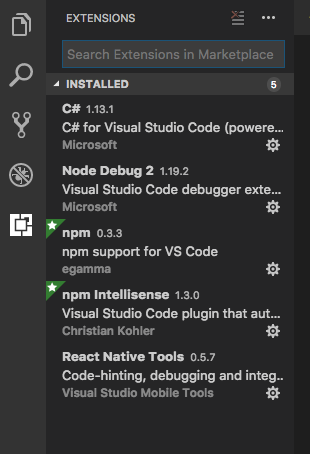
Please disable your .Net extensions and try again.
Seems like that may be cause of crashes
iTOYS
on 5 Dec 2017
These are the ones which I have installed. Are you telling about the first extension (c#) or others as well ?
nitishrana28
on 5 Dec 2017
yes, exactly
iTOYS
on 5 Dec 2017
The second error got removed (cli tools) but Debug adapter process has terminated unexpectedly still persists. I removed just c# extension.
nitishrana28
on 5 Dec 2017
Does it work from terminal?
react-native run-ios
iTOYS
on 5 Dec 2017
It does. But every time I have to run these 2 commands before doing that.
npm install -g react-native-cli
export PATH="/usr/local/Cellar/node/8.9.0/bin/:$PATH"
And the final output is an error :
Installing build/Build/Products/Debug-iphonesimulator/firstdemo.app
An error was encountered processing the command (domain=NSPOSIXErrorDomain, code=2):
Failed to install the requested application
An application bundle was not found at the provided path.
Provide a valid path to the desired application bundle.
Print: Entry, ":CFBundleIdentifier", Does Not Exist

Command failed: /usr/libexec/PlistBuddy -c Print:CFBundleIdentifier build/Build/Products/Debug-iphonesimulator/firstdemo.app/Info.plist
Print: Entry, ":CFBundleIdentifier", Does Not Exist
I got same problem too
 vincentsong
on 6 Dec 2017
vincentsong
on 6 Dec 2017
@vincentsong : You still facing it or fixed it ?
nitishrana28
on 6 Dec 2017
@nitishrana28 I restart the vs code and it's gone, but it's reporting time out to open tunnel now
vincentsong
on 7 Dec 2017
Well I have tried restarting VS Code as well as my system. The issue however persists.
@iTOYS : Please share the solution/fix for this. I am not able to proceed.
nitishrana28
on 7 Dec 2017
@nitishrana28 I have a potential fix for your issue here on your SO post.
Hopefully this will resolve your issue as it did mine.
 FletcherISO
on 21 Dec 2017
FletcherISO
on 21 Dec 2017
@FletcherISO : This fixed the issue I have been facing. .react folder still doesn't show up but project runs successfully after trying this
try running code . from the root directory of your project folder. You will need to install the shell command if you haven't already (type 'shift-command-p' and search for "Shell command: Install code command PATH").
Any comment regarding .react folder ?
nitishrana28
on 22 Dec 2017
.vscode/.react folder is required. we're create its automatically when you open React-Native project. So looks like you don't have enough rights to do it if you open VSCode from Spotlight.
iTOYS
on 29 Dec 2017
I am reproducing this as well. Is there any debugging/logging on launch that might help diagnose why .vscode/.react isn't being created on startup? I'm launching from Terminal and this worked once, but after rebooting my laptop it regressed.
 shanelile
on 10 Apr 2018
shanelile
on 10 Apr 2018
Still facing that
 ghost
on 19 Apr 2018
ghost
on 19 Apr 2018
same here. problem still exists
 jkooper
on 3 May 2018
jkooper
on 3 May 2018
Hi @jkooper please submit new issue describing your specific problem.
 ruslan-bikkinin
on 4 May 2018
ruslan-bikkinin
on 4 May 2018
hey! getting the same error. Unable to debug in VSCode due to the following error:
2workbench.main.js:sourcemap:2255 Debug adapter process has terminated unexpectedly
e.onDidNotificationChange @ workbench.main.js:sourcemap:2255
(anonymous) @ workbench.main.js:sourcemap:2255
e.fire @ workbench.main.js:sourcemap:169
e.notify @ workbench.main.js:sourcemap:2248
e.error @ workbench.main.js:sourcemap:3095
t.onDebugAdapterExit @ workbench.main.js:sourcemap:2444
(anonymous) @ workbench.main.js:sourcemap:2437
e.fire @ workbench.main.js:sourcemap:169
(anonymous) @ workbench.main.js:sourcemap:2389
emitTwo @ events.js:111
emit @ events.js:194
__dirname.ChildProcess._handle.onexit @ internal/child_process.js:215
Could you advice pls?
Thanks.
Cheers,
Gianluca.
 gc1508
on 10 May 2018
gc1508
on 10 May 2018
At no time has running code . from terminal from inside my React Native project directory has a .vscode/.react folder been created.
 bg-wilkesreid
on 17 Sep 2018
bg-wilkesreid
on 17 Sep 2018
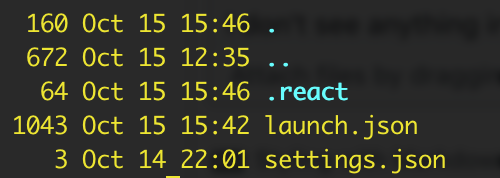
for me the problem seems to be:
"program": "${workspaceRoot}/.vscode/launchReactNative.js",
I don't see anything in .vscode:
 bgou
on 16 Oct 2018
bgou
on 16 Oct 2018
@vincentsong : You still facing it or fixed it ?
can u speak Chinese?
 NarutoOnePiece
on 6 Nov 2018
NarutoOnePiece
on 6 Nov 2018
@vincentsong : You still facing it or fixed it ?
can u speak Chinese?
@NarutoOnePiece Yes,我可以
but I didn't work on RN recently, just keep watching it.
vincentsong
on 6 Nov 2018
@vincentsong : You still facing it or fixed it ?
can u speak Chinese?
@NarutoOnePiece Yes,我可以
but I didn't work on RN recently, just keep watching it.
@vincentsong : You still facing it or fixed it ?
can u speak Chinese?
@NarutoOnePiece Yes,我可以
but I didn't work on RN recently, just keep watching it.
are u Chinese?
NarutoOnePiece
on 6 Nov 2018
I was facing this issue.. I had to install the react-native-cli:
npm install -g react-native-cli then reload the VS Code project. Then the .vscode/.react folder should get created during debugging.
ghost
on 21 Jan 2019
Related issues
 tavrez
·
4Comments
tavrez
·
4Comments
 peterp
·
4Comments
peterp
·
4Comments
 molant
·
3Comments
molant
·
3Comments
 Jacky9425
·
4Comments
Jacky9425
·
4Comments
 canpoyrazoglu
·
3Comments
canpoyrazoglu
·
3Comments
Most helpful comment
@nitishrana28 I have a potential fix for your issue here on your SO post.
Hopefully this will resolve your issue as it did mine.