Vscode-pull-request-github: Extension does not work, the tab on the sidebar shows an empty window.
- Extension version: 0.12.0
- VSCode Version: 1.39.2
- OS: Windows 10
Steps to Reproduce:
- Instal github pull requests.
- No step 2 needed.

The extension installs, then nothing happens except github icon appears on the sidebar.
Clicking on the icon an empty page appears.
Clicking on configure on this page gives an "command 'pr.configurePRViewlet' not found" error.
Clicking on create pull request gives an "command 'pr.create' not found" error.
Clicking on refresh gives an "command 'pr.refreshList' not found";
 Kaukjan
All 34 comments
@Kaukjan Can you open the command palette (Ctrl+shift+p), run the Developer: Toggle Developer Tools command, and report if there are any errors in the console?
 RMacfarlane
on 25 Oct 2019
RMacfarlane
on 25 Oct 2019
Hello, I've the same problem. This is my report in the console
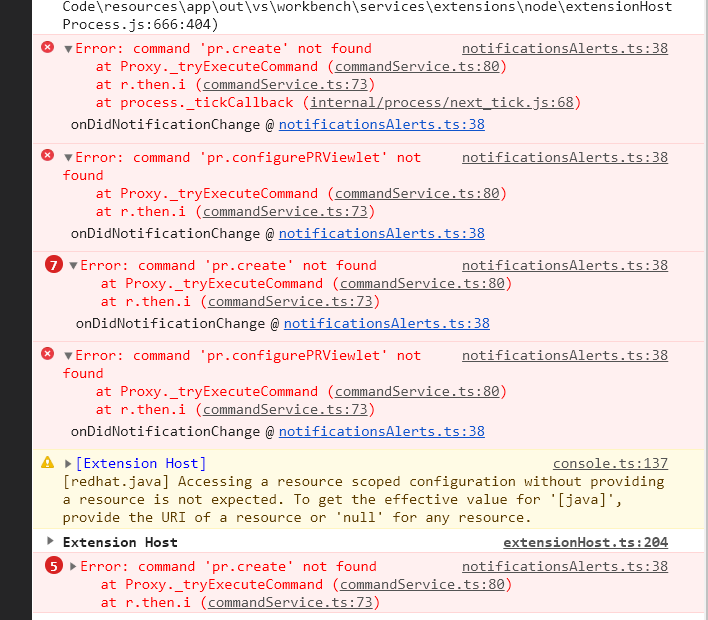
 Stykro
on 29 Oct 2019
Stykro
on 29 Oct 2019
Hi,
same behavior on my new vscode installation.
- Version: 1.39.2 (user setup)
- Commit: 6ab598523be7a800d7f3eb4d92d7ab9a66069390
- Date: 2019-10-15T15:35:18.241Z
- Electron: 4.2.10
- Chrome: 69.0.3497.128
- Node.js: 10.11.0
- V8: 6.9.427.31-electron.0
- OS: Windows_NT x64 10.0.16299
like @Kaukjan
I get this error in my console
notificationsAlerts.ts:38 Error: command 'pr.configurePRViewlet' not found
at Proxy._tryExecuteCommand (commandService.ts:80)
at r.then.i (commandService.ts:73)
onDidNotificationChange @ notificationsAlerts.ts:38
_register.model.onDidNotificationChange.e @ notificationsAlerts.ts:26
fire @ event.ts:580
addNotification @ notifications.ts:156
error @ notificationService.ts:56
telemetryActionsListener.value.toolBar.actionRunner.onDidRun.e @ compositePart.ts:258
fire @ event.ts:580
run @ actions.ts:211
async function (async)
run @ actions.ts:208
onClick @ menuEntryActionViewItem.ts:267
options.options.isMenu.i.setImmediate @ actionbar.ts:138
runCallback @ timers.js:694
tryOnImmediate @ timers.js:665
processImmediate @ timers.js:647
 stoamandl
on 29 Oct 2019
stoamandl
on 29 Oct 2019
I'm having trouble reproducing this myself - it looks like the extension just isn't being activated at all. If you open the output panel, is there a "GitHub Pull Requests" entry in the dropdown?

If that's selected, is there anything printed in that output channel?
RMacfarlane
on 29 Oct 2019
Hi,
Thank you for your message. I have this in the output panel
[Info] C:\Users\ydela.ssh\config: ENOENT: no such file or directory, open 'C:\Users\ydela.ssh\config'
I don't know how to deal with that...
Yves
De : Rachel Macfarlane notifications@github.com
Envoyé : mardi 29 octobre 2019 23:05
À : microsoft/vscode-pull-request-github vscode-pull-request-github@noreply.github.com
Cc : Yvesllc ydelachevasnerie@live.fr; Manual manual@noreply.github.com
Objet : Re: [microsoft/vscode-pull-request-github] Extension does not work, the tab on the sidebar shows an empty window. (#1411)
I'm having trouble reproducing this myself - it looks like the extension just isn't being activated at all. If you open the output panel, is there a "GitHub Pull Requests" entry in the dropdown?
[Screen Shot 2019-10-29 at 3 03 33 PM]https://user-images.githubusercontent.com/3672607/67812881-6d0d4700-fa5d-11e9-922c-c26071b0b76f.png
If that's selected, is there anything printed in that output channel?
—
You are receiving this because you are subscribed to this thread.
Reply to this email directly, view it on GitHubhttps://github.com/microsoft/vscode-pull-request-github/issues/1411?email_source=notifications&email_token=AFN7DZI6BHEAJ3DYIEIDMO3QRCXSBA5CNFSM4JE7KZH2YY3PNVWWK3TUL52HS4DFVREXG43VMVBW63LNMVXHJKTDN5WW2ZLOORPWSZGOECSHWQA#issuecomment-547650368, or unsubscribehttps://github.com/notifications/unsubscribe-auth/AFN7DZLPRENBL56XV3AN4JLQRCXSBANCNFSM4JE7KZHQ.
 Yvesllc
on 29 Oct 2019
Yvesllc
on 29 Oct 2019
@RMacfarlane the following seems to be the culprit:
Extension 'GitHub.vscode-pull-request-github cannot use PROPOSED API (must started out of dev or enabled via --enable-proposed-api)
updateEnableProposedApi @ abstractExtensionService.ts:484

Activating extension 'GitHub.vscode-pull-request-github' failed: [GitHub.vscode-pull-request-github]: Proposed API is only available when running out of dev or with the following command line switch: --enable-proposed-api GitHub.vscode-pull-request-github.
_logMessageInConsole @ abstractExtensionService.ts:396

[Extension Host] Here is the error stack:  Error: [GitHub.vscode-pull-request-github]: Proposed API is only available when running out of dev or with the following command line switch: --enable-proposed-api GitHub.vscode-pull-request-github
    at a (/usr/lib/code/out/vs/workbench/services/extensions/node/extensionHostProcess.js:490:143)
    at Object.t.checkProposedApiEnabled (/usr/lib/code/out/vs/workbench/services/extensions/node/extensionHostProcess.js:490:505)
    at Object.registerDecorationProvider (/usr/lib/code/out/vs/workbench/services/extensions/node/extensionHostProcess.js:699:266)
    at new t.PullRequestsTreeDataProvider (/home/rzeznik/.vscode-oss/extensions/github.vscode-pull-request-github-0.12.0/media/extension.js:1:558247)
    at /home/rzeznik/.vscode-oss/extensions/github.vscode-pull-request-github-0.12.0/media/extension.js:1:643426
    at Generator.next (<anonymous>)
    at /home/rzeznik/.vscode-oss/extensions/github.vscode-pull-request-github-0.12.0/media/extension.js:1:641725
    at new Promise (<anonymous>)
    at n (/home/rzeznik/.vscode-oss/extensions/github.vscode-pull-request-github-0.12.0/media/extension.js:1:641502)
    at t.activate (/home/rzeznik/.vscode-oss/extensions/github.vscode-pull-request-github-0.12.0/media/extension.js:1:643029)
    at Function._callActivateOptional (/usr/lib/code/out/vs/workbench/services/extensions/node/extensionHostProcess.js:667:613)
    at Function._callActivate (/usr/lib/code/out/vs/workbench/services/extensions/node/extensionHostProcess.js:667:264)
    at Promise.all.then.n (/usr/lib/code/out/vs/workbench/services/extensions/node/extensionHostProcess.js:666:404)
 marcin-rzeznicki
on 30 Oct 2019
marcin-rzeznicki
on 30 Oct 2019
@marcin-rzeznicki Ok, thanks! This is a known issue when using VSCodium or other community builds: https://github.com/microsoft/vscode-pull-request-github/issues/1309#issuecomment-522389581
Here's the issue tracking removing the proposed API: https://github.com/microsoft/vscode-pull-request-github/issues/1310
We're still waiting on one API to be promoted to stable, until then it should work if you launch VSCode with code --enable-proposed-api GitHub.vscode-pull-request-github from the command line.
This error doesn't seem to be logged for others in this thread, so I think there is still a another issue here.
RMacfarlane
on 30 Oct 2019
@RMacfarlane oh! thank you so much for the info - I must admit I didn't know it; it's really helpful
marcin-rzeznicki
on 31 Oct 2019
same here
Version: 1.39.2
Commit: 6ab598523be7a800d7f3eb4d92d7ab9a66069390
Date: 2019-10-18T10:58:05.878Z
Electron: 4.2.12
Chrome: 69.0.3497.128
Node.js: 10.11.0
V8: 6.9.427.31-electron.0
OS: Linux x64 4.19.81-1-MANJARO
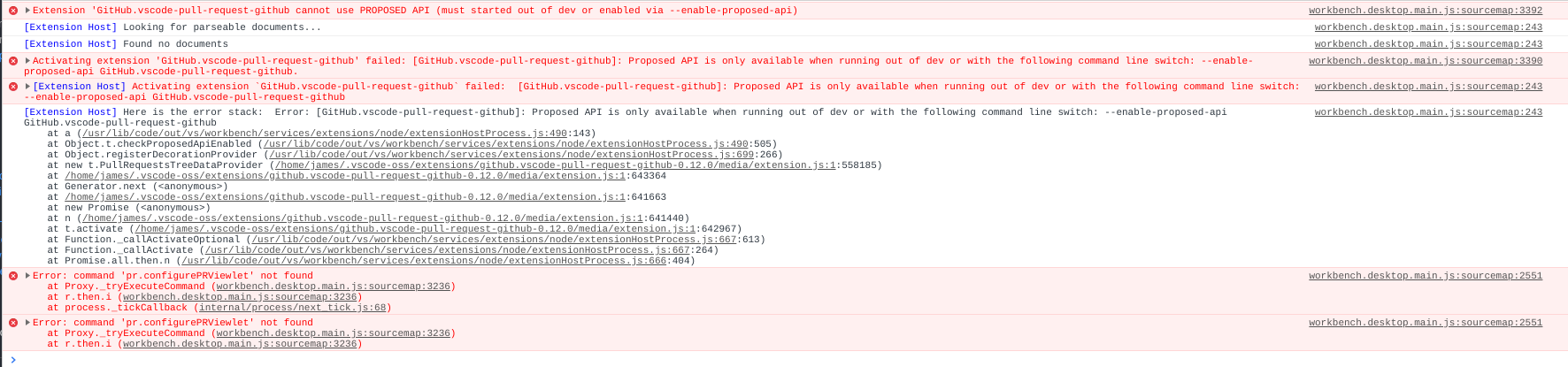
work with
code --enable-proposed-api GitHub.vscode-pull-request-github
 tofu-James
on 7 Nov 2019
tofu-James
on 7 Nov 2019
edit: found the problem, this machine didn't have Git installed!
I have the same issue, using the official Windows 10 64bit release, also tried from cmd with code --enable-proposed-api GitHub.vscode-pull-request-github but still doesn't work.
Version: 1.40.0 (user setup)
Commit: 86405ea23e3937316009fc27c9361deee66ffbf5
Date: 2019-11-06T17:02:13.381Z
Electron: 6.1.2
Chrome: 76.0.3809.146
Node.js: 12.4.0
V8: 7.6.303.31-electron.0
OS: Windows_NT x64 10.0.18362
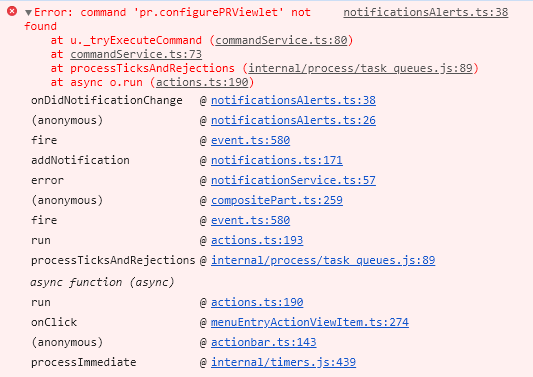
 cyb3rw0lf
on 13 Nov 2019
cyb3rw0lf
on 13 Nov 2019
Well, it seems that the solution is to download Git manually and install again. It did fix the problem on my machine.
 yesunhuang
on 19 Nov 2019
yesunhuang
on 19 Nov 2019
Well, it seems that the solution is to download Git manually and install again. It did fix the problem on my machine.
this dosent help on my machine
tofu-James
on 20 Nov 2019
Just reinstalled git, doesn't help.
Version: 1.40.1
Commit: 8795a9889db74563ddd43eb0a897a2384129a619
Date: 2019-11-15T22:58:14.270Z
Electron: 6.1.1
Chrome: 76.0.3809.146
Node.js: 12.4.0
V8: 7.6.303.31-electron.0
OS: Linux x64 5.3.11-1-MANJARO
 cscherrer
on 25 Nov 2019
cscherrer
on 25 Nov 2019
doesn't work on my laptop
 Hunterttt
on 26 Nov 2019
Hunterttt
on 26 Nov 2019
@marcin-rzeznicki Ok, thanks! This is a known issue when using VSCodium or other community builds: #1309 (comment)
Here's the issue tracking removing the proposed API: #1310
We're still waiting on one API to be promoted to stable, until then it should work if you launch VSCode with
code --enable-proposed-api GitHub.vscode-pull-request-githubfrom the command line.This error doesn't seem to be logged for others in this thread, so I think there is still a another issue here.
That fix worked for me. I saved that command as a shell script on my Linux box and replaced the launcher command by the script. Worked like a charm!
 CarlosNihelton
on 27 Dec 2019
CarlosNihelton
on 27 Dec 2019
have the same problem, please fix it
 emowtion
on 30 Dec 2019
emowtion
on 30 Dec 2019
For me the issue was Git was out of date on my mac. Updated via Homebrew and error went away.
$ brew update
$ brew upgrade git
 MosesMachua
on 19 Jan 2020
MosesMachua
on 19 Jan 2020
I also got this issue

 Dan-Gamin
on 21 Jan 2020
Dan-Gamin
on 21 Jan 2020
Got this same error trying to click on the config (gear) icon for this extension. I just installed VSCode and a couple extensions including this one (also GitLens and Powershell).
Just trying to get started with VSCode and Git integration for the first time, so this is very frustrating.

 powershellshock
on 21 Jan 2020
powershellshock
on 21 Jan 2020
@Dan-Gamin @powershellshock If you don't click on any of the icons on the view and wait for a bit, does the view eventually load?
The icon on the activity bar is loaded in VSCode before the extension has been completely activated, I've created an issue about this in VSCode: https://github.com/microsoft/vscode/issues/89058 For me, on Windows, it can take about 15 seconds for the extension to actually become active and display something in the view. Do you also see this? If the view never loads, can you try hitting F1 and then running Developer: Toggle Developer Tools and see if there is anything in the console?
I can at least prevent showing the icons before everything has loaded.
RMacfarlane
on 22 Jan 2020
@RMacfarlane No. I tried launching VScode and doing nothing for 1 minute, then clicked on the extension and waited another 1 minute before clicking on the configure (gear) icon. Same result with identical error.
powershellshock
on 22 Jan 2020
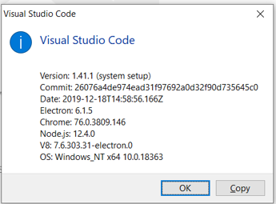
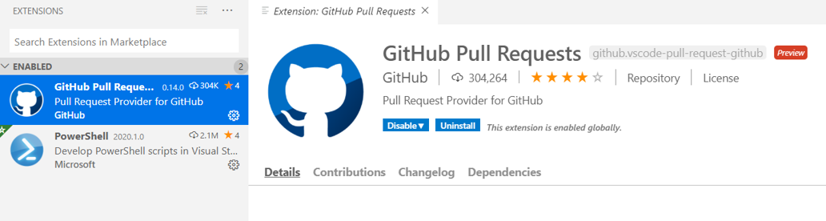
@powershellshock Can you try hitting F1 and then running Developer: Toggle Developer Tools and see if there is anything in the console? What version of VSCode and the extension are you using?
Can you see what is printed in the output channel for the extension?
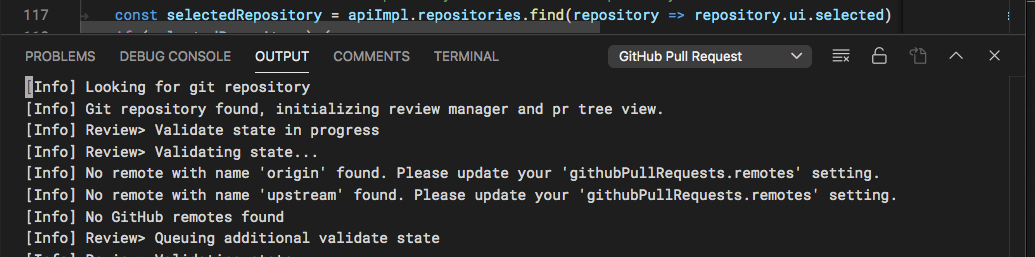
You can use the View: Toggle Output command to open the panel and chose "GitHub Pull Request" from the dropdown
RMacfarlane
on 22 Jan 2020

THis is what is printed in the output
 gsbuildtechs
on 29 Jan 2020
gsbuildtechs
on 29 Jan 2020
notificationsAlerts.ts:38 Error: command 'pr.configurePRViewlet' not found
at u._tryExecuteCommand (commandService.ts:80)
at commandService.ts:73
at processTicksAndRejections (internal/process/task_queues.js:89)
at async o.run (actions.ts:190)
powershellshock
on 29 Jan 2020
I had the same issue, and the enable proposed API flag wasn't working.
Apparently the issue was that I had another vscode window open which wasn't run using the flag, and the new one was ignoring the flag and forking the existing open process or something (not sure why really). Closing all vscode and then running with the flag fixed the issue.
 adrinjalali
on 11 Mar 2020
adrinjalali
on 11 Mar 2020
I have the same issue.
Extension version: v0.19.0
 pktiuk
on 8 Sep 2020
pktiuk
on 8 Sep 2020
@pktiuk Are you using VSCodium or another community build? If not, can you please open the output panel and select "GitHub Pull Request" from the dropdown and report any output there
RMacfarlane
on 9 Sep 2020
@RMacfarlane Still broken for me:
Version: 1.48.2
Commit: a0479759d6e9ea56afa657e454193f72aef85bd0
Date: 2020-08-25T10:56:10.074Z
Electron: 7.3.2
Chrome: 78.0.3904.130
Node.js: 12.8.1
V8: 7.8.279.23-electron.0
OS: Linux x64 5.4.60-2-MANJARO
Here's the output panel contents:
[Info] /home/chad/.ssh/config: ENOENT: no such file or directory, open '/home/chad/.ssh/config'
[Info] Looking for git repository
[Info] Git repository found, initializing review manager and pr tree view.
[Info] Review> Validate state in progress
[Info] Review> Validating state...
[Info] No remote with name 'upstream' found. Please update your 'githubPullRequests.remotes' setting.
[Info] Found GitHub remote
[Info] Review> no matching pull request metadata found for current branch master
It also says I haven't signed into Github, and offers me a button. But trying to authorize gives me
Oh no! An error occurred!
Please restart the sign in process from the editor.
Error code 801
FWIW my git is set up for ssh (use it all the time), and the knisterpeter.vscode-github extension seems to work fine.
cscherrer
on 9 Sep 2020
Hit this today, but on Codespaces - GitHub provider....
Nightly: v2020.11.25442
Result after connecting to Codespace:

Error in output....
[INFO] /home/codespace/.ssh/config: ENOENT: no such file or directory, open '/home/codespace/.ssh/config`
[INFO] Looking for git repository.
Full replay...
https://msit.microsoftstream.com/video/3edaa3ff-0400-b9eb-d12d-f1eb2aa5ee6b
 burkeholland
on 19 Nov 2020
burkeholland
on 19 Nov 2020
FYI, got this error on latest version 0.21.1. Reverted back to 0.21.0
 privomark
on 20 Nov 2020
privomark
on 20 Nov 2020
Version: 1.52.0-insider
Commit: caf01baa45b9816e2e1d8a2de22b40cf89459c03
Date: 2020-11-20T07:35:38.417Z
Electron: 9.3.3
Chrome: 83.0.4103.122
Node.js: 12.14.1
V8: 8.3.110.13-electron.0
OS: Darwin x64 20.1.0
getting [Info] Looking for git repository in output
console says
abstractExtensionService.ts:717 Activating extension 'GitHub.vscode-pull-request-github' failed: i.window.registerDecorationProvider is not a function.
tried on versions from latests (0.21.2) down to 0.20.0, all the same
 ivanvoznyakovsky
on 20 Nov 2020
ivanvoznyakovsky
on 20 Nov 2020
@ivanvoznyakovsky This should be fixed in 0.21.3, which I just published.
RMacfarlane
on 20 Nov 2020
I have the same problem with vscode-insiders
 daton89
on 25 Nov 2020
daton89
on 25 Nov 2020
https://github.com/microsoft/vscode-pull-request-github/issues/2307 tracks this issue for Codespaces. If you still see this issue on normal desktop VSCode, please open a new issue and include the output log. Thanks!
RMacfarlane
on 19 Jan 2021
Related issues
 kieferrm
·
4Comments
kieferrm
·
4Comments
 Velyks
·
3Comments
adrinjalali
·
4Comments
Velyks
·
3Comments
adrinjalali
·
4Comments
 Jonnokc
·
3Comments
Jonnokc
·
3Comments
 octogonz
·
3Comments
octogonz
·
3Comments
Most helpful comment
@marcin-rzeznicki Ok, thanks! This is a known issue when using VSCodium or other community builds: https://github.com/microsoft/vscode-pull-request-github/issues/1309#issuecomment-522389581
Here's the issue tracking removing the proposed API: https://github.com/microsoft/vscode-pull-request-github/issues/1310
We're still waiting on one API to be promoted to stable, until then it should work if you launch VSCode with
code --enable-proposed-api GitHub.vscode-pull-request-githubfrom the command line.This error doesn't seem to be logged for others in this thread, so I think there is still a another issue here.