Vscode-pull-request-github: Pull request list empty
Issue Type: Bug
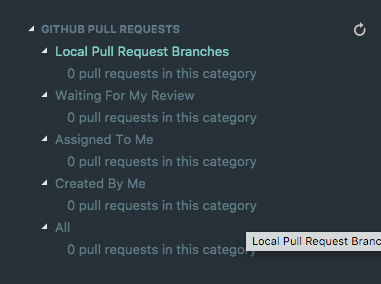
Seems like there is an issue that no pullrequests are received from github?
{
    "activationTimes": {
        "startup": true,
        "codeLoadingTime": 70,
        "activateCallTime": 2,
        "activateResolvedTime": 41,
        "activationEvent": "*"
    }
}
CPU-20181011T075358.129Z.cpuprofile.txt
Extension version: 0.2.0
VS Code version: Code - Insiders 1.29.0-insider (f151c46b1783cf4f9a4ca934a85f78846f08688e, 2018-10-11T05:11:48.238Z)
OS version: Darwin x64 17.7.0
System Info
|Item|Value|
|---|---|
|CPUs|Intel(R) Core(TM) i7-4980HQ CPU @ 2.80GHz (8 x 2800)|
|GPU Status|2d_canvas: enabled
checker_imaging: disabled_off
flash_3d: enabled
flash_stage3d: enabled
flash_stage3d_baseline: enabled
gpu_compositing: enabled
multiple_raster_threads: enabled_on
native_gpu_memory_buffers: enabled
rasterization: enabled
video_decode: enabled
video_encode: enabled
webgl: enabled
webgl2: enabled|
|Load (avg)|2, 2, 2|
|Memory (System)|16.00GB (0.28GB free)|
|Process Argv|-psn_0_1315137|
|Screen Reader|no|
|VM|0%|
 st-schneider
All 12 comments
Is this a public or private repo? If public please share the name.
Also, if you go to Output panel and switch to the GitHub Pull Request view, what is the output there?
 wyze
on 11 Oct 2018
wyze
on 11 Oct 2018
Private, sorry
st-schneider
on 11 Oct 2018
It would be great if you share the log in output panel (sanitizing the repo info is okay) to help us better troubleshoot.
 rebornix
on 11 Oct 2018
rebornix
on 11 Oct 2018
Found GitHub remote
Review> no matching pull request metadata found for current branch <branch>
GithubRepository> Unable to fetch PR: {"message":"Not Found","documentation_url":"https://developer.github.com/v3/pulls/#get-a-single-pull-request"}
GithubRepository> Unable to fetch PR: {"message":"Not Found","documentation_url":"https://developer.github.com/v3/pulls/#get-a-single-pull-request"}
GithubRepository> Unable to fetch PR: {"message":"Not Found","documentation_url":"https://developer.github.com/v3/pulls/#get-a-single-pull-request"}
GithubRepository> Unable to fetch PR: {"message":"Not Found","documentation_url":"https://developer.github.com/v3/pulls/#get-a-single-pull-request"}
GithubRepository> Unable to fetch PR: {"message":"Not Found","documentation_url":"https://developer.github.com/v3/pulls/#get-a-single-pull-request"}
GithubRepository> Unable to fetch PR: {"message":"Not Found","documentation_url":"https://developer.github.com/v3/pulls/#get-a-single-pull-request"}
GithubRepository> Unable to fetch PR: {"message":"Not Found","documentation_url":"https://developer.github.com/v3/pulls/#get-a-single-pull-request"}
GithubRepository> Unable to fetch PR: {"message":"Not Found","documentation_url":"https://developer.github.com/v3/pulls/#get-a-single-pull-request"}
GithubRepository> Unable to fetch PR: {"message":"Not Found","documentation_url":"https://developer.github.com/v3/pulls/#get-a-single-pull-request"}
GithubRepository> Unable to fetch PR: {"message":"Not Found","documentation_url":"https://developer.github.com/v3/pulls/#get-a-single-pull-request"}
GithubRepository> Unable to fetch PR: {"message":"Not Found","documentation_url":"https://developer.github.com/v3/pulls/#get-a-single-pull-request"}
GithubRepository> Unable to fetch PR: {"message":"Not Found","documentation_url":"https://developer.github.com/v3/pulls/#get-a-single-pull-request"}
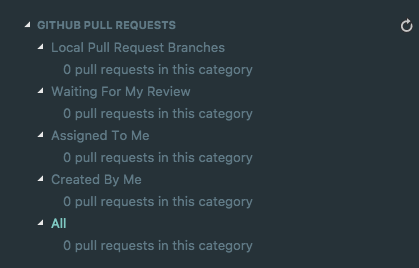

is still a thing
st-schneider
on 29 Oct 2018
Any news on this? I have perhaps the same, or a similar issue.
When using Visual Studio (with the GitHub extension), I can see all current pull requests
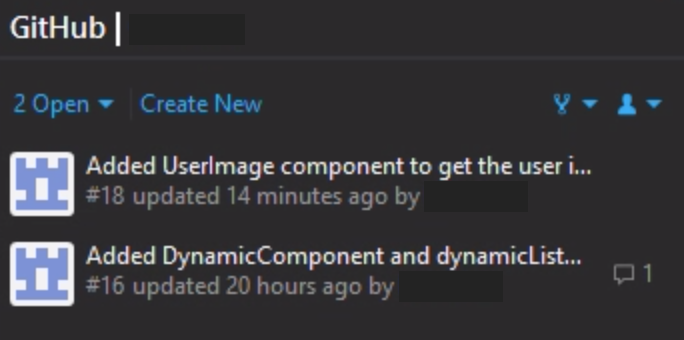
But in vscode (macOS), I see nothing.
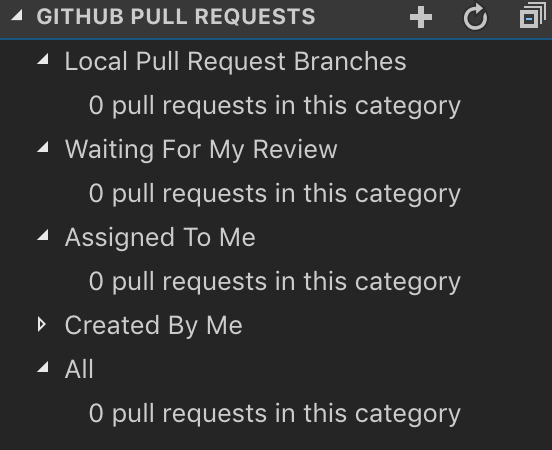
This is also a private repository.
From my output panel:
[Info] /Users/[username]/.ssh/config: ENOENT: no such file or directory, open '/Users/[username]/.ssh/config'
[Info] Looking for git repository
[Info] Git repository found, initializing review manager and pr tree view.
[Info] Found GitHub remote
[Info] https://api.github.com: GraphQL support detected
[Info] {
"data": {
"viewer": {
"login": "[username]",
"__typename": "User"
}
},
"loading": false,
"networkStatus": 7,
"stale": false
}
[Info] Review> no matching pull request metadata found for current branch master
[Info] Found GitHub remote
[Info] Review> no matching pull request metadata found for current branch master
 einord
on 21 Feb 2019
einord
on 21 Feb 2019
On further investigation on this issue, it seems like this depends on the fork.
When I clone my own fork, but add the original repository as a secondary remote it does not work.
But if I clone the original repository, it finds all pull requests.
einord
on 21 Feb 2019
@einord From a recent change, the extension now looks for remotes named origin and upstream by convention and displays PRs from those - you can configure this with the githubPullRequests.remotes setting
 RMacfarlane
on 22 Feb 2019
RMacfarlane
on 22 Feb 2019
@RMacfarlane Works like a charm. Thank you!
einord
on 28 Feb 2019
I have a bit different case
[Info] Looking for git repository
[Info] Git repository found, initializing review manager and pr tree view.
[Info] No GitHub remotes found
[Info] Review> no matching pull request metadata found for current branch master
[Info] Found GitHub remote
[Info] https://api.github.com: GraphQL support detected
[Info] Review> no matching pull request metadata found for current branch master
I have multiple source control providers, can it be because of that?
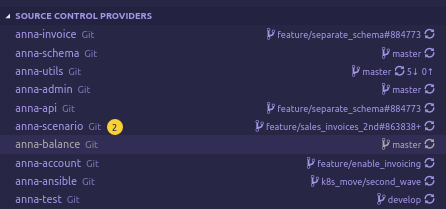
 PoisonousJohn
on 5 Apr 2019
PoisonousJohn
on 5 Apr 2019
@PoisonousJohn Yes, I think the multiple source control providers is the issue. There was a bug in VSCode 1.33 that prevented selection change events from reaching this extension (https://github.com/Microsoft/vscode-pull-request-github/issues/1111), so choosing a different provider wasn't updating the PR list. It should be already fixed in the VS Code Insiders
RMacfarlane
on 17 Apr 2019
Closing this issue since I think this has been fixed now.
RMacfarlane
on 24 Oct 2020
Related issues
 kieferrm
·
4Comments
kieferrm
·
4Comments
 RamonMeffert
·
3Comments
RamonMeffert
·
3Comments
 paulirish
·
3Comments
paulirish
·
3Comments
 Simran-B
·
4Comments
Simran-B
·
4Comments
 dbaeumer
·
4Comments
dbaeumer
·
4Comments
Most helpful comment
I have a bit different case
I have multiple source control providers, can it be because of that?