Vscode-pull-request-github: After checkout own PR, always returns to review mode when check out PR's working branch
- Extension version: 0.1.2
- VSCode Version: 1.27.1 (5944e81f3c46a3938a82c701f96d7a59b074cfdc, 2018-09-06T09:21:18.328Z)
- OS: Windows_NT x64 10.0.18234
Steps to Reproduce:
Assume we have a working branch named 'feature-branch'
- Send in a (own) PR to a repo (based on branch feature-branch).
- Checkout (own) PR with extension.
- Exit Review Mode (
git checkout master) - Run
git checkout feature-branch.
Now we are in review mode again.
 johlju
All 8 comments
If I'm understanding this correctly, this is by design. Since the branch feature-branch is associated with a PR, the extension will switch into review mode whenever you check it out, either from the Description page or the command line.
 RMacfarlane
on 11 Sep 2018
RMacfarlane
on 11 Sep 2018
But it wasn’t in review mode to start with. Although, it could be because I already had the working branch checked out when starting VS Code.
johlju
on 11 Sep 2018
So, I have run into a similar issue. When I installed the extension, I was in the middle of making changes to resolve review feedback on an existing PR, so I had that PR's branch checked out. I made the mistake of clicking the "Check out" button on my PR within VS Code. When I realized I couldn't actually make my fixes while in review mode, I clicked "Exit Review Mode".
This asks me what branch I want to switch to. I don't want to switch branches. I need to continue working on the one I'm in already. Choosing the current branch from the list disables the "Exit Review Mode" button but doesn't do anything else that I can see. Upon giving up and restarting VS Code, I find that I'm still in review mode. If I instead choose another branch, like master, I wind up out of review mode and on that branch.
But then if I checkout my branch again, I'm back in review mode.
As far as I can see, there is no way to escape review mode now. I'm stumped, and am not sure how to fix this so I can resume work on my code...
 a2sheppy
on 7 Jan 2019
a2sheppy
on 7 Jan 2019
Disable the extension as a temporary workaround? :thinking:
johlju
on 7 Jan 2019
@johlju Sure, get all clever and sci-fi. 😁
a2sheppy
on 7 Jan 2019
There are multiple duplicate issues like this, probably one that I opened too. And this is one of the reasons I'm not using this extension after trying it.
The way "Exit Review Mode" works is confusing, it doesn't exit review mode, it just switches branches. Meaning that once you switch back to the branch you will be in review mode again as that state in the extension is left behind.
In my opinion, it should really exit review mode, returning to the state the extension is in on startup. Switching branches being an optional convenience for the use case of checking out a branch solely for looking at its PR and not a requirement to exit review mode.
You might enter review mode from creating a PR on your own branch, or to look at comments on it to fix them, you don't necessarily want to switch branches when done, just turn off review mode (The review gutter, etc.).
 segevfiner
on 25 Dec 2019
segevfiner
on 25 Dec 2019
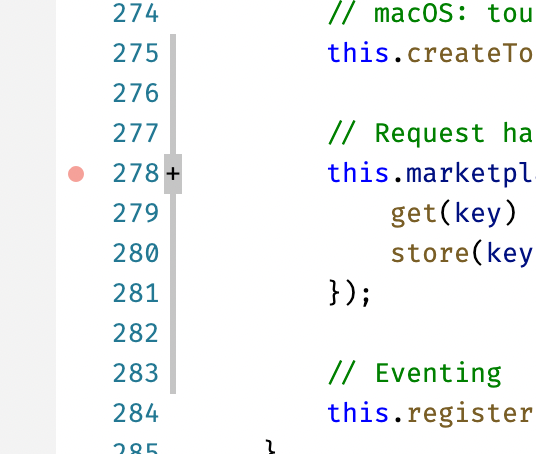
I would like to have a way to leave review mode. Now I am forced into it for a branch I switch to if it happens to be a PR too. But this PR I just created for myself, not for someone to review.
E.g. I see the review decorations now in the editor without having a way to turn that off:
 bpasero
on 13 Jan 2021
bpasero
on 13 Jan 2021
i want disable the start discussion too
 guigagb
on 22 Jan 2021
guigagb
on 22 Jan 2021
Related issues
 adrinjalali
·
4Comments
adrinjalali
·
4Comments
 joaomoreno
·
4Comments
joaomoreno
·
4Comments
 Simran-B
·
4Comments
Simran-B
·
4Comments
 Tyriar
·
3Comments
Tyriar
·
3Comments
 kieferrm
·
4Comments
kieferrm
·
4Comments
Most helpful comment
There are multiple duplicate issues like this, probably one that I opened too. And this is one of the reasons I'm not using this extension after trying it.
The way "Exit Review Mode" works is confusing, it doesn't exit review mode, it just switches branches. Meaning that once you switch back to the branch you will be in review mode again as that state in the extension is left behind.
In my opinion, it should really exit review mode, returning to the state the extension is in on startup. Switching branches being an optional convenience for the use case of checking out a branch solely for looking at its PR and not a requirement to exit review mode.
You might enter review mode from creating a PR on your own branch, or to look at comments on it to fix them, you don't necessarily want to switch branches when done, just turn off review mode (The review gutter, etc.).