Vscode-ng-language-service: Identifier 'invalid' is not defined. 'NgModel' does not contain such a member
I get this error for invalid and touched.
Sample Code:
```html
The funny thing is that when I insert ! before the condition the error disappears.
 AlQuraian
All 10 comments
I'm also encountering this.
<input
      id="name"
      name="name"
      type="text"
      class="form-control"
      minlength="3"
      maxlength="24"
      #name="ngModel"
      [(ngModel)]="formRsvp.name"
      required>
    <div
      *ngIf="name.errors && (name.dirty || name.touched)"
      class="small text-danger">
      <div [hidden]="!name.errors.required">
        Name is required.
      </div>
    </div>
I get the error for name.errors, name.dirty, and name.touched. Code works fine, it's the syntax highlighting that is the issue.
 kmaida
on 9 May 2017
kmaida
on 9 May 2017
I'm also encountering this.
"dependencies": {
    "@angular/animations": "^4.0.0",
    "@angular/common": "^4.0.0",
    "@angular/compiler": "^4.0.0",
    "@angular/compiler-cli": "^4.0.0",
    "@angular/core": "^4.0.0",
    "@angular/forms": "^4.0.0",
    "@angular/http": "^4.0.0",
    "@angular/platform-browser": "^4.0.0",
    "@angular/platform-browser-dynamic": "^4.0.0",
    "@angular/platform-server": "^4.0.0",
    "@angular/router": "^4.0.0",
    "angular2-image-upload": "^0.6.1",
    "core-js": "^2.4.1",
    "crypto-js": "^3.1.9-1",
    "hammerjs": "^2.0.8",
    "jquery": "^3.2.1",
    "js-cookie": "^2.1.4",
    "ng-lazyload-image": "^3.1.1",
    "ng2-file-upload": "^1.2.1",
    "rxjs": "^5.0.1",
    "ts-helpers": "^1.1.1",
    "zone.js": "^0.8.5"
  },
  "devDependencies": {
    "@angular/cli": "^1.0.4",
    "@angular/language-service": "^4.1.3",
    "@types/crypto-js": "^3.1.33",
    "@types/hammerjs": "^2.0.34",
    "@types/jasmine": "2.5.38",
    "@types/jquery": "^2.0.45",
    "@types/js-cookie": "^2.0.28",
    "@types/node": "^6.0.60",
    "codelyzer": "~2.0.0",
    "gulp": "^3.9.1",
    "gulp-connect": "^5.0.0",
    "gulp-connect-proxy-with-headers": "^10.4.1",
    "jasmine-core": "2.5.2",
    "karma": "~1.4.1",
    "karma-chrome-launcher": "^2.0.0",
    "karma-cli": "^1.0.1",
    "karma-coverage-istanbul-reporter": "^0.2.0",
    "karma-jasmine": "^1.1.0",
    "karma-jasmine-html-reporter": "^0.2.2",
    "protractor": "~5.1.0",
    "ts-node": "~2.0.0",
    "tslint": "^4.4.2",
    "typescript": "^2.3.2"
  }
<input type="text" placeholder="{{'please_input_mobile'|translate}}" class="mobile" required autofocus="autofocus" maxlength="11" minlength="10" [(ngModel)]="loginForm.mobile" id="mobile" name="mobile" #mobile="ngModel">
  <div class="error-box">
    <div *ngIf="mobile.errors && (mobile.dirty || mobile.touched)">
      <span [hidden]="!mobile.errors.required">{{'mobile_must_not_null' | translate}}</span>
      <span [hidden]="!mobile.errors.minlength">{{'please_input_real_mobile' | translate}}</span>
      <span [hidden]="!mobile.errors.maxlength">{{'please_input_real_mobile' | translate}}</span>
    </div>
  </div>
Identifier 'errors' is not defined. 'NgModel' does not contain such a member.
 yy7054wyq5
on 31 May 2017
yy7054wyq5
on 31 May 2017
+1 on .errors and .touched
 mariuspopovici
on 8 Jun 2017
mariuspopovici
on 8 Jun 2017
any update on this issue
 vscodeguru
on 11 Jun 2017
vscodeguru
on 11 Jun 2017
I also have this. Code works fine but syntax highlighting isn't.
<ul>
. <li class="text" *ngFor="let item of test | async">
. . {{ item.$value }}
. </li>
</ul>
'item.$value' is highlighted with the error message: "Angular: Identifier '$value" is not defined. 'T' does not contain such a member"
 caionovalins
on 12 Jun 2017
caionovalins
on 12 Jun 2017
I am also having this problem "Angular: Identifier '$value" is not defined. 'T' does not contain such a member" I cannot imagine what the problem might be. each 'item' of 'test' is of type 'any', so typescript should not be complaining about this. Typescript simply does not know whether 'T" does or does not contain such a member.
 rpdyer
on 19 Jun 2017
rpdyer
on 19 Jun 2017
Fixed in 0.1.4
 chuckjaz
on 23 Jun 2017
chuckjaz
on 23 Jun 2017
Bug is still visible, my code is working fine but the syntax highlighting isn't.
https://github.com/suyashgulati/iHealth-Frontend/blob/master/src/app/pages/ask-prev-disease/disease/disease.component.html
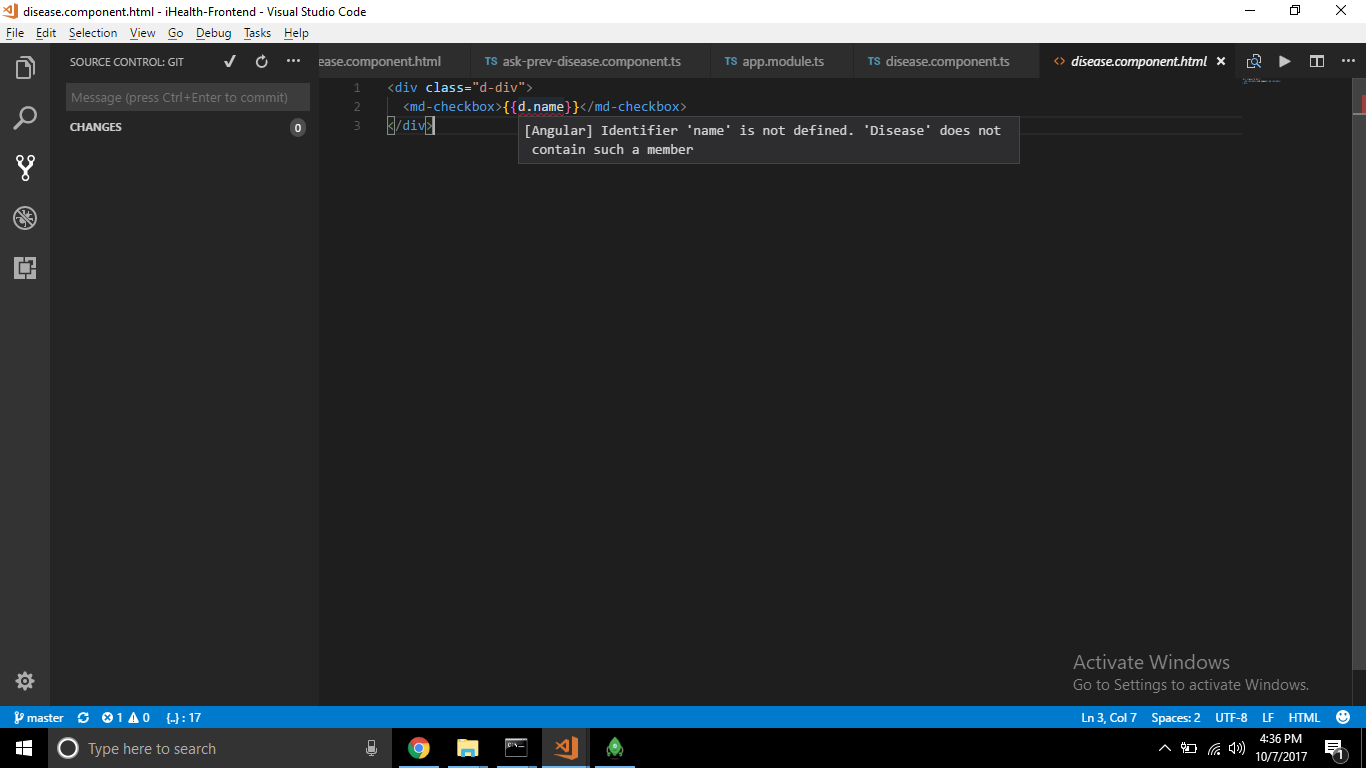
P.S. I am new to angular, please correct me if i am wrong anywhere.
 suyashgulati
on 7 Oct 2017
suyashgulati
on 7 Oct 2017
Hey Suyashgulati,
you were doing a small mistake in your template, please make sure your model clall correct if your using model class, other your looking for to display the output with help of component, "name" should be exit in your componet, other wise you will get same error.
try to use the below
{{name}} herr "name" is the property name that should be present in your component .
{{d.name}} here i''m not sure becoz the "d" is which one that might your getting name as property name from the json object or you'r using model.
if your using model make sure that model class reference varibale as "d"..
 VakamallaRamiReddy
on 18 Oct 2017
VakamallaRamiReddy
on 18 Oct 2017
This issue has been automatically locked due to inactivity.
Please file a new issue if you are encountering a similar or related problem.
Read more about our automatic conversation locking policy.
_This action has been performed automatically by a bot._
![angular-automatic-lock-bot[bot] picture](https://avatars.githubusercontent.com/in/40213?v=4&s=40) angular-automatic-lock-bot[bot]
on 15 Feb 2020
angular-automatic-lock-bot[bot]
on 15 Feb 2020
Related issues
 seangwright
·
4Comments
seangwright
·
4Comments
 Liero
·
3Comments
Liero
·
3Comments
 BorntraegerMarc
·
5Comments
BorntraegerMarc
·
5Comments
 MarcOne68
·
5Comments
MarcOne68
·
5Comments
 yjaaidi
·
5Comments
yjaaidi
·
5Comments
Most helpful comment
I'm also encountering this.
I get the error for
name.errors,name.dirty, andname.touched. Code works fine, it's the syntax highlighting that is the issue.