Vscode-mssql: Integrated connection broken after update to 1.10.0
- MSSQL Extension Version: 1.10.0
- VSCode Version: 1.52.1
- OS Version: Windows_NT x64 10.0.18362
Steps to Reproduce:
- Install a previous version (not sure which one) and configure some database profiles (Integrated auth) in vscode
- Let extension auto-update to version 1.10.0
After the update, all my previous database profiles are gone. When I add them now, I see a "mssql: Profile created and connected" notification. If I managed to get the database name correct, I can right click the database in the extensions explorer panel and use "new query" to run queries. However, when I try to just ctrl+shift+c to connect to the database using this profile, it now gives me the following error:
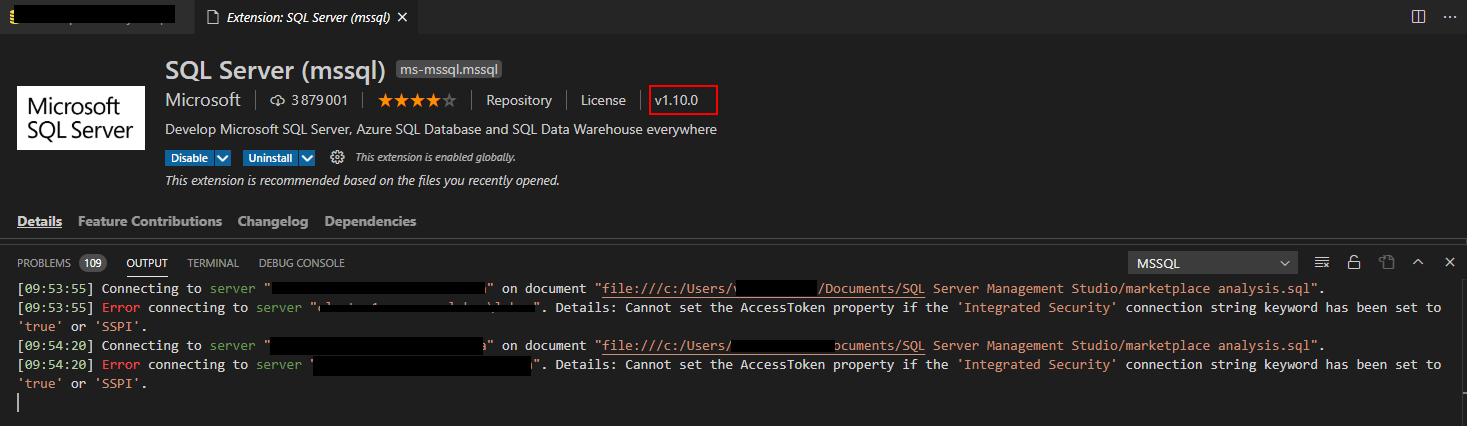
mssql: Failed to connect: System.InvalidOperationException: Cannot set the AccessToken property if the 'Integrated Security' connection string keyword has been set to 'true' or 'SSPI'.
   at Microsoft.Data.SqlClient.SqlConnection.CheckAndThrowOnInvalidCombinationOfConnectionOptionAndAccessToken(SqlConnectionString connectionOptions)
   at Microsoft.Data.SqlClient.SqlConnection.set_AccessToken(String value)
   at Microsoft.SqlTools.ServiceLayer.Connection.SqlConnectionFactory.CreateSqlConnection(String connectionString, String azureAccountToken) in D:\a\1\s\src\Microsoft.SqlTools.ServiceLayer\Connection\SqlConnectionFactory.cs:line 25
   at Microsoft.SqlTools.ServiceLayer.Connection.ConnectionService.TryOpenConnection(ConnectionInfo connectionInfo, ConnectParams connectionParams) in D:\a\1\s\src\Microsoft.SqlTools.ServiceLayer\Connection\ConnectionService.cs:line 593
I very much appreciated the ability to highlight and execute sql code in vscode using any of the configured databases. Please let me know if you need any more information or a log file of some sort. Thank you! I'll try reverting to 1.9.0 temporarily.
 TalMat
All 8 comments
Reverting to 1.9.0 does indeed fix this problem. The database profiles will still need to be re-added, but that's feasible. Might be worth investigating whether something was overwritten/reinitialized a bit heavy-handedly on the new installation though.
TalMat
on 7 Jan 2021
@TalMat Could you look at this thread and see if the solutions provided here fix the issue for you?
 abist
on 8 Jan 2021
abist
on 8 Jan 2021
I installed this extension today (so, no previous profiles) and I have the same issue
It works from the Sql Server tab (right click on a connection and hit New Query) but not from the command "MS SQL: Connect"
 MrLuje
on 11 Jan 2021
MrLuje
on 11 Jan 2021
Please try following the instructions on this comment to see if the new build fixes this issue for you.
 cssuh
on 13 Jan 2021
cssuh
on 13 Jan 2021
@cssuh still happening with the new build (extension folder cleaned & manual install of the vsix)
MrLuje
on 14 Jan 2021
@MrLuje Did this happen when you tried to add a new connection or connect to an existing connection? If you tried connecting to an existing connection could you please try adding a new connection to see if that works?
cssuh
on 15 Jan 2021
@cssuh An existing one.
It is indeed working fine from newly created connection 👍
MrLuje
on 15 Jan 2021
This has been fixed in the new 1.10.1 release.
cssuh
on 20 Jan 2021
Related issues
 paaland
·
3Comments
paaland
·
3Comments
 julielerman
·
5Comments
julielerman
·
5Comments
 coquagli
·
4Comments
coquagli
·
4Comments
 dbreese-keystone
·
7Comments
dbreese-keystone
·
7Comments
 tqhuy1811
·
4Comments
tqhuy1811
·
4Comments
Most helpful comment
@cssuh An existing one.
It is indeed working fine from newly created connection 👍