Vscode-mssql: Error reconnecting to saved SQL Login auth type connection - "Cannot set the AccessToken property..."
- MSSQL Extension Version: 1.10.0
- VSCode Version: 1.52.1
- OS Version: Windows 10 Pro
Steps to Reproduce:
- Open a .sql file in VS Code.
- Attempt to execute a SQL query (CTRL+SHIFT+E).
- Select "Create new connection" and fill in the prompts to connect to an on-prem SQL server with authentication type as SQL Login. (Do not save password.)
- Give the connection profile a name and save it.
- View the query results, it runs successfully.
- Then minimize VS Code for 5-10 minutes and/or close VS Code and re-open it.
- Open the same .sql file and try to run the same query again, using the saved connection profile.
- Enter the connection password when prompted.
Actual result:
Get the following error message:
mssql: Failed to connect: System.InvalidOperationException: Cannot set the AccessToken property if 'UserID', 'UID', 'Password', or 'PWD' has been specified in connection string.
   at Microsoft.Data.SqlClient.SqlConnection.CheckAndThrowOnInvalidCombinationOfConnectionOptionAndAccessToken(SqlConnectionString connectionOptions)
   at Microsoft.Data.SqlClient.SqlConnection.set_AccessToken(String value)
   at Microsoft.SqlTools.ServiceLayer.Connection.ReliableConnection.ReliableSqlConnection..ctor(String connectionString, RetryPolicy connectionRetryPolicy, RetryPolicy commandRetryPolicy, String azureAccountToken) in D:\a\1\s\src\Microsoft.SqlTools.ManagedBatchParser\ReliableConnection\ReliableSqlConnection.cs:line 77
   at Microsoft.SqlTools.ServiceLayer.Connection.SqlConnectionFactory.CreateSqlConnection(String connectionString, String azureAccountToken) in D:\a\1\s\src\Microsoft.SqlTools.ServiceLayer\Connection\SqlConnectionFactory.cs:line 25
   at Microsoft.SqlTools.ServiceLayer.Connection.ConnectionService.TryOpenConnection(ConnectionInfo connectionInfo, ConnectParams connectionParams) in D:\a\1\s\src\Microsoft.SqlTools.ServiceLayer\Connection\ConnectionService.cs:line 532
Expected result:
The connection succeeds and the query runs successfully -- just like it did when I first created the connection profile, before restarting VS Code.
Additional info:
When I create the connection profile, I notice the following config JSON gets created:
        {
            "server": "my-server-name",
            "database": "my_database",
            "authenticationType": "SqlLogin",
            "user": "my_user",
            "password": "",
            "emptyPasswordInput": false,
            "savePassword": false,
            "profileName": "MyProfileName",
            "azureAccountToken": "",
            "connectTimeout": 15,
            "encrypt": false,
            "applicationName": "vscode-mssql"
        }
If after restarting VS Code, I delete the line "azureAccountToken", and try to connect again, the error goes away, and connections/queries now succeed.
Unfortunately, this change does not seem to survive restarts of VS Code for some reason (the deleted line comes back), so it's not a great workaround. But maybe it at least sheds some light on the cause.
I can always try just reinstalling VS Code and the extension, in case maybe my installation is just broken or buggy somehow. But figured I'd put this out there, in case it's something that should be fixed or is easy to fix.
Edit: Forgot to mention, this issue started recently, sometime within the past several months. Before that, I was using the MSSQL extension for at least a year or more without issue. I don't know if it coincided with installing the 1.10.0 update or not.
 dbreese-keystone
All 7 comments
I also receive similar error using integrated authentication.
- MSSQL Extension Version: 1.10.0
- VSCode Version: 1.52.1
- OS Version: Windows 10 Pro
Using the same steps to reproduce as OP, except with Integrated security instead of SQL Login
mssql: Failed to connect: System.InvalidOperationException: Cannot set the AccessToken property if the 'Integrated Security' connection string keyword has been set to 'true' or 'SSPI'.
   at Microsoft.Data.SqlClient.SqlConnection.CheckAndThrowOnInvalidCombinationOfConnectionOptionAndAccessToken(SqlConnectionString connectionOptions)
   at Microsoft.Data.SqlClient.SqlConnection.set_AccessToken(String value)
   at Microsoft.SqlTools.ServiceLayer.Connection.ReliableConnection.ReliableSqlConnection..ctor(String connectionString, RetryPolicy connectionRetryPolicy, RetryPolicy commandRetryPolicy, String azureAccountToken) in D:\a\1\s\src\Microsoft.SqlTools.ManagedBatchParser\ReliableConnection\ReliableSqlConnection.cs:line 77
   at Microsoft.SqlTools.ServiceLayer.Connection.SqlConnectionFactory.CreateSqlConnection(String connectionString, String azureAccountToken) in D:\a\1\s\src\Microsoft.SqlTools.ServiceLayer\Connection\SqlConnectionFactory.cs:line 25
   at Microsoft.SqlTools.ServiceLayer.Connection.ConnectionService.TryOpenConnection(ConnectionInfo connectionInfo, ConnectParams connectionParams) in D:\a\1\s\src\Microsoft.SqlTools.ServiceLayer\Connection\ConnectionService.cs:line 532
Here is the connections json for the database I'm trying to connect to
        {
            "server": "my_server",
            "database": "my_database",
            "authenticationType": "Integrated",
            "profileName": "my_server",
            "password": "",
            "azureAccountToken": ""
        }
Following workaround in OP by removing azureAccountToken element resolves issue. I've restarted VSCode several times after doing this and the error does not come back and the azureAccountToken element is not restored.
I don't know if this is related to 1.10.0 since I just moved to a new machine and I don't remember what version I was using on my previous machine.
 etkeys
on 13 Jan 2021
etkeys
on 13 Jan 2021
mssql-1.10.0.vsix.zip
Hi, can you install this private build of mssql and see if this fixes the issue?
In order to install it, you will need to unzip the file. Then, in your folders, you will need to remove the folder ~\.vscode\extensions\ms-mssql.mssql-[version-number]. Then in VSCode, navigate to the Extensions tab on the left. Then, click the
 icon and then select
 Install from VSIX
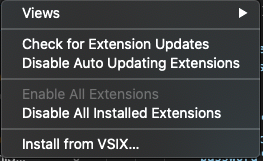 and choose the unzipped vsix file.
 cssuh
on 13 Jan 2021
cssuh
on 13 Jan 2021
I had the same issue. Seems that the extension is messing up storing the settings of a created conenction, and then trying to connect to Azure.
Removing the azureAccountToken key in the settings.json worked as a workaround for me (works even after restarting code)
 fbehrens
on 14 Jan 2021
fbehrens
on 14 Jan 2021
@cssuh,
I performed the following
- Removed my existing connections (only 1).
- Added new connection using 1.10.0 from the marketplace.
- Reviewed settings.
azureAccountTokenwas present. - Again, removed my existing connections.
- Uninstalled 1.10.0.
- Installed 1.10.0 vsix you provided above.
- Added new connection.
- Reviewed settings.
azureAccountTokenwas not present. - Attempted to run query using
MS SQL: New Queryand selecting connection that was just added. - Connection was made without out error.
- Execute test query. No error reported.
vsix update you provided has resolved the issue.
etkeys
on 14 Jan 2021
Thank you @etkeys, are you authenticating via SQL Login or integrated auth?
cssuh
on 14 Jan 2021
@cssuh Integrated
etkeys
on 14 Jan 2021
@cssuh Thank you.
 8888alex
on 15 Jan 2021
8888alex
on 15 Jan 2021
Related issues
 nivek7
·
3Comments
nivek7
·
3Comments
 paaland
·
3Comments
paaland
·
3Comments
 henksandoval
·
6Comments
henksandoval
·
6Comments
 casraysa
·
7Comments
casraysa
·
7Comments
 tqhuy1811
·
4Comments
tqhuy1811
·
4Comments
Most helpful comment
mssql-1.10.0.vsix.zip
Hi, can you install this private build of mssql and see if this fixes the issue?
In order to install it, you will need to unzip the file. Then, in your folders, you will need to remove the folder
 icon and then select
 and choose the unzipped vsix file.
~\.vscode\extensions\ms-mssql.mssql-[version-number]. Then in VSCode, navigate to theExtensionstab on the left. Then, click theInstall from VSIX