Vscode-markdown: `orderedList.autoRenumber` setting is ignored when adding items
What is the problem?
markdown.extension.orderedList.autoRenumber setting is ignored.
Numbers still increase when pressing enter and going to the next item.
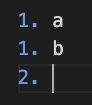
In this example, I had a list with 1. a and 1. b (which renders with correct ordering).
When pressing enter after b, it increases the next line by 1, ending up in broken list ordering 1 -> 1 -> 2:
How can I reproduce it?
- Set
markdown.extension.orderedList.autoRenumbertofalse - Reload Window (just to be safe)
- Go to settings and check that it is actually set to
false - Edit an ordered list and see: numbers still going up when pressing enter and going to the next item
 Domiii
All 5 comments
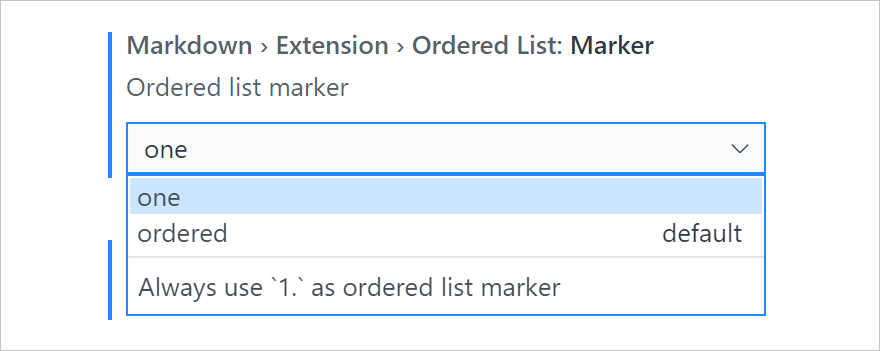
Thanks. You are looking for another configuration orderedList.marker, which controls what marker to add, while orderedList.autoRenumber means renumbering all list items below it.
 yzhang-gh
on 5 Sep 2020
yzhang-gh
on 5 Sep 2020
Hi @yzhang-gh, and thank you for your speedy reply!
What marker do I want? I want 1, and it already is 1 isn't it?
Note: It gives me 2, but I want 1.
Domiii
on 6 Sep 2020
yzhang-gh
on 6 Sep 2020
❤1
😄1
That fixes it! Thanks!
感謝你唷~
Domiii
on 7 Sep 2020
😄1
😉
yzhang-gh
on 7 Sep 2020
Was this page helpful?
0 / 5 - 0 ratings
Related issues
 nosalan
·
3Comments
nosalan
·
3Comments
 alexb148
·
3Comments
alexb148
·
3Comments
 PierreMarchand20
·
3Comments
PierreMarchand20
·
3Comments
 FrancesCoronel
·
4Comments
FrancesCoronel
·
4Comments
 ichirou2910
·
3Comments
ichirou2910
·
3Comments
Most helpful comment