Vscode-markdown: Is there a keyboard shortcut for code block?
I am able to create keybinding for code span (markdown.extension.editing.toggleCodeSpan) which surrounds the text with backticks.
Is it possible to setup keybinding for code block (triple backticks or 4-space indent)?
 nosalan
All 3 comments
You can add
{
    "key": "your keybinding",
    "command": "editor.action.insertSnippet",
    "args": {
        "snippet": "```\n$0\n```"
    },
    "when": "editorTextFocus && editorLangId == markdown"
}
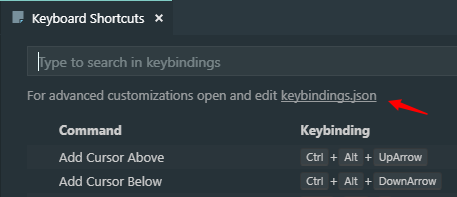
to your keybindings.json which can be opened here
 yzhang-gh
on 24 Oct 2018
yzhang-gh
on 24 Oct 2018
Thanks, looks powerful. I enhanced it a bit to include the selected text, when shortcut is pressed on a selection.
{
    "key": "ctrl+shift+C",
    "command": "editor.action.insertSnippet",
    "args": {
        "snippet": "```\n${TM_SELECTED_TEXT}$0\n```"
    },
    "when": "editorTextFocus && editorLangId == markdown"
}
Go to File > Preferences > Keyboard Shourtcuts with ctrl + k ctrl + s. Type markdown code and set any hot keys. It's markdown code block hot key.

Result:

 myBestSoftAndPref
on 6 Dec 2018
myBestSoftAndPref
on 6 Dec 2018
👍2
Was this page helpful?
0 / 5 - 0 ratings
Related issues
 chuyangliu
·
5Comments
chuyangliu
·
5Comments
 asbjornu
·
5Comments
asbjornu
·
5Comments
 MonsieurMan
·
3Comments
MonsieurMan
·
3Comments
 jerry-sky
·
4Comments
jerry-sky
·
4Comments
 akshaybabloo
·
3Comments
akshaybabloo
·
3Comments
Most helpful comment
Go to File > Preferences > Keyboard Shourtcuts with


ctrl + k ctrl + s. Typemarkdown codeand set any hot keys. It's markdown code block hot key.Result: