Vscode-markdown: Auto-update for TOC not working on Windows
What is the problem?
Neither the Update Table of Contents command, nor the Toc: Update on Save feature are working on Windows.
How can I reproduce it?
Write a few headings, create a TOC then add or remove a few headings. If auto-update is disabled, run the Update Table of Contents command .
Is there any error message in the console?
There is no error message in the console.
Version Information
Version: 1.45.1 (user setup)
Commit: 5763d909d5f12fe19f215cbfdd29a91c0fa9208a
Date: 2020-05-14T08:27:35.169Z
Electron: 7.2.4
Chrome: 78.0.3904.130
Node.js: 12.8.1
V8: 7.8.279.23-electron.0
OS: Windows_NT x64 10.0.18362
Extension Version: 3.0.0
 gurbindersingh
All 4 comments
Apparently it is not reproducible. If this is the case, we will see many people complaining about it.
Please try to reinstall the extension. It would be better if you can provide a minimal example (text snippet).
 yzhang-gh
on 29 May 2020
yzhang-gh
on 29 May 2020
I have already tried reinstalling the extension, that didn't work so I installed the last version (2.8.0) instead, which works as expected.
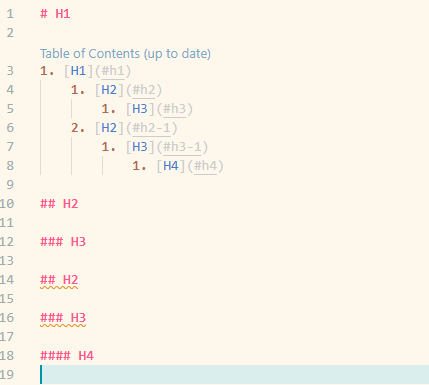
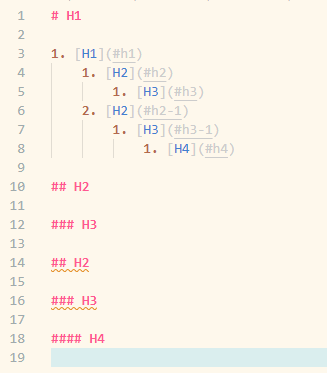
I have been able to reproduce it using the following snippet
# H1

## H2

### H3

## H2

### H3

#### H4
This is how it looks with the old version (2.8.0):
And this is using the latest version (3.0.0):
gurbindersingh
on 29 May 2020
Thanks for the information.
Now I know the reason (the toc.orderedList option). It should be fixed in the dev build.
yzhang-gh
on 30 May 2020
Thanks! Seems to be fixed in the latest version!
gurbindersingh
on 30 May 2020
Related issues
 ichirou2910
·
3Comments
ichirou2910
·
3Comments
 PierreMarchand20
·
3Comments
PierreMarchand20
·
3Comments
 akshaybabloo
·
3Comments
akshaybabloo
·
3Comments
 jerry-sky
·
4Comments
jerry-sky
·
4Comments
 nosalan
·
3Comments
nosalan
·
3Comments
Most helpful comment
Thanks for the information.
Now I know the reason (the
toc.orderedListoption). It should be fixed in the dev build.