Vscode-markdown: Feature request: `{` auto closing
What is the problem?
It would be nice if the { is a js file was $ in an md file in the screenshot below:

How can I reproduce it?
Enter $ in an md file.
Is there any error message in the console?
 upupming
All 22 comments
It might not be a good idea since $ is not a punctuation mark. I suggest using ctrl+m
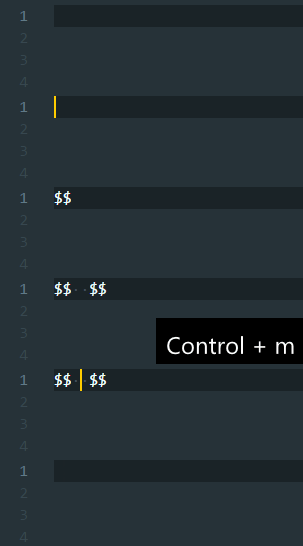
 yzhang-gh
on 16 Apr 2019
yzhang-gh
on 16 Apr 2019
Sure! I prefer the hotkey, too. One thing more, we should not insert whitespace when user press ctrl + m twice, otherwise we will get warning from markdownlint once enter a newline.
upupming
on 17 Apr 2019
We can add a third case
$$
|
$$
on third press
yzhang-gh
on 17 Apr 2019
If this is difficult, we should auto-close $ because auto complement of KaTeX is only supported in text surrounded by $$.
Also, we should auto-close { and } in math blocks.

upupming
on 23 Apr 2019
we should auto-close
$because auto complement of KaTeX is only supported in text surrounded by$$.
I don't get the point. The math completion also works inside $...$ 😳
As for the { thing, we can do it.
yzhang-gh
on 23 Apr 2019
Sorry for making it confusing.
I meant that if I type a opening $, I have to type another closing $ before
I can get auto complement. So auto closing the $ will help save time a lot.
On Tue, Apr 23, 2019, 7:53 PM Yu Zhang notifications@github.com wrote:
we should auto-close $ because auto complement of KaTeX is only supported
in text surrounded by $$.I don't get the point. The math completion also works inside $...$ 😳
As for the { thing, we can do it.
—
You are receiving this because you authored the thread.
Reply to this email directly, view it on GitHub
https://github.com/yzhang-gh/vscode-markdown/issues/421#issuecomment-485771037,
or mute the thread
https://github.com/notifications/unsubscribe-auth/AF4YPBDQGIEVE6SCOONNEVDPR32FBANCNFSM4HGJAKWA
.
upupming
on 23 Apr 2019
I understand.
For {, it is natural because no one wants a single {.
But for $, it is kind of different. The math is an extension to Markdown and I believe most of the users don't use that.
It will cause a problem when people _literally_ want a $ symbol (as US dollars, or as a special character).
So that is why we have the hotkey ctrl+m. Typing shift+4 and ctrl+m is both two keystrokes, why not using it 😉.
yzhang-gh
on 23 Apr 2019
Very reasonably.
I remembered that when I used Microsoft Word to edit formulas. There were many symbols that couldn't be typed by the keyboard, so I set up a lot of shortcuts, which I used very familiarly and could be typed very quickly.
Perhaps we should draft or find some standard shortcuts for mathematical symbols and apply it to Markdown All in One. Or, just let the user define the shortcut for a new symbol easily.
upupming
on 23 Apr 2019
Another proposal, we can add some shortcut for quick surround current math code block with \begin{aligned} and \end{aligned}, because I always want to change an ordinary math equation into aligned math block.
upupming
on 23 Apr 2019
Another thing, < should not be auto-closed.

upupming
on 23 Apr 2019
Thanks for the suggestion.
I also have some custom snippets (with keybindings). For your case, it can be
{
    "key": "ctrl+whatever",
    "command": "editor.action.insertSnippet",
    "args": {
        "snippet": "\\begin{aligned}\n$TM_SELECTED_TEXT$1\\end{aligned}"
    },
    "when": "editorTextFocus && editorLangId == markdown"
},
However, as a Markdown extension, I guess this might be too special a feature. Let's see whether there are other people also want this.
<> is provided by the official extension. I'm not sure whether we can override it.
yzhang-gh
on 23 Apr 2019
Thanks, I will try it.
I have another suggestion, you can see that the auto complement is always the same order and the user may press arrow down several times to get the complementation he/she needs.

As far as I can see, Eclipse IDE will change the complete order according to users' previous input, I think this is a good feature to be added.
upupming
on 23 Apr 2019
If I am free, I should try to make these possible. But I am also quite busy right now, someday will come a PR!
upupming
on 23 Apr 2019
👍
VSCode seems to be able to auto reorder the completions. It does work for TypeScript. Maybe there are some options for the extension authors. I will have a look in this weekend.
yzhang-gh
on 23 Apr 2019
About snippets for math, maybe we can consult LaTeXWorkshop's snippets.
 linsui
on 27 Apr 2019
linsui
on 27 Apr 2019
VSCode seems to be able to auto-reorder the completions
Need to set editor.suggestSelection to recentlyUsedByPrefix.
yzhang-gh
on 29 Apr 2019
Let's sort out this one by one, for Ctrl+M shortcut, I wanted to reuse the highlighting logic to detect the current math block and create/cancel the math block. But I am not familiar with it, so I created my own logic to deal with them. I have created two small algorithms to detect them.
upupming
on 19 May 2019
This is the current style I finished:
Create

Cancel

Note that I added extra space for users, do you like it?
upupming
on 19 May 2019
Sorry, I don't get the point. What feature would you like to implement?
For example, the current behaviour can be described as:
| -> $|$ -> $$ | $$ -> | -> ... (toggle with ctrl + m)
My previous idea is to add another state
$$
|
$$
between $$ | $$ and |.
Could you elaborate your expected behaviour like this?
yzhang-gh
on 19 May 2019
I finally used ctrl+shift+m to toggle displayed math.
upupming
on 19 May 2019
Let us discuss it in a PR.
upupming
on 19 May 2019
Keeping the plugin simple is a better idea, let me simply close this issue, for the <> auto closing problem, it is not very inconvenient when typing, but the implementation is too difficult. For math shortcuts, LaTeX-workshop is too complex, too. I will consider using my own key bindings.
upupming
on 19 May 2019
Related issues
 maoturing
·
4Comments
maoturing
·
4Comments
 akshaybabloo
·
3Comments
akshaybabloo
·
3Comments
 deanishe
·
4Comments
deanishe
·
4Comments
 nosalan
·
3Comments
nosalan
·
3Comments
 MonsieurMan
·
3Comments
MonsieurMan
·
3Comments
Most helpful comment
Thanks for the suggestion.
I also have some custom snippets (with keybindings). For your case, it can be
However, as a Markdown extension, I guess this might be too special a feature. Let's see whether there are other people also want this.
<>is provided by the official extension. I'm not sure whether we can override it.See https://github.com/Microsoft/vscode/blob/3a12b7ac2efd2f1f01a646ef5272313ad50bf618/extensions/markdown-basics/language-configuration.json#L28-L34