Vscode-markdown: Latin Keyboard characters not working 'ç' (ALT + C)
What is the problem?
While writing a .md file I cannot type ç (ALT + C). If I copy and paste it from somewhere else, it does work!
macOS High Sierra
Markdown plugin: 1.7.0
VScode: 1.28.2
How can I reproduce it?
Using UTF-8 try to write any word with ç.
Is there any error message in the console?
Nothing has been shown.
When I disable the plugin, it works great :)
 Jeskz0rd
All 2 comments
Thanks for telling me the keys alt+c (otherwise it will be very hard for me to nail the bug)
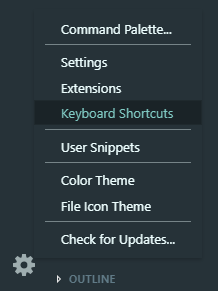
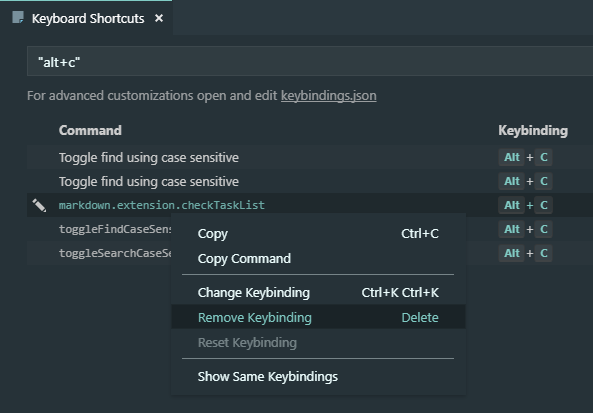
The problem is alt+c is overridden as check/uncheck task list command. You can delete it by
 yzhang-gh
on 12 Nov 2018
yzhang-gh
on 12 Nov 2018
❤1
🎉1
👍1
I have no words to describe how grateful I am with this solution :)
It worked like a charm and saved me a lot of time!!
Thanks mate for the quick response!
Jeskz0rd
on 13 Nov 2018
👍1
Was this page helpful?
0 / 5 - 0 ratings
Related issues
 akurani
·
4Comments
akurani
·
4Comments
 rdhar
·
4Comments
rdhar
·
4Comments
 lotapp
·
3Comments
lotapp
·
3Comments
 FrancesCoronel
·
4Comments
FrancesCoronel
·
4Comments
 gurbindersingh
·
4Comments
gurbindersingh
·
4Comments
Most helpful comment
Thanks for telling me the keys
alt+c(otherwise it will be very hard for me to nail the bug)The problem is
alt+cis overridden ascheck/uncheck task listcommand. You can delete it by