Vscode-markdown: Can't preview local image
What is the problem?
I installed this two extensions below for markdown writing, both of them are enabled.
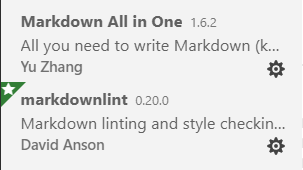
When inserting local image, the preview page just can't load the image.
(It works well when inserting picture url :) )

It works well (successfully loaded local and internet images) when disabling either markdown all in one or markdownlint.
However, if I disabled markdown all in one, the preview page just can't render Latex :(
How can I reproduce it?
ummm... install this two extensions and insert a local picture with relative path.
 ChildishChange
All 14 comments
I tested and found it is exactly as you said (didn't work when both enabled, but worked when disabling one of them). Really weird.
And I found a trick. First, enable markdownlint and disable this all-in-one extension (and see it work well). Then enable all-in-one extension, it magically still works.
 yzhang-gh
on 9 Oct 2018
yzhang-gh
on 9 Oct 2018
That did work, but it's not really an optimal solution.
I've used both extensions for a long time with no problem, but the latest update to all-in-one, broke the inline pictures.
 Splike
on 9 Oct 2018
Splike
on 9 Oct 2018
I have no idea what causes the weird thing. Since the sequence of enabling matters, it is probably related to certain VSCode mechanism that might have changed recently.
Before the reason is found out, please live with the tricky workaround.
yzhang-gh
on 9 Oct 2018
I have a similar problem, except that it happens to me even when I disable all my extensions.
What I've noticed though is that when turn the image into a normal link by removing !, then hover over it in the preview, it sometimes shows a strange path depending on whether Markdown All in One is enabled:
normal link:
vscode-resource:/d:/Notes/testing123.png
with extension:
vscode-resource:/d:/Notes/vscode-resource:/d:/Notes/vscode-resource:/d:/Notes/testing123.png
This might be why the link breaks?
 torazem
on 9 Oct 2018
torazem
on 9 Oct 2018
@torazem Thanks for the insights! I'll take a look.
yzhang-gh
on 9 Oct 2018
Thanks for you guys warming help!
Author of markdownlint commented my issue under their repo.
https://github.com/DavidAnson/markdownlint/issues/147#issuecomment-428250105
He though this may caused by Markdown preview security settings.
I tried but not help.
And he also said that markdownlint is not involved with the Preview window.
ChildishChange
on 9 Oct 2018
By now, it seems to be an upstream issue of VSCode. Let's waiting for the reply from the VSCode team.
And this should have nothing to do with the Markdownlint extension. So you could close the issue there 😄.
yzhang-gh
on 9 Oct 2018
Thanks a lot :)!
ChildishChange
on 10 Oct 2018
(Actually, I meant the issue in Markdownlint extension...)
yzhang-gh
on 10 Oct 2018
My bad ....
ChildishChange
on 10 Oct 2018
still broken in 1.30.2
 gerroon
on 21 Jan 2019
gerroon
on 21 Jan 2019
Are you sure it is exactly the same issue as described before?
I tested and found it is exactly as you said (didn't work when both enabled, but worked when disabling one of them). Really weird.
And I found a trick. First, enable markdownlint and disable this all-in-one extension (and see it work well). Then enable all-in-one extension, it magically still works.
https://github.com/yzhang-gh/vscode-markdown/issues/296#issuecomment-428103691
yzhang-gh
on 21 Jan 2019
same problem here , any solutions ?
 ychamare
on 1 Dec 2020
ychamare
on 1 Dec 2020
@ychamare
What do you mean by "same"?
The original problem turned out to be a bug of VS Code, and has been fixed long time ago.
VS Code applies many restrictions to the built-in preview. See
 Lemmingh
on 1 Dec 2020
Lemmingh
on 1 Dec 2020
Related issues
 chuyangliu
·
5Comments
chuyangliu
·
5Comments
 baby5
·
5Comments
baby5
·
5Comments
 MisterY
·
3Comments
MisterY
·
3Comments
 nosalan
·
3Comments
nosalan
·
3Comments
 maoturing
·
4Comments
maoturing
·
4Comments
Most helpful comment
I have a similar problem, except that it happens to me even when I disable all my extensions.
What I've noticed though is that when turn the image into a normal link by removing
!, then hover over it in the preview, it sometimes shows a strange path depending on whether Markdown All in One is enabled:normal link:
vscode-resource:/d:/Notes/testing123.pngwith extension:
vscode-resource:/d:/Notes/vscode-resource:/d:/Notes/vscode-resource:/d:/Notes/testing123.pngThis might be why the link breaks?