Vscode-jupyter: DS: Support the ability to take input from users for executed cells.
This is what Jupyter shows:

We show this.

 rchiodo
All 13 comments
It would be great to have this fixed in VS Code.
Is anyone working on this now?
 sergei3000
on 8 Aug 2019
sergei3000
on 8 Aug 2019
No sorry this is not a high priority at the moment. We do accept outside PR's though if you'd like to try implementing it.
We try to prioritize stuff based on feedback, so up voting certainly moves things up the priority queue.
rchiodo
on 8 Aug 2019
Are there any updates on this issue?
It would be great to have this feature implemented.
 jmoeyersons
on 5 Sep 2019
jmoeyersons
on 5 Sep 2019
Sorry it's not being looked at the moment. Feel free to up vote it. We generally work on stuff based on the number of votes and comments items have.
rchiodo
on 5 Sep 2019
Would love to have this implemented as well... we're not allowed to store data or passwords locally at work, so we need to query the database each time we run out code — the lack of this feature prevents us from using the VSCode Jupyter support.
 AllanLRH
on 26 Sep 2019
AllanLRH
on 26 Sep 2019
Moving back to triage. There's a LOT of up votes on this one.
rchiodo
on 26 Sep 2019
I got the same issue today.
- Extension Name:
python - Extension Version:
2019.11.41015-dev - OS Version:
Windows_NT x64 10.0.18362 - VSCode version:
1.39.0-insider

 forgetful-glitch
on 10 Oct 2019
forgetful-glitch
on 10 Oct 2019
sending back to triage to re-evaluate
 ronglums
on 22 Oct 2019
ronglums
on 22 Oct 2019
Not sure how feasible, but I would assume this should approx. work as follows:
- If
input(prompt)is called, open an input in VS Code, with the text beingprompt(similar to the screenshot below from the Azure IoT Extension)

- Take the user input and feed it to the python runtime.
The details could be more complicated than I assume:
promptnot available before execution- Cells are executed in one go and the result is parsed - this could occur in the middle of a cell
- String encoding issues (special characters, newlines, tabs...)
- Signals (Ctrl C, Ctrl D, ...)
Therefore, an interim solution could be approximately the following:
Add some syntax that is recognized by the VS Code extension but ignored else, e.g.:
a = input('Python uses this prompt: ') #%I 'VS Code uses this prompt instead'
could be parsed, the prompts for the user displayed and the code that is sent to the jupyter cell for execution is rewritten as
a = r"[result from above]" # beware of r'\' and a few similar issues
This would be somewhat ugly and prone to breaking but maybe good enough as an interim solution.
 oerpli
on 4 Nov 2019
oerpli
on 4 Nov 2019
I'm guessing 3 days to implement this.
I _think_ all we need to do is change this code to allow_stdin:
    private generateRequest = (code: string, silent?: boolean): Kernel.IFuture | undefined => {
        //traceInfo(`Executing code in jupyter : ${code}`);
        try {
            const cellMatcher = new CellMatcher(this.configService.getSettings().datascience);
            return this.session ? this.session.requestExecute(
                {
                    // Remove the cell marker if we have one.
                    code: cellMatcher.stripFirstMarker(code),
                    stop_on_error: false,
                    allow_stdin: false,
                    store_history: !silent // Silent actually means don't output anything. Store_history is what affects execution_count
                },
                true
            ) : undefined;
        } catch (exc) {
            // Any errors generating a request should just be logged. User can't do anything about it.
            traceError(exc);
        }

        return undefined;
    }
Then provide UI to do the input.
rchiodo
on 15 Nov 2019
I have this working. Here's what it will look like:
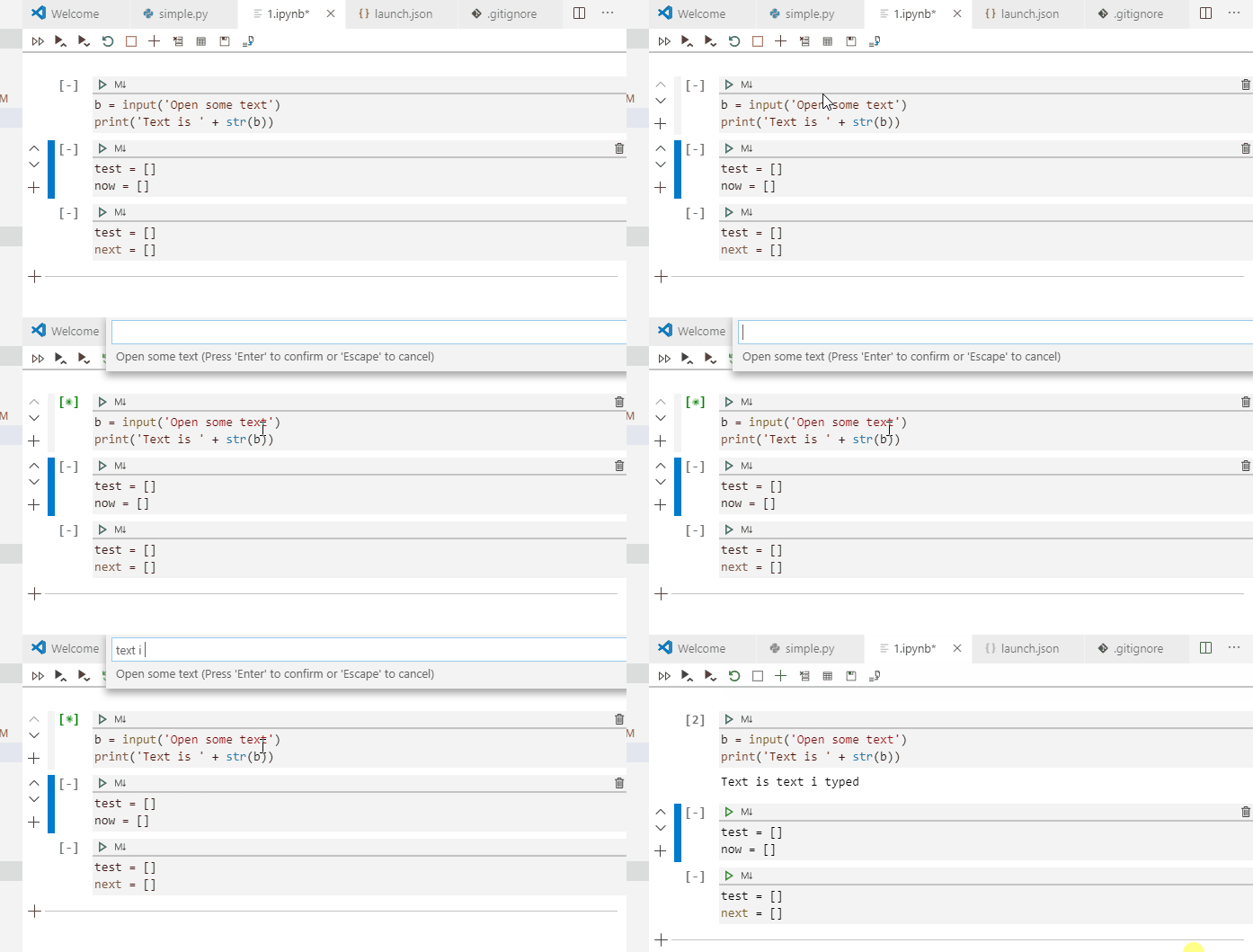
Supports straight input and password based.
rchiodo
on 15 Nov 2019
Looks great, though I have a questions:
It seems you're doing this in a .ipynb file. I personally never use those but the #%% magic comment syntax for cells in regular scripts.
Is it also working there (same backend maybe?) or will #%% be EOL in the near future (which would be a pity in my opinion).
oerpli
on 15 Nov 2019
Same backend, so it will work for the interactive window too.
rchiodo
on 15 Nov 2019
Related issues
 hyderkh
·
4Comments
hyderkh
·
4Comments
 BCArg
·
3Comments
BCArg
·
3Comments
 janosh
·
4Comments
janosh
·
4Comments
 dimitry-ishenko
·
4Comments
dimitry-ishenko
·
4Comments
 schatt89
·
4Comments
schatt89
·
4Comments
Most helpful comment
Same backend, so it will work for the interactive window too.