Vscode-jupyter: Dataviewer cannot handle MultiIndex
Issue Type: Bug
The dataviewer tab cannot show the index of a dataframe with a multiindex properly. While in the interactive python tab it is rendered as it is in Jupyter, in the dataviewer tab it shows hashes for the index, making it quite useless.
idx = pd.MultiIndex.from_product(
    [['bar', 'foo'], ['one', 'two']], names=['first', 'second']
)
df = pd.DataFrame(np.random.randn(4, 2), index=_idx)
The above is rendered in the dataviewer tab as:

I expect to see it rendered something like:
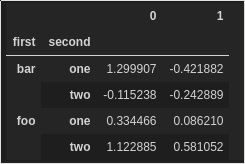
as it does for the interactive python tab.
Extension version: 2019.6.24221
VS Code version: Code - Insiders 1.37.0-insider (8fa811108f0f0524c473020ef57b6620f6c201e1, 2019-07-12T09:18:33.949Z)
OS version: Linux x64 5.1.17-300.fc30.x86_64
Remote OS version: Linux x64 5.1.18-300.fc30.x86_64
System Info
|Item|Value|
|---|---|
|CPUs|AMD Ryzen 5 2400G with Radeon Vega Graphics (8 x 2908)|
|GPU Status|2d_canvas: enabled
flash_3d: enabled
flash_stage3d: enabled
flash_stage3d_baseline: enabled
gpu_compositing: enabled
multiple_raster_threads: enabled_on
native_gpu_memory_buffers: disabled_software
oop_rasterization: disabled_off
protected_video_decode: unavailable_off
rasterization: disabled_software
skia_deferred_display_list: disabled_off
skia_renderer: disabled_off
surface_synchronization: enabled_on
video_decode: unavailable_off
viz_display_compositor: disabled_off
webgl: enabled
webgl2: enabled|
|Load (avg)|2, 1, 1|
|Memory (System)|29.45GB (0.63GB free)|
|Process Argv|--unity-launch|
|Screen Reader|no|
|VM|0%|
|Item|Value|
|---|---|
|Remote|SSH:
|OS|Linux x64 5.1.18-300.fc30.x86_64|
|CPUs|Intel(R) Core(TM) i5-8250U CPU @ 1.60GHz (8 x 2169)|
|Memory (System)|7.68GB (4.77GB free)|
|VM|0%|
 suvayu
All 9 comments
@suvayu . Thanks for the report on this and sorry about the long delay response. This issue slipped through our tracking a bit. I'm not sure if we'll have a quick fix for this given how our data view works, but we'll look into it.
 IanMatthewHuff
on 21 Aug 2019
IanMatthewHuff
on 21 Aug 2019
Is there an ETA on this one? Do you think this is a beginner friendly issue? If so, I might take a crack at it.
suvayu
on 26 Sep 2019
I am having the same problem, when importing stock data using yfinance. Are there any news on this bug ?
 totyped
on 12 Apr 2020
totyped
on 12 Apr 2020
Bringing back to triage. Several hits (including myself). Is this possibly something not too difficult to handle? If so, we should do it sooner. If not, then we can wait continue to keep it scheduled for the overall data viewer update (ETA is still not known)
 greazer
on 27 Apr 2020
greazer
on 27 Apr 2020
This is not an easy fix. We'd have to understand and implement row splitting.
 rchiodo
on 29 Apr 2020
rchiodo
on 29 Apr 2020
We do not yet have an ETA for this, but it will be part of a workitem that overhauls the whole data viewing experience.
greazer
on 30 Apr 2020
@greazer @rchiodo Thanks for the updates. Is there an issue or branch I can follow to stay updated? I would also love to contribute with testing :)
suvayu
on 2 May 2020
This item here is our general 'Improve Data Viewing':
https://github.com/microsoft/vscode-python/issues/10452
rchiodo
on 3 May 2020
Dupe of microsoft/vscode-jupyter#1144
greazer
on 25 Jun 2020
Related issues
 AlbertDeFusco
·
4Comments
AlbertDeFusco
·
4Comments
 PolishShatter
·
4Comments
PolishShatter
·
4Comments
 ashtou
·
3Comments
rchiodo
·
3Comments
ashtou
·
3Comments
rchiodo
·
3Comments
 sonulohani
·
3Comments
sonulohani
·
3Comments