Vscode-jupyter: Ctrl+1/2 doesn't focus into input box of Interactive Window
Bug: Notebook Editor, Interactive Window, Editor cells
This seems to be the same issue as in microsoft/vscode-python#7597 and microsoft/vscode-python#9693. Behavior was as expected couple of days ago. Probably, changed after recent update of vscode-python extension.
Steps to cause the bug to occur
- Manually focus cursor in input box of Interactive Window, which is in second editor group.
- Change focus to another editor group with Ctrl+1.
- Change back focus to Interactive Window with Ctrl+2.
- Try to change focus again with Ctrl+1.
Actual behavior
- Focus hasn't returned to input box.
- Most of the times second use of Ctrl+1 doesn't have any effect. Sometimes, when focus is changed "quickly", it returns to first editor group.
Actual behavior with gif:

Test that it works with normal file instead of Interactive Window:
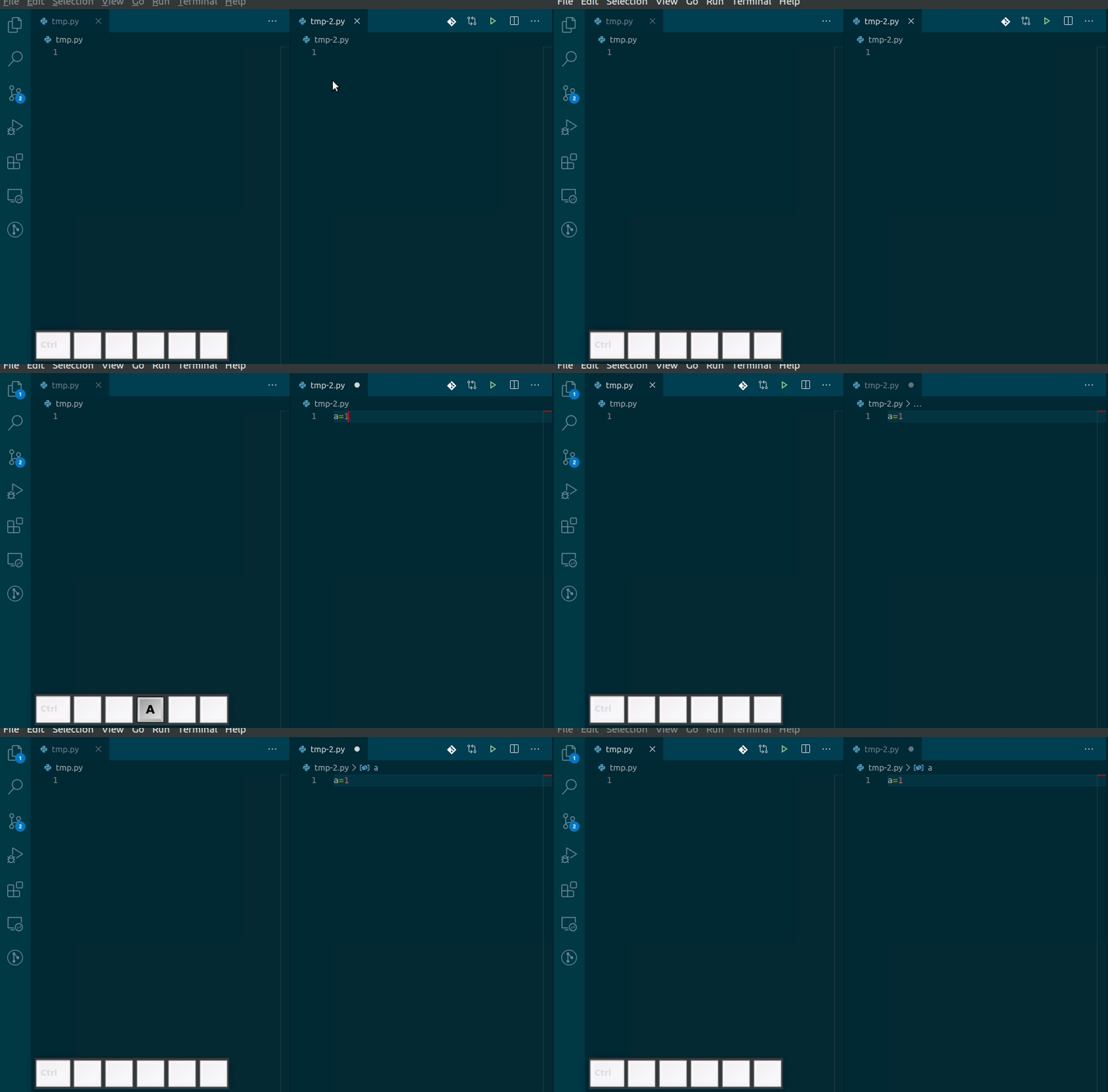
Expected behavior
- Focus should return to input box after Ctrl+2.
- Combinations Ctrl+1 and Ctrl+2 can be used multiple times in a row.
Your Jupyter and/or Python environment
- Jupyter server running: Local
- Extension version: 2020.5.78807
- VS Code version: 1.45.0
- Setting python.jediEnabled: true
- Python and/or Anaconda version: Python 3.8.2, conda 4.8.3
- OS: Linux (Ubuntu 18.04.4):
- Virtual environment: conda
Developer Tools Console Output
I am not really sure, what should go here, as output is rather verbose.
Microsoft Data Science for VS Code Engineering Team: @rchiodo, @IanMatthewHuff, @DavidKutu, @DonJayamanne, @greazer
 echasnovski
All 18 comments
I thought the reason might be the upgrade of the VS Code.
The problem actually exists in VS Code 1.45.0 with the latest three versions of the Python Extension, while it works well in VS Code 1.44.2 with 2020.5.78807.
BTW, if we make a new tab in the group of the interactive window, the focus function comes back. However, no code can be typed in the input box unless we restart the interactive window.
 xiejx5
on 15 May 2020
xiejx5
on 15 May 2020
Same issue here, with the same specs as @echasnovski
 colehawkins
on 16 May 2020
colehawkins
on 16 May 2020
Repro-ed on VSCode 1.45.1 with Python extension 2020.5.80290 & macOS. We'll investigate. Thank you for the bug report!
 joyceerhl
on 29 May 2020
joyceerhl
on 29 May 2020
This is driving me crazy. My whole python workflow is broken because of this bug.
 hikmet517
on 12 Jun 2020
hikmet517
on 12 Jun 2020
Because of this issue I had to use the mouse while programming.
A Workaround (in my setup) to focus the interactive input box is pressing: CTRL+` 2
(i.e. first focusing to the terminal with CTRL+` and then pressing Ctrl+2)
 ilkerhk
on 24 Jun 2020
ilkerhk
on 24 Jun 2020
@ilkerhk's solution doesn't work for me. Curious if there was any update on this issue?
 ejolly
on 11 Jul 2020
ejolly
on 11 Jul 2020
I investigated and this is caused by a change upstream in https://github.com/microsoft/vscode/issues/97992, so unfortunately a fix would need to be made to VS Code for this bug to be resolved.
joyceerhl
on 11 Jul 2020
Ah that's unfortunate. Thanks for the quick response @joyceerhl
ejolly
on 11 Jul 2020
There are quite a lot of different threads on this problem, but it does not seem to have a fix yet? Is there a place we can raise the issue, as I think this for many is quite important. I had hoped this would be fixed in the july version if it was a vs code issue?
 lasseklokker
on 31 Aug 2020
lasseklokker
on 31 Aug 2020
I agree this bug is really annoying.
Note: Even when it gets focus using the above workaround, pasting (from the main clipboard or from X-selection) are both not working in the interactive input box. I feel like these problems might be related.
ilkerhk
on 31 Aug 2020
Is there a fix yet? This bug is so annoying...
 fishstoryyy
on 13 Sep 2020
fishstoryyy
on 13 Sep 2020
+1
 laol777
on 3 Oct 2020
laol777
on 3 Oct 2020
This bug is what is preventing my switching to VS Code as my primary IDE. It's a small, but highly annoying issue.
 davidwb7777
on 15 Oct 2020
davidwb7777
on 15 Oct 2020
Any news to this issue?
fishstoryyy
on 16 Oct 2020
This is waiting on a fix in VS code itself. See the upstream issue Joyce logged:
https://github.com/microsoft/vscode/issues/97992
I believe VS code is asking us to debug it though. We have not had the time to try that yet.
 rchiodo
on 16 Oct 2020
rchiodo
on 16 Oct 2020
The workaround I mentioned above is not working consistently. This bug forced me to find another silly workaround:
I create an extra editorgroup in which I open a file named CommandHistory.py. ( Diagram below shows a sample layout, 1-main file I work on, 2- Python Interactive, 3- CommanHistory.py )
CommandHistory.py is just a python file. Now ctrl+3 works perfectly, but instead of jumping to interactive command textbox, ctrl+3 focuses third editorgroup, which is CommandHistory.py. Then typing something and pressing shift+enter run the line in the interactive window.
    |  2
1   |------
    |  3
Edit (6-Nov). In fact, I start to like this workaround more after adding the following shortcuts. Now I only use shift+tab to switch between main editor, and "command history".
 {
        "key": "shift+tab",
        "command": "workbench.action.focusThirdEditorGroup",
        "when": "activeEditorGroupIndex == 1"
    },
    {
        "key": "shift+tab",
        "command": "workbench.action.focusFirstEditorGroup",
        "when": "activeEditorGroupIndex == 3"
    }
I think I have a repro for the cat coding sample. Not sure how the focus gets lost, but this should repro in cat coding:
- Add this to the HTML in extension.ts:
                <textarea id="text-area" width="450" height="400">Test</textarea>
                <textarea id="text-area-2" width="450" height="400">Test 2</textarea>
- Add this to the main.js
let lastFocusedTextArea = (oldState && oldState.lastFocusedTextArea);

...
// Update state
        vscode.setState({ count: currentCount, lastFocusedTextArea });


    window.addEventListener('focus', () => {
        if (document.activeElement) {
            if (document.activeElement.nodeName === 'TEXTAREA') {
                lastFocusedTextArea = document.activeElement.id;
            } else if (document.activeElement.nodeName === 'BODY' && lastFocusedTextArea) {
                const elem = document.getElementById(lastFocusedTextArea);
                elem?.focus();
            }
        }

    }, true);
Open cat coding and put in second group.
Switch back and forth with CTRL+1 and CTRL+2. If you hit CTRL+2 a bunch really quick, focus will switch out of the window. Not sure where it went.
rchiodo
on 1 Dec 2020
Root cause of problem seems to be related to this:
https://github.com/microsoft/vscode/commit/88929c7a45ec3d1b0c570113cf222ff92a860f60
and this
https://github.com/microsoft/vscode/commit/870700e95c18eff7f0827595b521a9d10a243274
What's happening now is that the blur at the top of the first commit is happening async too. Sometimes it can happen after the focus delay.
rchiodo
on 1 Dec 2020
Related issues
 BCArg
·
3Comments
rchiodo
·
3Comments
BCArg
·
3Comments
rchiodo
·
3Comments
 jediyoda36
·
4Comments
jediyoda36
·
4Comments
 qdlmcfresh
·
3Comments
qdlmcfresh
·
3Comments
 AlbertDeFusco
·
4Comments
AlbertDeFusco
·
4Comments
Most helpful comment
This is waiting on a fix in VS code itself. See the upstream issue Joyce logged:
https://github.com/microsoft/vscode/issues/97992
I believe VS code is asking us to debug it though. We have not had the time to try that yet.