Vscode-jupyter: Duplicate copy in Notebook Editor
Bug: Notebook Editor, Interactive Window, Editor cells
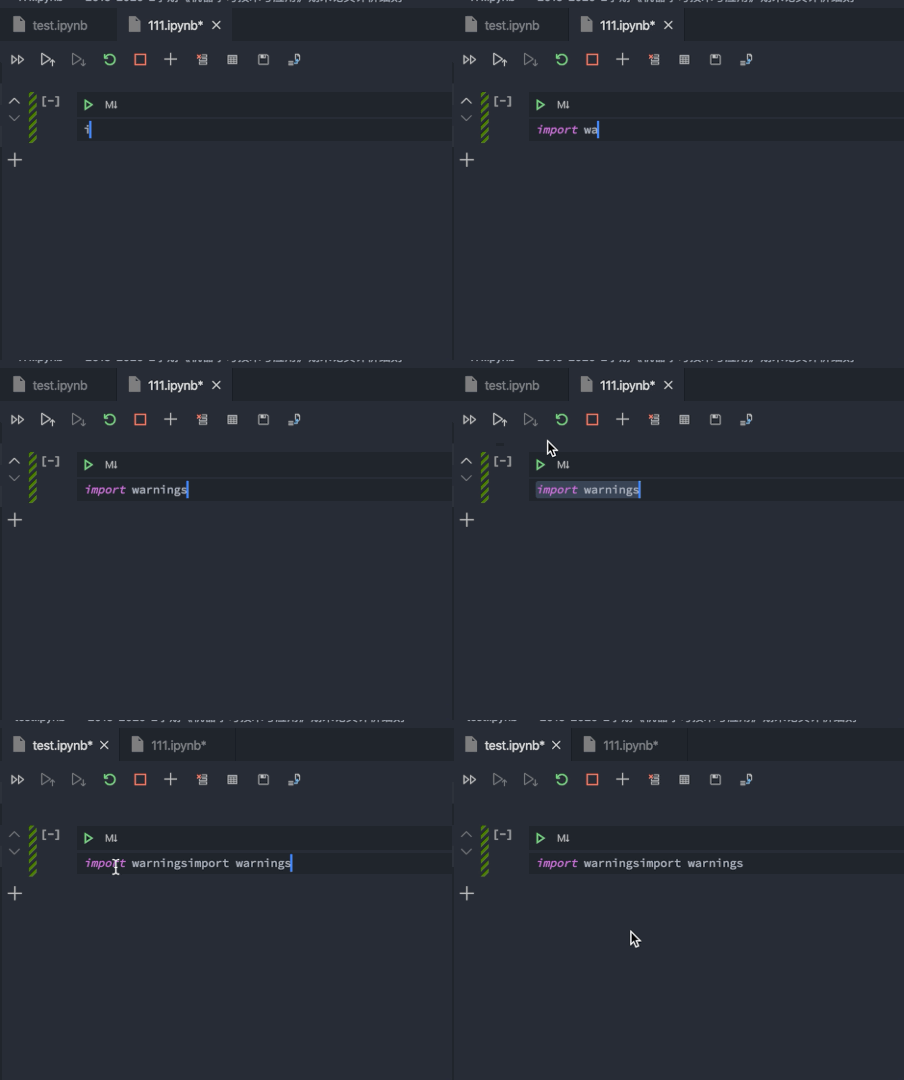
Steps to cause the bug to occur
- Open two ipynb files in VSCode
- Copy the code in one file, and paste it into another file
- You can find just like you've paste twice.
Actual behavior
There are two copies of the content of your clipboard
Expected behavior
There should be only one paste.
Your Jupyter and/or Python environment
_Please provide as much info as you readily know_
- Jupyter server running: Local
- Extension version: 2020.5.80290
- VS Code version: 1.45.1
- Setting python.jediEnabled: false
- Setting python.languageServer: Microsoft
- Python and/or Anaconda version: Python 3.7.7 & conda 4.8.3
- OS: Mac
- Virtual environment: conda
Developer Tools Console Output
No output available.
Microsoft Data Science for VS Code Engineering Team: @rchiodo, @IanMatthewHuff, @DavidKutu, @DonJayamanne, @greazer, @joyceerhl
 Saafo
Saafo
All 5 comments
Repro-ed. In particular, this issue only appears to show up when the paste destination is an ipynb that has been saved to disk. I.e. copy from untitled -> paste to titled / copy from titled -> paste to titled trigger the error; copy from titled -> paste to untitled / copy from untitled -> paste to untitled do not. Thanks for the bug report!
 joyceerhl
on 31 May 2020
joyceerhl
on 31 May 2020
This seems to happen only on mac, I can't repro it on windows or ubuntu.
 DavidKutu
on 2 Jun 2020
DavidKutu
on 2 Jun 2020
@DavidKutu just noticed while going through open issues that this is likely a dupe of microsoft/vscode-python#11796, and in that issue multiple users reported the bug with Darwin as the OS.
joyceerhl
on 3 Jun 2020
@joyceerhl yeah, it seems to be the same issue...
Saafo
on 3 Jun 2020
@Saafo I've tagged you in the other issue, please follow that one.
DavidKutu
on 3 Jun 2020
Related issues
 StevenLi-DS
·
34Comments
StevenLi-DS
·
34Comments
 taolluo
·
103Comments
taolluo
·
103Comments
 leonarduschen
·
61Comments
leonarduschen
·
61Comments
 Louis-DR
·
61Comments
Louis-DR
·
61Comments
 kdkavanagh
·
53Comments
kdkavanagh
·
53Comments