Vscode-jupyter: New notebook editor doesn't support %matplotlib widget
Bug: Notebook Editor, Interactive Window, Editor cells
Steps to cause the bug to occur
- Call for
%matplotlib widgetin a preview notebook editor. - Call for a plot to be drawn.
Actual behavior
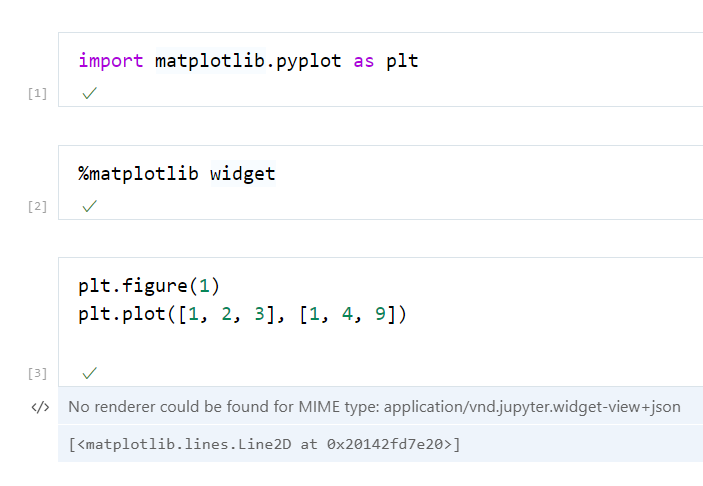
The cell output reads:
No renderer could be found for MIME type: application/vnd.jupyter.widget-view+json

[<matplotlib.lines.Line2D at 0x20142fd7e20>]
Minimal example:
Expected behavior
For a matplotlib widget to be drawn, as per the current notebook editor:

Your Jupyter and/or Python environment
- Jupyter server running: Local
- Extension version: v2020.9.104154-dev
- VS Code version: 1.49.0-insider
- Setting python.jediEnabled: false
- Setting python.languageServer: Microsoft
- Python and/or Anaconda version: 3.8.5
- OS: Windows
- Virtual environment: conda
 ruilvo
All 5 comments
@ruilvo thanks for reporting this and sorry about the issue. Currently I believe that widget support is still coming online for the new notebook editor, but I'm seeing an issue with display in the old notebook display as well.
 IanMatthewHuff
on 25 Aug 2020
IanMatthewHuff
on 25 Aug 2020
@IanMatthewHuff Thanks for the reply. The preview notebook editor looks great. I like that it's slowly opening up to have the cells feel like small regular text editors, with all the cool functionality we use on the regular files. Not sure what you mean about the old notebook display... It was always looked like that for me, care to explain what you mean?
ruilvo
on 26 Aug 2020
@ruilvo Not sure if it's just a setup issue. But on my machine I'm not actually seeing the matplotlib widget on the non-preview editor, though it is working for you. That's all I meant by the old notebook display. Figured that when we investigate this bug for the new notebook editor we should make sure that we check the old editor as well.
IanMatthewHuff
on 26 Aug 2020
@IanMatthewHuff Make sure you're running the magic %matplotlib widget and not for example %matplotlib notebook. And when you do, VSCode should prompt you to install the additional third-party JS to make it work. If I recall correctly it once didn't work on the notebook, but running the magic on an IPython interactive window caused the prompt to display.
ruilvo
on 27 Aug 2020
Thanks for your feedback. This issue will be addressed once VS Code adds native support for editing notebooks. Please see https://github.com/microsoft/vscode/issues/91987. This work is in progress, so some widget behavior is still not working well.
 greazer
on 27 Aug 2020
greazer
on 27 Aug 2020
Related issues
 PierreMarchand20
·
74Comments
PierreMarchand20
·
74Comments
 collinmccarthy
·
103Comments
collinmccarthy
·
103Comments
 ddouglas87
·
138Comments
ddouglas87
·
138Comments
 bigrat911
·
71Comments
bigrat911
·
71Comments
 StevenLi-DS
·
34Comments
StevenLi-DS
·
34Comments