Vscode-jupyter: Feature request - default themes for Python interactive window
Consider the possibly to change the style of the Python Interactive window, especially when using jupyter, and providing a list of default themes, a style "JupyterLab" would be nice for example.
It would allow us to enhance the results, like Markdown Preview Enhanced enhances the markdown output (and provides a list of default themes) or VS Code Jupyter Notebook Previewer enhances its own window viewer.
 PierreMarchand20
All 74 comments
An example: I like the solarized dark theme but it gives me the following highlighting


which is not really readable (especially the blue for functions and black for operations). Strangely enough, it is different from my python highlighting

At least, it would be nice to have the same colors as in the '.py' file.
PierreMarchand20
on 24 Dec 2018
We have an outstanding issue (#3107) to fix up the colors for the python in the interactive window.
Are you asking for more than just matching the python colors? Did you want theming for graphs and such too?
 rchiodo
on 2 Jan 2019
rchiodo
on 2 Jan 2019
Oh Well I do not know, a good start would be to have the same syntax coloring as in the editor. Because the python parts of the interactive window really hurt the eyes.
But then, it would be nice to have the option to have something like https://github.com/jithurjacob/vscode-nbpreviewer or the Jupiter lab, with a white background. Because for example, if I want to show something "live", it would be more readable.
PierreMarchand20
on 4 Jan 2019
I have the same issue. The jupyter window is much more readable if I change the theme to Light. So I wonder if it is possible to set different themes for those two separate windows.
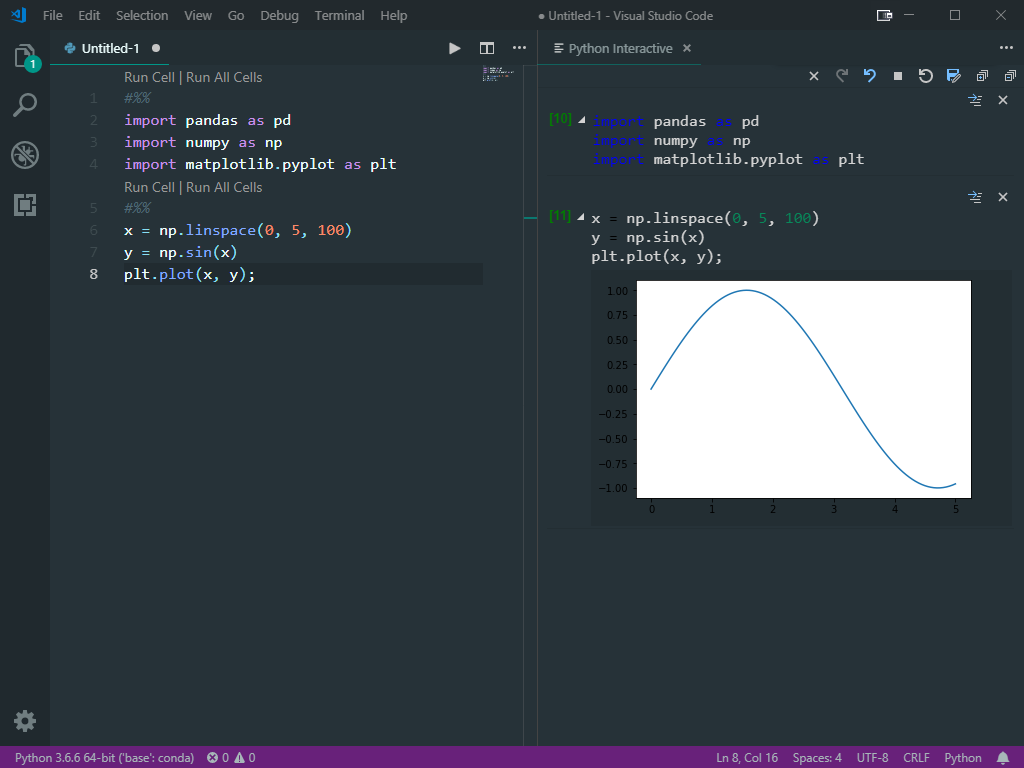

 StevenLi-DS
on 12 Jan 2019
StevenLi-DS
on 12 Jan 2019
a new issue was opened for this request by @IanMatthewHuff.
StevenLi-DS
on 14 Jan 2019
@PierreMarchand20 In the meantime:
https://github.com/neuron-team/vscode-ipe
StevenLi-DS
on 15 Jan 2019
Thx ! I know this one also: https://marketplace.visualstudio.com/items?itemName=donjayamanne.jupyter
PierreMarchand20
on 15 Jan 2019
But I guess that at the end, the goal is to have all these features in vscode-python
PierreMarchand20
on 15 Jan 2019
@PierreMarchand20 indeed...
StevenLi-DS
on 15 Jan 2019
@rchiodo The version 2019.1.0 somehow converts the tick label to white in fivethirtyeight theme. Is this expected?

StevenLi-DS
on 31 Jan 2019
Yes that's expected. You have to do this instead (as we are applying a dark background to matplotlib when the theme is dark):
#%%
with plt.style.context('fivethirtyeight', True):
    fix, ax = plt.subplots()
Without the after_reset style argument, I get this:

With after_reset set to True, I get this:

rchiodo
on 31 Jan 2019
How should I specify this if I use plt.use.style()?
StevenLi-DS
on 31 Jan 2019
You'd put that command before your plot. Like so:
plt.style.use('fivethirtyeight')
fix, ax = plt.subplots()
This goes into more detail:
https://matplotlib.org/users/style_sheets.html
Essentially imagine we have a plt.style.use('dark_background') at the very top of your file (because that's what we do when you startup with a dark scheme)
If you want to override just parts of it, this works:
plt.style.use(['fivethirtyeight', 'dark_background'])
fix, ax = plt.subplots()
I end up with this result then:

rchiodo
on 31 Jan 2019
Thanks for the information man... I just want the text labels to be black and eventually end up using:
plt.style.use(['seaborn', 'fivethirtyeight'])
+1 to fix this issue
currently the interactive window is really hard to be used with dark themes
 stefandeml
on 26 Feb 2019
stefandeml
on 26 Feb 2019
@stefandeml what theme are you currently using? Some of the dark themes we aren't finding the colors for, but it should work for the default dark theme.
rchiodo
on 26 Feb 2019
I should also add, it's unlikely we'll be adding 'custom' jupyter themes anytime soon. We're going to make the vscode themes all work with our window, but I don't see us adding our own set of colors.
rchiodo
on 26 Feb 2019
@rchiodo can confirm that the default dark theme works, but nothing else. For example, I am using this: https://marketplace.visualstudio.com/items?itemName=zhuangtongfa.Material-theme
 tku137
on 26 Feb 2019
tku137
on 26 Feb 2019
The issue with changing the style is that is also reflected in exported figures.
Example code:
#%%
import matplotlib.pyplot as plt
import numpy as np

#%%
%matplotlib inline

#%%
x = np.linspace(0, 2 * np.pi, 100)
y = np.sin(x)

fig, ax = plt.subplots()
ax.plot(x, y)

fig.savefig('plot.png')
If exexuted with, for example, the Dark theme the PNG also will have a dark themed plot. This might not be what you would expect!
 fkjogu
on 27 Feb 2019
fkjogu
on 27 Feb 2019
Without adding several themes for the jupyter window, just one similar to jupyter lab would be nice. Or at least a simple one with a white background and written black. This would make us able to export figures with a more neutral style.
PierreMarchand20
on 27 Feb 2019
One potential idea would be for us to ship a vscode theme with special scopes.
Right now a vscode theme has json like so for different colors:
"name": "Abyss",
    "tokenColors": [
        {
            "settings": {
                "background": "#000c18",
                "foreground": "#6688cc"
            }
        },
        {
            "scope": ["meta.embedded", "source.groovy.embedded"],
            "settings": {
                "background": "#000c18",
                "foreground": "#6688cc"
            }
        },
We could add a theme like this with special scopes that we use just in our jupyter output. Something like:
"name": "Python Interactive",
    "tokenColors": [
        {
            "scope": ["matplotlib.background", ],
            "settings": {
                "background": "#FFFFFF",
            }
        },
Once we did that other people could make interactive themes based on other themes. (A theme can include other theme's json too)
rchiodo
on 27 Feb 2019
+1 for fixing on dark themes. Was really excited about the new interactive console... but what a shock when I saw the colors:
Compare the functions above and below!

I'm currently using Material Theme: Palenight High Contrast.
VS Marketplace Link: https://marketplace.visualstudio.com/items?itemName=Equinusocio.vsc-material-theme
We're going to make the vscode themes all work with our window, but I don't see us adding our own set of colors.
Looking forward to those additions @rchiodo !
 KenanHArik
on 7 Mar 2019
KenanHArik
on 7 Mar 2019
@KenanHArik that theme should be working now. At least it does in our insiders build.

Although make sure to reload VS code after installing. The 'Python Interactive' window isn't capable of updating themes while it's open.
rchiodo
on 7 Mar 2019
Using a dark theme here (Palenight) and a lot of the colours in the interactive view are unreadable :(
It also seems to be ignoring my font settings
I'm on 1.32.1 and I just installed the insiders build of the extension

 benc-uk
on 8 Mar 2019
benc-uk
on 8 Mar 2019
What does regular code look like? There's a known issue (#3175) with exception messages. Those colors are created by jupyter and not us. We need to just change the background on exceptions so that the jupyter colors work.
rchiodo
on 8 Mar 2019
Actually fixing microsoft/vscode-python#3175 is trivial. I'm going to add a setting to specify the background color for error messages and default it to white.
rchiodo
on 8 Mar 2019
See microsoft/vscode-python#4683 for the fix. That should make 'Palenight' work.
rchiodo
on 8 Mar 2019
Font settings should work, but you need to restart the Python Interactive window.
rchiodo
on 8 Mar 2019
@benc-uk the next insiders build should be able to show errors in dark themes:

You can set the background color for errors with "errorBackgroundColor". It defaults to white.
rchiodo
on 8 Mar 2019
Great, thanks!
benc-uk
on 8 Mar 2019
Uggh, just noticed the foreground color for normal text is still using the theme color. I'll update that too to based it off of the background color you set.
rchiodo
on 8 Mar 2019
@KenanHArik that theme should be working now. At least it does in our insiders build.
Although make sure to reload VS code after installing. The 'Python Interactive' window isn't capable of updating themes while it's open.
Thank you @rchiodo, just confirmed this is working on the insiders release. FYI The colors are not 100% match to my theme, but they work well on the palenight background.
Is there a rough timeline on when this may roll into the general extension release?
KenanHArik
on 11 Mar 2019
Should be in the next release. We release every 4 weeks now, so in a couple of weeks.
rchiodo
on 11 Mar 2019
Fantastic!
I can confirm that it now works as expected.
stefandeml
on 14 Mar 2019
Sorry I am a bit lost in the comments. So I have problems with errors (eg dark blue against black) in version 1.32.3.

so I should use insiders build for the next week?
 seanv507
on 21 Mar 2019
seanv507
on 21 Mar 2019
Yes insiders build of the python extension has the fix. We haven't officially shipped it yet.
rchiodo
on 21 Mar 2019
Any blocker which prevents you from shipping this fix?
Rich Chiodo notifications@github.com schrieb am Do. 21. März 2019 um
16:24:
Yes insiders build of the python extension has the fix. We haven't
officially shipped it yet.—
You are receiving this because you were mentioned.
Reply to this email directly, view it on GitHub
https://github.com/Microsoft/vscode-python/issues/3773#issuecomment-475274904,
or mute the thread
https://github.com/notifications/unsubscribe-auth/AInEg9Eu9xONoGvKMlQ9qlH4Twa_1Zt1ks5vY6QogaJpZM4ZdqEJ
.>
Stefan Deml
- 41 76 665 60 55
stefandeml
on 21 Mar 2019
@stefandeml no, there is nothing blocking this. We'll ship it officially next week.
If you want it now, you can install the insider's build.
Download the vsix from the link and run the 'Install From VSIX' command in VS code.
rchiodo
on 21 Mar 2019
Yeah, I've it working already. However it seems to bother a couple of users
hence shipping the update would be awesome.
Rich Chiodo notifications@github.com schrieb am Do. 21. März 2019 um
18:35:
@stefandeml https://github.com/stefandeml no, there is nothing blocking
this. We'll ship it officially next week.If you want it now, you can install the insider's build
https://pvsc.blob.core.windows.net/extension-builds/ms-python-insiders.vsix
.Download the vsix from the link and run the 'Install From VSIX' command in
VS code.—
You are receiving this because you were mentioned.
Reply to this email directly, view it on GitHub
https://github.com/Microsoft/vscode-python/issues/3773#issuecomment-475330572,
or mute the thread
https://github.com/notifications/unsubscribe-auth/AInEg4nTfOCk-DFlMGOhDZxTdj_8TC-pks5vY8LrgaJpZM4ZdqEJ
.>
Stefan Deml
- 41 76 665 60 55
stefandeml
on 21 Mar 2019
To give the examples I had first given at the beginning of this thread:


It is almost as great as the highlighting of python code (the operator * is missing but it is not a big deal) and it is way more readable. But now there is an issue with error messages, they have a white background which makes them a bit weird in a dark theme:

PierreMarchand20
on 27 Mar 2019
Yeah our tokenization of the python code isn't exactly the same as VS Code. They don't expose their tokenizer and us implementing the same one would take a long time (and add some native dependencies that we didn't want). So we went with a 'close-enough' solution.
The error messages switching to white is another workaround. Jupyter colorizes the error messages using ansi escape codes. We didn't want to spend the time translating them for every theme, so forcing the background to white makes them match what Jupyter does.
rchiodo
on 27 Mar 2019
@rchiodo the code indeed looks much better than before!
But I wonder if it is possible to add a setting to let the user pick a background color for the error messages to match their theme? or maybe use another color than pure white? The white color really has a very high contrast on a dark theme. 😢
StevenLi-DS
on 29 Mar 2019
@StevenLi-DS Actually there is :)

That setting I have there does this:

You'll have to play around with it to get something that still lets you read the text of the error message.
Here's what #444444 produces:

rchiodo
on 29 Mar 2019
@rchiodo #444444 accidentally matches with my theme perfectly. Thanks!!!

JSON code:
{"python.dataScience.errorBackgroundColor": "#44444444"}
Got lost in the comments, but is there a way to leave the python interactive window in a light mode, and everything else in dark? For example, I am running into this rendering issue with the default dark theme. It would be nice to be able to see the syles that I set, as I use lots of plots for papes and such.

 Mathenym
on 25 Apr 2019
Mathenym
on 25 Apr 2019
There's supposed to be but it looks like our latest update broke it. :(.
It's this setting here:

I'll enter a new bug for it.
rchiodo
on 25 Apr 2019
Here's the new bug. Hopefully we'll have an insider's build fix for this shortly.
rchiodo
on 25 Apr 2019
@rchiodo It seems more like a facecolor issue to me and users just need to set it to white since many themes use transparent facecolor.
StevenLi-DS
on 25 Apr 2019
@StevenLi-DS How do you set the facecolor? I don't see it in the .json file for the theme that is applied. Or do you mean set the facecolor for every plot?
Mathenym
on 25 Apr 2019
which style are you using? I believe you can set it globally. e.g.
sns.set_style(rc={'figure.facecolor':'white'})

StevenLi-DS
on 25 Apr 2019
The 'ignoreVscodeTheme' problem will be fixed in our next insider's build if you want to try that too.
Set the 'ignoreVscodeTheme' setting and we should force the Python Interactive window to be the 'Light default(+)' theme.
rchiodo
on 26 Apr 2019
Thanks for all the help! One more question. Is there a way I can avoid this? I realize I can either ignore the theme or accept the theme. But is there a way I can leave the theme, but not have the plots render in dark mode?

Better yet, It would be nice to be able to customize the colors of interactive mode in a .json file similarly to how we can customize themes.
Mathenym
on 26 Apr 2019
I think it should be possible.
We save the default base theme for matplotlib in a variable. If you type in 'globals()' it should show it. Something like '_VSCode_defaultMatplotlib_Params'
You can then put this in a cell to reset:
matplotlib.rcParams.update(_VSCode_defaultMatplotlib_Params)
This combo worked beautifully:
import matplotlib as mpl
mpl.rcParams.update(_VSCode_defaultMatplotlib_Params)
sns.set_style(rc = {'figure.facecolor':'white'})
thank you!
Mathenym
on 26 Apr 2019
Thanks, this fixed my error messages window!
I have a similar issue with the output window as well, is there a similar setting, or different way to control this?

 jaymegordo
on 24 May 2019
jaymegordo
on 24 May 2019
@jaymegordo are you asking if you can control the colors on text output? That's not currently possible. It uses the default font and colors for the theme.
If that is what you wanted, what did you want to change?
rchiodo
on 24 May 2019
@rchiodo yes I was asking if its possible to modify the text output colors. I've modified my vs code theme (dark blue background) and wanted to match it. (I didn't realize that the interactive editor didn't have access to vs code theme colors.) Would be a nice feature to have if you're taking suggestions, thanks!
jaymegordo
on 24 May 2019
How did you modify your theme? In your settings file?
Our output is using this color right now:
notifications.background
If you set that in your settings, that should change the output color.
rchiodo
on 24 May 2019
We have access to some of the colors. The non-scope theme colors get set in our root css for our Python Interactive window. So the one above gets turned into a css var like so:
:root {
--vscode-notifications-background: #f3f3f3;
}
Scope theme colors (the ones we don't get) are the colors used in the editor for different tokens.
rchiodo
on 24 May 2019
@rchiodo YESSS perfect that's exactly what I wanted!! And thanks for the explanation.
Not quite as important, but do you have a similar mapping for all the Python Interactive colors just in case I wanted to change anything else? Or just something to browse and see what I can change?
jaymegordo
on 24 May 2019
Right now that information is in all of our CSS files in our code. Might be worth it to expose it somehow in a markdown file. I'll enter an issue for that.
That --vscode-notifications-background is being used here:
https://github.com/microsoft/vscode-python/blob/286ef4fef4a0f30e943a2736e49583c0b7df96d7/src/datascience-ui/history-react/cell.css#L60
rchiodo
on 24 May 2019
I entered an issue for figuring out this mapping:
https://github.com/microsoft/vscode-python/issues/5761
rchiodo
on 24 May 2019
@rchiodo very excited to see the color in the interactive windows finally matches with the theme!!!
There are two issues I want to ask:
- I customized the theme like not italicizing comments. Is there any way to reflect those customizations in python interactive window?
- Can I customize the fontsize of the code in the python interactive window?
StevenLi-DS
on 29 May 2019
We have an outstanding issue (#5701) of not picking up your user customizations for themes. Once we fix that, you can change the italicization of comments.
You can only change the code fontsize in the interactive window by changing your code font size in the editor.
rchiodo
on 29 May 2019
seems like this issue could be closed now.
StevenLi-DS
on 9 Jul 2019
@PierreMarchand20 at the beginning of this thread, you gave an example where the dark color theme made the graph background also black, do you know how to make it white, like this?

 wqp89324
on 20 Jul 2019
wqp89324
on 20 Jul 2019
One point I was making with this thread was that I did not how to do it. Then, reading the messages in the thread, you can either use the option ignoreVsCodeTheme or use in your code the following line: mpl.rcParams.update(_VSCode_defaultMatplotlib_Params). But the latter is not rendering well for me so I would suggest the former.
By the way, I noticed that there is no more issue with the background error color right ? If so, I agree that we could close this issue since we can set a light Color theme to the interactive window (which was what I was asking for at the beginning). But the default theme with a dark theme has really improved so I actually do not use this option ^^ thank you !
PierreMarchand20
on 20 Jul 2019
@PierreMarchand20 Thanks! I tried ignoreVsCodeTheme, which kinda work (interactive window is all light theme now), but still not as good as Spyder (the screenshot I attached earlier), and I attach another one below.

In Spyder, the dark theme works everywhere except for the figures, which is really the behavior I'm after. What do you think?
wqp89324
on 21 Jul 2019
Well then you can try the second approach I suggested, it will be closer to what you want. The idea is to change the parameter of matplotlib. But @rchiodo will know better than me about this.
PierreMarchand20
on 21 Jul 2019
actually, I got decent results with just mpl.style.use('classic')

PierreMarchand20
on 21 Jul 2019
Closing this as the original issue is resolved.
rchiodo
on 22 Jul 2019
Sorry wrong issue. Not sure we're going to do themes for the interactive window though.
rchiodo
on 22 Jul 2019
As I said in my previous message, I am ok to close it since allowing we can know use a light theme and most of the issues with colouring has been solved
PierreMarchand20
on 22 Jul 2019
Thanks. Will close then.
rchiodo
on 22 Jul 2019
Related issues
 sonulohani
·
3Comments
sonulohani
·
3Comments
 ashtou
·
3Comments
ashtou
·
3Comments
 qdlmcfresh
·
3Comments
qdlmcfresh
·
3Comments
 janosh
·
4Comments
janosh
·
4Comments
 jediyoda36
·
4Comments
jediyoda36
·
4Comments
Most helpful comment
@benc-uk the next insiders build should be able to show errors in dark themes:
You can set the background color for errors with "errorBackgroundColor". It defaults to white.