Vscode-jupyter: Settings Stop on Error not working
Bug: Notebook Editor
In the extension settings there is an option "Data Science: Stop On Error. Stop running cells if a cell throws an exception" (python.dataScience.stopOnError).
Is this option not intended to handle errors like in the Jupyter notebook interface (stop execution in the cell causing the error)?

Steps to cause the bug to occur
- Enable the setting "Data Science: Stop On Error. Stop running cells if a cell throws an exception"
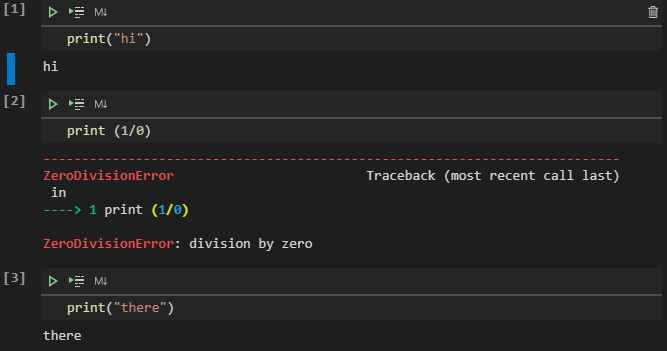
- Create new Jupyter notebook with 3 cells (1st and 3rd cell a print statement, 2nd cell raise an exception)
Actual behavior
- All cells are executed

Expected behavior
- Execution stops after the 2nd cell like in the jupyter notebook interface.

Your Jupyter and/or Python environment
- Jupyter server running: Local
- Extension version: 2020.7.96456
- VS Code version: 1.47.3
- Setting python.jediEnabled: true
- Setting python.languageServer: Jedi
- Python and/or Anaconda version: winpython 3.7.7
- OS: Windows | Mac | Linux (distro): Windows
- Virtual environment: N/A
 keluc
keluc
All 6 comments
hi @keluc , did you reload the window after changing the setting? You can do so by pressing Ctrl + Shift + P and selecting "Developer: Reload Window"
 claudiaregio
on 7 Aug 2020
claudiaregio
on 7 Aug 2020
not at first but I've tried it several times but it doesn't seem to change anything.
keluc
on 10 Aug 2020
Ok, we will take a look into this, thanks!
claudiaregio
on 10 Aug 2020
same here on WinPython-3.8.5.0rc / vscode-1.48.0 / python-vscode-2020-8-101144
 stonebig
on 15 Aug 2020
stonebig
on 15 Aug 2020
In addition to the issue described above, if you execute a number of cells above a certain cell and those take some time to be executed (indicator [*]), you can execute the last cell and this one gets a prompt number before the other cells are finished.
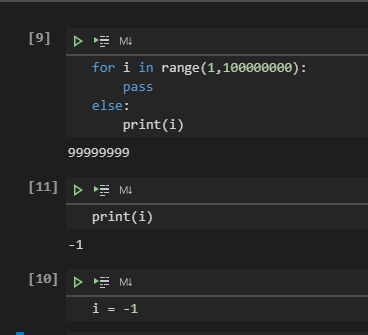
If you execute all from the beginning it seems to execute in the correct order (at least the number of times I tried)
In the jupyter notebook or lab the execution order is always maintained.

Is this behaviour caused by the same issue?
keluc
on 17 Aug 2020
Validated. Will be in our next major release.
 rchiodo
on 21 Aug 2020
rchiodo
on 21 Aug 2020
Related issues
 ddouglas87
·
138Comments
ddouglas87
·
138Comments
 kdkavanagh
·
53Comments
kdkavanagh
·
53Comments
 clouds56
·
75Comments
clouds56
·
75Comments
 StevenLi-DS
·
34Comments
StevenLi-DS
·
34Comments
 greazer
·
64Comments
greazer
·
64Comments
Most helpful comment
Validated. Will be in our next major release.