Vscode-jupyter: Timed out waiting to get a heartbeat from kernel process
Hello All,
I am having issues with my jupyter notebook on my vscode. I am using python 3.8.3 on windows 10. Also, I installed Microsoft python extension on my vscode.
Kindly find the attached copy of the errors that I am getting on the vscode

. And help me out with the necessary steps to take to resolve this issue.
Microsoft Data Science for VS Code Engineering Team: @rchiodo, @IanMatthewHuff, @DavidKutu, @DonJayamanne, @greazer, @joyceerhl
 Lukmon892
All 20 comments
exactly the same issue here.
Python: 3.8.3 (Anaconda)
IPython: 7.16.1 (Anaconda)
VS code: 1.49.2
 hhchi13
on 26 Sep 2020
hhchi13
on 26 Sep 2020
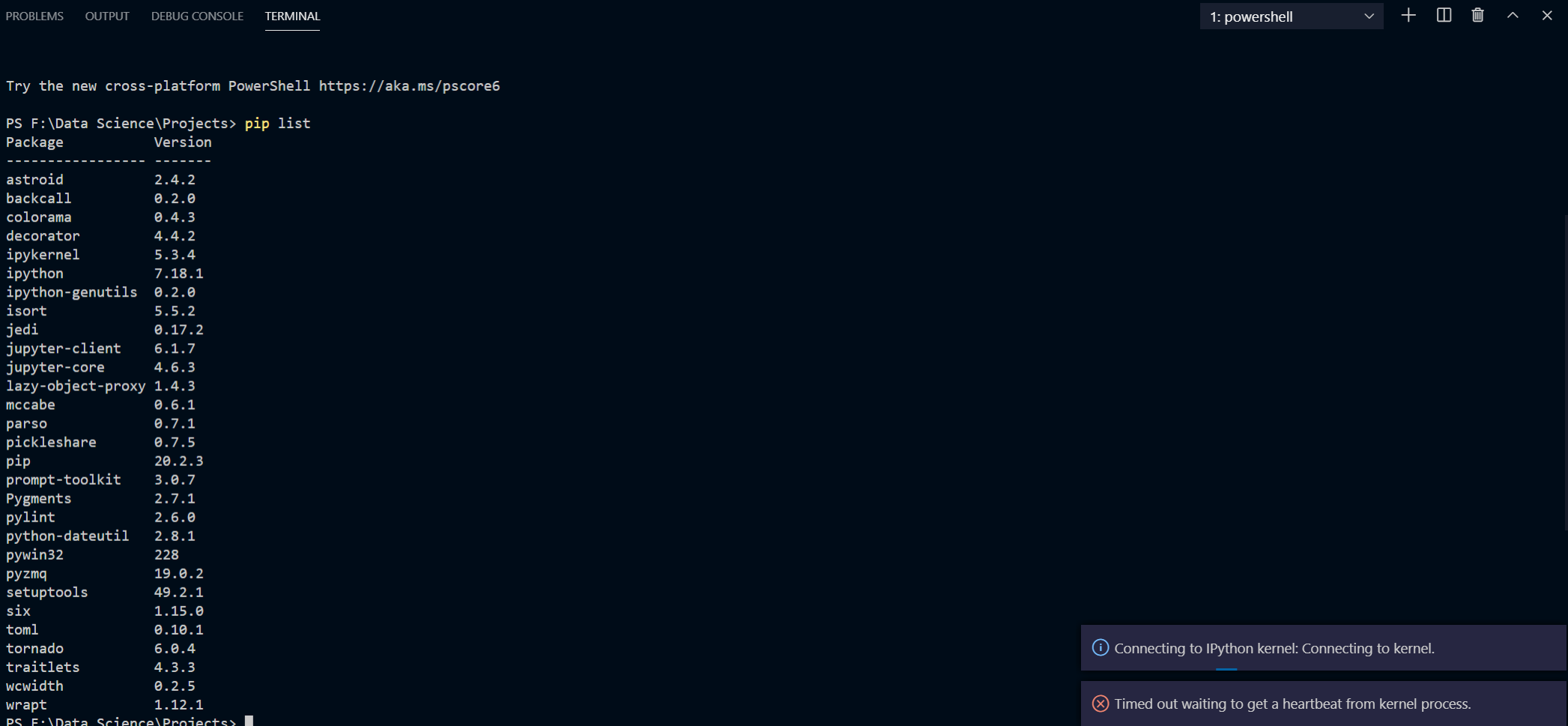
I might have the same issue but different trigger. I use Python Interactive and when trying to run a cell I get the same message
Python: 3.8.5
VS code: 1.49.2 (user setup)
 ALeoGen
on 27 Sep 2020
ALeoGen
on 27 Sep 2020
Hey folks. We had a recent issue introduced that is specifically hitting windows users who have a space in their user names. I see for a number of the recent reports that they seem to be in this category. We'll be rolling out a fix for this issue in the very near future.
 IanMatthewHuff
on 27 Sep 2020
IanMatthewHuff
on 27 Sep 2020
I was having this issue. I reinstalled the Python extension and it is working now.
 constant5
on 28 Sep 2020
constant5
on 28 Sep 2020
I was also having the issue
if the kernel issue is just in vscode and not in the jupyter notebook ("which you might be opening with anaconda prompt").
you should install the previous version of python, check this link!! and this link also..
 code-devel
on 29 Sep 2020
code-devel
on 29 Sep 2020
@IanMatthewHuff just a question since I have been experiencing a lot of notebook issues like this lately (before this it was the traitlets update issue) is it safe to say changing my OS from Windows to Linux is expected to improve my situation?
 leonarduschen
on 30 Sep 2020
leonarduschen
on 30 Sep 2020
@leonarduschen No, in general a very large percent of our users and many of our developers are on Windows, we just happened to get bit by a couple of issues in the last two releases. Performance should be expected to be as good on Windows as on Linux in general.
IanMatthewHuff
on 30 Sep 2020
We believe this has been fixed in the latest point release of the Python extension.
 greazer
on 1 Oct 2020
greazer
on 1 Oct 2020
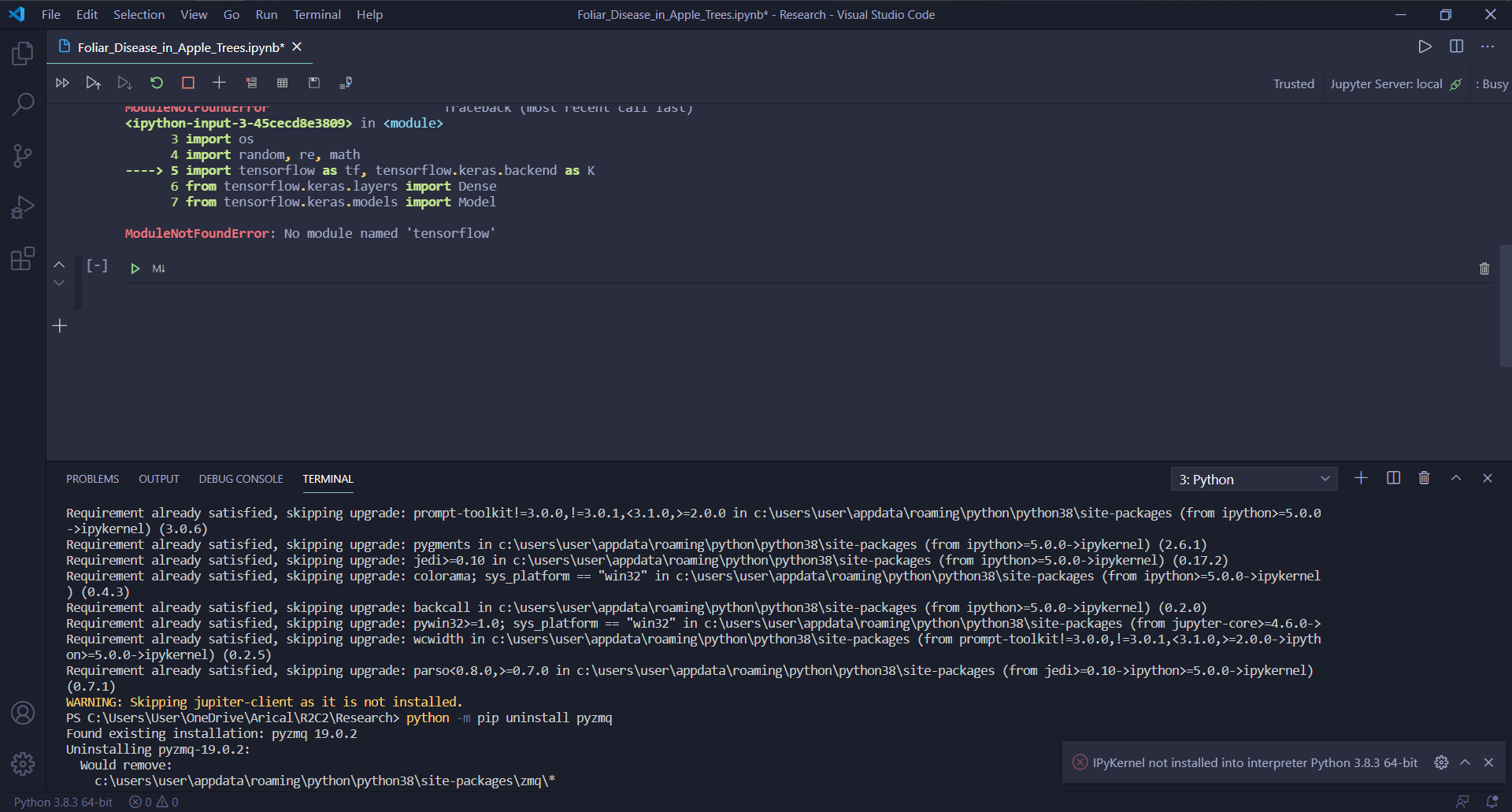
Same problem
 TomChan0508
on 4 Oct 2020
TomChan0508
on 4 Oct 2020
Timed out waiting to get a heartbeat from kernel process
I get the same error.
Version: 1.51.1
Commit: e5a624b788d92b8d34d1392e4c4d9789406efe8f
Date: 2020-11-10T23:31:29.624Z
Electron: 9.3.3
Chrome: 83.0.4103.122
Node.js: 12.14.1
V8: 8.3.110.13-electron.0
OS: Linux x64 4.19.0-11-amd64
 Nikhil1O1
on 12 Nov 2020
Nikhil1O1
on 12 Nov 2020
@Nikhil1O1 unfortunately 'Timed out waiting to get a heartbeat from a kernel process' is just a generic error. It can happen for any number of reasons.
Can you set this value:
"jupyter.logging.level": "debug"
Repro your problem, open the 'Jupyter' output tab, and then upload the contents of the output tab to a new issue? It's likely not related to this issue (as this was about spaces in the path which should have been fixed).
 rchiodo
on 12 Nov 2020
rchiodo
on 12 Nov 2020
@rchiodo I am having the same problem with WSL2 and SageMath.
User belongs to experiment group 'NativeNotebookEditor'
/usr/bin/python3 ~/.vscode-server-insiders/extensions/ms-toolsai.jupyter-2020.11.358541065/pythonFiles/pyvsc-run-isolated.py -c "import jupyter"
/usr/bin/python3 ~/.vscode-server-insiders/extensions/ms-toolsai.jupyter-2020.11.358541065/pythonFiles/pyvsc-run-isolated.py -c "import jupyter"
/usr/bin/python3 ~/.vscode-server-insiders/extensions/ms-toolsai.jupyter-2020.11.358541065/pythonFiles/pyvsc-run-isolated.py -c "import notebook"
/usr/bin/python3 ~/.vscode-server-insiders/extensions/ms-toolsai.jupyter-2020.11.358541065/pythonFiles/pyvsc-run-isolated.py -c "import notebook"
/usr/bin/python3 ~/.vscode-server-insiders/extensions/ms-toolsai.jupyter-2020.11.358541065/pythonFiles/pyvsc-run-isolated.py -c "import ipykernel"
/usr/bin/python3 ~/.vscode-server-insiders/extensions/ms-toolsai.jupyter-2020.11.358541065/pythonFiles/pyvsc-run-isolated.py -c "import ipykernel"
/usr/bin/python3 ~/.vscode-server-insiders/extensions/ms-toolsai.jupyter-2020.11.358541065/pythonFiles/pyvsc-run-isolated.py jupyter kernelspec --version
/usr/bin/python3 ~/.vscode-server-insiders/extensions/ms-toolsai.jupyter-2020.11.358541065/pythonFiles/pyvsc-run-isolated.py jupyter kernelspec --version
/usr/bin/python3 ~/.vscode-server-insiders/extensions/ms-toolsai.jupyter-2020.11.358541065/pythonFiles/pyvsc-run-isolated.py vscode_datascience_helpers.daemon --daemon-module=vscode_datascience_helpers.kernel_launcher_daemon -v
/usr/bin/python3 ~/.vscode-server-insiders/extensions/ms-toolsai.jupyter-2020.11.358541065/pythonFiles/pyvsc-run-isolated.py vscode_datascience_helpers.daemon --daemon-module=vscode_datascience_helpers.kernel_launcher_daemon -v
/usr/bin/python3 ~/.vscode-server-insiders/extensions/ms-toolsai.jupyter-2020.11.358541065/pythonFiles/pyvsc-run-isolated.py vscode_datascience_helpers.daemon --daemon-module=vscode_datascience_helpers.jupyter_daemon -v
/usr/bin/python3 ~/.vscode-server-insiders/extensions/ms-toolsai.jupyter-2020.11.358541065/pythonFiles/pyvsc-run-isolated.py vscode_datascience_helpers.daemon --daemon-module=vscode_datascience_helpers.jupyter_daemon -v
/usr/bin/python3 ~/.vscode-server-insiders/extensions/ms-toolsai.jupyter-2020.11.358541065/pythonFiles/pyvsc-run-isolated.py vscode_datascience_helpers.daemon --daemon-module=vscode_datascience_helpers.jupyter_daemon -v
/usr/bin/python3 ~/.vscode-server-insiders/extensions/ms-toolsai.jupyter-2020.11.358541065/pythonFiles/pyvsc-run-isolated.py vscode_datascience_helpers.daemon --daemon-module=vscode_datascience_helpers.jupyter_daemon -v
/usr/bin/python3 ~/.vscode-server-insiders/extensions/ms-toolsai.jupyter-2020.11.358541065/pythonFiles/pyvsc-run-isolated.py vscode_datascience_helpers.daemon --daemon-module=vscode_datascience_helpers.jupyter_daemon -v
/usr/bin/python3 ~/.vscode-server-insiders/extensions/ms-toolsai.jupyter-2020.11.358541065/pythonFiles/pyvsc-run-isolated.py vscode_datascience_helpers.daemon --daemon-module=vscode_datascience_helpers.jupyter_daemon -v
/usr/bin/sage --python -m sage.repl.ipython_kernel -f /tmp/tmp-506nDwiRrRqUcl.json
cwd: /mnt/c/Users/Elad Zelingher/.vscode-insiders/extensions/ms-vscode-remote.remote-wsl-0.51.3
Error 2020-11-12 15:04:20: Disposing session as kernel process died ExitCode: 1, Reason: undefined
Error 2020-11-12 15:04:20: Failed to connect raw kernel session: Error: Canceled
Error 2020-11-12 15:04:20: failed to create INotebook in kernel [Error: Canceled
at t.KernelShellFutureHandler.dispose (/home/elad/.vscode-server-insiders/extensions/ms-toolsai.jupyter-2020.11.358541065/out/client/extension.js:32:482004)
at /home/elad/.vscode-server-insiders/extensions/ms-toolsai.jupyter-2020.11.358541065/out/client/extension.js:47:787217
at Map.forEach ()
at g._clearState (/home/elad/.vscode-server-insiders/extensions/ms-toolsai.jupyter-2020.11.358541065/out/client/extension.js:47:787160)
at g.dispose (/home/elad/.vscode-server-insiders/extensions/ms-toolsai.jupyter-2020.11.358541065/out/client/extension.js:47:780908)
at /home/elad/.vscode-server-insiders/extensions/ms-toolsai.jupyter-2020.11.358541065/out/client/extension.js:32:264323
at Object.t.swallowExceptions (/home/elad/.vscode-server-insiders/extensions/ms-toolsai.jupyter-2020.11.358541065/out/client/extension.js:1:132214)
at l.dispose (/home/elad/.vscode-server-insiders/extensions/ms-toolsai.jupyter-2020.11.358541065/out/client/extension.js:32:264285)
at t.RawSession.dispose (/home/elad/.vscode-server-insiders/extensions/ms-toolsai.jupyter-2020.11.358541065/out/client/extension.js:49:187286)
at processTicksAndRejections (internal/process/task_queues.js:94:5)]
Error 2020-11-12 15:04:20: DataScience Error [Error: Canceled
at t.KernelShellFutureHandler.dispose (/home/elad/.vscode-server-insiders/extensions/ms-toolsai.jupyter-2020.11.358541065/out/client/extension.js:32:482004)
at /home/elad/.vscode-server-insiders/extensions/ms-toolsai.jupyter-2020.11.358541065/out/client/extension.js:47:787217
at Map.forEach ()
at g._clearState (/home/elad/.vscode-server-insiders/extensions/ms-toolsai.jupyter-2020.11.358541065/out/client/extension.js:47:787160)
at g.dispose (/home/elad/.vscode-server-insiders/extensions/ms-toolsai.jupyter-2020.11.358541065/out/client/extension.js:47:780908)
at /home/elad/.vscode-server-insiders/extensions/ms-toolsai.jupyter-2020.11.358541065/out/client/extension.js:32:264323
at Object.t.swallowExceptions (/home/elad/.vscode-server-insiders/extensions/ms-toolsai.jupyter-2020.11.358541065/out/client/extension.js:1:132214)
at l.dispose (/home/elad/.vscode-server-insiders/extensions/ms-toolsai.jupyter-2020.11.358541065/out/client/extension.js:32:264285)
at t.RawSession.dispose (/home/elad/.vscode-server-insiders/extensions/ms-toolsai.jupyter-2020.11.358541065/out/client/extension.js:49:187286)
at processTicksAndRejections (internal/process/task_queues.js:94:5)]
Version: 1.52.0-insider (user setup)
Commit: 050a123750e4ef4009930d0da1ff7a1a6441d4f3
Date: 2020-11-12T05:43:04.852Z
Electron: 9.3.3
Chrome: 83.0.4103.122
Node.js: 12.14.1
V8: 8.3.110.13-electron.0
OS: Windows_NT x64 10.0.19042
 darkl
on 12 Nov 2020
darkl
on 12 Nov 2020
@darkl can you do the same thing I suggested for @Nikhil1O1? Turn on full logging and log a separate bug. THis looks like the problem, but we should have more output than that:
Error 2020-11-12 15:04:20: Disposing session as kernel process died ExitCode: 1, Reason: undefined
@rchiodo I did turn on "jupyter.logging.level": "debug", I think:
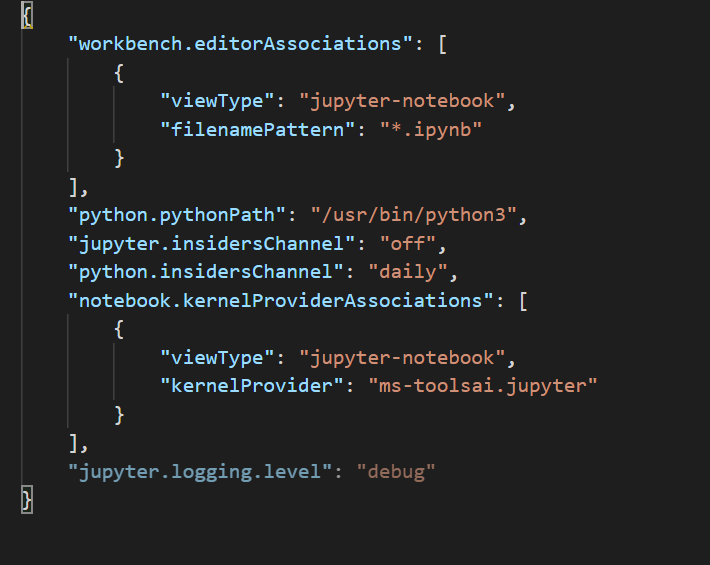
darkl
on 12 Nov 2020
@rchiodo I did turn on
"jupyter.logging.level": "debug", I think:
Where can I find this file?
 iyoushe1703
on 17 Nov 2020
iyoushe1703
on 17 Nov 2020
@rchiodo I did turn on
"jupyter.logging.level": "debug", I think:
How to turn this on??+
Shall I run this in a cell or terminal??
Nikhil1O1
on 17 Nov 2020
Use Ctrl+Shift+P and write JSON there. Choose Preferences: Open Settings (JSON).
Elad
darkl
on 17 Nov 2020
Use Ctrl+Shift+P and write
JSONthere. Choose Preferences: Open Settings (JSON).Elad
Okay, I added "jupyter.logging.level": "debug" in the json, but where will the output be returned?
I mean when I get the kernel heartbeat error, How can I access the log?
Nikhil1O1
on 19 Nov 2020
I think go to Output (CTRL+SHIFT+U) and then select Jupyter.

@rchiodo can you confirm I understood your instructions correctly?
Elad
darkl
on 19 Nov 2020
@Nikhil1O1 unfortunately 'Timed out waiting to get a heartbeat from a kernel process' is just a generic error. It can happen for any number of reasons.
Can you set this value:
"jupyter.logging.level": "debug"Repro your problem, open the 'Jupyter' output tab, and then upload the contents of the output tab to a new issue? It's likely not related to this issue (as this was about spaces in the path which should have been fixed).
3973
I tried to explain my issue in the given link
Nikhil1O1
on 19 Nov 2020
Related issues
rchiodo
·
38Comments
 StevenLi-DS
·
34Comments
StevenLi-DS
·
34Comments
 HenriqueAJNB
·
48Comments
HenriqueAJNB
·
48Comments
 ddouglas87
·
138Comments
ddouglas87
·
138Comments
 lxlguy
·
38Comments
lxlguy
·
38Comments
Most helpful comment
Hey folks. We had a recent issue introduced that is specifically hitting windows users who have a space in their user names. I see for a number of the recent reports that they seem to be in this category. We'll be rolling out a fix for this issue in the very near future.