Vscode-jest: Disable starting Jest automatically
Is there a way to not have Jest start automatically when I'm in the root folder with Jest installed?
 dandv
dandv
All 17 comments
Apparently you can customise the activation events (see README) but this doesn't work for me currently.
Edit: Actually it doesn't quite say that explicitly, I think they might just be hardcoded. Given that 95% of my work in our repo is Python work, but that there's Jest installed for our frontend, it would be great to be able to delay starting until I start editing JS files.
 danpalmer
on 27 Jul 2018
danpalmer
on 27 Jul 2018
I have the following in my user settings, which seems to have disabled the auto-startup:
"jest.runAllTestsFirst": false,
"jest.autoEnable": false,
"jest.showCoverageOnLoad": false
 Adverbly
on 1 Aug 2018
Adverbly
on 1 Aug 2018
Do we need both now? You used to be ok with only:
"jest.autoEnable": false,
 seanpoulter
on 2 Aug 2018
seanpoulter
on 2 Aug 2018
There is something wrong... In my case I have autoEnable disabled but changing from enabled to disabled any of these two Enable Code Lens or Enable Inline Error Messages still triggers Jest, and on all files and changes not only on tests.
VS Code 1.30.2
vscode-jest 2.9.2
OS Mojave 10.14.3
Also having disabled Enable Inline Error Messages there is a "leftover" from it think 😊

 ghs
on 31 Jan 2019
ghs
on 31 Jan 2019
I have the following in my user settings, which seems to have disabled the auto-startup:
"jest.runAllTestsFirst": false,
"jest.autoEnable": false,
"jest.showCoverageOnLoad": false
@Adverbly Bby 'user settings', do you mean "settings.json" file .vscode folder? I wanted to know the location where I can above line of code
 briwoto
on 18 May 2019
briwoto
on 18 May 2019
I'm here chiming in on a setting to completely enable/disable this Jest plugin with a single setting. For instance, the ESLint extension does this with it's eslint.enable option.
Why is such feature needed?
Personally, I work on multiple personal/work projects and not all of them are using Jest. In fact, not using Jest is the norm, using Jest is the exception. So, ideally (for me), I'd have the extension completely disabled by default and I should have a single option to enable it per project.
Unfortunately, for me, this is a showstopper :(
What do you mean with "completely disabled"?
I mean, with something like jest.enable: false, this extension should act like it was never installed in the first place:
- Never run
jest, not even once. - Don't show
Debugcode lens. - Don't show green/red filled/unfilled circles next to test specs.
- Don't show inline error messages.
Does this seem like a reasonable request?
 rfgamaral
on 6 Jul 2019
rfgamaral
on 6 Jul 2019
I just looked into the code base and to my limited knowledge of this extension I see two ways this could be implemented:
1)
diff --git a/src/JestExt.ts b/src/JestExt.ts
index d8f19dd..ceaa26a 100644
--- a/src/JestExt.ts
+++ b/src/JestExt.ts
@@ -102,15 +102,15 @@ export class JestExt {

     this.status = statusBar.bind(workspaceFolder.name)

-    // The theme stuff
-    this.setupDecorators()
-    // The bottom bar thing
-    this.setupStatusBar()
-    // reset the jest diagnostics
-    resetDiagnostics(this.failDiagnostics)
-
     // If we should start the process by default, do so
     if (this.pluginSettings.autoEnable) {
+      // The theme stuff
+      this.setupDecorators()
+      // The bottom bar thing
+      this.setupStatusBar()
+      // Reset the jest diagnostics
+      resetDiagnostics(this.failDiagnostics)
+      // Start the process
       this.startProcess()
     } else {
       this.channel.appendLine('Skipping initial Jest runner process start.')
2)
diff --git a/package.json b/package.json
index c8487bd..34ba970 100644
--- a/package.json
+++ b/package.json
@@ -49,6 +49,12 @@
       "type": "object",
       "title": "Jest configuration",
       "properties": {
+        "jest.enable": {
+          "description": "Controls whether Jest is enabled or not",
+          "type": "boolean",
+          "default": true,
+          "scope": "resource"
+        },
         "jest.autoEnable": {
           "description": "Automatically start Jest for this project",
           "type": "boolean",
diff --git a/src/JestExt.ts b/src/JestExt.ts
index d8f19dd..cd735bb 100644
--- a/src/JestExt.ts
+++ b/src/JestExt.ts
@@ -74,6 +74,9 @@ export class JestExt {
     failDiagnostics: vscode.DiagnosticCollection,
     instanceSettings: InstanceSettings
   ) {
+    if (!this.pluginSettings.enable) {
+      return;
+    }
     this.workspaceFolder = workspaceFolder
     this.jestWorkspace = jestWorkspace
     this.channel = outputChannel
diff --git a/src/Settings/index.ts b/src/Settings/index.ts
index 17de618..e9d667c 100644
--- a/src/Settings/index.ts
+++ b/src/Settings/index.ts
@@ -1,6 +1,7 @@
 import { TestState } from '../DebugCodeLens'

 export interface IPluginResourceSettings {
+  enable?: boolean
   autoEnable?: boolean
   enableInlineErrorMessages?: boolean
   enableSnapshotUpdateMessages?: boolean
If any of these options are acceptable and wouldn't cause any additional problems, I don't mind opening a PR for any of them. Just let me know :)
rfgamaral
on 6 Jul 2019
@rfgamaral if you simply want to disable the extension "completely" for a given workspace, there is a simpler solution: use vscode's extension management functionality:
I mean, with something like jest.enable: false, this extension should act like it was never installed in the first place:
vscode can disable extension by workspace.
I'd have the extension completely disabled by default and I should have a single option to enable it per project.
the settings in this extension are meant to control different aspect of the extension, we didn't really have a single switch to turn on/off all functionality since vscode already have that, so probably no need to reinvent the wheel... but hey, thanks for diving deeper into the code, great attitude!
 connectdotz
on 6 Jul 2019
connectdotz
on 6 Jul 2019
@connectdotz Unfortunately that is not ideal for a couple of reasons:
- Such workspace configuration is not saved in the
settings.jsonfile. This makes this configuration unsyncable (I use Settings Sync to sync my VS Code settings across multiple machines). - I believe you'll not be able to use that technique with multi-root workspaces. If only some of the projects use Jest, the extensions will be enabled/disabled for all of them. Whereas if we had an extension open, you can truly enable/disable it globally, per workspace or per project, true flexibility.
Would it be so bad to have such an option built into the extension? What exactly are your concerns of implementing such option? Maybe we can find a common ground :)
rfgamaral
on 6 Jul 2019
Such workspace configuration is not saved in the settings.json file. This makes this configuration unsyncable (I use Settings Sync to sync my VS Code settings across multiple machines).
hmmm... You just need to set it up once per project. No need to sync settings nor would it interfere with it... maybe I misunderstand your point?
I believe you'll not be able to use that technique with multi-root workspaces.
Yes, you could use it for multi-root workspaces if you want to disable the extension "completely" as you originally requested. But if you are talking about turning on/off some folders in the multi-root project, it is a different story and is fully supported via jest.disabledWorkspaceFolders.
Would it be so bad to have such an option built into the extension?
When there is a simpler way to achieve the same functionality, we should always consider that first.
connectdotz
on 6 Jul 2019
hmmm... You just need to set it up once per project. No need to sync settings nor would it interfere with it... maybe I misunderstand your point?
Maybe it was me who didn't explain better. I work on multiple machines, my home desktop PC and a laptop. I have 2 separate installations of VS Code and I sync all my settings between them so I don't have to do the same thing twice on each machine. What you are suggesting forces me to set it up twice per project, once on each machine. It's just cumbersome when everything could be synced (the global setting and each project setting can also be synced by adding it to Git).
But forget about that! It would help me a bit but in all honesty it's still not the solution I consider perfect (more on that below).
Yes, you could use it for multi-root workspaces if you want to disable the extension "completely" as you originally requested. But if you are talking about turning on/off some folders in the multi-root project, it is a different story and is fully supported via jest.disabledWorkspaceFolders.
Wasn't aware of that and it could indeed help with situation but it wouldn't be ideal for me. I mean, I'd prefer to have it disabled globally and enable it per project. The way the Jest extension options are setup, I'm forced to do the opposite (enable globally and disable per project).
When there is a simpler way to achieve the same functionality, we should always consider that first.
I think that's a bit subjective. For me, "simpler", is a single on/off option setting that I can place in VS Code global settings.json file and/or in a project's .vscode/settings.json file. Having to click through menus to disable an extension globally and re-enable it per project, once again through menus, is more "complicated". And like I said, none of these options are syncable. I can't setup a new VS Code installation in a different machine and have all these settings automatically imported without worrying about that.
Anyway, after thinking a bit more about this, I believe I'm approaching the problem (and the solution) incorrectly. Actually, it's probably a completely different issue which I'll open in a bit. So sorry for all this confusion.
However, for this issue in particular, IMO what should be reviewed is only this:
There is something wrong... In my case I have autoEnable disabled but changing from enabled to disabled any of these two Enable Code Lens or Enable Inline Error Messages still triggers Jest, and on all files and changes not only on tests.
Also having disabled Enable Inline Error Messages there is a "leftover" from it think 😊
Personally, from my point of view, jest.autoEnable: false shouldn't trigger code lens, inline error messages or those green/red circles until I manually run Jest. Cause that's what the autoEnable setting is supposed to do, right? If so, wouldn't my option 1 proposal solve that? Would that change some intended behavior?
rfgamaral
on 6 Jul 2019
It seems there is some misunderstanding of what these settings are for (maybe we should consider better naming). It would be easier to understand them from the angle of the extension's core mission: _helping developers to produce high-quality software with continuous jest testing_, specifically:
show your project's test status continuously: by default, it starts a jest process upon activation to monitor and update the test status indicators (the circles) accordingly. Setting
"jest.autoEnable": falsetells the extension: _"don't run jest at start-up, I will manually run it later"_. Since the test hasn't been run, the extension displayed the "unknown" (empty circle) status indicator to accurately reflect the project's status. (maybe "runJestOnStartup" is a better name?)- help to debug jest test: by offering a debug codelens for certain test status (this is configurable). By default, "unknown" is one of the test statuses for codelens. You can debug tests independent of the "jest startup process" mentioned above because vscode debugger will launch its own node/jest upon triggered.
I understand from the point of view that _"I don't want my project test status to be monitored"_, these settings seem inconsistent. But that is not what this extension is about, and hopefully, you can see now from the other angle where _"I do want this extension to keep me honest and monitor my test status continuously"_, they offer different knobs for different functionalities under a consistent goal.
Can we add a new setting to turn off the whole extension? Sure we can, but why do that when users can simply not install the extension or disable it using the platform feature? Not only this functionality doesn't help advance the extension's core mission, but it also overlaps/reinvent-the-wheel with the platform feature, thus I hesitate with such addition.
connectdotz
on 7 Jul 2019
Thanks for having a look at where to add the enable/disable code @rfgamaral. You've got the right idea. I think we could move that logic up a few levels up to where we activate the extension src/extension.ts. Here's the order of events as I see it:
- The user performs one of the Activation Events defined in the
package.json - VS Code activates the extension by calling the
activatefunction in src/extension.ts - 👉 _We check if the extension is enabled or disabled and act accordingly._
- We prepare the extension by creating an instance of the
ExtensionManagerwhich applies settings and creates an output channel, etc.
I was thinking something like this with some rework to extract all that logic and wrap the activate and deactivate calls.
--
There are a few different problems we've raised so far. Do we need any separate issues? :thinking:
- [ ] The documentation isn't clear about how to disable the extension using the settings
- [ ] The documentation isn't clear about how to disable the extension using the extension managers newer "Disable for this workspace" setting
- [ ] The documentation isn't clear about what
jest.autoEnabledoes, and how it affects the Code Lens and inline error messages. - [ ] @rfgamaral has identified a new use case to enable/disable the extension that we didn't consider.
As a developer who uses uses more than one computer, I would like to enable/disable the extension using the workspace or user settings that are synchronized between machines/the team
--
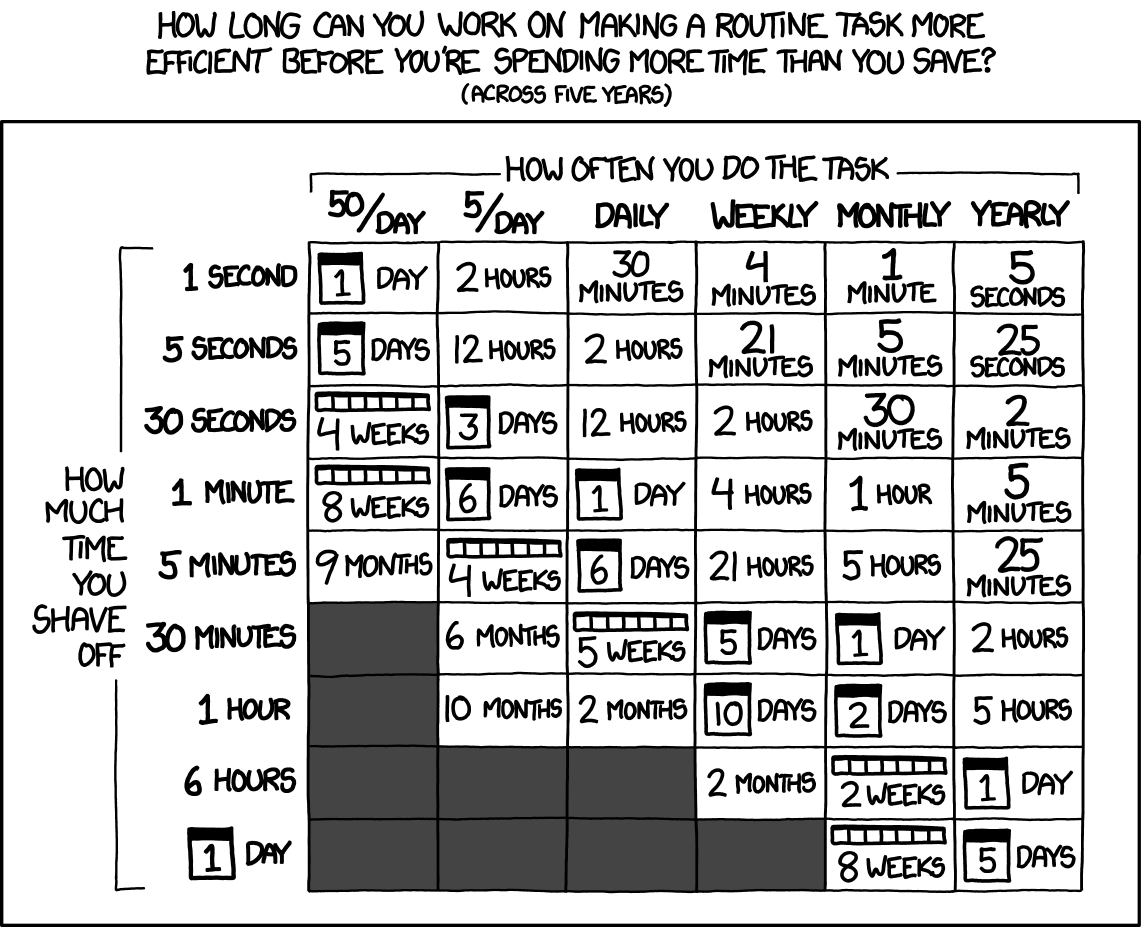
That's a good summary @connectdotz. I've spent a bit of time reviewing this issue today, but I probably should have been reviewing PRs or other issues 😓. The setting alone isn't worth our time. It takes a dev less than 30 seconds to uninstall the extension. Here's that timeless humbling reference chart:
xkcd.com/1205: Is it worth the time?
_Don't forget the time you spend finding the chart to look up what you save. And the time spent reading this reminder about the time spent. And the time trying to figure out if either of those actually make sense. Remember, every second counts toward your life total, including these right now._
--
Can we add a new setting to turn off the whole extension? Sure we can, but why do that when users can simply not install the extension or disable it using the platform feature? Not only this functionality doesn't help advance the extension's core mission, but it also overlaps/reinvent-the-wheel with the platform feature, thus I hesitate with such addition.
There _is_ one other reason you'd consider making the change: using a list of folders in jest.disabledWorkspaceFolders seems brittle. Was that an intentional choice to use a setting at the workspace instead of in the workspace folders?
Can you use a workspace on two different environments? If you can, it seems like you'd end up with changes between path separators, absolute paths, and network drive mappings. (I'm not sure if we've had any related issues).
seanpoulter
on 7 Jul 2019
@connectdotz
I understand practically (more on that below) everything you're saying and I kinda agree, but I'd personally make some changes (some visual) if possible:
- I'm not sure what you use for "skip" but for "fail"/"pass", red and green are obvious and I believe these are filled circles, right? But if a test status is "unknown" I don't think a green circle is a good choice, perhaps gray?
- This is just nitpicking but could you add a little bit of breathing space between the circle and the
it(ortest) function? - As for the option name, instead of
runJestOnStartupand since all options are prefixed withjest, my suggestion is simplyjest.runOnStartup.
I understand from the point of view that "I don't want my project test status to be monitored", these settings seem inconsistent.
No, I understand you're point of view and like I said, I was approaching the problem incorrectly.
Can we add a new setting to turn off the whole extension? Sure we can, but why do that when users can simply not install the extension or disable it using the platform feature?
Yes, we can use the platform feature, but as I explained earlier, this is not a good platform feature, at least for me. But I also understand that I'm barking at the wrong tree. I mean, yes, it would be easy for this extension to implement a on/off switch, like any other extension could do it if someone requests it, very easy. But you're right in one thing, that should be the platform's job and what's really missing here it's not the functionality per-se, but the fact that those settings are not stored in Code settings.json file. I should probably file and issue with Code about that.
Anyway, we digress too much but just to conclude this on my part... I understand your vision for the extension and I'd be pretty happy if only Jest detection is improved.
@seanpoulter
I'd say that most of the raised issues are one and the same, documentation and perhaps the jest.autoEnable option name. If those things are improved, I believe we are good. I just don't think documenting Code's own extension manager options is needed, perhaps a short reference to that and a link to the official documentation is enough.
As for my use case, like I just said above, this is a Code issue and not something each extension should have to solve for themselves.
rfgamaral
on 7 Jul 2019
@rfgamaral your 3 suggestions above all sounded reasonable, we would welcome a PR to address those. Regarding the settings name change, we should take a more progressive approach, i.e. mark the old one deprecated instead of removing it outright.
... but the fact that those settings are not stored in Code settings.json file. I should probably file and issue with Code about that.
I agree 👍
@seanpoulter yes we miss you 😉! I did fall for your chart...
Can you use a workspace on two different environments? If you can, it seems like you'd end up with changes between path separators, absolute paths, and network drive mappings. (I'm not sure if we've had any related issues).
each folder in the workspace has a "path" and "name" attributes, we refer to them via the "name", not "path", so should not have os compatibility issue from our perspective.
using a list of folders in jest.disabledWorkspaceFolders seems brittle. Was that an intentional choice to use a setting at the workspace instead of in the workspace folders?
@escaton can elaborate this more, I remember originally simply because there is no good/simple way to check if each folder is capable or interested in running the extension. Giving its dynamic nature, we can't use the static "activation events" to pre-examine each folder, rather than implementing complicated logic to _guess_ each folder eligibility (with the possibility of being wrong), I agree with @escaton approach to let users customize it via the setting, simple and effective.
If users do not want to run this extension for any of the workspace folder, I would still recommend them to disable or uninstall the extension instead of adding each folder in jest.disabledWorkspaceFolders, simply because disable-in-platform-level is the cleanest and most efficient way (why activate the extension only to turn off all the features?). This setting is not about disabling the extension but to instruct what the extension should monitor in a multi-root workspace where not all folders are javascript, with jest etc.
Regarding documentation, I could not agree more. To save both users' and our time, we definitely need to revamp it... I will take a shot shortly.
connectdotz
on 10 Jul 2019
I'm not sure what you use for "skip" but for "fail"/"pass", red and green are obvious and I believe these are filled circles, right? But if a test status is "unknown" I don't think a green circle is a good choice, perhaps gray?
This is just nitpicking but could you add a little bit of breathing space between the circle and the it (or test) function?
I'll try to open 2 PRs soon, one for each of these issues.
@connectdotz
Regarding the settings name change, we should take a more progressive approach, i.e. mark the old one deprecated instead of removing it outright.
I agree, but I'll leave that to you since you're much more comfortable with your extension (and coding extensions in general) than me 😄
rfgamaral
on 10 Jul 2019
this is ok:
"jest.autoEnable": false,
 heavenkiller2018
on 20 Nov 2019
heavenkiller2018
on 20 Nov 2019
Related issues
 kartheektrilochan
·
28Comments
kartheektrilochan
·
28Comments
 tiagor87
·
16Comments
tiagor87
·
16Comments
 jackfranklin
·
19Comments
connectdotz
·
37Comments
jackfranklin
·
19Comments
connectdotz
·
37Comments
 Cael6
·
19Comments
Cael6
·
19Comments
Most helpful comment
I have the following in my user settings, which seems to have disabled the auto-startup: