Vscode-jest: Disable Debug button
Is there any configuration to disable the debug button. It is making VS code behave strangely. First it adds a new line making it awkward to visualise my code. I have also experienced scrolling while I'm typing with the new debug functionality.
 Cael6
Cael6
All 19 comments
It doesn't look like there was an option added with the pull request but it'd be quick to add for anyone interested.
 seanpoulter
on 28 Nov 2017
seanpoulter
on 28 Nov 2017
I'm also having this problem - after every new line I have to scroll up
 bogdan-calapod
on 29 Nov 2017
bogdan-calapod
on 29 Nov 2017
FWIW I would much rather have the lens say "Expected value to be (using ===): true, Received: false" than "Debug." Is there an existing feature request for this?
 smith
on 29 Nov 2017
smith
on 29 Nov 2017
I am having weird scrolling behavior as well on Code-Insiders.
 Moeriki
on 30 Nov 2017
Moeriki
on 30 Nov 2017
This is starting to get in my way while coding - for example when I have the following files:
component.js:
import React, { Component } from 'react'

class Component extends Component {

  render () {
    return <div>
    </div>
  }
}

export default Component
````

And the following component.test.js:
```javascript
import React from 'react'
import {shallow} from 'enzyme'
import Component from './'

describe('Component', () => {
  it('shadow renders', () => { shallow(<Component />) })

  it('renders at least one image', () => {
    const wrapper = shallow(<Component />)
    expect(wrapper.find('img').length).toBeGreaterThan(0)
  })
})
While trying to write between the components' <div> to write the render content, the "debug" indicator flips around after every keystroke and I can't write anything.
I've currently resorted to running Jest watch mode in the integrated terminal, but it isn't ideal. This plugin was working amazingly well until this feature dropped.
VSCode version: 1.18.1
OS: Windows 10 Fall Creators Update (Build 1709)
bogdan-calapod
on 30 Nov 2017
Seems to me like it is more a bug than an enhancement: VSCode can quickly become fairly unusable.
Note that on top of having the feature to disable it, you might still want to fix the actual debug button, because right now it appears in random places (comments, etc.) even outside jest-related code.
 rraziel
on 30 Nov 2017
rraziel
on 30 Nov 2017
It's pretty easy to add this as a feature 👍
I'm at the end of a deadline, so I have no time, but I can review and merge stuff
 orta
on 30 Nov 2017
orta
on 30 Nov 2017
Any updates on this ? Currently this plugin makes vscode unusable, at least for me.
bogdan-calapod
on 7 Dec 2017
@smith, no we don't have an existing feature request for changing the "Debug" text to be the error message.
Can we help you get started on a PR @bogdan-calapod?
seanpoulter
on 7 Dec 2017
Actually I'd be interested - I might have a couple hours free in the weekend to look into it, but I haven't worked on vscode extensions until now.
Apart from the official documentation is there any other resource I should be aware of to get started ?
bogdan-calapod
on 7 Dec 2017
Awesome. I've found those docs a good start to understand what the extension lifecycle. There are also docs for the vscode API that help.
If you follow the Contributing notes to clone the repo, open it in Code, and start debugging with the "Launch Extension" debug config you're halfway there. Since it would take most of your time getting familiar with the code, here's the gist:
- settings are defined in the
"contributes"section ofpackage.jsonandIPluginSettings - don't get hung up on when the CodeLens
provideCodeLenses(...)is called -- follow those decorations
seanpoulter
on 7 Dec 2017
Sounds great - I'll be getting to work and will get back when I have something
bogdan-calapod
on 8 Dec 2017
For future time travellers the setting you're looking for is "jest.enableCodeLens": false
 Huddo121
on 19 Dec 2017
Huddo121
on 19 Dec 2017
Oh no, @Huddo121! Any other feedback/features to make the CodeLens useful? I've got the PR in to fix which documents it displays on.
seanpoulter
on 19 Dec 2017
@seanpoulter
I would of been happy with a delay setting, so that all the problems that I was seeing with the code lens (code scrolling and code jumping around being the biggest for me) could be mitigated. So "jest.codeLensDelay": 2500 would prevent the lens from displaying unless I had stopped typing for 2.5 seconds.
The lens also sometimes appears in weird places
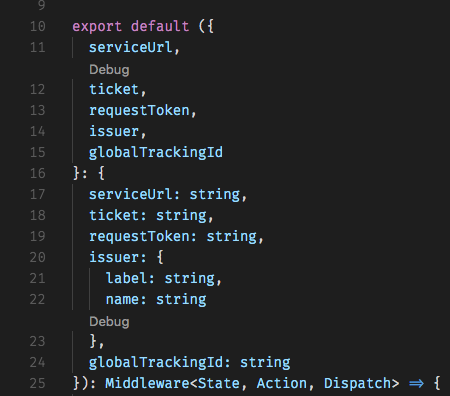
I've also got one sitting here between two import statements, at the top of a file.
When I click on the debug lens, a message pops up saying "Cannot find jest.js file!". I don't know what that file is, a quick search hasn't turned up anything, and I haven't needed it before now, so perhaps linking to some documentation about whatever that file is in the message would be beneficial.
Huddo121
on 19 Dec 2017
Those are some great ideas @Huddo121. Thanks for the feedback.
I would of been happy with a delay setting, so that all the problems that I was seeing with the code lens (code scrolling and code jumping around being the biggest for me) could be mitigated.
How about waiting until there are test results in to add the CodeLens?
The lens also sometimes appears in weird places
Yep, it wasn't This should be fixed by a recent PR. Let me know if it's acting up.
When I click on the debug lens, a message pops up saying "Cannot find jest.js file!".
Any chance that's a repo we can troubleshoot? If you're using a non-standard test script command, clicking on Debug will make that error message appear. It's similar to #193.
seanpoulter
on 24 Dec 2017
Who from 2020.
- Open settings
- Type "code lens" in search bar
- disable top check box
- Profit
 specialistvlad
on 24 Jan 2020
specialistvlad
on 24 Jan 2020
Are those instructions to disable the Code Lens everywhere @specialistvlad?
seanpoulter
on 24 Jan 2020
Are those instructions to disable the Code Lens everywhere @specialistvlad?
Definitely enough for me 😊
specialistvlad
on 17 Mar 2020
Related issues
 luisrudge
·
27Comments
luisrudge
·
27Comments
 kartheektrilochan
·
28Comments
kartheektrilochan
·
28Comments
 Drakota
·
16Comments
Drakota
·
16Comments
 qwerty2k
·
26Comments
qwerty2k
·
26Comments
 orenmizr
·
15Comments
orenmizr
·
15Comments
Most helpful comment
For future time travellers the setting you're looking for is
"jest.enableCodeLens": false