Vscode-java-debug: Ability to run java program in much simpler way
_From @patelkunal on August 22, 2018 12:40_
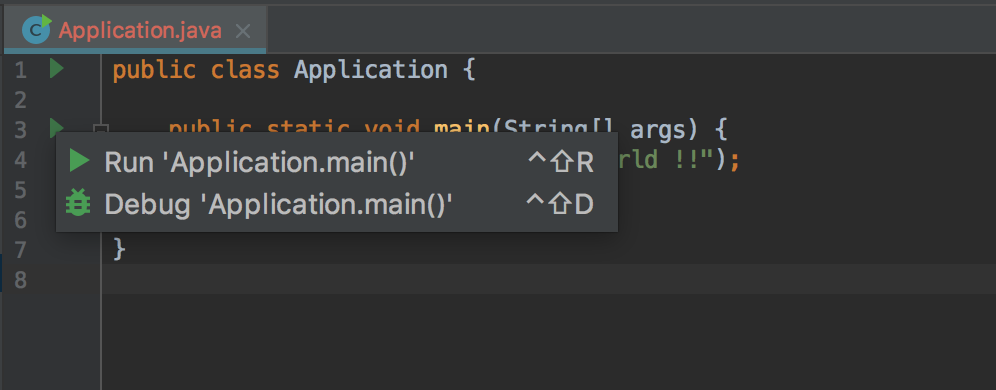
It would be great functionality to run java main class/program from visual code on click of annotation like Intellij (every main method annotated with nice run green icon). That makes it very easy to just run the java program/main method without any hassle.
Currently debugger-for-java plugin serves the work around by adding entry into launch.json and then select the class from drop-down list (finding it little difficult because I have ten/twenty main method/class inside my workspace). It would be awesome that I can invoke my java program based on context of the main editor with main method annotation. And since this plugin knows the classpath based on either maven/gradle builds, it would be easier to invoke the main method from the annotated icon. Again this is my wish to have it but it would improve developer experience up-to great extent.
Attaching reference images about requested feature


I have also been using vscode for tutoring algos/cs-problem-solving where I am using have multi-modules build with many-many main classes (because its easy to explain the concept rather than worrying about best-practices at that moment). And when I press F5, it gives me long list of dropdown to select my main class which I want to run.
I have also explored code-runner plugin but it just dumb way of typing out command and its difficult to work with classpath and other modules settings. And again I have to maintain commands for all of my main class - why can't that main method can be identified by plugin and get nice annotation to make it easier to run.
Environment
- Operating System: MacOS
- JDK version: 1.8.0_172
- Visual Studio Code version: 1.26.1
- Java extension version: 0.29.0
Feel free to mark duplicate if this is already been handled (though couldn't find in issues here).
Thanks in advance,
/kp
_Copied from original issue: redhat-developer/vscode-java#615_
 yaohaizh
All 19 comments
@testforstephen @Eskibear Please take a look at this issue. It should be related to your current work items.
yaohaizh
on 23 Aug 2018
_From @fbricon on August 23, 2018 2:43_
While I appreciate the idea of making it easier to run Java apps from the editor, this is out of scope of vscode-java.
Please open a ticket in https://github.com/Microsoft/vscode-java-debug/issues
yaohaizh
on 23 Aug 2018
interesting idea. appreciate it.
 testforstephen
on 24 Aug 2018
testforstephen
on 24 Aug 2018
@patelkunal I'm working on a task https://github.com/Microsoft/vscode-java-debug/issues/350 to improve the experience for multiple main classes selection scenario. i suggest you to have a look at that.
The brief idea is
- Put recently used main class in the top.
- Put main class from active editor in the top. If it's not the most recently used one, then put it to the second top.
And UX is

testforstephen
on 24 Aug 2018
work around by adding entry into launch.json and then select the class from drop-down list (finding it little difficult because I have ten/twenty main method/class inside my workspace).
@testforstephen Cool, it looks like the "active editor" one you are working is exactly targeting to this issue.
And from the image, I think whether we can provide a shortcut (e.g. leveraging code lens) to run/debug a mainClass. For me, the "Run" icon looks simple and straightforward indicating the run/debug functionality.
 Eskibear
on 24 Aug 2018
Eskibear
on 24 Aug 2018
The experience can be improved up-to some extent with #350 because it still has dropdown selection view. I am suggesting not to have any extra views apart from that annotated main method and all complexities are hidden behind that button/icon and when its clicked just run the particular program (from active editor only) with resolved class path and show output into OUTPUT. I think this gives neat-and-clean experience for running java program.
Few question/clarifications -
- The same flow applied for run and debug both (somehow I am thinking that both run and debug are two different functionalities - please correct me if thats not the case). And I would really appreciate/like to see them different as run flow should be pretty simple than debug (in terms of lot of views like break-point, variables, stack-trace, etc.) and run will have just console output view along with active editor.
- I am sure that classpath is considered based on maven/gradle builds even in case of running main class, I have seen in debug case its been resolved flawlessly.
I am again open for voting for this feature And would love to offer any help - though I am pretty much newbie to javascript or typescript world but can help in anything in java.
 patelkunal
on 24 Aug 2018
patelkunal
on 24 Aug 2018
Another challenge for running program with shortcut is how to specify program runtime args, cwd, vmArgs, console.
It probably is enough for most Java programs to only have mainClass and classpaths launch configs. But we still need consider the program with stdin, and program args. Currently these configs must be setted in launch.json. If run/debug the program with annotation shortcut, we need find a good way to prompt these parameters friendly.
testforstephen
on 24 Aug 2018
I understand that running program is not straight-forward in all the cases. Lets brainstorm for options suitable for taking configs while running program.
Just writing my opinion for handling config cases - please feel free to disagree.
cwd- We should be good enough to default to ${workspaceFolder}, and have an option to override in launch.json if required.vmArgs- default set to empty setting and if required set using launch.jsonconsole- should be default internalConsole, I am sure that everyone uses the internalConsole than external one (could use vscode telemetry to see user behavior)args- should default to "" and if required set as JSON array in launch.json for every argument for program.stdin inputs- this is indeed tricky one, Should it be handled the same way as while debug of program? Or based on stdin triggers we could leverage changing focus to something similar to Debug Console and wait for the input.
patelkunal
on 27 Aug 2018
yeah, this is doable. Have a quick look at Intellij ux, the run/debug green icon will launch the program only with mainClass and classpaths by default. If there is a debug config with the same Main Class name existed, then use it as the launch config for current program.
stdin is not a problem. To support stdin, you just need specify console option to integratedTerminal or externalTerminal, that the program will be launched in cmd terminal or your platform related shell environment. The default internalConsole only supports stdout.
stdin inputs - this is indeed tricky one, Should it be handled the same way as while debug of program? Or based on stdin triggers we could leverage changing focus to something similar to Debug Console and wait for the input.
testforstephen
on 27 Aug 2018
Sounds awesome for accepting feature request. Really appreciate it. I am very much familiar with this feature of Intellij as that's my primary IDE at work.
I would love to get involved into development of this and anything else. Please feel free to bug me.
patelkunal
on 27 Aug 2018
The annotation ux for VSCode is codeLens. See what JUnit extension did.
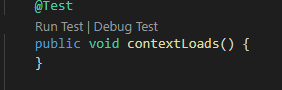
Not sure whether we can add an icon ▷ in the VSCode gutter area as what Intellij did.
@aeschli Is this possible for VSCode?
testforstephen
on 31 Aug 2018
Here is the policy to implement the feature.
- Provide the codeLens (▷ Run | 🐞Debug) on top of main method as the ui entry.
- When the user clicks the codeLens label, at first construct a debug configuration, then invoke
vscode.debug.startDebugging(workspaceFolder, debugConfig)api to launch debugger.
When constructing debug configuration, search launch.json to find the corresponding debug configuration with the same mainClass and projectName. If it exists, pass it to debugger directly, otherwise, generate a default debug configuration to launch.json.
If the user wants to customize the launch options, he/she can change the debug configuration in launch.json.
Runcommand will start program without debugging,Debugcommand will start debugging normally.
testforstephen
on 6 Sep 2018
Approach sounds good.
While you are doing this, can't it be possible to introduce a keyboard shortcut as well to launch program (either run or debug) as you mention above? Basically launch program (run/debug) from active editor when shortcut key is pressed. Currently F5 does the job by listing all possible programs to launch (Its also very good to see that list LRU manner and active-editor gets precedence) though it would be awesome to just have single shortcut to invoke/launch the program. May be I am asking too much :)
patelkunal
on 7 Sep 2018
Quickly run the program through shortcut key is another story, suggest putting it in a new issue and discuss there. Because the shortcut key can be pressed at any time, the context is lost. The active editor could be a non Java file, or a Java file without main method.
testforstephen
on 7 Sep 2018
Move the discussion about providing shortcut to launch program to the new issue #431.
testforstephen
on 18 Sep 2018
@patelkunal this feature is included in 0.13.0, welcome to have a try.
testforstephen
on 19 Sep 2018
Hello. I appreciate this feature, but is there a way to disable it in the settings?
 ZijunH
on 21 Sep 2018
ZijunH
on 21 Sep 2018
No setting to disable it yet, but we can consider adding an option to control it.
testforstephen
on 21 Sep 2018
Awesome (y)
patelkunal
on 27 Sep 2018
Related issues
 PG-practice
·
3Comments
PG-practice
·
3Comments
 AlexMAS
·
5Comments
AlexMAS
·
5Comments
 James-Oswald
·
3Comments
James-Oswald
·
3Comments
 spottedmahn
·
6Comments
spottedmahn
·
6Comments
 srfrnk
·
5Comments
srfrnk
·
5Comments
Most helpful comment
Here is the policy to implement the feature.
vscode.debug.startDebugging(workspaceFolder, debugConfig)api to launch debugger.When constructing debug configuration, search launch.json to find the corresponding debug configuration with the same mainClass and projectName. If it exists, pass it to debugger directly, otherwise, generate a default debug configuration to launch.json.
If the user wants to customize the launch options, he/she can change the debug configuration in launch.json.
Runcommand will start program without debugging,Debugcommand will start debugging normally.