Vscode-java-debug: Unable to launch Java Project on Mac. Failed to launch debuggee VM. Reason: com.sun.jdi.connect.VMStartException: VM did not connect within given time: 10000 ms
Unable to launch Java Project on Mac.
Environment
- Operating System: Mac 10.13.1
- JDK version: 8u152
- Visual Studio Code version: 1.18.1
- Java extension version: Langage 0.14.0 / Debug 0.3.0
Steps To Reproduce
- Simply run the project.


Current Result
Failed to launch debuggee VM. Reason: com.sun.jdi.connect.VMStartException: VM did not connect within given time: 10000 ms

Expected Result
Should be able to run and output "HELLOWORLD" in console
Additional Informations
Sample Project
Test.zip
This Project can be launched on my Win10 and also on Mac when debug was on 0.2.0
 ZZYSonny
All 19 comments
This issue only happens on Java8 on Mac.
When I updated to Java9, there aren't such problem.
ZZYSonny
on 17 Nov 2017
Not repo on debug: 0.4.0 language support 0.15.0 vscode 0.18.1 for mac jdk 1.8
 andxu
on 7 Dec 2017
andxu
on 7 Dec 2017
I've same error, my environment:
MacOS version: 10.12.5
JDK version: 1.8.0_66
Visual Studio Code version: 1.19.3
Java Extension Pack version: 0.2.0
Debugger For Java version: 0.5.0

 ghost
on 26 Jan 2018
ghost
on 26 Jan 2018
@andxu please work with the users to dig out more details on their project settings and find ways to reproduce. I see multiple reports here.
 akaroml
on 2 Mar 2018
akaroml
on 2 Mar 2018
Cannot repro on my machine, @ZZYSonny, could you please try to upgrade the latest debugger version 0.6.0 and modify the launch.json to see if this bug eliminates:
{
    "version": "0.2.0",
    "configurations": [
        {
            "type": "java",
            "name": "Project_Main",
            "request": "launch",
            "mainClass": "Main",
            "args": ""
        }
    ]
}
@baodng could you please help us to provide the following command results for us:
tree <your project root>
echo $JAVA_HOME
which java
I'm also seeing the same issue.
MacOS: 10.13.4
➜ complete git:(master) ✗ java -version
java version "1.8.0_171"
Java(TM) SE Runtime Environment (build 1.8.0_171-b11)
Java HotSpot(TM) 64-Bit Server VM (build 25.171-b11, mixed mode)
Java Extension Pack: 0.3.0
VSCode: 1.23.1
Running the sample java code from github
https://github.com/spring-guides/gs-spring-boot.git
➜ complete git:(master) ✗ ls -altr
total 88
drwxr-xr-x 3 jaylee staff 96 May 29 15:56 .mvn
-rw-r--r-- 1 jaylee staff 796 May 29 15:56 build.gradle
drwxr-xr-x 3 jaylee staff 96 May 29 15:56 gradle
-rwxr-xr-x 1 jaylee staff 5046 May 29 15:56 gradlew
-rw-r--r-- 1 jaylee staff 2314 May 29 15:56 gradlew.bat
-rwxr-xr-x 1 jaylee staff 7058 May 29 15:56 mvnw
-rwxr-xr-x 1 jaylee staff 5006 May 29 15:56 mvnw.cmd
-rw-r--r-- 1 jaylee staff 1991 May 29 15:56 pom.xml
drwxr-xr-x 4 jaylee staff 128 May 29 15:56 src
drwxr-xr-x 4 jaylee staff 128 May 29 15:57 .gradle
drwxr-xr-x 3 jaylee staff 96 May 29 15:57 .settings
-rw-r--r-- 1 jaylee staff 601 May 29 15:57 .project
-rw-r--r-- 1 jaylee staff 805 May 29 15:57 .classpath
drwxr-xr-x 4 jaylee staff 128 May 29 15:58 bin
drwxr-xr-x 13 jaylee staff 416 May 29 15:58 ..
drwxr-xr-x 17 jaylee staff 544 May 29 16:00 .
drwxr-xr-x 3 jaylee staff 96 May 29 16:00 .vscode

 jaylee185
on 30 May 2018
jaylee185
on 30 May 2018
@jaylee185 Can you reproduce this issue? Then can you take this try:
- Modify your launch.json#console from
internalConsoletointegratedTerminal - Press F5 and save the command line text from TERMINAL output view

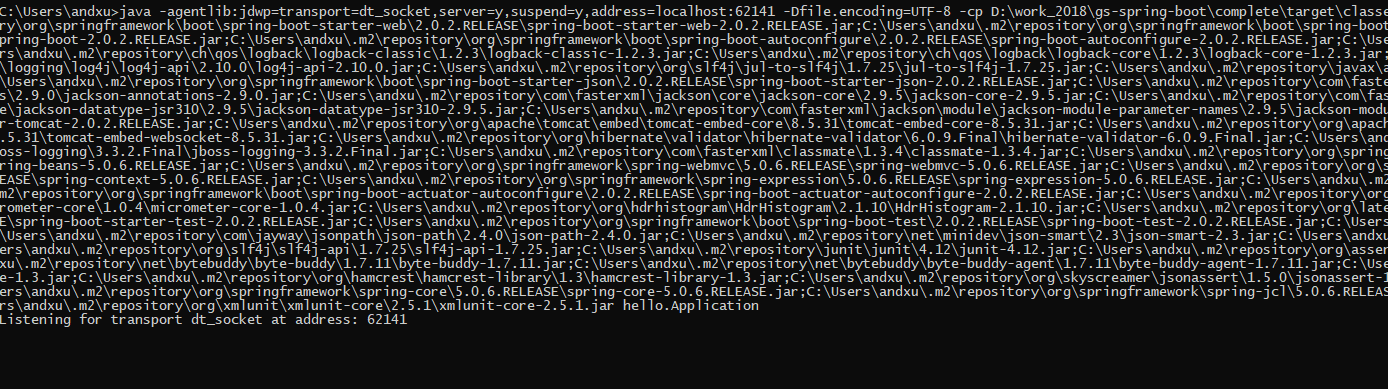
- Change the command line from sever=n to server=y and the port after
address=to an random port(please choose a port which not occupied by your system) and run it in your system terminal, please give use the snapshot of command in your system terminal, like:
Thanks
Andy Xu
andxu
on 19 Jun 2018
@jaylee185, we cannot reproduce this bug on mac, could you pleas take a try and give us the feedback?
andxu
on 20 Jun 2018
Hi Andy,
Here’s the snap shot by following the instruction.
cd /Users/jaylee/gs-spring-boot ;
/Users/jaylee/.sdkman/candidates/java/8.0.171-oracle/jre/bin/java
-agentlib:jdwp=transport=dt_socket,server=y,suspend=y,address=localhost:62410
-Dfile.encoding=UTF-8 -cp
/Users/jaylee/gs-spring-boot/complete/bin/main:/Users/jaylee/gs-spring-boot/complete/bin/test:/complete/bin/default:/Users/jaylee/.gradle/caches/modules-2/files-2.1/org.springframework.boot/spring-boot-starter-web/2.0.3.RELEASE/41fd4180bea3813de8f3c602b5a126218360315b/spring-boot-starter-web-2.0.3.RELEASE.jar:/Users/jaylee/.gradle/caches/modules-2/files-2.1/org.springframework.boot/spring-boot-starter-actuator/2.0.3.RELEASE/d370eeff676d24523ee530f6abc569474d2f9bf9/spring-boot-starter-actuator-2.0.3.RELEASE.jar:/Users/jaylee/.gradle/caches/modules-2/files-2.1/org.springframework.boot/spring-boot-starter-json/2.0.3.RELEASE/2e389a8727588c549c28bb277f0f573f65554850/spring-boot-starter-json-2.0.3.RELEASE.jar:/Users/jaylee/.gradle/caches/modules-2/files-2.1/org.springframework.boot/spring-boot-starter/2.0.3.RELEASE
ERROR: transport error 202: gethostbyname: unknown host
ERROR: JDWP Transport dt_socket failed to initialize, TRANSPORT_INIT(510)
JDWP exit error AGENT_ERROR_TRANSPORT_INIT(197): No transports initialized
[debugInit.c:750]
Thanks,
Jay
On June 18, 2018 at 11:56:00 PM, Andy Xu(devdiv) ([email protected])
wrote:
@jaylee185
https://urldefense.proofpoint.com/v2/url?u=https-3A__github.com_jaylee185&d=DwMFaQ&c=clK7kQUTWtAVEOVIgvi0NU5BOUHhpN0H8p7CSfnc_gI&r=kFRVO2dLb_tCN3ewav2SzdxZFsRu22GdeFB1tztHDXk&m=k3oc1Zv53WMkTOJ3GkyxZCbUuWB6KGdTmiVXo7WWBE8&s=Y4FLK1tBYBX9P4CJnd5-UFrHuLY8AUuFKyPHjH8CC68&e=
Can you reproduce this issue? Then can you take this try:
- Modify your launch.json#console from internalConsole to
integratedTerminal - Press F5 and save the command line text from TERMINAL output view
- Change the command line from sever=n to server=y and run it in your
system terminal, please give use the snapshot of command in your system
terminal
Thanks
Andy Xu
—
You are receiving this because you were mentioned.
Reply to this email directly, view it on GitHub
https://urldefense.proofpoint.com/v2/url?u=https-3A__github.com_Microsoft_vscode-2Djava-2Ddebug_issues_164-23issuecomment-2D398294373&d=DwMFaQ&c=clK7kQUTWtAVEOVIgvi0NU5BOUHhpN0H8p7CSfnc_gI&r=kFRVO2dLb_tCN3ewav2SzdxZFsRu22GdeFB1tztHDXk&m=k3oc1Zv53WMkTOJ3GkyxZCbUuWB6KGdTmiVXo7WWBE8&s=7pQzOgMvKeXO0YO9wTN49LLn5xyOoqDW_5QVKJ60-CE&e=,
or mute the thread
https://urldefense.proofpoint.com/v2/url?u=https-3A__github.com_notifications_unsubscribe-2Dauth_AHJY-2DhF31RjcWpNAFbMR9X1zwD3jdxbPks5t-2DKB9gaJpZM4QhjMe&d=DwMFaQ&c=clK7kQUTWtAVEOVIgvi0NU5BOUHhpN0H8p7CSfnc_gI&r=kFRVO2dLb_tCN3ewav2SzdxZFsRu22GdeFB1tztHDXk&m=k3oc1Zv53WMkTOJ3GkyxZCbUuWB6KGdTmiVXo7WWBE8&s=oLBNhy20bAfYSl7_Es3IlpwZr6oJlhu5_AQ7sPKIepk&e=
.
jaylee185
on 20 Jun 2018
Hi Andy,
Never mind. I think it works for me now. I wasn’t under the complete
folder. Once I used code . from complete folder. Spring boot is able to
start.
Thanks,
Jay
On June 19, 2018 at 9:13:47 PM, JAY LEE ([email protected]) wrote:
Hi Andy,
Here’s the snap shot by following the instruction.
cd /Users/jaylee/gs-spring-boot ;
/Users/jaylee/.sdkman/candidates/java/8.0.171-oracle/jre/bin/java
-agentlib:jdwp=transport=dt_socket,server=y,suspend=y,address=localhost:62410
-Dfile.encoding=UTF-8 -cp
/Users/jaylee/gs-spring-boot/complete/bin/main:/Users/jaylee/gs-spring-boot/complete/bin/test:/complete/bin/default:/Users/jaylee/.gradle/caches/modules-2/files-2.1/org.springframework.boot/spring-boot-starter-web/2.0.3.RELEASE/41fd4180bea3813de8f3c602b5a126218360315b/spring-boot-starter-web-2.0.3.RELEASE.jar:/Users/jaylee/.gradle/caches/modules-2/files-2.1/org.springframework.boot/spring-boot-starter-actuator/2.0.3.RELEASE/d370eeff676d24523ee530f6abc569474d2f9bf9/spring-boot-starter-actuator-2.0.3.RELEASE.jar:/Users/jaylee/.gradle/caches/modules-2/files-2.1/org.springframework.boot/spring-boot-starter-json/2.0.3.RELEASE/2e389a8727588c549c28bb277f0f573f65554850/spring-boot-starter-json-2.0.3.RELEASE.jar:/Users/jaylee/.gradle/caches/modules-2/files-2.1/org.springframework.boot/spring-boot-starter/2.0.3.RELEASE
ERROR: transport error 202: gethostbyname: unknown host
ERROR: JDWP Transport dt_socket failed to initialize, TRANSPORT_INIT(510)
JDWP exit error AGENT_ERROR_TRANSPORT_INIT(197): No transports initialized
[debugInit.c:750]
Thanks,
Jay
On June 18, 2018 at 11:56:00 PM, Andy Xu(devdiv) ([email protected])
wrote:
@jaylee185
https://urldefense.proofpoint.com/v2/url?u=https-3A__github.com_jaylee185&d=DwMFaQ&c=clK7kQUTWtAVEOVIgvi0NU5BOUHhpN0H8p7CSfnc_gI&r=kFRVO2dLb_tCN3ewav2SzdxZFsRu22GdeFB1tztHDXk&m=k3oc1Zv53WMkTOJ3GkyxZCbUuWB6KGdTmiVXo7WWBE8&s=Y4FLK1tBYBX9P4CJnd5-UFrHuLY8AUuFKyPHjH8CC68&e=
Can you reproduce this issue? Then can you take this try:
- Modify your launch.json#console from internalConsole to
integratedTerminal - Press F5 and save the command line text from TERMINAL output view
- Change the command line from sever=n to server=y and run it in your
system terminal, please give use the snapshot of command in your system
terminal
Thanks
Andy Xu
—
You are receiving this because you were mentioned.
Reply to this email directly, view it on GitHub
https://urldefense.proofpoint.com/v2/url?u=https-3A__github.com_Microsoft_vscode-2Djava-2Ddebug_issues_164-23issuecomment-2D398294373&d=DwMFaQ&c=clK7kQUTWtAVEOVIgvi0NU5BOUHhpN0H8p7CSfnc_gI&r=kFRVO2dLb_tCN3ewav2SzdxZFsRu22GdeFB1tztHDXk&m=k3oc1Zv53WMkTOJ3GkyxZCbUuWB6KGdTmiVXo7WWBE8&s=7pQzOgMvKeXO0YO9wTN49LLn5xyOoqDW_5QVKJ60-CE&e=,
or mute the thread
https://urldefense.proofpoint.com/v2/url?u=https-3A__github.com_notifications_unsubscribe-2Dauth_AHJY-2DhF31RjcWpNAFbMR9X1zwD3jdxbPks5t-2DKB9gaJpZM4QhjMe&d=DwMFaQ&c=clK7kQUTWtAVEOVIgvi0NU5BOUHhpN0H8p7CSfnc_gI&r=kFRVO2dLb_tCN3ewav2SzdxZFsRu22GdeFB1tztHDXk&m=k3oc1Zv53WMkTOJ3GkyxZCbUuWB6KGdTmiVXo7WWBE8&s=oLBNhy20bAfYSl7_Es3IlpwZr6oJlhu5_AQ7sPKIepk&e=
.
jaylee185
on 20 Jun 2018
then it looks like gethostbyname command of 'localhost' failed, check the content of /etc/hosts for the following statement:
127.0.0.1 localhost
andxu
on 20 Jun 2018
This issue has been closed automatically because it needs more information and has not had recent activity. Please reach out if you have or find the answers we need so that we can investigate further.
![no-response[bot] picture](https://avatars.githubusercontent.com/u/26350515?v=4&s=40) no-response[bot]
on 7 Aug 2018
no-response[bot]
on 7 Aug 2018
I am still facing the same issue.
 mukteshkrmishra
on 29 Aug 2019
mukteshkrmishra
on 29 Aug 2019
Having the same issue.
 RishabhTayal
on 30 Aug 2019
RishabhTayal
on 30 Aug 2019
A recent update seems to have brought this on. Can confirm it's happening on both Mac and windows for myself and another user under my project (no significant changes to the code or launch.json file since the last time the project was worked on a few days ago). Updating to the latest JDK 8 does not resolve the issue.
 Palidino
on 31 Aug 2019
Palidino
on 31 Aug 2019
Can reproduce this issue with the latest release (and the following config) -
Version: 1.38.0
Commit: 3db7e09f3b61f915d03bbfa58e258d6eee843f35
Date: 2019-09-03T21:47:00.464Z
Electron: 4.2.10
Chrome: 69.0.3497.128
Node.js: 10.11.0
V8: 6.9.427.31-electron.0
OS: Darwin x64 18.7.0
The process just dies with the following message -
ERROR: transport error 202: recv failed during handshake: Connection reset by peer
ERROR: JDWP Transport dt_socket failed to initialize, TRANSPORT_INIT(510)
JDWP exit error AGENT_ERROR_TRANSPORT_INIT(197): No transports initialized [debugInit.c:750]
 aridastidar
on 10 Sep 2019
aridastidar
on 10 Sep 2019
This happend to me after Spring boot told me to add it to hosts. Such as described here: https://stackoverflow.com/questions/33289695/inetaddress-getlocalhost-slow-to-run-30-seconds
And for some reason I thought it was a good idea to replace localhost with the my macbook name. It sped up my startup but I couldn't debug with the mentioned error. The etc/hosts file should have both localhost and the local name.
such as: 127.0.0.1 localhost my-mac.local
 ChrisWeissmann
on 5 Mar 2020
ChrisWeissmann
on 5 Mar 2020
I simply did
rm ~/.config/Code/User/settings.json
and it worked for me.
 joydeba
on 21 Sep 2020
joydeba
on 21 Sep 2020
Related issues
 mojo2012
·
5Comments
mojo2012
·
5Comments
 erihanse
·
3Comments
erihanse
·
3Comments
 radu-ion
·
5Comments
radu-ion
·
5Comments
 testforstephen
·
4Comments
testforstephen
·
4Comments
 manastalukdar
·
7Comments
manastalukdar
·
7Comments
Most helpful comment
then it looks like gethostbyname command of 'localhost' failed, check the content of
/etc/hostsfor the following statement:127.0.0.1 localhost