Vscode-intelephense: PHP 7.4 arrow functions not supported?!
Describe the bug
With PHP 7.4 arrow functions were introduced. Unfortunately arrow functions are shown as wrong code. Even with runnable code.
To Reproduce
Just create a simple arrow function as a callback. The editor will shown that it's wrong. But with it's working with PHP 7.4.
Expected behavior
The editor shouldn't mark it as an error.
I already tried to change the PHP Version in Intelephense > Environment: PHP Version to 7.4.0 and added "fn" to Intelephense: Stubs. Unfortunately both didn't work.
Screenshots
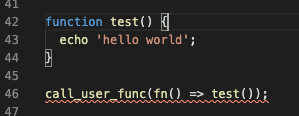
function test() {
  echo 'hello world';
}

call_user_func(fn() => test());
Platform and version
macOS Mojave
Version 10.14.6
Visual Studio Code
Version 1.42.1
PHP Intelephense
Version 1.3.11
 SaschaS93
All 5 comments
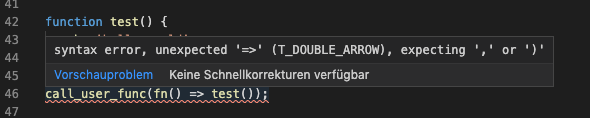
I can't reproduce the issue. Please post the error.
 bmewburn
on 26 Feb 2020
bmewburn
on 26 Feb 2020
SaschaS93
on 26 Feb 2020
This might be error from build-in php validator from vscode, can you check if you have path to php7.4 in php.validate.executablePath or set "php.validate.enable": false?
 KapitanOczywisty
on 26 Feb 2020
KapitanOczywisty
on 26 Feb 2020
Ahh sorry. You're right.
Was working with PHP 7.4 in Docker but I had an older version installed on my local machine.
Sorry. But I wish you a nice weekend! :)
SaschaS93
on 28 Feb 2020
I can't seem to resolve this, I have these configurements:
{
    "php.validate.enable": false,
    "intelephense.environment.phpVersion": "7.4.5",
}
Yet, my IDE complains on the arrow functions:

I've tried to reindex the workspace and restarting VSCode, to no avail. Any ideas?
 PatricNox
on 30 Sep 2020
PatricNox
on 30 Sep 2020
Related issues
 mushmelty
·
4Comments
mushmelty
·
4Comments
 dgunay
·
3Comments
dgunay
·
3Comments
 Ilyes512
·
3Comments
Ilyes512
·
3Comments
 usrnm-nk
·
3Comments
usrnm-nk
·
3Comments
 pseudoanime
·
3Comments
pseudoanime
·
3Comments
Most helpful comment
Ahh sorry. You're right.
Was working with PHP 7.4 in Docker but I had an older version installed on my local machine.
Sorry. But I wish you a nice weekend! :)