Vscode-intelephense: PHP-related user snippets appear twice in completion suggestions
I have a few user-defined snippets that I use for inserting PHP code in mixed
HTML and PHP files, but when I have intelephense enabled, these snippets appear
twice in the Intelisense suggestion list, although slightly differently. I've found that the problem is related to intelephense, as the problem goes away when disabling the extension.
Here are three of my snippets from html.json:
    "Expand PHP tags": {
        "prefix": "-p",
        "body": [
            "<?php \n$1"
        ],
        "description": "Expand PHP tags"
    },
    "Expand Inline PHP tag": {
        "prefix": "-pin",
        "body": "<?php $1 ?>",
        "description": "Create an inline PHP tag"
    },
    "Expand Shorthand PHP Echo Tag": {
        "prefix": "-pe",
        "body": "<?= $1 ?>",
        "description": "Expand a shorthand PHP echo tag"
    }
And when I enter -p to trigger selection of the snippets, I see the following in
Intellisense suggestions... every snippet is duplicated.

When I enter more of the snippet prefix, the first choice displays the proper snippet and behaves correctly, but the second one doesn't display the snippet preview properly, and if I select that snippet, then the minus sign will be inserted before the snippet (and it shouldn't be).
Displaying correctly:

Preview doesn't appear:

And here's what happens if I choose the snippet that doesn't have the preview — the minus sign remains in the code, instead of being replaced properly:

 mushmelty
All 4 comments
This extension forwards requests outside of <?php ?> to the html language server. So there is two completion requests taking place, one for PHP and one for HTML. Could be that there is a snippet being included from each of these calls. Doesn't look like there are many options to control snippets in vscode, I'll look into whether these can be filtered out.
 bmewburn
on 2 Apr 2019
bmewburn
on 2 Apr 2019
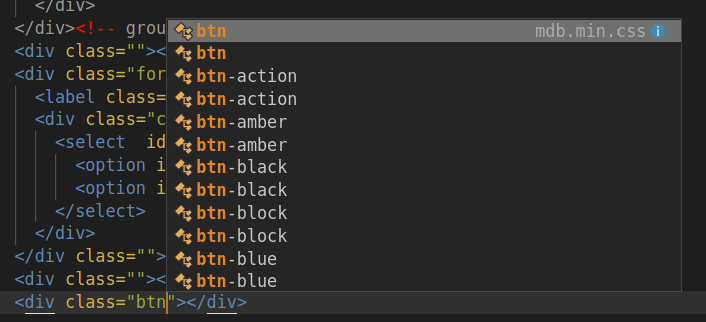
same problem for me with bootstrap 4 extension
 hayusama
on 6 Apr 2019
hayusama
on 6 Apr 2019
Its duplicate every CSS class, please fix this
 fakhamatia
on 8 May 2019
fakhamatia
on 8 May 2019
In 1.3 requests for html intelligence are no longer forwarded client side.
bmewburn
on 20 Oct 2019
Related issues
 aleksandervines
·
3Comments
aleksandervines
·
3Comments
 9brada6
·
3Comments
9brada6
·
3Comments
 zlianon
·
4Comments
zlianon
·
4Comments
 vanasis
·
4Comments
vanasis
·
4Comments
 superadmini
·
4Comments
superadmini
·
4Comments
Most helpful comment
This extension forwards requests outside of
<?php ?>to the html language server. So there is two completion requests taking place, one for PHP and one for HTML. Could be that there is a snippet being included from each of these calls. Doesn't look like there are many options to control snippets in vscode, I'll look into whether these can be filtered out.