Vscode-intelephense: False unexpected token diagnostics
Issue Type: Bug
Quando faço uma cópia de um trecho de código e colo em outro lugar, o código apresenta bug e mesmo voltando ao estado anterior continua com erro o arquivo.
Extension version: 1.3.7
VS Code version: Code 1.41.1 (26076a4de974ead31f97692a0d32f90d735645c0, 2019-12-18T14:57:51.166Z)
OS version: Darwin x64 19.2.0
System Info
|Item|Value|
|---|---|
|CPUs|Intel(R) Core(TM) i5-8257U CPU @ 1.40GHz (8 x 1400)|
|GPU Status|2d_canvas: enabled
flash_3d: enabled
flash_stage3d: enabled
flash_stage3d_baseline: enabled
gpu_compositing: enabled
metal: disabled_off
multiple_raster_threads: enabled_on
oop_rasterization: disabled_off
protected_video_decode: unavailable_off
rasterization: enabled
skia_renderer: disabled_off
surface_control: disabled_off
surface_synchronization: enabled_on
video_decode: enabled
viz_display_compositor: enabled_on
viz_hit_test_surface_layer: disabled_off
webgl: enabled
webgl2: enabled|
|Load (avg)|2, 2, 1|
|Memory (System)|8.00GB (0.13GB free)|
|Process Argv||
|Screen Reader|no|
|VM|0%|
 guidocerqueira
All 24 comments

não há erro nesse código
guidocerqueira
on 7 Jan 2020
I have the same issue
 larryx64
on 7 Jan 2020
larryx64
on 7 Jan 2020
I'm having trouble reproducing this issue. Is there any reproduction steps or code that can be provided? Is there any relevant information in the output tab?
 bmewburn
on 7 Jan 2020
bmewburn
on 7 Jan 2020
Não necessariamente precisa seguir uma etapa para produzir o erro. Ao copiar qualquer trecho de código e colar em qualquer parte do arquivo o intelephense apresenta erro de “unexpected token”. Só consigo corrigir passando da seguinte forma: ”intelephense.diagnostics. unexpectedTokens”: false.
guidocerqueira
on 7 Jan 2020
It's really weird.
Between my message and yours, I rolled back to version 1.3.5 and I stopped having the issue.
After your message, I went back to version the latest version (1.3.7) to provide context and screenshots and now I can't seem to reproduce the issue, even after reloading window and quitting VS Code.
Good news...I guess 😬
Sorry for lack of info in the first message.
larryx64
on 7 Jan 2020
@guidocerqueira I still can't reproduce it, I don't see this behaviour when copying and pasting. What is the encoding of the file?
bmewburn
on 7 Jan 2020
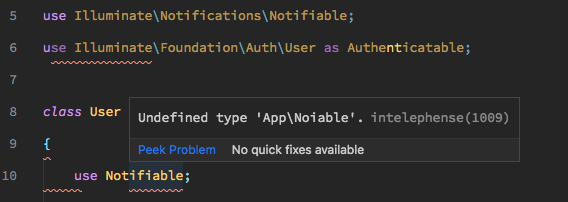
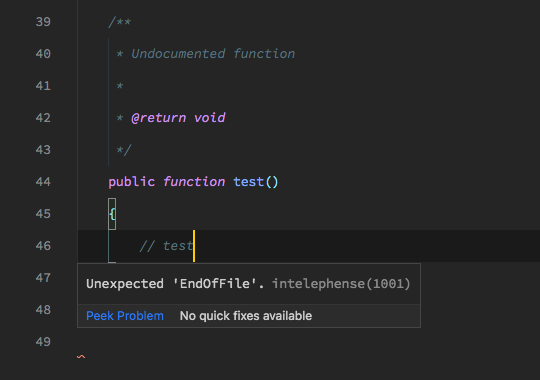
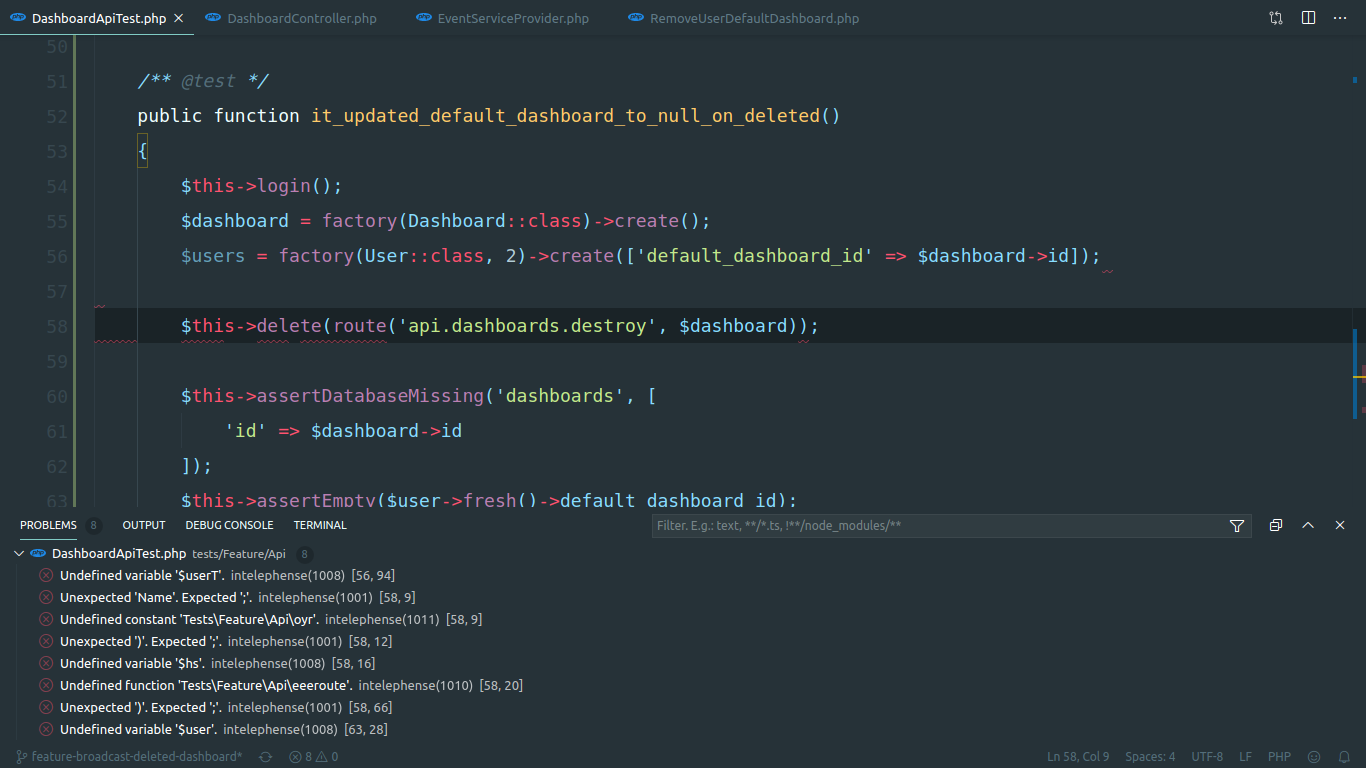
Now I get weird errors like these ones (this is on a fresh Laravel install)
When I use the php-cs-fixer: fix this file command directly, it works as expected.
However, when I use the format command (which uses the php-cs-fixer formatter), it seems to break things.

larryx64
on 7 Jan 2020
My default formatter for PHP files is overrided in my VS Code settings.
"[php]": {
    "editor.defaultFormatter": "junstyle.php-cs-fixer"
},
When I close the file and reopen it everything is fine.
larryx64
on 7 Jan 2020
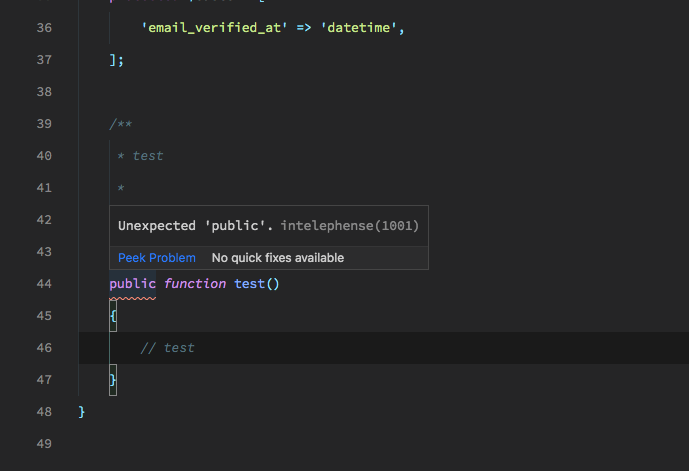
Now I just opened a new project, inserted this snippet with the prefix func
"Public Method": {
    "prefix": "func",
    "body": [
        "$4",
        "public function $1(${2:\\$${3:arguments}})",
        "{",
        "\t$0",
        "}"
    ],
    "description": ""
}
and I get this error

Thank you for your time
larryx64
on 7 Jan 2020
@guidocerqueira I still can't reproduce it, I don't see this behaviour when copying and pasting. What is the encoding of the file?
@bmewburn estou usando a codificação padrão de uma instalação do laravel 6. Fiz um teste em outro computador e também não consigo reproduzir o erro. Pode ser alguma configuração diferente do meu vscode... Enfim, estou sem saber o que está acontecendo.
guidocerqueira
on 7 Jan 2020
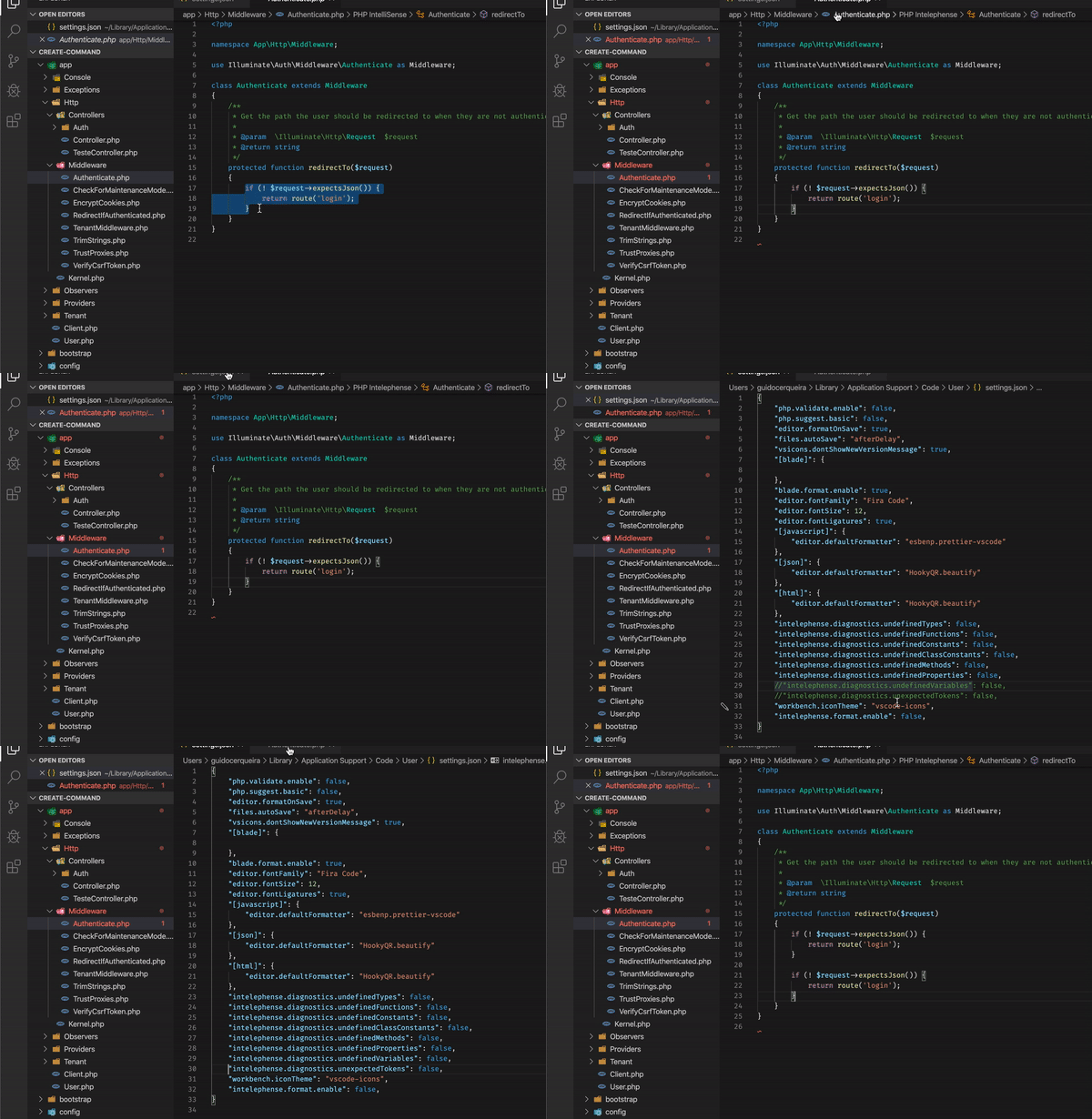
@bmewburn veja esse exemplo do erro...
guidocerqueira
on 8 Jan 2020
I have the same issues. I am getting weird errors all over my codes.
 w1lldone
on 8 Jan 2020
w1lldone
on 8 Jan 2020
Screenshots are not particularly helpful. What is useful for debugging is code that reproduces the issue and information on the format on save and format on paste settings and whether the intelephense formatter is used or another formatter.
bmewburn
on 8 Jan 2020
This is the some pieces of code that shows up as an error by intelephense. The error will be gone once I restart VS Code.
- Format on Save/Type/Paste: Disabled
- Formatter:
bmewburn.vscode-intelephense-clientorwongjn.php-snifferorfterrag.vscode-php-cs-fixer(Tried all of them, all of them will have the same issue.)
I doubt that it's a formatter issue because I have this error even while typing or adding new lines of codes. This happens to any file that I open. Even different projects, this is only one of them.


    public function getParentDetails(Request $request)
    {
        $user = JWTAuth::parseToken()->authenticate();

        $parent['id'] = $user->id;
        $parent['name'] = $user->name;
        $parent['relationship'] = $user->relationship;
        $parent['phone_number'] = $user->phone_number;
        $parent['mobile_number'] = $user->mobile_number;
        $parent['email'] = $user->email;
        $parent['address'] = $user->address;
        $parent['work_address'] = $user->work_address;
        $parent['spouse_name'] = $user->spouse_name;
        $parent['spouse_mobile_number'] = $user->spouse_mobile_number;
        $parent['spouse_work_address'] = $user->spouse_work_address;
        // $parent->save();

        return response()->json(['data' => $parent, 'status' => 'ok']);
    }
 hakimzulkufli
on 8 Jan 2020
hakimzulkufli
on 8 Jan 2020
@hakimzulkufli could I get the complete file? You can email me at address in my profile if preferred.
bmewburn
on 8 Jan 2020
@bmewburn
Somehow, the false alarms seems to be gone after closing the file and reopening it. Prior to this, I had to restart my VS Code completely to get rid of the error detection and false alarms. However, the issue is still occurring on my end.
From my experience, formatting or simply indenting codes will cause this issue. Here is a sample of the false alarm when I indents and play around with tabs. I think you can reproduce this error by shifting the indentations or running the formatter a couple of times.

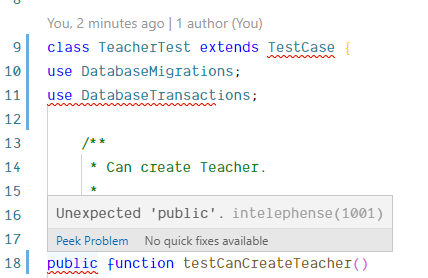
Full code below with the indentations intentionally uglified or download here:
<?php

namespace Tests\Unit;

use Tests\TestCase;
use Illuminate\Foundation\Testing\DatabaseMigrations;
use Illuminate\Foundation\Testing\DatabaseTransactions;

class TeacherTest extends TestCase {
use DatabaseMigrations;
use DatabaseTransactions;

    /**
     * Can create Teacher.
     *
     * @return void
     */
public function testCanCreateTeacher()
    {
        $institute = factory(\App\Institute::class)->create();
$teacher   = factory(\App\User::class)->create(
            [
                'institute_id' => $institute->institute_id,
                'group_id'     => 3
            ]
        );

$this->assertDatabaseHas('users', $teacher->toArray());
    }

    /**
     * Can read Teacher.
     *
     * @return void
     */
public function testCanReadTeacher(){
        $institute = factory(\App\Institute::class)->create();

        $teacher = factory(\App\User::class)->create(
            [
                'institute_id' => $institute->institute_id,
                'group_id'     => 3
            ]
        );

        $found = \App\User::findOrFail($teacher->id);

        $this->assertInstanceOf(\App\User::class, $found);
        $this->assertEquals($found->name, $teacher->name);
        $this->assertEquals($found->institute_id, $teacher->institute_id);
    }

    /**
     * Can update Teacher.
     *
     * @return void
     */
    public function testCanUpdateTeacher()
    {
        $institute = factory(\App\Institute::class)->create();

        $teacher = factory(\App\User::class)->create(
            [
                'institute_id' => $institute->institute_id,
                'group_id'     => 3
            ]
        );

        $data = [
            'name'    => 'Updated Name',
            'remarks' => 'Updated user profile.',
        ];

        $update = $teacher->update($data);

        $this->assertTrue($update);
        $this->assertDatabaseHas('users', $data);
    }

    /**
     * Can deactivate Teacher.
     *
     * @return void
     */
    public function testCanDeactivateTeacher()
    {
        $institute = factory(\App\Institute::class)->create();

        $teacher = factory(\App\User::class)->create(
            [
                'institute_id' => $institute->institute_id,
                'group_id'     => 3
            ]
        );

        $data = [
            'active_status' => 0
        ];

        $update = $teacher->update($data);

        $this->assertTrue($update);
        $this->assertDatabaseHas('users', $data);
    }
}
Still can't reproduce...
bmewburn
on 8 Jan 2020
I saw similar things on my end. I tried downgrading Intelephense all the way to 1.2.3, no change. I even tried a previous version of VS Code, no change. With that in mind...
Most of you all appear to be using Laravel (as I am), and so I looked at my extensions. After some trial-and-error, I found that disabling "Laravel Blade Spacer" seems to eliminate the problem.
I can reproduce this easily in a fresh VS Code workspace with only Intelephense 1.3.7 and Laravel Blade Spacer extensions installed. If I disable Laravel Blade Spacer and reload the workspace, the problem is gone.
Any chance any of you fellow Laravel devs are using that extension? If so, does disabling that extension help you as well?
 mattlibera
on 8 Jan 2020
mattlibera
on 8 Jan 2020
Very strange even if downgrading does not solve it. I still cant reproduce this with blade spacer or php-cs-fixer installed. It appears the intelephense version of the open document gets out of sync somehow.
bmewburn
on 8 Jan 2020
Anyone here using vscode remote development extensions?
bmewburn
on 8 Jan 2020
@bmewburn I have the extension Remote - SSH extension installed
@mattlibera oddly enough, that seems to have done the trick for me too? No problem so far in the last 30 minutes.
larryx64
on 8 Jan 2020
@bmewburn I have Remote - Containers installed but disabled. No other remote development extensions for me.
@larryx64 Weird, but good to have validation from another person. I've been going ever since I posted that with no recurrence of the issue.
mattlibera
on 8 Jan 2020
I had something like that once ore twice on remote, more often this happens with spellchecker. Maybe workspace is big and server too slow to keep up with changes? (I'm not using laravel)
 KapitanOczywisty
on 8 Jan 2020
KapitanOczywisty
on 8 Jan 2020
I'm going to close this one and track in #944 . I think the bug here is that extensions can alter the order of text document changes for other extensions and is more a vscode issue. workaround for now is to disable Laravel Blade Spacer or use version 1.x of Laravel Blade Spacer instead of 2.x
bmewburn
on 8 Jan 2020
Related issues
 steven7mwesigwa
·
4Comments
steven7mwesigwa
·
4Comments
 ottopic
·
3Comments
ottopic
·
3Comments
 aleksandervines
·
3Comments
aleksandervines
·
3Comments
 zlianon
·
4Comments
zlianon
·
4Comments
 superadmini
·
4Comments
superadmini
·
4Comments
Most helpful comment
I'm going to close this one and track in #944 . I think the bug here is that extensions can alter the order of text document changes for other extensions and is more a vscode issue. workaround for now is to disable Laravel Blade Spacer or use version 1.x of Laravel Blade Spacer instead of 2.x