Vscode-intelephense: Undefined symbol 'where'.intelephense(1002)
Describe the bug
I use the thinkphp framework in China, I upgrade PHP Intelephense to 1.3.0.
When I opened my project code, I've found a lot of error is that the plug-in is wrong.
There's so much wrong was "Undefined symbol 'where(with)' "
So I can only replace the previous version.
To Reproduce
    $order_id = self::where(['code' => $code])->value('order_id');
    if (!$order_id) {
        $this->error = '订单不存在';
        return false;
    }
    $station_id = Order::where(['order_id' => $order_id])->value('station_id');

    // 判断当扫描回收员和订单是否为同一回收站
    if ($station_id != $collector_info->station_id) {
        // 非同一个回收站
        $order = Order::with('staff.photo')->where(['order_id' => $order_id])->find();
        $order->station = Substation::where(['station_id' => $order->station_id])->find();
        $order->order_display_type = 2;

    } else {
        // 同一个回收站
        $order = Order::with('orderAddress,orderItem,staff.photo')->where(['order_id' => $order_id])->find();

        // 订单页面展示类型
        $order->order_display_type = 1;
    }
When there's '::where' or '::with' where, The following words will be reported to the wrong at '::' after, the error is "Undefined symbol 'where'.intelephense(1002)".
Expected behavior
I don't think there's anything wrong with this. Please fix it.
Screenshots
If applicable, add screenshots to help explain your problem.
Platform and version
Windows 10,
vscode 1.40.2,
intelephense 1.3.0.
 hlbbt
hlbbt
All 31 comments
I also have this problem.
Ubuntu 18.04
vscode 1.4.0.2
intelephense 1.3.0.
 wangdeer
on 3 Dec 2019
wangdeer
on 3 Dec 2019
I also have this problem.
Ubuntu 18.04
vscode 1.4.0.2
intelephense 1.3.0.
你是中国人吧
hlbbt
on 3 Dec 2019
I also have this problem.
Ubuntu 18.04
vscode 1.4.0.2
intelephense 1.3.0.你是中国人吧
被发现了!捂脸.gif
wangdeer
on 3 Dec 2019
I also have this problem.
Ubuntu 18.04
vscode 1.4.0.2
intelephense 1.3.0.你是中国人吧
被发现了!捂脸.gif
哈哈哈哈哈,等大牛解决吧
hlbbt
on 3 Dec 2019
I also have this problem with version 1.3.0. There are quite a lot of undefined symbol (1002) throwing with this version
 vbasky
on 3 Dec 2019
vbasky
on 3 Dec 2019
Before you spam too much, there are a bunch of new options intelephense.diagnostics.*, maybe defaults are too strict for ya.
And please use English.
 KapitanOczywisty
on 3 Dec 2019
KapitanOczywisty
on 3 Dec 2019
And what would that new options be, should I have to look into the CHANGELOG.md ?
vbasky
on 3 Dec 2019
KapitanOczywisty
on 3 Dec 2019
Before you spam too much, there are a bunch of new options
intelephense.diagnostics.*, maybe defaults are too strict for ya.And please use English.
I didn't find this configuration you said
And you don't have to pay attention to the Chinese in my code.
hlbbt
on 3 Dec 2019

Disable this setting might help
 ssoda
on 3 Dec 2019
ssoda
on 3 Dec 2019
Happen to me also.
Laravel 6.0
 EvilTwin01
on 3 Dec 2019
EvilTwin01
on 3 Dec 2019
Renamestar
Easily rename a symbol within a document or across the entire workspace.Code foldingstar
Fold definitions, blocks, use declarations, heredoc strings, comments and custom regions.Find all implementationsstar
Quickly find all implementations of an interface or abstract symbol.Go to declarationstar
Quickly navigate to interface and abstract method declarations.Go to type definitionstar
Quickly navigate to variable type definitions.接口 和抽象 门面 类提示跳转收费了 ,70元
在哪儿看到的这个信息呢?发个链接吧
hlbbt
on 3 Dec 2019
Disable this setting might help
restore to normal,I don't quite understand what this option is about.
hlbbt
on 3 Dec 2019
you guys can downgrade its version to the previous version and the problem solved 👍
 pieroashady
on 3 Dec 2019
pieroashady
on 3 Dec 2019
This is the new feature added in 1.3.0.
You can see it in the Change Log.
Change Log
[1.3.0 - 2019-12-03]
Added
- PHP 7.4 support.
- Config to enable/disable diagnostics and diagnostic categories.
- Config to set target PHP version.
- Undefined Type, function, constant, member diagnostic errors.
- Deprecated diagnostic hints.
- Support for running diagnostics
onSave. - Auto phpdoc creation. Triggered by
/**. PREMIUM
Disable the intelephense.diagnostics.undefinedSymbols option can solve this problem.
wangdeer
on 3 Dec 2019
#
添加
我刚花了72块钱,突然感觉花的没用...
hlbbt
on 3 Dec 2019
添加
我刚花了72块钱,突然感觉花的没用...
Rich!
wangdeer
on 3 Dec 2019
添加
我刚花了72块钱,突然感觉花的没用...
Rich!
说中文
hlbbt
on 3 Dec 2019
添加
我刚花了72块钱,突然感觉花的没用...
Rich!
说中文
Please close this issue. O(∩_∩)O哈哈~
wangdeer
on 3 Dec 2019
添加
我刚花了72块钱,突然感觉花的没用...
Rich!
说中文
我也花了70!
wangdeer
on 3 Dec 2019
添加
我刚花了72块钱,突然感觉花的没用...
Rich!
说中文
我也花了70!
没感觉出来有什么高级功能
hlbbt
on 3 Dec 2019
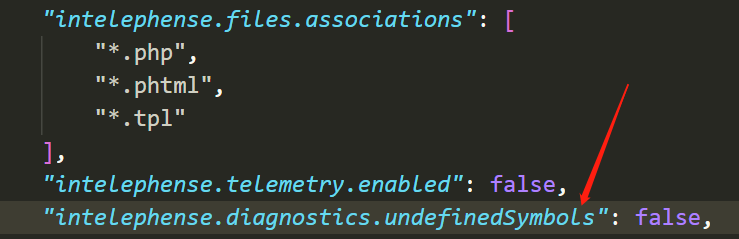
1.3.0 Final Solution
There is no need to reduce the version to 1.2.3
Add this setting to your user settings (in your setting.json)
"intelephense.diagnostics.undefinedSymbols": false,
hlbbt
on 3 Dec 2019
I'm not familiar with this framework but I'm assuming there is __call and/or __callStatic methods defined. There is currently a bug where these methods are not considered. For now, undefined symbols can be disabled as above until the fix is released.
 bmewburn
on 3 Dec 2019
bmewburn
on 3 Dec 2019
@bmewburn Yes! Laravel uses magic methods (__call and __callStatic) extensively in its Facades.
 aleedhillon
on 3 Dec 2019
aleedhillon
on 3 Dec 2019
I'm not familiar with this framework but I'm assuming there is
__calland/or__callStaticmethods defined. There is currently a bug where these methods are not considered. For now, undefined symbols can be disabled as above until the fix is released.
I’m seeing the same behaviour in simple classes of my own writing, but so far, they are indeed only the ones that use __call and/or __callStatic, which would explain it. Disabling undefined symbols for now and looking forward to 1.3.1!
 kokoshneta
on 3 Dec 2019
kokoshneta
on 3 Dec 2019
__calland/or__callStatic[...] There is currently a bug where these methods are not considered.
If there is any @method (in that class) this should still throw undefined if no matching @method is found, otherwise don't check when __call(Static) present. Maybe __call should be visible on hover in 2nd case?
KapitanOczywisty
on 3 Dec 2019
Using Laravel, in the config/app.php there are a lot of aliases, like
'View' => Illuminate\Support\Facades\View::class
If I insert "use View" in a php file, the extension says undefined symbol, and also when I use the class, like return View::make('emails.....); this is also said to be undefined.
To turn off the "intelephense.diagnostics.undefinedSymbols" is not be best solution, as we loose the notify for the real undefined variables, which is a great feature.
 dobosgy
on 3 Dec 2019
dobosgy
on 3 Dec 2019
This problem is not only with laravel. In a PHP file, when using a namespace, the global functions are marked as undefined too. For example in wordpress the wp_die is marked as undefined.
Seems like the best option is just to downgrade.
 macr1408
on 3 Dec 2019
macr1408
on 3 Dec 2019
In addition to disabling a useful feature not being an ideal solution, downgrading isn't either because we get a distracting badge of 1 extension needing an upgrade in the activity bar. It may not be a big deal to some but my OCD is taking a big hit.
 enkia
on 3 Dec 2019
enkia
on 3 Dec 2019
@whizsid thankyou for marking as duplicate but Is there something miss-configured with my intelephense or its an actual bug? I got this issue after recent upgrade of VSCODE.
 umersheikh1
on 9 Dec 2019
umersheikh1
on 9 Dec 2019
@umersheikh1 This is a bug of this extension. I think this issue is resolving with the next release of this extension. This is not an issue of vscode main repository.
 whizsid
on 9 Dec 2019
whizsid
on 9 Dec 2019
Related issues
 steven7mwesigwa
·
4Comments
steven7mwesigwa
·
4Comments
 pseudoanime
·
3Comments
pseudoanime
·
3Comments
 nn-hh
·
3Comments
nn-hh
·
3Comments
 9brada6
·
3Comments
9brada6
·
3Comments
 ghost
·
3Comments
ghost
·
3Comments
Most helpful comment
1.3.0 Final Solution
There is no need to reduce the version to 1.2.3
Add this setting to your user settings (in your setting.json)
"intelephense.diagnostics.undefinedSymbols": false,
