Vscode-gitlens: Revision navigation doesn't work after release 11.0.0
I have an issue with navigation to previous commits. Just shown popup with message 'There is no previous commit'.
But it works fine when I use previous release version 10.2.3
Can anybody help how to fix it?
 PaulLitvin
All 8 comments
I'm experiencing the issue too while clicking on the "Open Changes with Previous Revision" button. The extension doesn't detect revisions before the file rename. The "File History" panel doesn't show commits before the rename as well. "Toggle File Blame Annotations" displays references to these previous commits, though.
It all works fine on 10.2.3. @PaulLitvin, thank you for the tip!
 artkravchenko
on 26 Nov 2020
artkravchenko
on 26 Nov 2020
@PaulLitvin @artkravchenko When you experience this is it always with renamed files? I can't seem to reproduce the issue with the _Open Changes with Previous Revision_ command. But not showing renames by default in the _File History_ view is a by-design change in v11 (because Git rename detection can cause all sorts of other history issues). You can easily toggle it from the view:
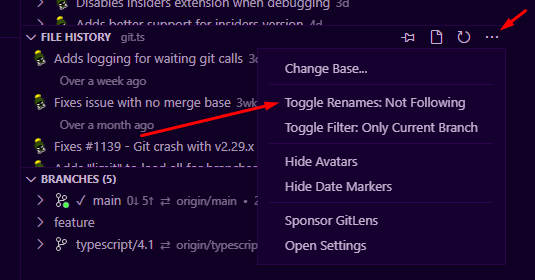
Or by setting "gitlens.advanced.fileHistoryFollowsRenames": true in your settings.json
Outside of the _File History_ view, and the Show File History command, there shouldn't be a change in behavior when navigating through history. Can both of you please enable output channel logging by setting "gitlens.outputLevel": "debug" in your settings. This will enable logging to the GitLens channel in the Output pane. Once enabled, please reproduce the issue and attach the log from the GitLens channel.
 eamodio
on 28 Nov 2020
eamodio
on 28 Nov 2020
I've noticed this on all of my files as well. Sometimes clicking it takes me to a further back commit and I have to click forwards afterwards. Other times it says there are no changes at all, but funnily enough the File blame shows multiple commits

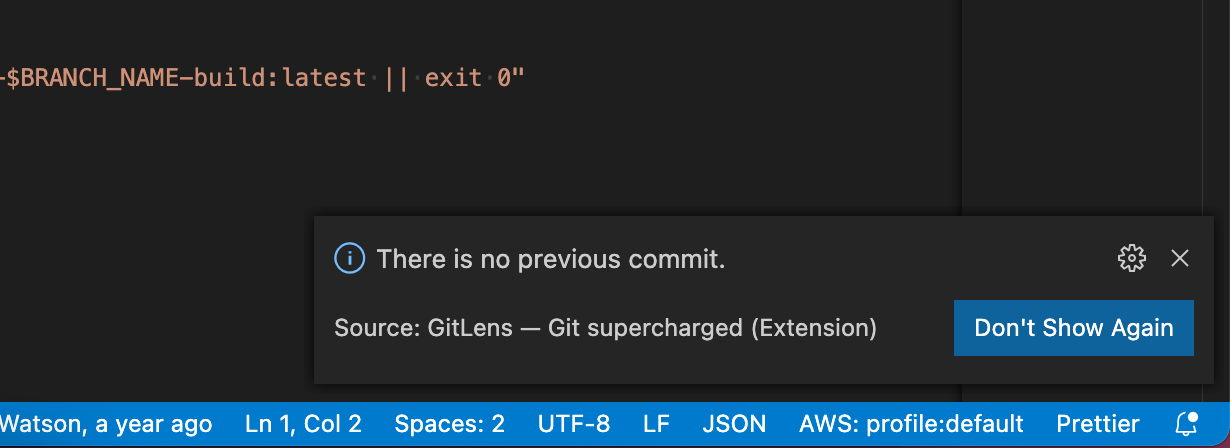
This file: cloudbuild.json never changed it's name
 intellix
on 28 Nov 2020
intellix
on 28 Nov 2020
@intellix
Can you please enable output channel logging by setting "gitlens.outputLevel": "debug" in your settings. This will enable logging to the GitLens channel in the Output pane. Once enabled, please reproduce the issue and attach the log from the GitLens channel.
eamodio
on 29 Nov 2020
git version: git version 2.24.3 (Apple Git-128)
[2020-11-29 21:58:31:457] [21ed] GitUri.fromUri — e=Uri(file:///Users/dom/Projects/gitlab/www/cloudbuild.json)
[2020-11-29 21:58:31:457] [21ee] GitService.getRepoPath — e=Uri(file:///Users/dom/Projects/gitlab/www/cloudbuild.json)
[2020-11-29 21:58:31:457] [21ef] GitService.getRepository — e=Uri(file:///Users/dom/Projects/gitlab/www/cloudbuild.json), t={"skipCacheUpdate":true}
[2020-11-29 21:58:31:457] [21f0] GitService.isTracked returned true • 0 ms — e=/Users/dom/Projects/gitlab/www/cloudbuild.json, t=/Users/dom/Projects/gitlab/www, i={"skipCacheUpdate":true}
[2020-11-29 21:58:31:457] [21ef] GitService.getRepository returned /Users/dom/Projects/gitlab/www • 0 ms
[2020-11-29 21:58:31:457] [21ee] GitService.getRepoPath returned /Users/dom/Projects/gitlab/www • 0 ms
[2020-11-29 21:58:31:457] [21ed] GitUri.fromUri returned GitUri(file:///Users/dom/Projects/gitlab/www/cloudbuild.json repoPath=/Users/dom/Projects/gitlab/www) • 0 ms
[2020-11-29 21:58:31:457] [21f1] GitService.getPreviousDiffUris — e=/Users/dom/Projects/gitlab/www, t=GitUri(file:///Users/dom/Projects/gitlab/www/cloudbuild.json repoPath=/Users/dom/Projects/gitlab/www), i=undefined, n=0
[2020-11-29 21:58:31:457] [21f2] GitService.getStatusForFile — e=/Users/dom/Projects/gitlab/www, t=cloudbuild.json
[2020-11-29 21:58:31:488] [/Users/dom/Projects/gitlab/www] git status --porcelain=v2 --find-renames -- cloudbuild.json • 30 ms
[2020-11-29 21:58:31:488] [21f3] GitStatusParser.parse completed • 0 ms
[2020-11-29 21:58:31:489] [21f2] GitService.getStatusForFile completed • 31 ms
[2020-11-29 21:58:31:489] [21f4] GitService.getPreviousUri — e=/Users/dom/Projects/gitlab/www, t=GitUri(file:///Users/dom/Projects/gitlab/www/cloudbuild.json repoPath=/Users/dom/Projects/gitlab/www), i=undefined, n=0, o=undefined, r=false
[2020-11-29 21:58:31:537] [/Users/dom/Projects/gitlab/www] git log --format=%x3cr%x3e%x20%H -n3 --follow --first-parent --name-status -- cloudbuild.json • 48 ms
[2020-11-29 21:58:31:537] [21f4] GitService.getPreviousUri completed • 48 ms
[2020-11-29 21:58:31:537] [21f1] GitService.getPreviousDiffUris completed • 79 ms
[2020-11-29 21:58:31:538] ShowMessage(info, 'There is no previous commit.', suppressCommitHasNoPreviousCommitWarning, {"title":"Don't Show Again"})
Tried these two myself locally and it returned nothing:
git status --porcelain=v2 --find-renames -- cloudbuild.json
git log --format=%x3cr%x3e%x20%H -n3 --follow --first-parent --name-status -- cloudbuild.json
If I remove --follow I get these three commits which match what I see in the blame view:
<r> ab622bfbb7e9ba9086054e3802c0c70c6f189449
<r> f9fae3c2a165386db0601946334018f5f6bde309
<r> 02bf6c64dbd91009245d3d93a70d6482ebf38b12
@intellix what happens if you remove the --first-parent rather than the --follow
eamodio
on 30 Nov 2020
Can you please try out the latest insiders version? It has a possible fix for this issue 🤞
You can install the insiders version from here.
eamodio
on 30 Nov 2020
yep without first-parent:
git log --format=%x3cr%x3e%x20%H -n3 --follow --name-status -- cloudbuild.json
Returns:
<r> 549c52b0622adf2dfd15fe3592e743aeb509714e

M       cloudbuild.json
<r> ca04243b7c0238b07e2c3abedb6a2326a2fe29c5

M       cloudbuild.json
<r> 2636b7e950e920b005f2caa95458c6db212bf676

M       cloudbuild.json
And can confirm that the insider build works for me :) Thanks so much. This extension is the bees knees!
intellix
on 30 Nov 2020
Related issues
 rajesh996
·
29Comments
rajesh996
·
29Comments
 lindskogen
·
20Comments
lindskogen
·
20Comments
 rjbruin
·
22Comments
rjbruin
·
22Comments
 minj
·
24Comments
minj
·
24Comments
 pankajpatel
·
20Comments
pankajpatel
·
20Comments
Most helpful comment
yep without first-parent:
Returns:
And can confirm that the insider build works for me :) Thanks so much. This extension is the bees knees!