Vscode-gitlens: Icons not showing in interactive rebase
Hello, I'm a really enthusiastic with the new interactive rebase feature that comes with GitLens 11, though some icons are not showing, instead there is a square for branch, commit and toggle down icons as if a font was missing or something.
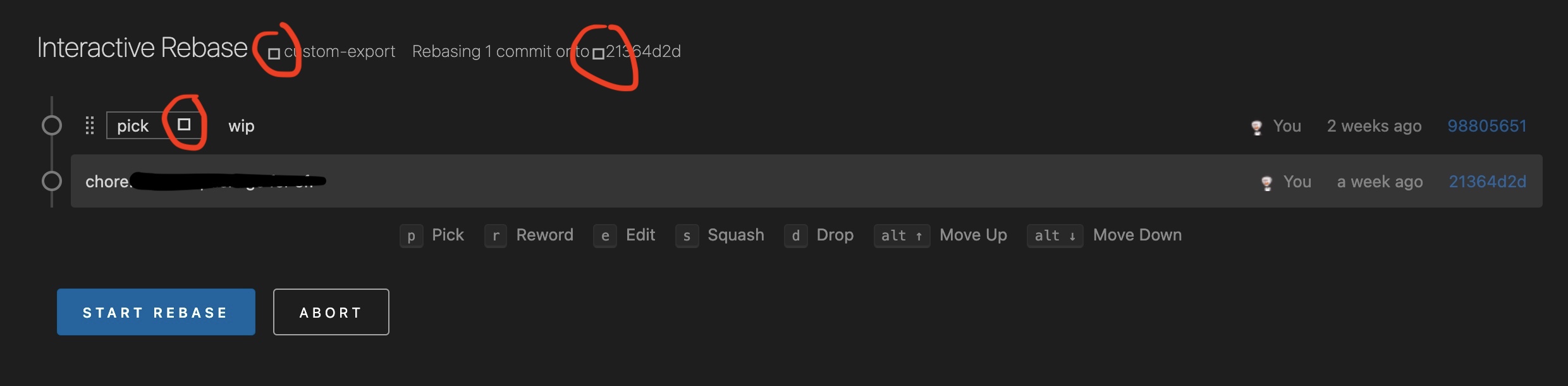
- GitLens Version:
11.0.0 - Git Version:
2.24.3 - VSCode Version:
1.51.1 - OS Version: MacOS
11.0.1&10.15.7 - Editor font family setting:
Fira Code, Menlo, Monaco, 'Courier New', monospace
 DDeis
DDeis
All 11 comments
Me,too
 lanmeidada
on 16 Nov 2020
lanmeidada
on 16 Nov 2020
@lanmeidada Are you also on macOS?
 eamodio
on 16 Nov 2020
eamodio
on 16 Nov 2020
I'm on Windows 10 and I can confirm this. It was even worse before restarting VSCode.
The commits were not visible at all, there was just the "Interactive Rebase" heading and labels of buttons (Start rebase and Abort) without the borders or background.
A suggestion - add a note this page is coming from gitlens so people can find an easy way to disable it (see #1153)
 ceecko
on 16 Nov 2020
ceecko
on 16 Nov 2020
A suggestion - add a note this page is coming from gitlens so people can find an easy way to disable it (see #1153)
Indeed, I also had a hard time finding out that view was coming from GitLens 😅
DDeis
on 16 Nov 2020
I'm also on Windows 10, and seeing squares like that in other places too, such as the gitlens settings editor:
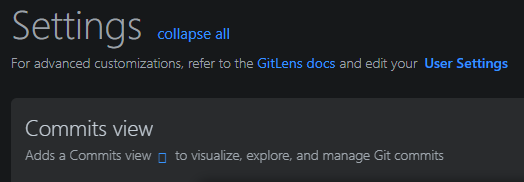
Not sure if that's intentional, but it seems odd.
 plwalsh
on 16 Nov 2020
plwalsh
on 16 Nov 2020
Thanks for the info. Definitely not expected. It looks like the codicons font (the built-in vscode icon set) is not being loaded correctly.
eamodio
on 16 Nov 2020
It looks like this issue is somewhat related to https://github.com/microsoft/vscode/issues/85872
@plwalsh @DDeis @ceecko @lanmeidada Do any of you have any other missing icons?
eamodio
on 16 Nov 2020
@eamodio No, all other icons are fine.
ceecko
on 16 Nov 2020
When you see the issue you can run the Open Webview Developer Tools command from the command palette and see if there are any errors in the console?
eamodio
on 16 Nov 2020
I happened upon an old issue you submitted (https://github.com/microsoft/vscode/issues/63967) just trying to figure out how to open that dang console 😅.. Open did nothing, Toggle opened it.
But here's what popped up in the console when I launched an interactive rebase:

plwalsh
on 16 Nov 2020
Same issue for me in GitLens Settings & Interactive Rebase Editor (on Ubuntu)
 raphinesse
on 17 Nov 2020
raphinesse
on 17 Nov 2020
Related issues
 vgrafe
·
3Comments
vgrafe
·
3Comments
 ridhwaans
·
3Comments
ridhwaans
·
3Comments
 isaacwashere
·
3Comments
eamodio
·
3Comments
isaacwashere
·
3Comments
eamodio
·
3Comments
 rfgamaral
·
3Comments
rfgamaral
·
3Comments
Most helpful comment
@eamodio No, all other icons are fine.