Vscode-gitlens: Hovers only work when saving file after switching to another file
Not sure if this is actually an issue, so I'm opening it as question.
I noticed that the hovers over the lines are not working when I switch to a new file in a different tab. I realized afterwards that they only start to come when I save the file. This does look like a strange behavior. Is this on purpose?
Im running on Ubuntu Mate 18.04 and I could also verify the same behavior in Arch Linux.
vscode: 1.41.1
gitlens: 10.2.0
 nunojsa
All 8 comments
I have the same behavior, but with existing files. It can be few cases:
- file is changed but but didn't save
- just opened file
- other cases when conditions weren't memorized
windows 10
 pixmaster
on 24 Jan 2020
pixmaster
on 24 Jan 2020
@nunojsa @pixmaster Can you provide some step-by-step instructions for how to reproduce this? Thanks!
 eamodio
on 11 Feb 2020
eamodio
on 11 Feb 2020
Unfortunately, I couldn't find why it's happening. In some files it just don't work. After file save it works again.
pixmaster
on 12 Feb 2020
@eamodio for me it happens pretty easily. So if I just do:
- Open vscode with more than one files opened;
- Hovers will work in the file you are currently;
- Switch to another tab/file;
- Hovers won't work until you save the file.
nunojsa
on 12 Feb 2020
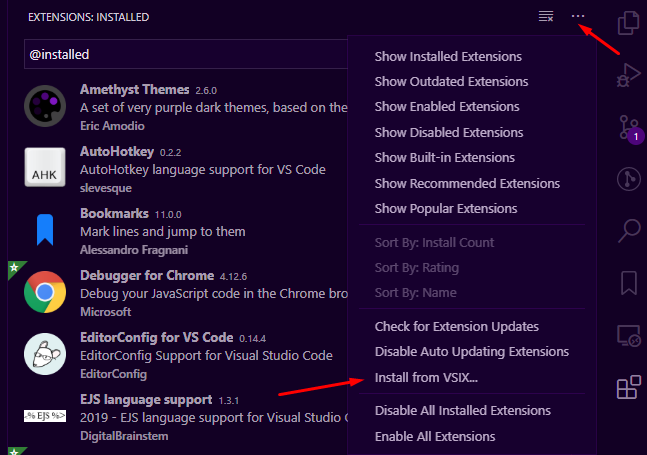
@nunojsa @terski Can you try this upcoming version of GitLens?
Rename the file to remove the .zip and then install it
eamodio
on 23 Mar 2020
@eamodio I'm running it now. Appears to be fixed. 👍 Thank you! 🙏
 terski
on 24 Mar 2020
terski
on 24 Mar 2020
Hey there, I've been having the same problem lately, blame annotations show up very inconsistently. For now adding "gitlens.hovers.enabled": true, to the settings file _seems_ to fix it, emphasis on seems. It could just be chance.
Edit: It just failed, so forget all I said :P
 marcmarina
on 15 May 2020
marcmarina
on 15 May 2020
Fixed in GitLens 11
eamodio
on 1 Dec 2020
Related issues
 ahhmarr
·
3Comments
ahhmarr
·
3Comments
 mindpivot
·
4Comments
mindpivot
·
4Comments
 susiwen8
·
3Comments
eamodio
·
3Comments
susiwen8
·
3Comments
eamodio
·
3Comments
 obrejla
·
3Comments
obrejla
·
3Comments
Most helpful comment
@eamodio for me it happens pretty easily. So if I just do: