Vscode-gitlens: Error: Unknown view gitlens.views.fileHistory:gitlens
- GitLens Version: 9.6.0
- VSCode Version: 1.33.0
- OS Version: Windows 7 64bits
Steps to Reproduce:
- Execute the "GitLens: Show File History" or "GitLens: Show File History View" command
- The file history view does not show, and an error message pops in the output:
[2019-04-12 05:56:23:297] e.isVisible
Error: Unknown view gitlens.views.fileHistory:gitlens
I tried reinstalling the extension (and even deleting the files in the .vscode/extensions folder), but the problem is still present.
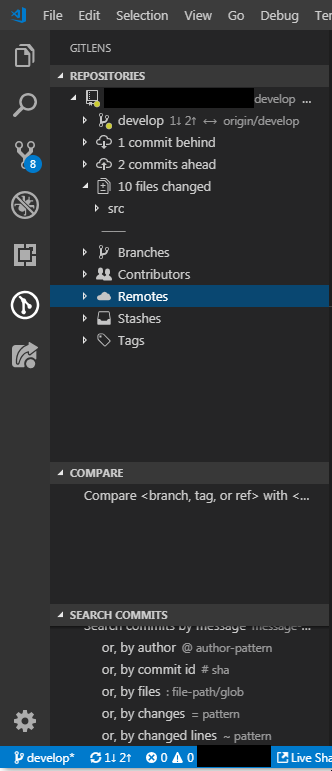
Here's a screenshot of my sidebar:
 scambier
All 7 comments
This sounds like the same issue as https://github.com/eamodio/vscode-gitlens/issues/710. Unfortunately I can't reproduce either of these. Can you try again with vscode 1.33.1 to see if it makes any difference?
 eamodio
on 12 Apr 2019
eamodio
on 12 Apr 2019
I tried with the following VSCode versions (in that order) :
- Upgrade to 1.33.1: not working
- Downgrade to 1.32.3: not working
- Downgrade to 1.31.1 : not working
- Downgrade to 1.28.2: working
- Upgrade to 1.29.1: not working
I uninstalled and reinstalled the extension each time I changed VSCode version
scambier
on 12 Apr 2019
@scambier I think I have figured out the issue -- do you have gitlens.views.fileHistory.enabled set to false in your vscode configuration? If so, that explains the issue, since GitLens doesn't even register the view if it is disabled. I will make a change in the next version to instead prompt you to enable the view in this case.
eamodio
on 16 Apr 2019
Indeed, that was the issue, even though I don't remember disabling it.
scambier
on 18 Apr 2019
@scambier I think I have figured out the issue -- do you have
gitlens.views.fileHistory.enabledset tofalsein your vscode configuration? If so, that explains the issue, since GitLens doesn't even register the view if it is disabled. I will make a change in the next version to instead prompt you to enable the view in this case.
@eamodio Can you share how did you do it? Sorry if it is a naive questions
 musahaidari
on 4 Feb 2020
musahaidari
on 4 Feb 2020
@musahaidari F1 > "Open User/Workspace Settings"
Click on the "json" icon to have a raw view
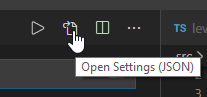
Then locate the setting and either change its value or delete the line.
scambier
on 4 Feb 2020
This issue has been automatically locked since there has not been any recent activity after it was closed. Please open a new issue for related bugs.
![github-actions[bot] picture](https://avatars2.githubusercontent.com/in/15368?v=4&s=40) github-actions[bot]
on 27 Nov 2020
github-actions[bot]
on 27 Nov 2020
Related issues
 isaacwashere
·
3Comments
isaacwashere
·
3Comments
 ridhwaans
·
3Comments
eamodio
·
3Comments
ridhwaans
·
3Comments
eamodio
·
3Comments
 vgrafe
·
3Comments
vgrafe
·
3Comments
 robertzauner
·
3Comments
robertzauner
·
3Comments