Vscode-gitlens: Public Key issue when trying to push/pull for Visual Studio Code on Mac
Hi,
I can't seem to find the right answer here or on the web.
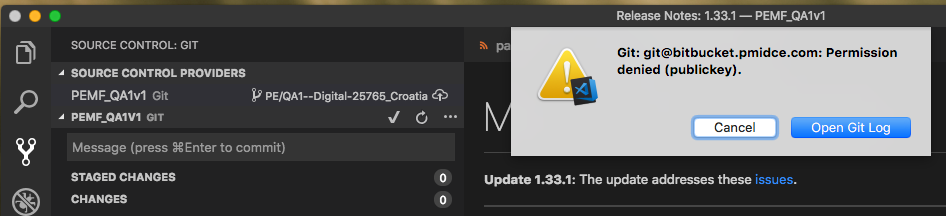
So, if I create a project opening my Repo folder, VSC and GitLens see all the branch details. However, I cannot use the pull/push features as I get a Permission (publickey) denied error.
I can't figure what setting to update to overcome this issue.
Hoping you can advise.

 mikeflemingcfs
All 9 comments
@mikeflemingcfs Do you see this same issue using the pull/push commands in vscode directly?
 eamodio
on 7 Apr 2019
eamodio
on 7 Apr 2019
If you mean I just use VSC terminal? If I do that I get the passphrase request and then it pushes.
mikeflemingcfs
on 10 Apr 2019
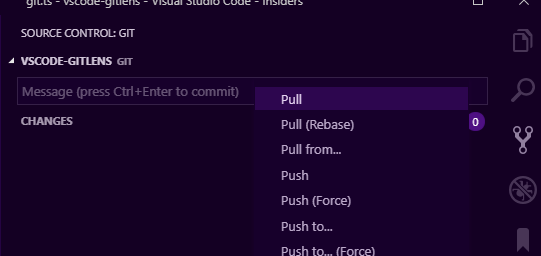
I mean from either the command palette -- Git: Pull or from the ... menu on the Source Control sidebar:
eamodio
on 10 Apr 2019
Hi Eamodio, yes same issue using the command palette.
Whilst this isn't causing me an issue in Bitbucket, could it be the issue in VSC?
fatal: ambiguous argument 'PE/QA1-Digital-25765_Croatia@{u}': unknown revision or path not in the working tree.
Use '--' to separate paths from revisions, like this:
'git
git for-each-ref --format %(refname) %(objectname) --sort -committerdate
git remote --verbose
mikeflemingcfs
on 15 Apr 2019
Source Control, same issue.
mikeflemingcfs
on 16 Apr 2019
This was the troubleshooting page that helps me resolve my issue. In essence, the fact that I was able to successfully push/pull to Bitbucket using sourcetree, obscured the fact that my ssh keys had not been added to git.
https://confluence.atlassian.com/bitbucket/troubleshoot-ssh-issues-271943403.html
mikeflemingcfs
on 16 Apr 2019
@mikeflemingcfs glad you figured it out!
eamodio
on 16 Apr 2019
need to add your private key to ssh agent
ssh-add ~/.ssh/<private_key_file>
 aprofromindia
on 25 Feb 2020
aprofromindia
on 25 Feb 2020
This issue has been automatically locked since there has not been any recent activity after it was closed. Please open a new issue for related bugs.
![github-actions[bot] picture](https://avatars2.githubusercontent.com/in/15368?v=4&s=40) github-actions[bot]
on 26 Nov 2020
github-actions[bot]
on 26 Nov 2020
Related issues
 robertzauner
·
3Comments
robertzauner
·
3Comments
 isaacwashere
·
3Comments
isaacwashere
·
3Comments
 ahhmarr
·
3Comments
ahhmarr
·
3Comments
 ridhwaans
·
3Comments
ridhwaans
·
3Comments
 obrejla
·
3Comments
obrejla
·
3Comments