Vscode-gitlens: ID for xxx is already registered?!
- GitLens Version: 9.3.0
- VSCode Version: 1.30.1 (User setup)
- OS Version: Windows 10 (Professional, x86)
Steps to Reproduce:
- Open a repository based on your local PC, then use the command below to sync with your remote one:
git pull --rebase [your remote rep name] [your remote branch name]:[your local branch name]

There'll be an error thrown out (plz see the image below, on the right bottom corner).
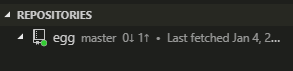
Then the Git tree cannot be expand until I click "refresh" button:
Here're some logs:
Log_ForGit.txt
Log_forGitLen.txt
 ghost
ghost
All 15 comments
@Maledong can you try out this build and see if it resolves the issue for you?
Please remove the .zip from the end of the file and install the vsix.
gitlens-9.3.0.vsix.zip
 eamodio
on 4 Jan 2019
eamodio
on 4 Jan 2019
This bug is still open, and this problem still occurs……So isn't this fixed (Just for a confirm)...
ghost
on 9 Feb 2019
Yeah, I had to roll back the first "fix", and I'm quite convinced there is a vscode bug here -- but I've had a hard time pinning it down. I am also hoping once vscode finishes moving extensions over to their new tree implementation that the issue will just go away 😄
But its terribly annoying -- I just don't have an idea how to fix it at this point :(
eamodio
on 9 Feb 2019
OK no problem, just for a confirm and don't worry, frankly speaking, I can continue using that :)
ghost
on 9 Feb 2019
👍 Also at least now the refresh button on the view will fix everything too.
eamodio
on 9 Feb 2019
I also ran into this issue, thanks for the information in this topic.
 erfurtjohn
on 12 Feb 2019
erfurtjohn
on 12 Feb 2019
still got the same issue (vscode 1.37.1, gitlen 9.9.3)
Element with id gitlens:repository(...) is already registered
 mydmdm
on 4 Sep 2019
mydmdm
on 4 Sep 2019
I am also getting the same issue (vscode 1.37.1, gitlen 9.9.3)
 shanmugharajk
on 23 Sep 2019
shanmugharajk
on 23 Sep 2019
I have it too. (vscode 1.39.0, gitlens 10.1.1)
 alexleduc76
on 11 Oct 2019
alexleduc76
on 11 Oct 2019
Wondering if there has been any movement on this issue? I get this message every day. (VSCode 1.48.0, GitLens v10.2.2). Thanks.
 jg572h
on 17 Aug 2020
jg572h
on 17 Aug 2020
For those running into this issue, do you have any reproducible cases? I have seen it every now and again, but nothing that I can trap and debug.
eamodio
on 17 Aug 2020
For me it happens right after I open my project (an Angular project). All I have to do is click on the GitLens icon in the sidebar, and the message comes up.
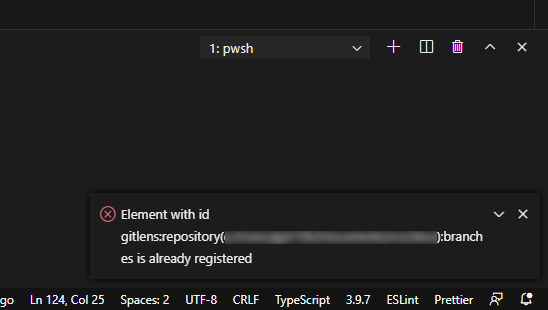
This particular project has a lot of branches, in case that is helpful.
Another thing is that the project is part of a larger project, and both this project and the larger project have VS Code workspaces.
Is there a cache somewhere that I could try to clear?
jg572h
on 17 Aug 2020
@jg572h are these repos open source?
eamodio
on 17 Aug 2020
Sorry, they're not.
jg572h
on 17 Aug 2020
I fixed this issue in VS Code -- so this should no longer happen.
eamodio
on 2 Dec 2020
Related issues
 dwlsalmeida
·
3Comments
dwlsalmeida
·
3Comments
 batjko
·
4Comments
batjko
·
4Comments
 robertzauner
·
3Comments
robertzauner
·
3Comments
 JP-Ellis
·
3Comments
JP-Ellis
·
3Comments
 susiwen8
·
3Comments
susiwen8
·
3Comments
Most helpful comment
👍 Also at least now the refresh button on the view will fix everything too.